Nextflow subworkflow (v1.22.0+)
depictio/publish is a piece of Nextflow code that a pipeline developer adds to an nf-core pipeline. With it, the pipeline itself turns each run into Depictio dashboards, as its last step, with no Depictio server involved. It is not a CLI command and not something you click in the app.
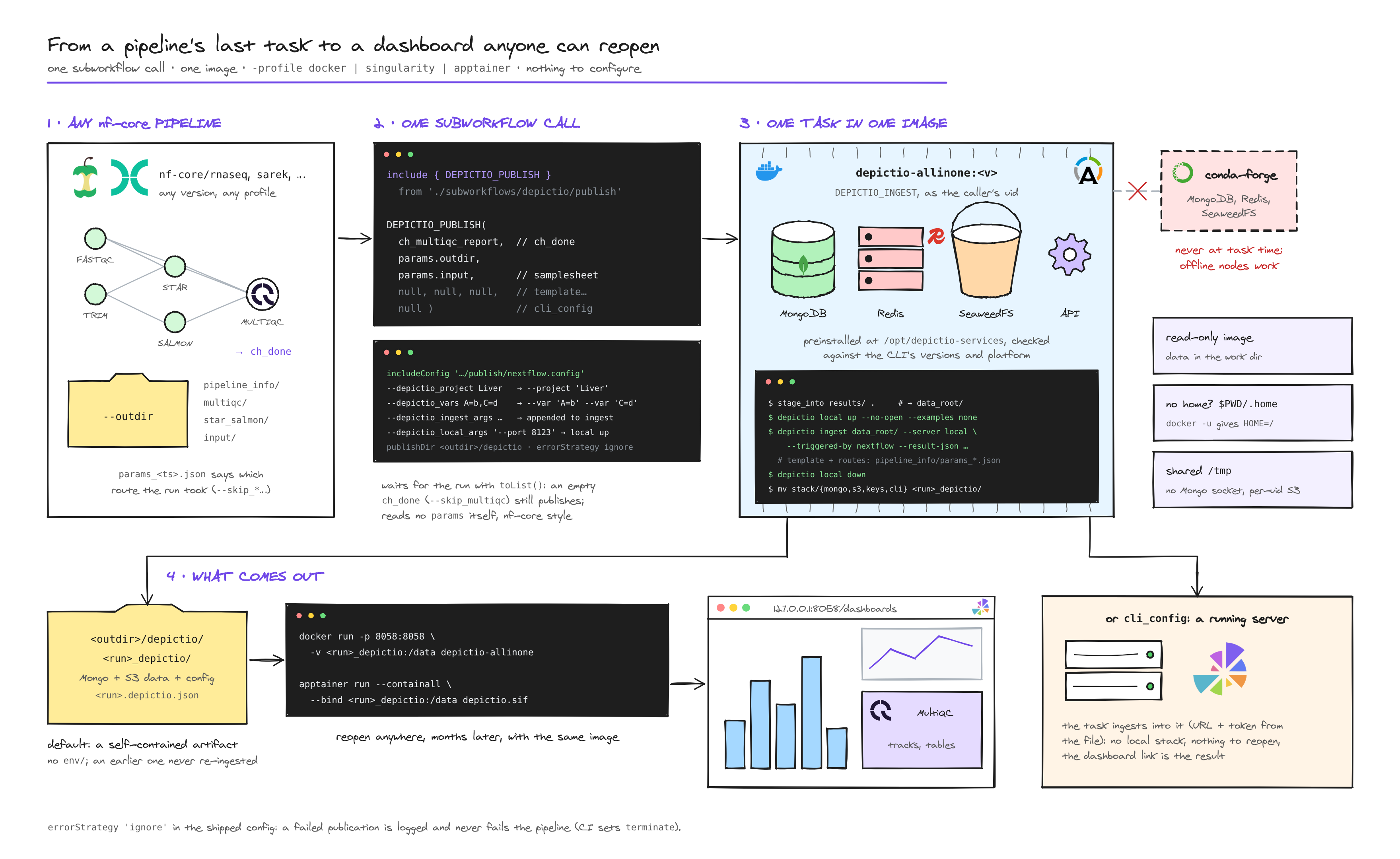
What it is
Two Nextflow components, in the nf-core layout:
| Component | Kind | What it does |
|---|---|---|
depictio/ingest |
module (DEPICTIO_INGEST) |
One task: starts a temporary single-user Depictio, ingests the run into it, stops it and emits its data folder |
depictio/publish |
subworkflow (DEPICTIO_PUBLISH) |
The glue: waits until the run's results are published, adds the samplesheet, then calls DEPICTIO_INGEST. This is what a pipeline calls |
The subworkflow names no pipeline: it reads the template to use from the run's pipeline_info/, at the closest bundled release, and the template's route variables (--skip_*, --tools) from the run's params (template variables). The same code therefore fits every pipeline Depictio has a template for.
Where it is
They ship inside the depictio Python package, not in nf-core/modules, from v1.22.0 (source on GitHub):
depictio/cli/configs/nextflow/
├── depictio.config                   the onComplete trigger (see Nextflow trigger)
├── modules/depictio/ingest/          the module
│   ├── main.nf                       the DEPICTIO_INGEST process
│   ├── meta.yml, environment.yml     nf-core metadata, conda environment
│   └── tests/main.nf.test
└── subworkflows/depictio/publish/    the subworkflow
    ├── main.nf                       the DEPICTIO_PUBLISH workflow
    ├── nextflow.config               its process settings (publishDir, errorStrategy, args)
    ├── meta.yml
    └── tests/main.nf.test
With depictio installed, depictio config nextflow prints the path of depictio.config, so its folder is $(dirname "$(depictio config nextflow)").
Who does what
- The pipeline developer copies both folders into the pipeline once, and calls
DEPICTIO_PUBLISHat the end ofmain.nf(below). - Whoever runs the pipeline adds
--depictio true, or leaves it on by default. After the run,results/depictio/<run>_depictio/sits next to the other results: a self-contained folder with the data and dashboards. - Anyone who gets that folder opens it with one command (Reopen the artifact), on a laptop or a cluster node. No server to install or keep running.
- A failed ingestion never fails the run (
errorStrategy 'ignore').
Compared with the Nextflow trigger: the trigger runs outside the pipeline once it completes, and pushes the run to a Depictio server that already runs. depictio/publish runs inside the pipeline, and produces the dashboards itself.
Add it to a pipeline
Copy the subworkflow and its module into the pipeline:
NF="$(dirname "$(depictio config nextflow)")"
cp -r "$NF/subworkflows/depictio" subworkflows/local/
cp -r "$NF/modules/depictio" modules/local/
In v1.22.0 the subworkflow includes the module with ../../../modules/depictio/ingest/main, the package's layout. Once copied as above, that path no longer resolves: change line 9 of subworkflows/local/depictio/publish/main.nf to
include { DEPICTIO_INGEST } from '../../../../modules/local/depictio/ingest/main'
Then, in the pipeline's main.nf, after the main workflow, and in its nextflow.config:
include { DEPICTIO_PUBLISH } from './subworkflows/local/depictio/publish/main'

if (params.depictio) {
    DEPICTIO_PUBLISH(
        NFCORE_RNASEQ.out.multiqc_report,   // published outputs: wait for them
        params.outdir,
        params.input,                       // the samplesheet, path or URL
        params.depictio_template,           // null: detected from pipeline_info/
        params.depictio_project_config,     // null: the template's project
        params.depictio_dashboards,         // null: the template's dashboards
        params.depictio_cli_config,         // null: build an artifact
    )
}
params {
    depictio                = true
    depictio_template       = null
    depictio_project_config = null
    depictio_dashboards     = null
    depictio_cli_config     = null
    depictio_project        = null   // project name (default: the template's)
    depictio_vars           = [:]    // e.g. [GROUP_COL: 'condition'], or 'K=V,K2=V2'
    depictio_ingest_args    = ''     // more `depictio ingest` options
    depictio_local_args     = ''     // `depictio local up` options, e.g. '--port 8123'
}
includeConfig 'subworkflows/local/depictio/publish/nextflow.config'
Declare the params in nextflow_schema.json too, or nf-schema rejects them. A run sets any of them with --depictio_*. An explicit depictio_vars entry wins over the run's params. Given an instance's CLI.yaml as depictio_cli_config, the task sends the run there instead of building an artifact (not the default, may change); keep its token in a Nextflow secret, DEPICTIO_CLI_TOKEN.
Docker, Singularity and Apptainer
The depictio/ingest module now runs in ghcr.io/depictio/depictio-allinone:<version> instead of ghcr.io/depictio/depictio-cli: the CLI, the server, MongoDB, Redis and SeaweedFS, preinstalled. With -profile docker, podman, singularity or apptainer, the task downloads nothing and needs nothing configured: depictio local up reads the services the image sets in DEPICTIO_SERVICES_PREFIX, and a version mismatch fails the task rather than downloading. The image is about 2.9 GB (linux/amd64 and linux/arm64), pulled once per machine.
- Docker / Podman: run as the host's user (
docker.runOptions = '-u $(id -u):$(id -g)'). A task with no writableHOMEuses its work directory. - Singularity / Apptainer: the read-only image is fine. The stack listens on 127.0.0.1 on free ports, so it runs on a shared node beside other users' stacks.
- Conda (
-profile conda) installsdepictio[local]instead and fetches the services from conda-forge, so the node needs network access.
Reopen the artifact
results/depictio/
├── <run>.depictio.json    how the ingestion ended, project and dashboard links
└── <run>_depictio/        the artifact (about 100 MB for the rnaseq test profile)
Take <version> from the module's versions.yml. The artifact holds the stack's keys and admin token: share it as you would the data. An earlier run's artifact in the same <outdir>/depictio/ is skipped, never ingested as data.