

The cutandrun template covers the peak-calling chain of a standard run:
- Overview: the run in four key figures, live findings and four figures, each linked to the tab that explains it
- Data & QC: the MultiQC report (FastQC, Trim Galore, Bowtie 2 against the target and the spike-in, the deepTools fingerprint), then depth, spike-in scaling, duplication and enrichment per library
- Chromatin signal: the nucleosomal fragment ladder, then the SEACR regions, their pile-up and the signal they hold
- Agreement: how much SEACR and MACS2 agree, the consensus set each target's replicates reproduce, and both on one genomic region
One MultiQC report per run, chosen by MULTIQC_REPROCESSED
cutandrun 3.2.2 pins MultiQC 1.19, which writes no parquet, and Depictio
reads only multiqc.parquet (MultiQC 1.31 and later). A run made with a
newer MultiQC, as the Nextflow trigger runs are, publishes
04_reporting/multiqc/multiqc_data/multiqc.parquet itself, and the template
binds that one by default. A run on the pinned 1.19 needs its report
re-generated first:
It re-runs the pinned MultiQC 1.35 over the run's own raw tool outputs and
writes multiqc/multiqc_data/multiqc.parquet at the root, next to a
REPROCESSED.json recording both versions; --dry-run prints the plan
first. Ingest such a run with --var MULTIQC_REPROCESSED=true, which binds
the re-generated report instead of the pipeline's. The template never binds
both: a re-generated report ingested without the variable is not read, and
the MultiQC tab stays empty.
Both callers, or either one
Both validation runs called peaks with both callers (--peakcaller
seacr,macs2). SEACR is cutandrun's default and the path the template is
built on; the MACS2 collections are optional, so a SEACR-only run still
ingests and the layout drops what is missing; a MACS2-only run drops the SEACR
tiles the same way. Read Caller agreement with care then: with one caller
the comparison reads as complete disagreement.
Quick start
The results directory is the only thing you have to pass for a run whose own
MultiQC report is a parquet (MultiQC 1.31 or later): the sample hub is built
from the run's own pipeline_info/samplesheet.valid.csv. For a run aligned to
another build than hg38, add --var GENOME=<assembly>.
python -m depictio.dev_scripts.multiqc_reprocess \
--src /path/to/cutandrun_results --dest /path/to/cutandrun_results
depictio ingest /path/to/cutandrun_results \
--template nf-core/cutandrun/latest \
--var MULTIQC_REPROCESSED=true
The release's own report has no parquet, so it is re-generated first, and the variable points the MultiQC collection at the re-generated one.
depictio config nextflow --install # once per machine
nextflow run nf-core/cutandrun -r 3.2.2 -profile docker --outdir results
No depictio ingest, and no template named: the pipeline ingests its own
output directory when it finishes and resolves this template from its own
manifest. See Nextflow trigger.
Reference
The template reads the validated samplesheet, the Bowtie 2 logs (target and
spike-in), the SEACR stringent calls, the MACS2 narrow peaks, the per-target
consensus peak counts, the fragment-length histograms and fragment BEDs and the
three deepTools QC tables, on top of the MultiQC parquet. Every collection and
recipe matches on file name, so the numbered stage directories cutandrun
publishes are never spelled out. The SEACR scan skips igv/, where the pipeline
copies every SEACR bed for its IGV session, so no region is read twice. A caller
that finds nothing for a sample still writes its peak file, at 0 bytes: the ingest
skips it with a warning, and the caller comparison keeps a row with no peaks for
that sample.
cutandrun 3.2.2 still ships no params.json, so no variable is set from the run's
parameters. Besides DATA_ROOT, MULTIQC_REPROCESSED says which MultiQC report
to bind and GENOME (default hg38) sets the genome axis of the Locus tab.
Self-adapting layout
The dashboard adapts to whatever the run actually produced: components bound to pruned or unparsed data collections are hidden, tabs left with no real visualizations are dropped entirely, and the remaining components are re-packed so there are no empty rows.
Template variables
Variables you provide when running the template: DATA_ROOT is the results directory given to depictio ingest, the others are set with --var NAME=value:
| Variable | Required | Description |
|---|---|---|
DATA_ROOT |
✓ | Root directory containing cutandrun output, the pipeline's --outdir (01_prealign/, 02_alignment/, 03_peak_calling/, 04_reporting/, pipeline_info/). |
MULTIQC_REPROCESSED |
— | Set (any value) when the MultiQC report was re-generated with depictio.dev_scripts.multiqc_reprocess: binds multiqc/multiqc_data/multiqc.parquet instead of the pipeline's own 04_reporting/multiqc/multiqc_data/multiqc.parquet. |
GENOME |
— | UCSC assembly the run was aligned to (hg38, hg19, mm10, ...). Sets the genome axis of the Locus tab; pass --var GENOME=ASSEMBLY for a run on another build. |
Data collections
22 data collections — 19 required 3 optional · 13 direct 9 derived.
Origin tells you whether a collection is real pipeline data or a reshape of it: direct = a pipeline output (scanned, or a recipe that reads raw files); derived = a recipe that reshapes one or more direct collections into the layout a visualization needs (no new measurement). Reads shows what produces it: a recipe .py transform, whose name links to its source on GitHub, or a raw file scanned off disk. (A direct collection can still have a recipe — one that merely parses/cleans the raw file; derived means the recipe reshapes another collection.)
| Tag | Origin | Type | Reads | Status |
|---|---|---|---|---|
samples |
direct | Table | recipe cutandrun/samples.py |
required |
samplesheet |
direct | Table | file samplesheet.valid.csv$ |
required |
multiqc_data |
direct |  MultiQC MultiQC |
file multiqc/multiqc_data/multiqc.parquet$ |
required |
bowtie2_logs_raw |
direct | Table | file .*.bowtie2.log$ |
required |
bowtie2_spikein_factors |
derived | Table | recipe bowtie2/spikein_factors.py |
required |
deeptools_fingerprint_metrics |
direct | Table | recipe deeptools/fingerprint_metrics.py |
required |
deeptools_sample_pca |
direct | Table | recipe deeptools/sample_pca.py |
required |
deeptools_correlation_matrix |
direct | Table | recipe deeptools/correlation_matrix.py |
required |
seacr_peaks_raw |
direct | Table | file (?!(?:./)?igv/)./[^/]*.seacr.peaks.\w+.bed$ |
required |
seacr_peaks |
derived | Table | recipe seacr/peaks.py |
required |
seacr_peak_summary |
derived | Table | recipe seacr/peak_summary.py |
required |
macs2_peaks |
direct | Table | recipe macs2/peaks.py |
optional |
seacr_consensus_peaks |
direct | Table | recipe seacr/consensus_peaks.py |
required |
seacr_fragment_lengths_raw |
direct | Table | file .*.frags.len.txt$ |
required |
seacr_fragment_lengths |
derived | Table | recipe seacr/fragment_lengths.py |
required |
seacr_fragment_classes |
derived | Table | recipe seacr/fragment_classes.py |
required |
frip |
derived | Table | recipe cutandrun/frip.py |
required |
caller_agreement |
derived | Table | recipe cutandrun/caller_agreement.py |
required |
samtools_flagstat_raw |
direct | Table | file (?:.*/)?markdup/[^/]+.flagstat$ |
required |
samtools_flagstat |
derived | Table | recipe samtools/flagstat.py |
required |
seacr_frags_raw |
direct | Table | file .*.frags.cut.bed$ |
optional |
seacr_frags_profile |
derived | Table | recipe seacr/frags_profile.py |
optional |
Conditional routes
Rows are data collections; columns are the variables you set or params.json flags auto-detected from the run. Each filled cell is the effect of setting that variable; an empty cell means that variable leaves the collection unchanged. (21 collections are unaffected by any variable — present on every run.)
+ included− removed⇄ repointed
| Data collection | MULTIQC_REPROCESSED |
|---|---|
multiqc_data |
⇄ |
Cross-DC links
22 links — selecting a value in the source collection filters the target. The join column is shown after the source.
| Source · column | Target | Filters | |
|---|---|---|---|
samples · sample_id |
→ | multiqc_data |
Filter the MultiQC panels by the samples picked in the left panel |
samples · sample_id |
→ | seacr_peaks |
Filter the SEACR peak table by the samples picked in the left panel |
samples · sample_id |
→ | seacr_peak_summary |
Filter the SEACR QC summary by the samples picked in the left panel |
samples · sample_id |
→ | seacr_fragment_lengths |
Filter the fragment-length curves by the samples picked in the left panel |
samples · sample_id |
→ | bowtie2_spikein_factors |
Filter the spike-in factors by the samples picked in the left panel |
samples · sample_id |
→ | seacr_fragment_classes |
Filter the fragment-class composition by the samples picked in the left panel |
samples · sample_id |
→ | frip |
Filter the signal budget by the samples picked in the left panel |
samples · sample_id |
→ | caller_agreement |
Filter the caller comparison by the samples picked in the left panel |
samples · sample_id |
→ | macs2_peaks |
Filter the MACS2 peak table by the samples picked in the left panel |
samples · target |
→ | seacr_consensus_peaks |
Filter the consensus intervals by the targets picked in the left panel |
caller_agreement · sample |
→ | seacr_peaks |
Carry a sample selected on the caller comparison over to its SEACR peaks |
caller_agreement · sample |
→ | seacr_peak_summary |
Carry a sample selected on the caller comparison over to its SEACR QC row |
bowtie2_spikein_factors · sample |
→ | multiqc_data |
Carry the alignment and spike-in thresholds over to the MultiQC panels |
seacr_peaks · sample |
→ | caller_agreement |
Carry a sample selected on the SEACR panels back to the caller comparison |
samples · sample_id |
→ | deeptools_fingerprint_metrics |
Filter the fingerprint metrics by the samples picked on the samplesheet |
samples · sample_id |
→ | deeptools_sample_pca |
Filter the PCA scatter by the samples picked on the samplesheet |
samples · sample_id |
→ | deeptools_correlation_matrix |
Filter the correlation matrix rows by the samples picked on the samplesheet |
samples · sample_id |
→ | samtools_flagstat |
Filter the duplication counts by the samples picked on the samplesheet |
samples · sample_id |
→ | seacr_frags_profile |
Filter the fragment pile-up by the samples picked in the left panel |
seacr_peaks · chr |
→ | seacr_frags_profile |
A region brushed or typed on the SEACR navigator narrows the fragment pile-up |
seacr_peaks · chr |
→ | macs2_peaks |
A region brushed or typed on the SEACR navigator narrows the MACS2 calls |
seacr_peaks · chr |
→ | seacr_consensus_peaks |
A region brushed or typed on the SEACR navigator narrows the consensus intervals |
Recipes
Each recipe reshapes raw pipeline output into a tidy table. The name links to its source; Output lists the validated OUTPUT_SCHEMA columns.
| Recipe | Transforms | Output |
|---|---|---|
bowtie2/spikein_factors.py |
Spike-in normalisation factors, from the two Bowtie 2 log sets of a run. | sample, total_pairs, target_aligned, target_align_rate, spikein_aligned, spikein_align_rate, spikein_fraction, target_per_spikein, scale_factor |
cutandrun/caller_agreement.py |
Do MACS2 and SEACR agree, sample by sample? | sample, target, caller, n_peaks, total_bp, median_width, max_width, n_shared, n_unique, frac_shared, log10_n_peaks, other_caller, n_peaks_other |
cutandrun/frip.py |
How much of a sample's fragment coverage falls inside its own peaks. | sample, target, signal_class, coverage_bp, fraction, frip, n_peaks, peak_span_bp, fragment_bp, scale_factor |
cutandrun/samples.py |
One row per CUT&RUN sample, from the samplesheet the pipeline validated. | sample_id, target, replicate, replicate_label, role, is_control, control_target, n_libraries, library_ids, single_end |
deeptools/correlation_matrix.py |
deepTools plotCorrelation matrix as a square table, one row per sample. | sample |
deeptools/fingerprint_metrics.py |
Per-sample deepTools fingerprint metrics, one row per library. | sample, auc, synthetic_auc, auc_ratio, x_intercept, synthetic_x_intercept, elbow_point, synthetic_elbow_point, synthetic_js_distance |
deeptools/sample_pca.py |
deepTools plotPCA coordinates in long form, one row per sample. | sample, pc1, pc2, pc3, pc1_variance, pc2_variance |
macs2/peaks.py |
Concatenate MACS2 narrowPeak calls into one tidy peak table. | sample, peak_id, chr, start, end, width, summit, score, fold_enrichment, neg_log10_pvalue, neg_log10_qvalue |
samtools/flagstat.py |
One row per (sample, filter stage) from a samtools flagstat report. |
sample, stage, total_reads, mapped_reads, mapped_pct, duplicate_reads, properly_paired_reads, properly_paired_pct, singleton_pct |
seacr/consensus_peaks.py |
Consensus peak x replicate presence matrix from CUT&RUN consensus BEDs. | peak_id, target, caller, chr, start, end, width, num_peaks, num_samples, support, total_signal, max_signal |
seacr/fragment_classes.py |
The fragment-length histogram binned into nucleosome classes. | sample, target, fragment_class, class_order, n_fragments, fraction, median_length, mono_to_sub, sample_median_length |
seacr/fragment_lengths.py |
Fragment-length distribution per sample, the signature CUT&RUN QC figure. | sample, target, fragment_length, count, fraction, cumulative_fraction |
seacr/frags_profile.py |
Fragment pile-up around the strongest SEACR regions, one window per region. | sample, target, peak_id, peak_rank, chr, summit, offset_bp, bin_start, bin_end, fragments, cpm |
seacr/peak_summary.py |
One row per sample: what SEACR called and how strong those calls are. | sample, threshold_mode, num_peaks, total_bp, width_median, width_mean, width_max, total_signal_sum, total_signal_median, max_signal_median, signal_density_median |
seacr/peaks.py |
Tidy every SEACR peak of every sample into one table. | sample, peak_id, threshold_mode, chr, start, end, width, summit, total_signal, max_signal, signal_density, log10_total_signal |
Template variables
Variables you provide when running the template: DATA_ROOT is the results directory given to depictio ingest, the others are set with --var NAME=value:
| Variable | Required | Description |
|---|---|---|
DATA_ROOT |
✓ | Root directory containing cutandrun output (01_prealign/, 02_alignment/, 03_peak_calling/, 04_reporting/, pipeline_info/) plus the reprocessed multiqc/multiqc_data/multiqc.parquet. |
GENOME |
— | UCSC assembly the run was aligned to (hg38, hg19, mm10, ...). Sets the genome axis of the Locus tab; pass --var GENOME= |
Data collections
22 data collections — 19 required 3 optional · 13 direct 9 derived.
Origin tells you whether a collection is real pipeline data or a reshape of it: direct = a pipeline output (scanned, or a recipe that reads raw files); derived = a recipe that reshapes one or more direct collections into the layout a visualization needs (no new measurement). Reads shows what produces it: a recipe .py transform, whose name links to its source on GitHub, or a raw file scanned off disk. (A direct collection can still have a recipe — one that merely parses/cleans the raw file; derived means the recipe reshapes another collection.)
| Tag | Origin | Type | Reads | Status |
|---|---|---|---|---|
samples |
direct | Table | recipe cutandrun/samples.py |
required |
samplesheet |
direct | Table | file samplesheet.valid.csv$ |
required |
multiqc_data |
direct | MultiQC |
file (?:.*/)?multiqc(?:/[^/]+)?/multiqc_data/multiqc.parquet$ |
required |
bowtie2_logs_raw |
direct | Table | file .*.bowtie2.log$ |
required |
bowtie2_spikein_factors |
derived | Table | recipe bowtie2/spikein_factors.py |
required |
deeptools_fingerprint_metrics |
direct | Table | recipe deeptools/fingerprint_metrics.py |
required |
deeptools_sample_pca |
direct | Table | recipe deeptools/sample_pca.py |
required |
deeptools_correlation_matrix |
direct | Table | recipe deeptools/correlation_matrix.py |
required |
seacr_peaks_raw |
direct | Table | file (?!(?:./)?igv/)./[^/]*.seacr.peaks.\w+.bed$ |
required |
seacr_peaks |
derived | Table | recipe seacr/peaks.py |
required |
seacr_peak_summary |
derived | Table | recipe seacr/peak_summary.py |
required |
macs2_peaks |
direct | Table | recipe macs2/peaks.py |
optional |
seacr_consensus_peaks |
direct | Table | recipe seacr/consensus_peaks.py |
required |
seacr_fragment_lengths_raw |
direct | Table | file .*.frags.len.txt$ |
required |
seacr_fragment_lengths |
derived | Table | recipe seacr/fragment_lengths.py |
required |
seacr_fragment_classes |
derived | Table | recipe seacr/fragment_classes.py |
required |
frip |
derived | Table | recipe cutandrun/frip.py |
required |
caller_agreement |
derived | Table | recipe cutandrun/caller_agreement.py |
required |
samtools_flagstat_raw |
direct | Table | file (?:.*/)?markdup/[^/]+.flagstat$ |
required |
samtools_flagstat |
derived | Table | recipe samtools/flagstat.py |
required |
seacr_frags_raw |
direct | Table | file .*.frags.cut.bed$ |
optional |
seacr_frags_profile |
derived | Table | recipe seacr/frags_profile.py |
optional |
Cross-DC links
22 links — selecting a value in the source collection filters the target. The join column is shown after the source.
| Source · column | Target | Filters | |
|---|---|---|---|
samples · sample_id |
→ | multiqc_data |
Filter the MultiQC panels by the samples picked in the left panel |
samples · sample_id |
→ | seacr_peaks |
Filter the SEACR peak table by the samples picked in the left panel |
samples · sample_id |
→ | seacr_peak_summary |
Filter the SEACR QC summary by the samples picked in the left panel |
samples · sample_id |
→ | seacr_fragment_lengths |
Filter the fragment-length curves by the samples picked in the left panel |
samples · sample_id |
→ | bowtie2_spikein_factors |
Filter the spike-in factors by the samples picked in the left panel |
samples · sample_id |
→ | seacr_fragment_classes |
Filter the fragment-class composition by the samples picked in the left panel |
samples · sample_id |
→ | frip |
Filter the signal budget by the samples picked in the left panel |
samples · sample_id |
→ | caller_agreement |
Filter the caller comparison by the samples picked in the left panel |
samples · sample_id |
→ | macs2_peaks |
Filter the MACS2 peak table by the samples picked in the left panel |
samples · target |
→ | seacr_consensus_peaks |
Filter the consensus intervals by the targets picked in the left panel |
caller_agreement · sample |
→ | seacr_peaks |
Carry a sample selected on the caller comparison over to its SEACR peaks |
caller_agreement · sample |
→ | seacr_peak_summary |
Carry a sample selected on the caller comparison over to its SEACR QC row |
bowtie2_spikein_factors · sample |
→ | multiqc_data |
Carry the alignment and spike-in thresholds over to the MultiQC panels |
seacr_peaks · sample |
→ | caller_agreement |
Carry a sample selected on the SEACR panels back to the caller comparison |
samples · sample_id |
→ | deeptools_fingerprint_metrics |
Filter the fingerprint metrics by the samples picked on the samplesheet |
samples · sample_id |
→ | deeptools_sample_pca |
Filter the PCA scatter by the samples picked on the samplesheet |
samples · sample_id |
→ | deeptools_correlation_matrix |
Filter the correlation matrix rows by the samples picked on the samplesheet |
samples · sample_id |
→ | samtools_flagstat |
Filter the duplication counts by the samples picked on the samplesheet |
samples · sample_id |
→ | seacr_frags_profile |
Filter the fragment pile-up by the samples picked in the left panel |
seacr_peaks · chr |
→ | seacr_frags_profile |
A region brushed or typed on the SEACR navigator narrows the fragment pile-up |
seacr_peaks · chr |
→ | macs2_peaks |
A region brushed or typed on the SEACR navigator narrows the MACS2 calls |
seacr_peaks · chr |
→ | seacr_consensus_peaks |
A region brushed or typed on the SEACR navigator narrows the consensus intervals |
Recipes
Each recipe reshapes raw pipeline output into a tidy table. The name links to its source; Output lists the validated OUTPUT_SCHEMA columns.
| Recipe | Transforms | Output |
|---|---|---|
bowtie2/spikein_factors.py |
Spike-in normalisation factors, from the two Bowtie 2 log sets of a run. | sample, total_pairs, target_aligned, target_align_rate, spikein_aligned, spikein_align_rate, spikein_fraction, target_per_spikein, scale_factor |
cutandrun/caller_agreement.py |
Do MACS2 and SEACR agree, sample by sample? | sample, target, caller, n_peaks, total_bp, median_width, max_width, n_shared, n_unique, frac_shared, log10_n_peaks, other_caller, n_peaks_other |
cutandrun/frip.py |
How much of a sample's fragment coverage falls inside its own peaks. | sample, target, signal_class, coverage_bp, fraction, frip, n_peaks, peak_span_bp, fragment_bp, scale_factor |
cutandrun/samples.py |
One row per CUT&RUN sample, from the samplesheet the pipeline validated. | sample_id, target, replicate, replicate_label, role, is_control, control_target, n_libraries, library_ids, single_end |
deeptools/correlation_matrix.py |
deepTools plotCorrelation matrix as a square table, one row per sample. | sample |
deeptools/fingerprint_metrics.py |
Per-sample deepTools fingerprint metrics, one row per library. | sample, auc, synthetic_auc, auc_ratio, x_intercept, synthetic_x_intercept, elbow_point, synthetic_elbow_point, synthetic_js_distance |
deeptools/sample_pca.py |
deepTools plotPCA coordinates in long form, one row per sample. | sample, pc1, pc2, pc3, pc1_variance, pc2_variance |
macs2/peaks.py |
Concatenate MACS2 narrowPeak calls into one tidy peak table. | sample, peak_id, chr, start, end, width, summit, score, fold_enrichment, neg_log10_pvalue, neg_log10_qvalue |
samtools/flagstat.py |
One row per (sample, filter stage) from a samtools flagstat report. |
sample, stage, total_reads, mapped_reads, mapped_pct, duplicate_reads, properly_paired_reads, properly_paired_pct, singleton_pct |
seacr/consensus_peaks.py |
Consensus peak x replicate presence matrix from CUT&RUN consensus BEDs. | peak_id, target, caller, chr, start, end, width, num_peaks, num_samples, support, total_signal, max_signal |
seacr/fragment_classes.py |
The fragment-length histogram binned into nucleosome classes. | sample, target, fragment_class, class_order, n_fragments, fraction, median_length, mono_to_sub, sample_median_length |
seacr/fragment_lengths.py |
Fragment-length distribution per sample, the signature CUT&RUN QC figure. | sample, target, fragment_length, count, fraction, cumulative_fraction |
seacr/frags_profile.py |
Fragment pile-up around the strongest SEACR regions, one window per region. | sample, target, peak_id, peak_rank, chr, summit, offset_bp, bin_start, bin_end, fragments, cpm |
seacr/peak_summary.py |
One row per sample: what SEACR called and how strong those calls are. | sample, threshold_mode, num_peaks, total_bp, width_median, width_mean, width_max, total_signal_sum, total_signal_median, max_signal_median, signal_density_median |
seacr/peaks.py |
Tidy every SEACR peak of every sample into one table. | sample, peak_id, threshold_mode, chr, start, end, width, summit, total_signal, max_signal, signal_density, log10_total_signal |
Dashboard tabs
One dashboard: the Overview, then seven child tabs in three groups, read as a funnel from the libraries to the peaks a target's replicates reproduce. Each tab below carries the same icon and colour the dashboard gives it, so the page and the app read alike.
| Group | Tabs |
|---|---|
| Data & QC | MultiQC, Libraries |
| Chromatin signal | Fragments, Peaks |
| Agreement | Caller agreement, Consensus, Locus |
Each child tab opens with a short intro and a strip of four cards, then at most
three open sections; tables and details follow, collapsed. The persistent Sample
filters (target, sample, replicate, role) sit in the left panel and narrow every
tab through the project links. The Sample sheet is pinned, collapsed, to the
bottom of every child tab. The template has no grouping variable: target, the
samplesheet group, is what every grouped tile reads. The IgG controls are samples
throughout; only the peak collections omit them.
Chromatin profiling, from fragments to the peaks replicates reproduce.
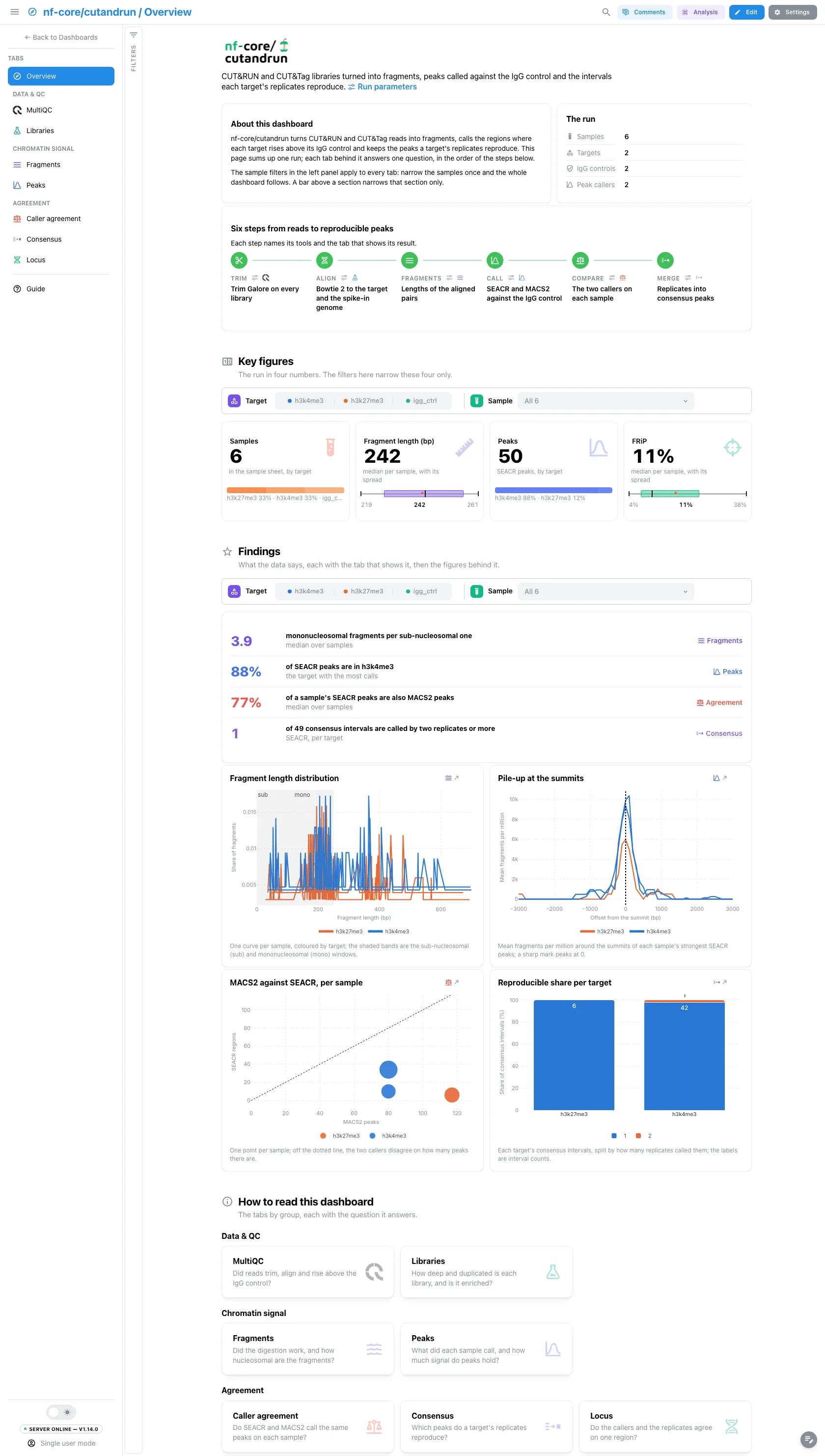
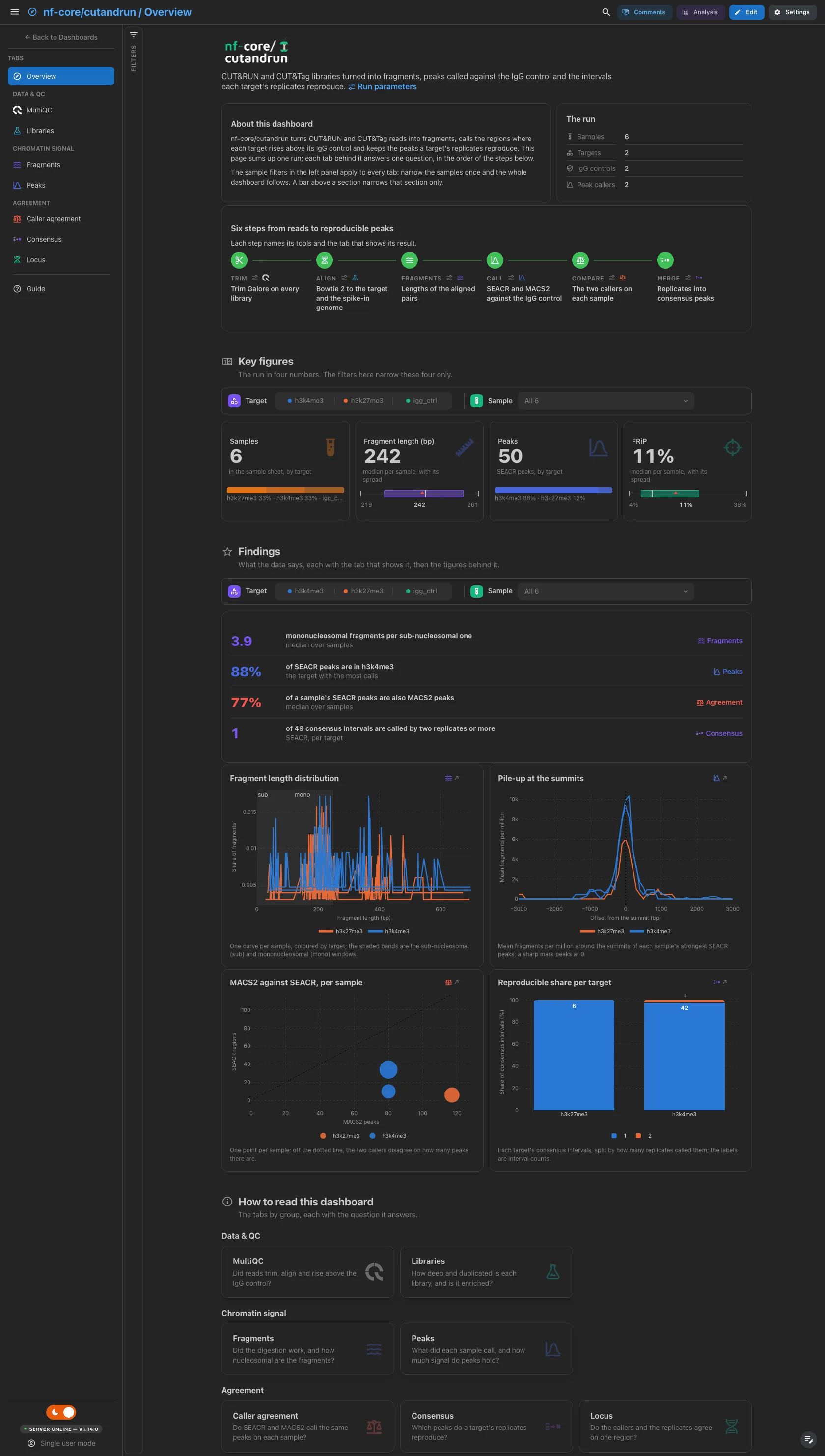
A short hero links the run parameters, which for cutandrun 3.2.2 are the
software versions: the run ships no params.json. About this dashboard says
how the two filter levels work, The run lists the samples, targets, IgG
controls and peak callers read from the data, and Pipeline walks the six steps
from trimming to the consensus merge, each linked to its tool versions and its
tab. The findings are live values: they follow the filters, and a route that
lacks their data drops them. The Locus tab has no figure here, since it is a
browser rather than a summary.
Filters and components
Filters · the left panel starts collapsed. Key figures and Findings each have their own filter bar (target and sample): each narrows its own section only.
| Section | What it holds |
|---|---|
| Top | Hero, About this dashboard, The run, Pipeline |
| Key figures | 4 headline cards: samples, fragment length, peaks, FRiP |
| Findings | Live result rows, then 4 figures: the fragment-length distribution, the pile-up at the SEACR summits, MACS2 against SEACR per sample and the reproducible share per target |
| How to read this dashboard | The tabs by group, each with its question |
Data & QC · Did reads trim, align and rise above the IgG control?
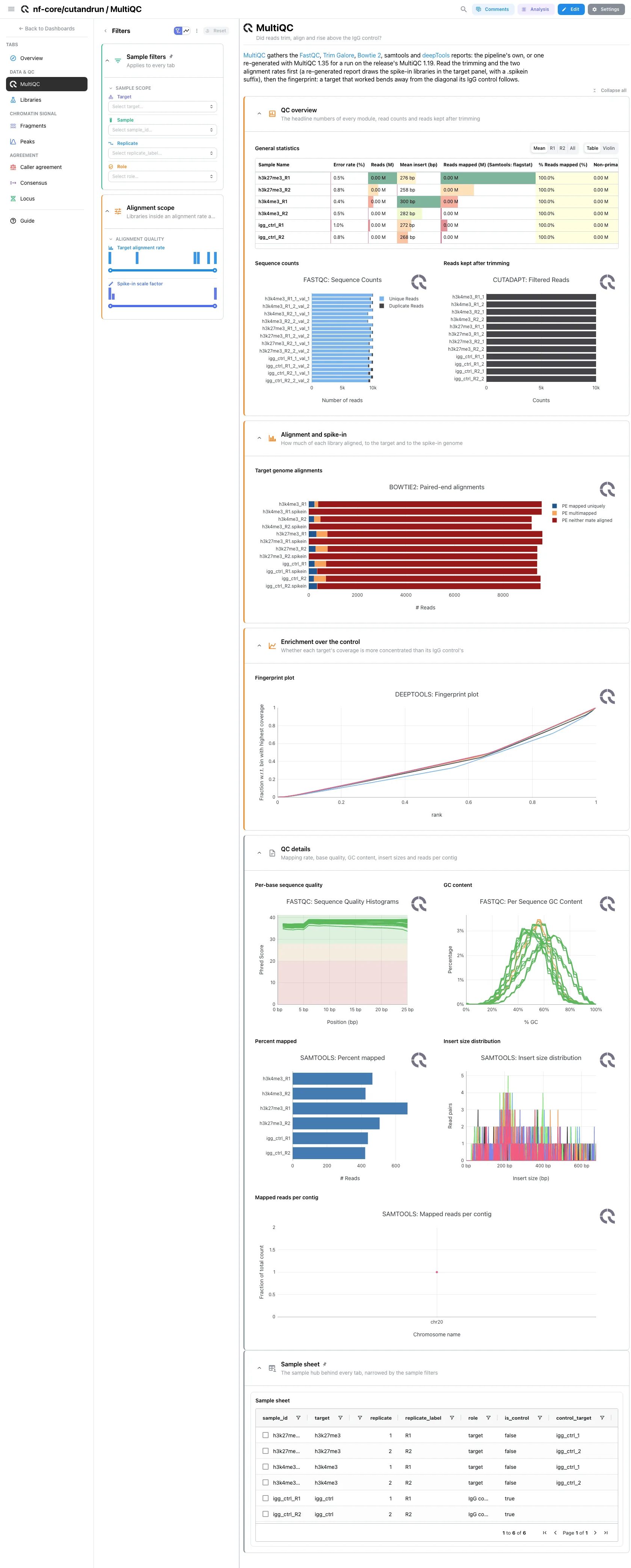
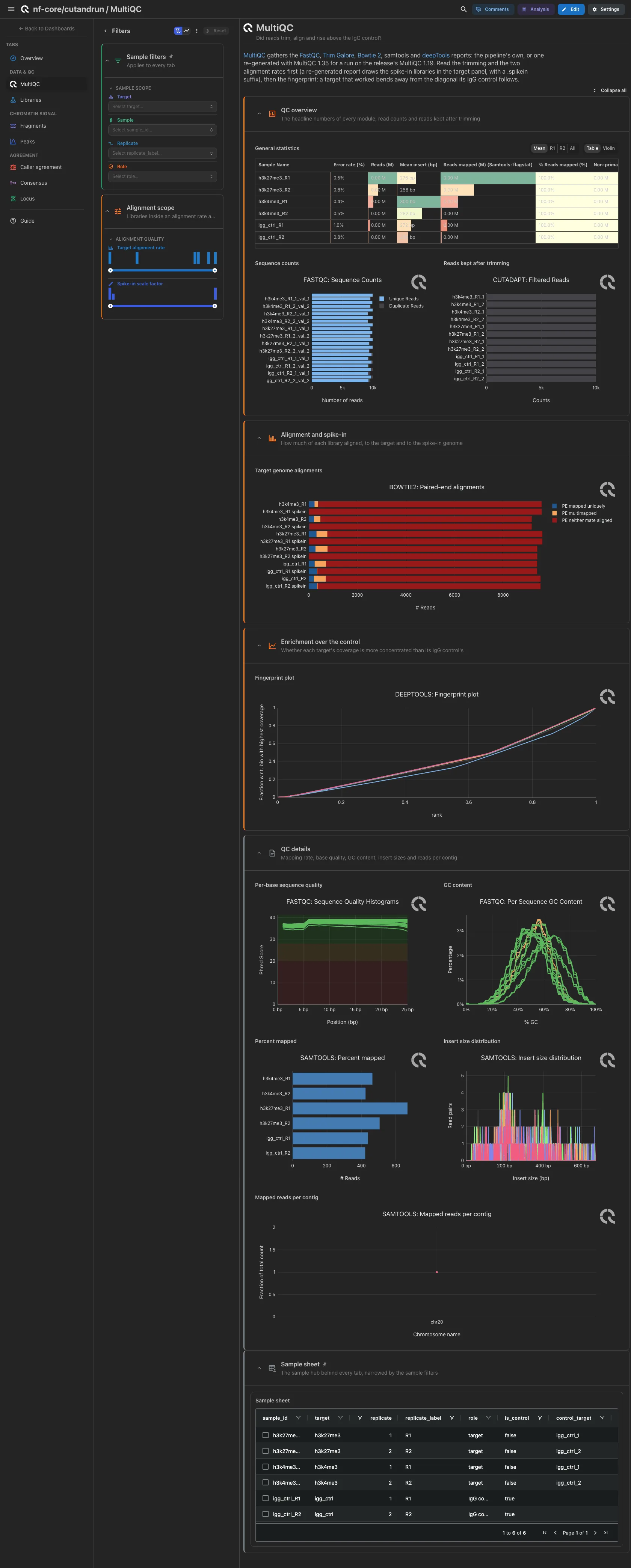
MultiQC panels only. Open: general statistics, FastQC sequence counts and the
reads kept after trimming, the Bowtie 2 alignments to the target genome beside
those to the spike-in genome, then the deepTools fingerprint. Percent mapped,
base quality, GC content, insert sizes and reads per contig are collapsed. A
re-generated report has no separate spike-in Bowtie 2 module: the import drops
the spike-in tile, and the target tile, now full width, shows both genomes,
the spike-in libraries carrying a .spikein suffix.
Filters and components
Filters · Target alignment rate and Spike-in scale factor ranges
on bowtie2_spikein_factors, carried into the report by a reverse link.
| Section | What it holds |
|---|---|
| QC overview | 3 MultiQC panels |
| Alignment and spike-in | 2 MultiQC panels (target and spike-in genome) |
| Enrichment over the control | 1 MultiQC panel (fingerprint) |
| QC details (collapsed) | 5 MultiQC panels |
Data & QC · How deep and duplicated is each library, and is it enriched?
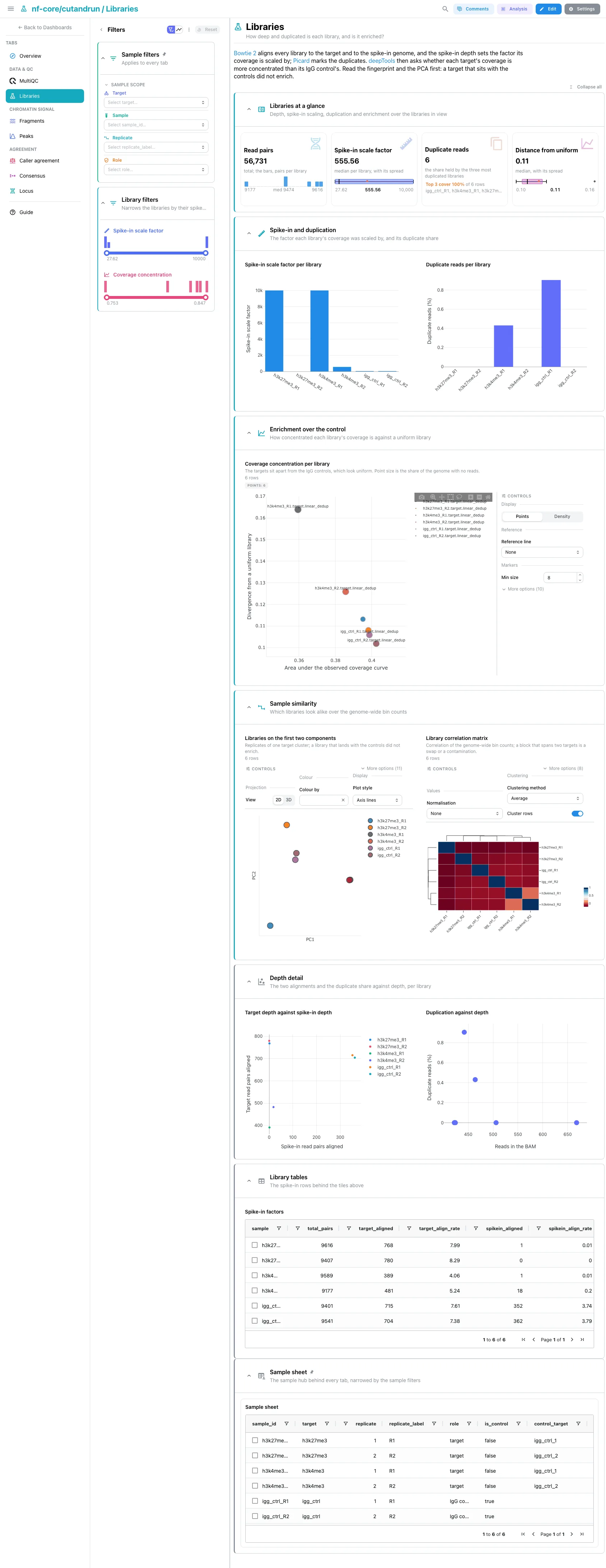
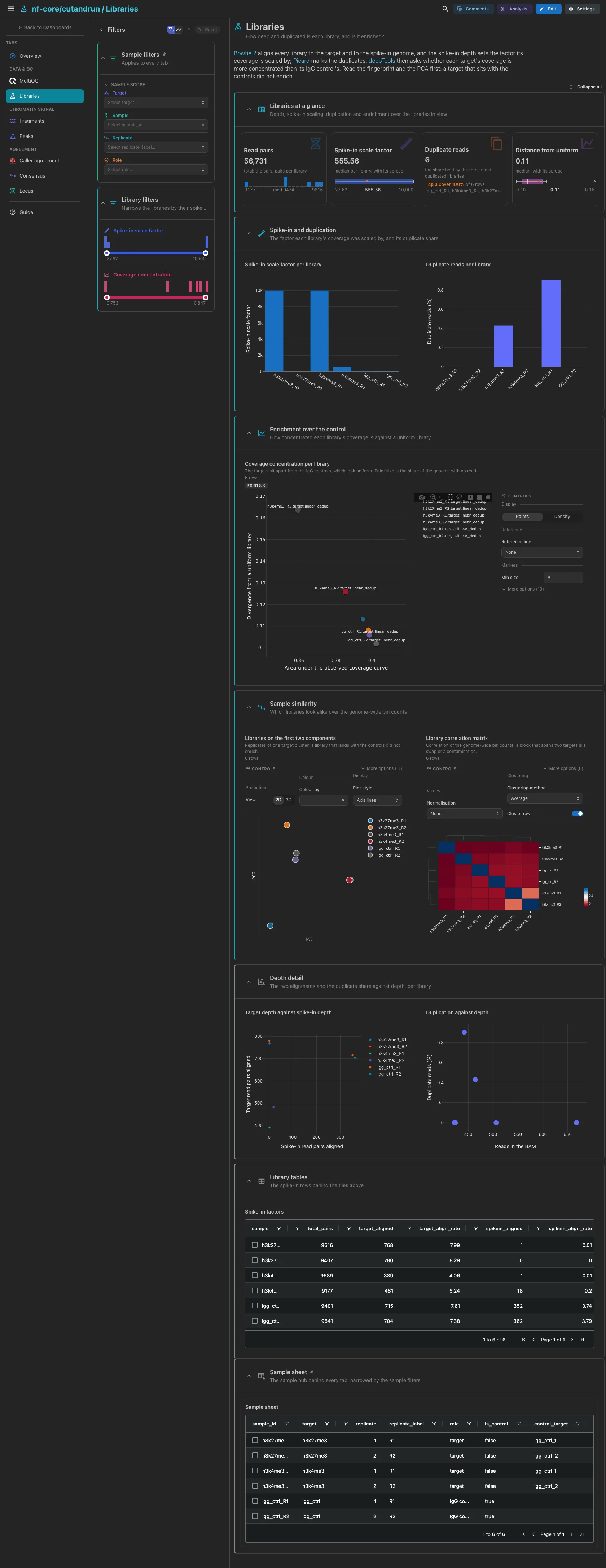
The tables the pipeline publishes beside the report. Read pairs, the spike-in scale factor, duplicate reads and the distance from a uniform library. Then the scale factor and the duplicate share per library, the fingerprint metrics, where targets sit apart from the IgG controls, and the PCA beside the clustered correlation matrix of the genome-wide bin counts.
Filters and components
Filters · a Spike-in scale factor range on bowtie2_spikein_factors
and a Coverage concentration range on deeptools_fingerprint_metrics.
| Section | What it holds |
|---|---|
| Libraries at a glance | 4 cards |
| Spike-in and duplication | 2 bars |
| Enrichment over the control | 1 advanced visualization |
| Sample similarity | 2 advanced visualizations |
| Depth detail (collapsed) | 2 scatters |
| Library tables (collapsed) | Spike-in factors |
Chromatin signal · Did the digestion work, and how nucleosomal are the fragments?
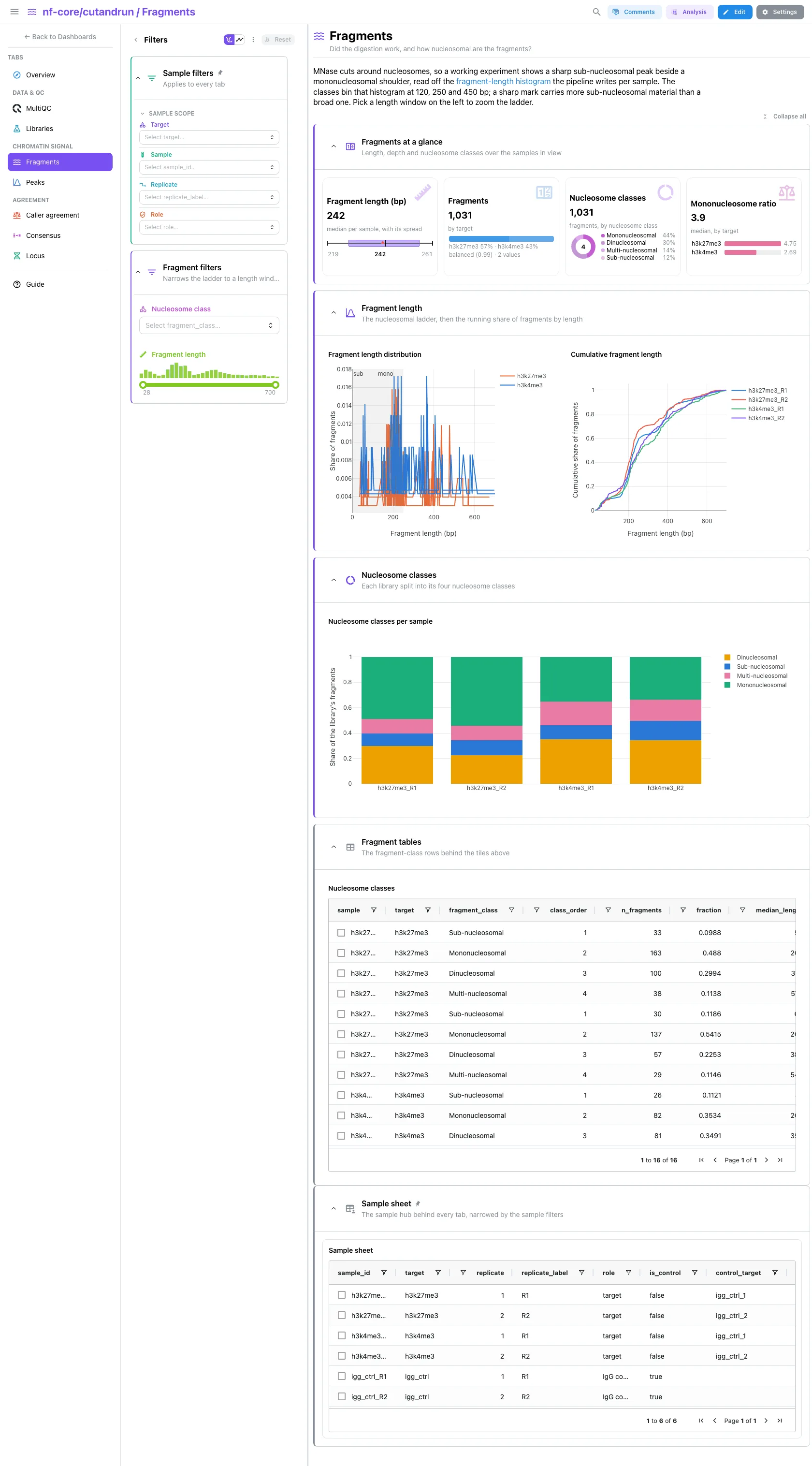
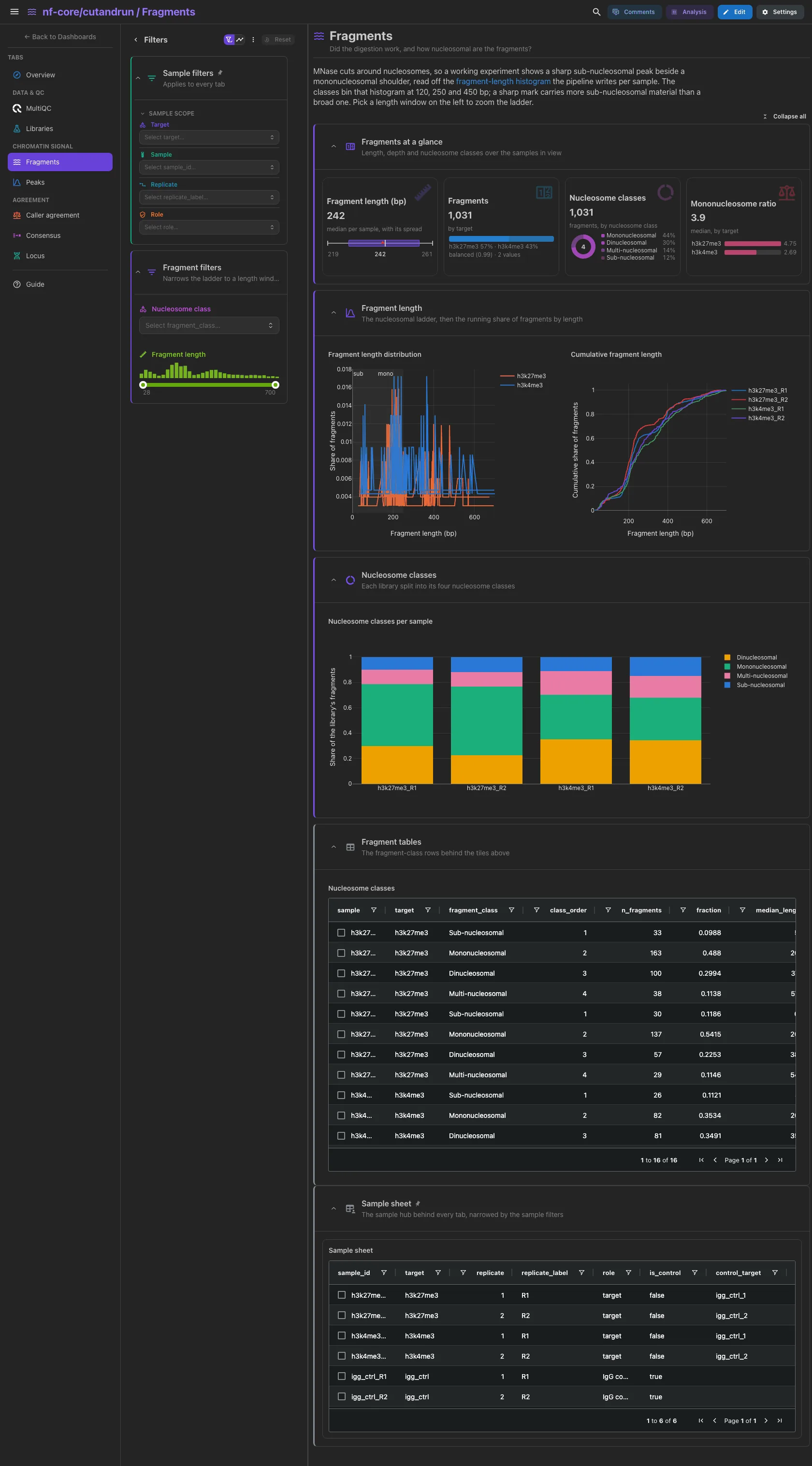
The nucleosomal ladder. The median fragment length, the fragments counted, the fragments by nucleosome class and the mononucleosome to sub-nucleosome ratio per target. Then the fragment-length distribution, one curve per sample with the sub-nucleosomal and mononucleosomal windows shaded, beside its cumulative twin, and each library split into its four nucleosome classes.
Filters and components
Filters · Nucleosome class on seacr_fragment_classes and a
Fragment length range on seacr_fragment_lengths.
| Section | What it holds |
|---|---|
| Fragments at a glance | 4 cards |
| Fragment length | 2 line charts |
| Nucleosome classes | 1 bar |
| Fragment tables (collapsed) | Nucleosome classes |
Chromatin signal · What did each sample call, and how much signal do peaks hold?
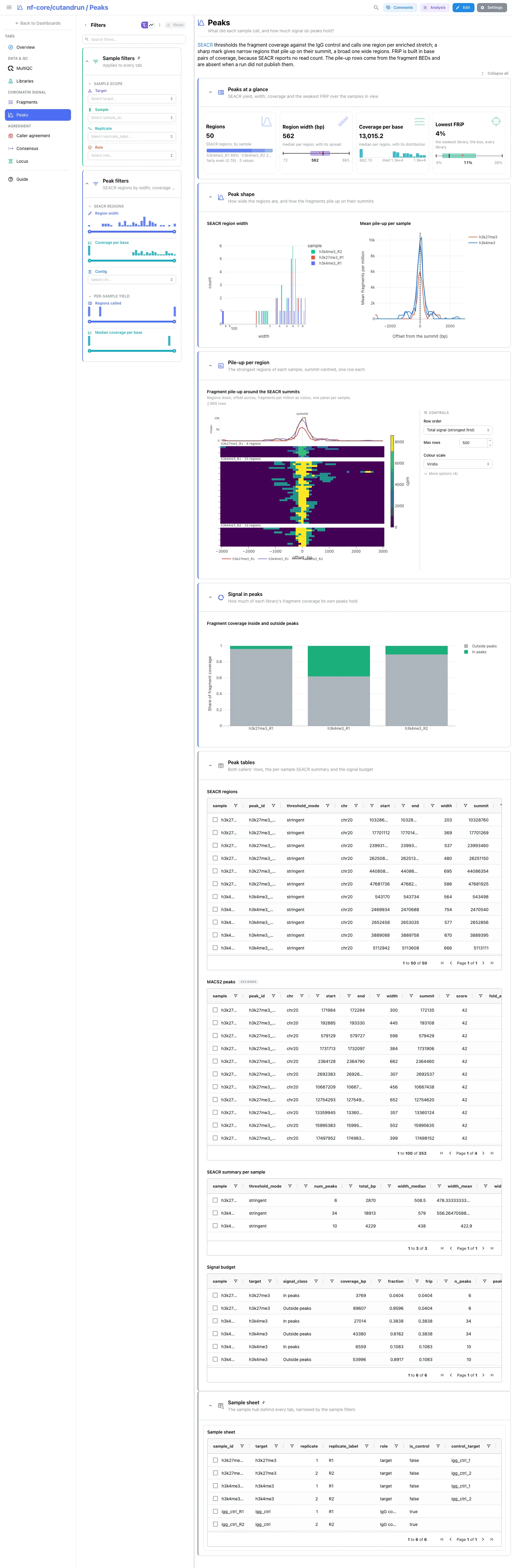
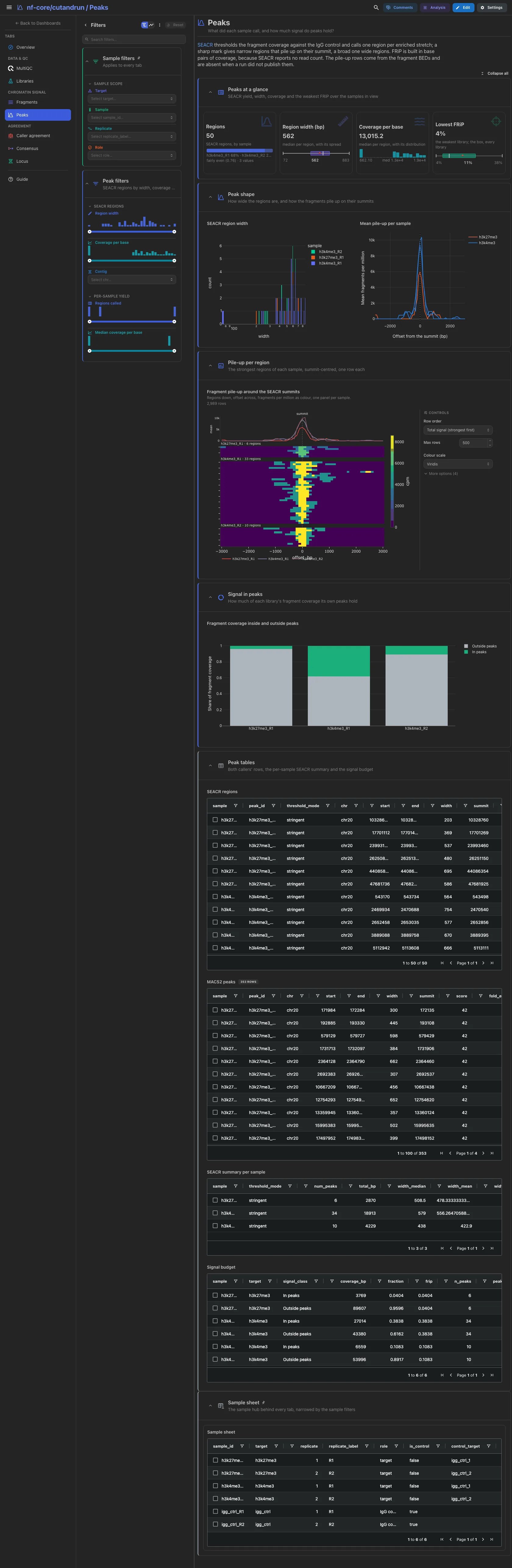
SEACR regions, their width, their coverage per base and the lowest FRiP in view. Then the region width beside the mean pile-up on the summits, the summit-centred pile-up of each sample's strongest regions, and the fragment coverage inside and outside peaks. FRiP is built in base pairs of coverage, because SEACR reports no read count. The pile-up tiles need the fragment BEDs and drop when a run did not publish them.
Filters and components
Filters · Region width, Coverage per base and Contig on
seacr_peaks, then Regions called and Median coverage per base on
seacr_peak_summary.
| Section | What it holds |
|---|---|
| Peaks at a glance | 4 cards |
| Peak shape | 1 histogram + 1 line chart |
| Pile-up per region | 1 advanced visualization |
| Signal in peaks | 1 bar |
| Peak tables (collapsed) | SEACR regions, MACS2 peaks, SEACR summary per sample, Signal budget |
The pile-up needs the fragment BEDs
Both fragment collections are optional. A run or a mirror without the
*.frags.cut.bed files ingests everything else, and the pile-up tiles here,
the fragment track of the Locus tab and the pile-up figure on the Overview
drop out.
Agreement · Do SEACR and MACS2 call the same peaks on each sample?
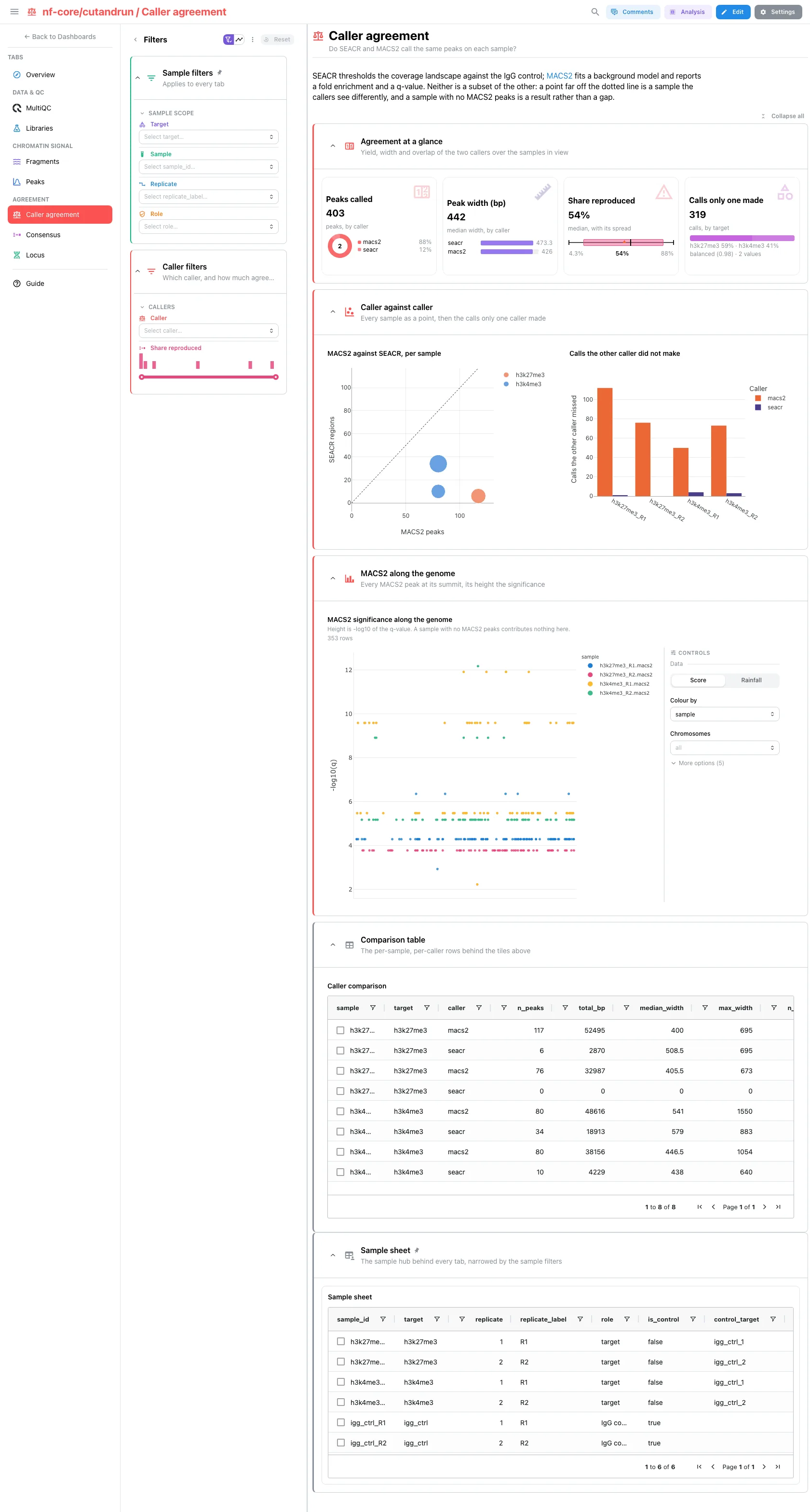
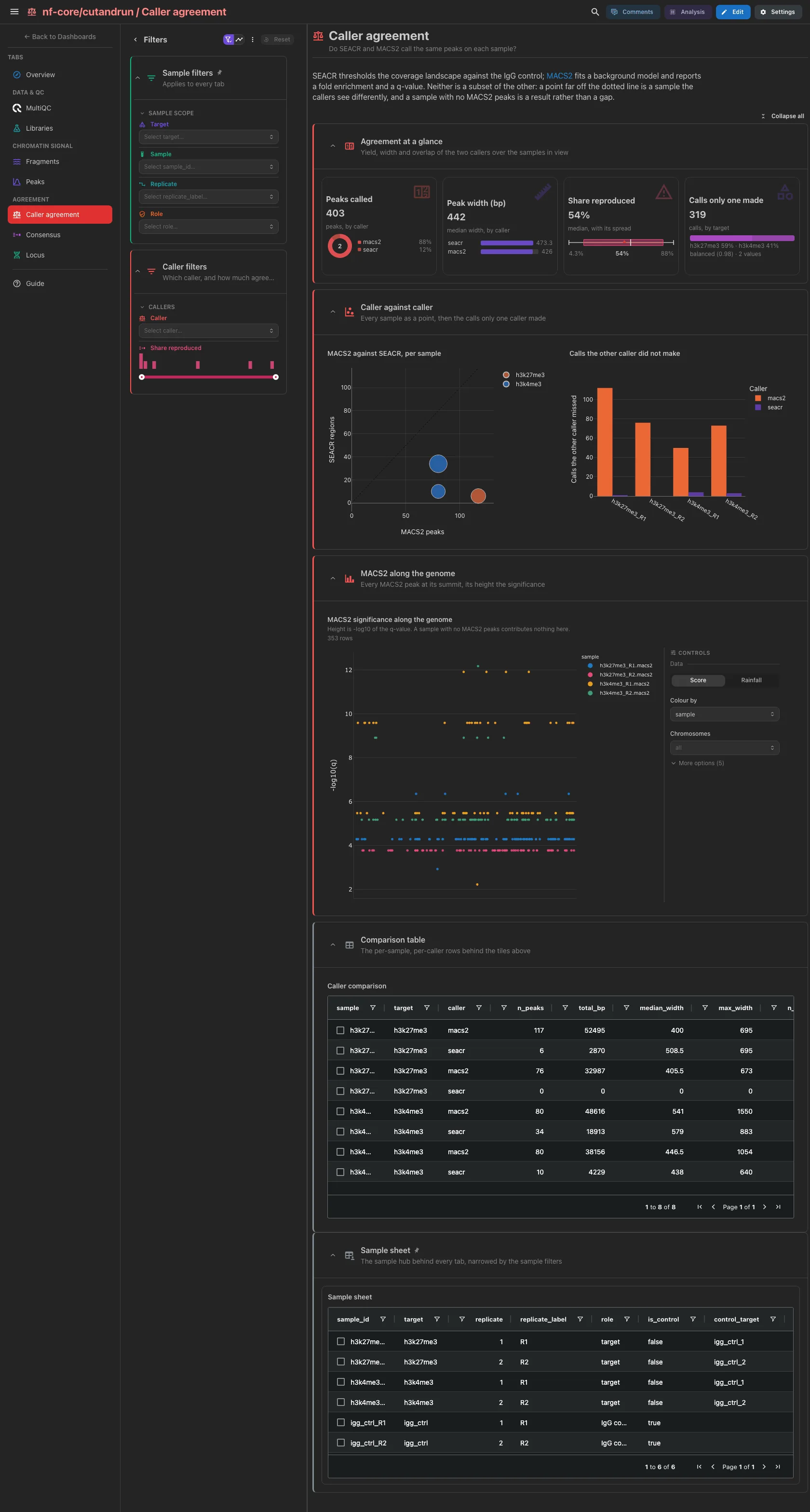
Peaks called by caller, the peak width by caller, the share of one caller's peaks the other reproduces and the calls only one caller made. Then MACS2 against SEACR, one selectable point per sample, beside the calls the other caller did not make, and the MACS2 significance along the genome. A sample with no MACS2 peaks keeps its row, so it reads as disagreement rather than as missing data.
Filters and components
Filters · Caller and a Share reproduced range, both on
caller_agreement.
| Section | What it holds |
|---|---|
| Agreement at a glance | 4 cards |
| Caller against caller | 1 scatter + 1 bar |
| MACS2 along the genome | 1 advanced visualization |
| Comparison table (collapsed) | Caller comparison |
Agreement · Which peaks do a target's replicates reproduce?
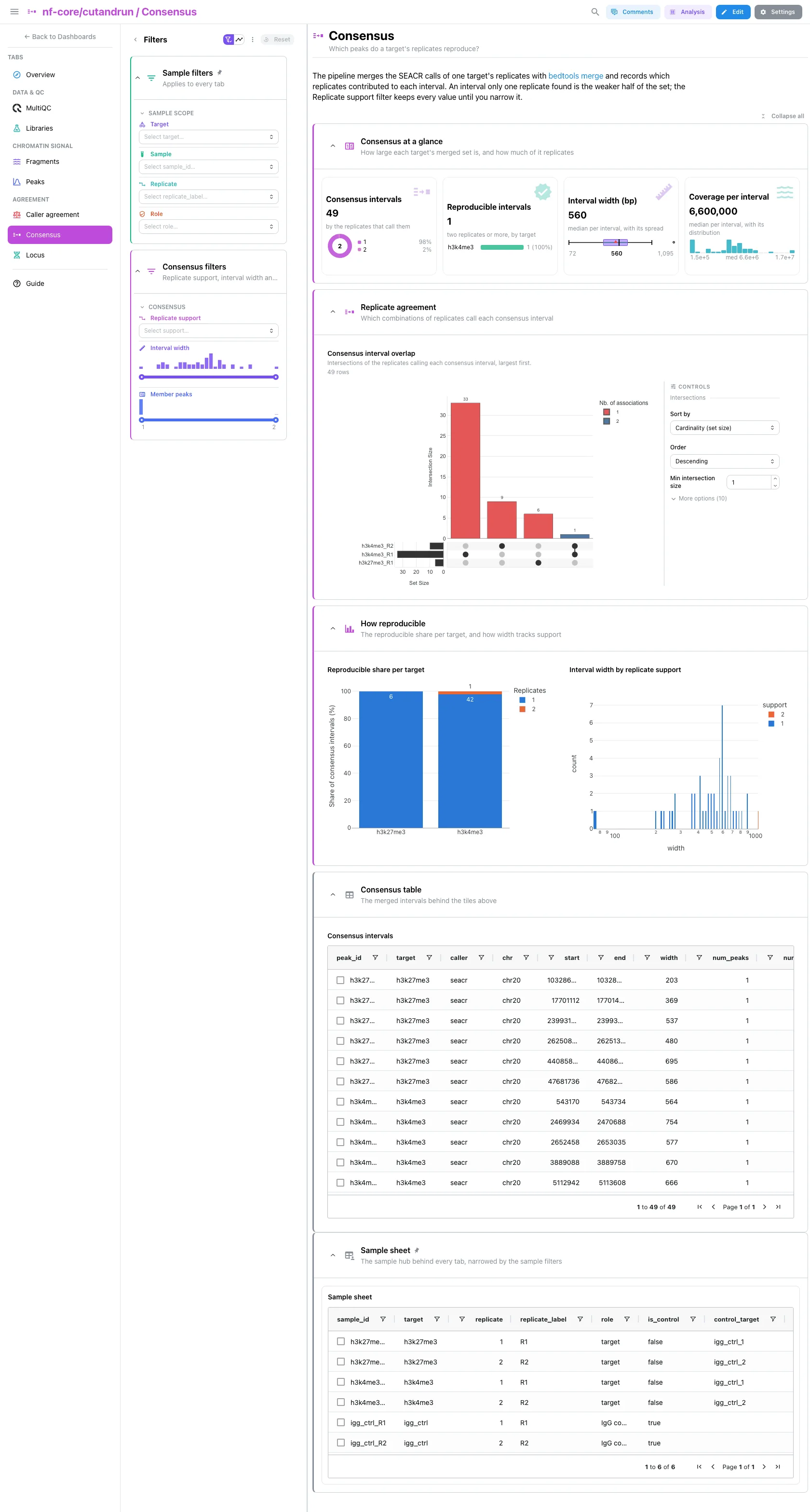
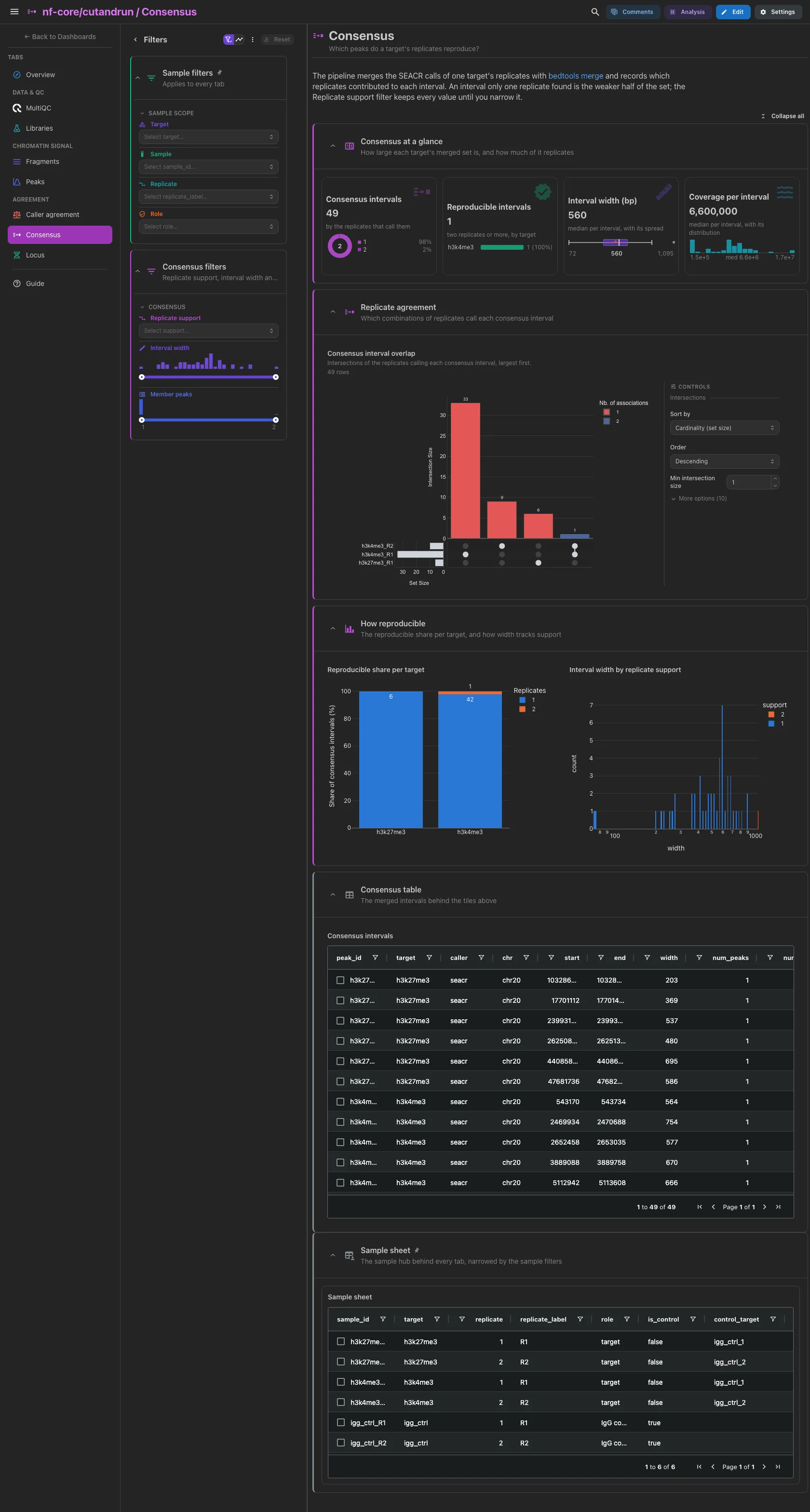
Consensus intervals by replicate support, the reproducible ones (two
replicates or more) by target, the interval width and the coverage per
interval. Then the UpSet of the replicates calling each interval, the
reproducible share per target and the interval width by support. The
Replicate support filter keeps every value until you narrow it, so the cards
include single-replicate intervals.
Filters and components
Filters · Replicate support, and Interval width and Member
peaks ranges, all on seacr_consensus_peaks.
| Section | What it holds |
|---|---|
| Consensus at a glance | 4 cards |
| Replicate agreement | 1 advanced visualization (UpSet) |
| How reproducible | 1 bar + 1 histogram |
| Consensus table (collapsed) | Consensus intervals |
Agreement · Do the callers and the replicates agree on one region?
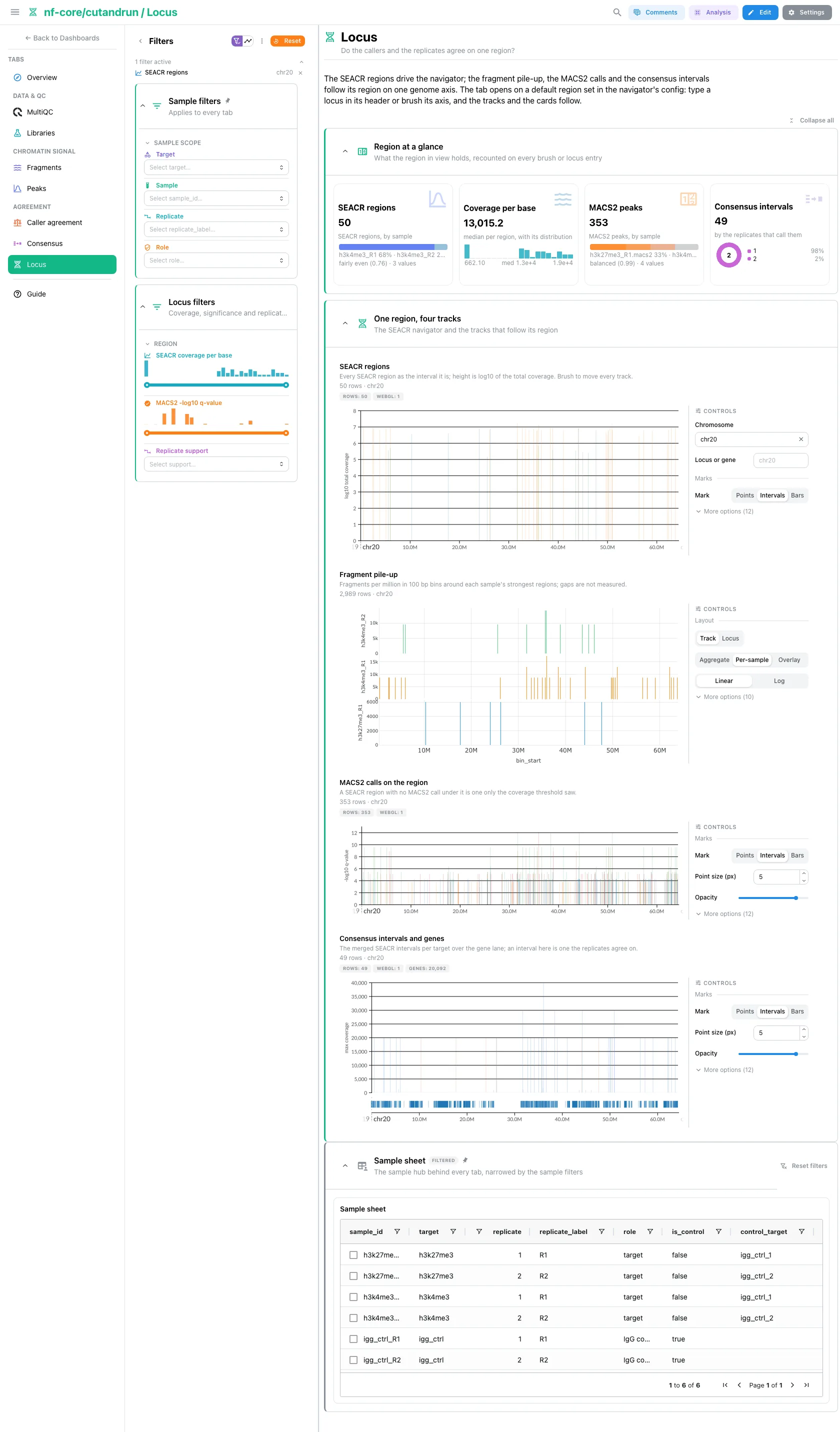
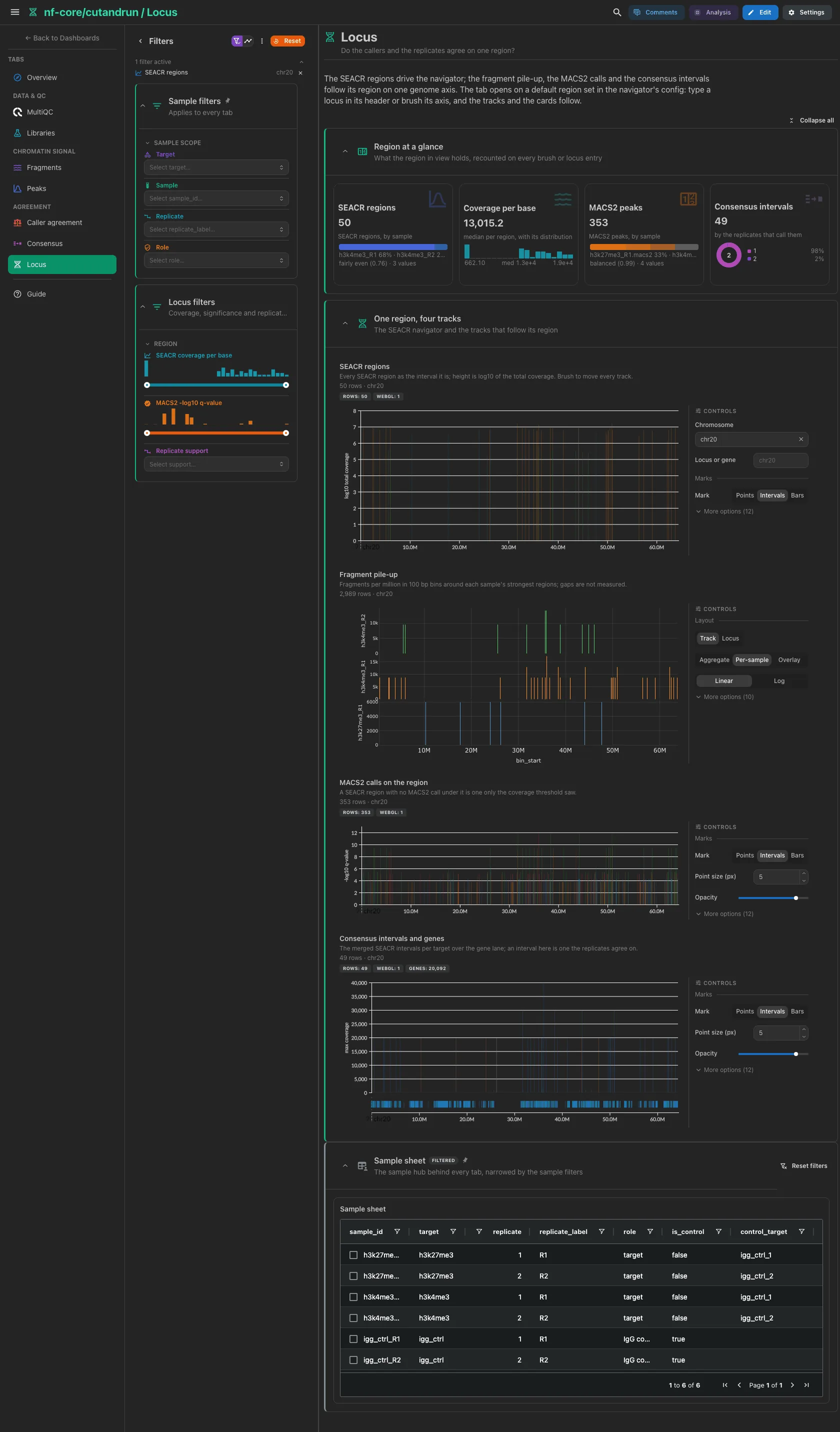
One region on one genome axis. The cards count what the region in view holds and follow it as the tracks do. The SEACR navigator opens on the first contig the calls sit on, so a run aligned to part of the genome opens on data: type a locus in its header or brush its axis, and the fragment pile-up, the MACS2 calls and the consensus intervals over the gene lane follow.
Filters and components
Filters · SEACR coverage per base on seacr_peaks, MACS2 -log10
q-value on macs2_peaks and Replicate support on
seacr_consensus_peaks.
| Section | What it holds |
|---|---|
| Region at a glance | 4 cards |
| One region, four tracks | 4 advanced visualizations |
Pass the assembly for a run not on hg38
The navigator fetches only the chromosome of its region from the
assembly it is given, which defaults to hg38. For a run aligned to
another build, pass --var GENOME=<assembly> at ingest, or the tracks
land on the wrong coordinates.
A broad mark reproduces poorly, and the dashboard says so
The replicates of a broad histone mark overlap badly, so a large part of its consensus intervals rests on a single replicate. That is a property of the data, not of the template.
Tables and point views select on their entity column: the sample sheet on
sample_id; the per-sample tables (SEACR summary, fragment classes, spike-in
factors, signal budget, caller comparison), the caller, depth and duplication
scatters and the fingerprint tile on sample; the peak and consensus tables, the
MACS2 significance track and the SEACR, MACS2 and consensus tracks of the Locus
tab on peak_id. A lasso on a scatter, a brush on a track or a picked table row
becomes a dashboard filter that narrows the other tiles of its collection and
follows the project links to the collections they reach. The deepTools PCA emits
a selection, but its collection has no outgoing link, so it narrows no other
tile.
Running the pipeline
Depictio reads the output of nf-core/cutandrun. Run the pipeline first:
nextflow run nf-core/cutandrun -r 3.2.2 \
--input samplesheet.csv \
--genome GRCh38 \
--peakcaller seacr,macs2 \
--outdir results -profile docker
Then point Depictio at the results. A run on the release's pinned MultiQC 1.19 needs its report re-generated first, and the variable that binds it:
python -m depictio.dev_scripts.multiqc_reprocess --src results/ --dest results/
depictio ingest results/ --template nf-core/cutandrun/latest \
  --var MULTIQC_REPROCESSED=true
A run made with MultiQC 1.31 or later skips both: depictio ingest results/
--template nf-core/cutandrun/latest reads the report the pipeline published.
See nf-co.re/cutandrun/usage for full pipeline documentation.
Required data structure
Point depictio ingest at the directory holding the pipeline output. Depictio scans
recursively and matches on file name, so the stage numbering below is the
reference run's layout, not a requirement.
<DATA_ROOT>/
├── pipeline_info/
│   ├── samplesheet.valid.csv                          # the sample hub is derived from this
│   └── software_versions.yml                          # provenance, with local_versions.yml
├── 01_prealign/
│   ├── pretrim_fastqc/*_fastqc.zip
│   └── trimgalore/{fastqc/*_fastqc.zip,*_trimming_report.txt}
├── 02_alignment/bowtie2/
│   ├── target/log/*.bowtie2.log
│   ├── spikein/log/*.spikein.bowtie2.log
│   └── target/markdup/*.{stats,flagstat,idxstats}
├── 03_peak_calling/
│   ├── 04_called_peaks/
│   │   ├── seacr/*.seacr.peaks.stringent.bed          # required, the default caller
│   │   └── macs2/*.macs2_peaks.narrowPeak             # optional, plus *.macs2_peaks.xls
│   ├── 05_consensus_peaks/*.consensus.peak_counts.bed # *.seacr.consensus.* in 3.2.2
│   └── 06_fragments_from_bams/
│       ├── *.frags.len.txt
│       └── *.frags.cut.bed                            # optional, for the pile-up tiles
├── 04_reporting/
│   ├── deeptools_qc/
│   │   ├── *.plotFingerprint.qcmetrics.txt
│   │   └── all_target_bams.plot{PCA.tab,Correlation.mat.tab}
│   ├── igv/                                           # copies of the SEACR beds, skipped
│   └── multiqc/multiqc_data/multiqc.parquet           # the run's own, MultiQC 1.31 or later
└── multiqc/multiqc_data/
    └── multiqc.parquet                                # or this one, from multiqc_reprocess
A tree may hold both MultiQC parquets: the default binds the run's own under
04_reporting/, --var MULTIQC_REPROCESSED=true the re-generated one at the
root, and the template never loads the two together.
Validation runs
No AWS megatest is usable for 3.2.2: every cutandrun 3.2.x prefix in the bucket
holds directory markers only. The template was validated on two EMBL HPC runs of
the release instead: cutandrun322-full, the test_full profile (the megatest
design, two histone marks in two replicates each against IgG controls), and
cutandrun322-small, the test_full_small profile (the same design on a read
subset against one chromosome, with linear duplicate removal and mitochondrial
filtering on). Both runs wrote MultiQC 1.19, so both were re-generated with
multiqc_reprocess and checked with --var MULTIQC_REPROCESSED=true; the
pipeline's own MultiQC 1.35 report was checked on the small run only. The small
run was ingested on a local stack, its zero-byte peak file included; the full run
was checked by dry runs and by building every collection without a server.
megatest.yaml lists the tables-only subset a 3.2.2 megatest would need, so a
usable S3 run can be pinned later without rewriting it. The 3.1 megatest the
previous template version was built on is still fetched by
download_test_data.sh
next to the 3.1 template:
bash depictio/projects/nf-core/cutandrun/3.1/download_test_data.sh /tmp/cutandrun_test
python -m depictio.dev_scripts.multiqc_reprocess \
  --src /tmp/cutandrun_test --dest /tmp/cutandrun_test
depictio ingest /tmp/cutandrun_test --template nf-core/cutandrun/3.1
The screenshots above show the 3.1 template on an earlier layout of the dashboard; the 3.2.2 layout has not been captured yet.
Additional resources
- nf-co.re/cutandrun: official pipeline documentation
- nf-co.re/cutandrun/3.2.2/docs/output: the output files the template reads
- nf-co.re/cutandrun/3.1/results: AWS test results of the 3.1 release (3.2.x has none)
- Template System Reference: YAML format, variables, conditionals
- Recipes: how to read, test, and write recipes
Authorship
 weber8thomas
Reviewing a template on your own data, or taking over a role here, is a contribution in itself: the contributing guide says what each one involves.