

The variantbenchmarking template turns a benchmarking run into a precision/recall funnel:
- Overview: four key figures, live findings and four figures for the route the run took, each linked to its tab
- Germline: rtg-tools vcfeval and hap.py, on the precision-recall plane, by variant type and over the quality-threshold sweep
- Somatic: som.py with binomial 95% intervals and allele-fraction strata, cross-checked by rtg-tools vcfeval
- Structural & CNV: Truvari, SVanalyzer and Wittyer, per event and per base
- MultiQC: the run's own report, in the per-variant-type templates
Choosing a template
nf-core/variantbenchmarking benchmarks one variant type per run: its own documentation states that "only one type of variant analysis is possible for each run". Depictio therefore ships one template per variant type, plus an umbrella template that reads any of them, one route or several under one root.
There is no variable and no selector for this choice. It is made entirely by the id you
pass to --template. Pick the row matching the run you want to explore.
--template id |
Produced by a run with | Benchmark tools | Expected in the results directory |
|---|---|---|---|
nf-core/variantbenchmarking/1.4.0/categories/small |
--analysis germline --variant_type small |
hap.py, rtg-tools vcfeval | small/ and multiqc/multiqc_data/multiqc.parquet |
nf-core/variantbenchmarking/1.4.0/categories/indel |
--analysis somatic --variant_type indel |
som.py, rtg-tools vcfeval | indel/ and multiqc/multiqc_data/multiqc.parquet |
nf-core/variantbenchmarking/1.4.0/categories/structural |
--variant_type structural |
truvari, SURVIVOR, through MultiQC only | multiqc/multiqc_data/multiqc.parquet |
nf-core/variantbenchmarking/1.4.0 |
any of the above, or several runs collected under one root | rtg-tools vcfeval, hap.py, som.py, Truvari, SVanalyzer, Wittyer | any of small/, indel/, sv/, cnv/; all optional |
Each category is a self-contained project with its own dashboard, so three pipeline runs give you three projects. The umbrella template shows the tab of each route it finds, so it also reads a data root holding several, which is how nf-core's own megatest is laid out.
Category ids must pin the version
latest is resolved only in the last segment of a template id. So
nf-core/variantbenchmarking/latest works and resolves to 1.4.0, but
nf-core/variantbenchmarking/latest/categories/small does not: the literal
latest is never substituted mid-path, the directory it names does not exist, and
the run fails with Template ... not found. Always spell category ids with the
pinned version, nf-core/variantbenchmarking/1.4.0/categories/small.
See _resolve_template_id_in in
depictio/cli/cli/utils/templates.py.
Self-adapting layout
Nearly every collection is optional, so each dashboard adapts to what the run
actually produced: components bound to missing collections are hidden and tabs left
with no visualizations are dropped. On the umbrella template the Structural & CNV
tab binds the optional Truvari, SVanalyzer and Wittyer collections, so it disappears
entirely on a run with no sv/ or cnv/ directory, which is the case for every
published nf-core megatest.
Quick start
DATA_ROOT is the only template variable, so the results directory is the only thing you ever
have to pass. None of the four templates needs a --var flag.
depictio ingest /path/to/germline_results \
  --template nf-core/variantbenchmarking/1.4.0/categories/small
Two tabs: hap.py and rtg-tools benchmark metrics, plus the run's MultiQC report.
depictio ingest /path/to/somatic_results \
  --template nf-core/variantbenchmarking/1.4.0/categories/indel
Two tabs: som.py metrics with allele-fraction strata and confidence intervals, plus the run's MultiQC report.
Reference
The four templates are independent projects. Pick one and the reference below switches to it, so the Data collections tables can be read one at a time rather than four deep.
Note the tag naming: the umbrella template prefixes its collections with germline_ and
somatic_ to keep both variant types apart inside one project, while each category
template uses the short unprefixed tag.
Germline small variants
Template variables
Variables you provide when running the template: DATA_ROOT is the results directory given to depictio ingest, the others are set with --var NAME=value:
| Variable | Required | Description |
|---|---|---|
DATA_ROOT |
✓ | Root containing small/ (germline benchmark tables) and multiqc/multiqc_data/multiqc.parquet. |
Data collections
4 data collections — 2 required 2 optional · 4 direct 0 derived.
Origin tells you whether a collection is real pipeline data or a reshape of it: direct = a pipeline output (scanned, or a recipe that reads raw files); derived = a recipe that reshapes one or more direct collections into the layout a visualization needs (no new measurement). Reads shows what produces it: a recipe .py transform, whose name links to its source on GitHub, or a raw file scanned off disk. (A direct collection can still have a recipe — one that merely parses/cleans the raw file; derived means the recipe reshapes another collection.)
| Tag | Origin | Type | Reads | Status |
|---|---|---|---|---|
vcfeval_summary |
direct | Table | recipe rtgtools/vcfeval_summary.py |
required |
happy_summary |
direct | Table | recipe happy/summary.py |
optional |
happy_roc |
direct | Table | recipe happy/roc.py |
optional |
multiqc_data |
direct |  MultiQC MultiQC |
file multiqc/multiqc_data/multiqc.parquet |
required |
Recipes
Each recipe reshapes raw pipeline output into a tidy table. The name links to its source; Output lists the validated OUTPUT_SCHEMA columns.
| Recipe | Transforms | Output |
|---|---|---|
happy/roc.py |
Extract a germline precision/recall ROC curve from hap.py per-quality ROC output. | quality, recall, precision, f1 |
happy/summary.py |
Pool hap.py per-sample summaries into a germline SNP/INDEL performance table. | variant_type, filter, truth_tp, truth_fn, query_fp, recall, precision, f1 |
rtgtools/vcfeval_summary.py |
Normalize an rtg-tools vcfeval aggregated summary into a tidy benchmark table. | label, caller, truth_set, tp_base, tp_comp, fp, fn, precision, recall, f1 |
Somatic indels
Template variables
Variables you provide when running the template: DATA_ROOT is the results directory given to depictio ingest, the others are set with --var NAME=value:
| Variable | Required | Description |
|---|---|---|
DATA_ROOT |
✓ | Root containing indel/ (somatic benchmark tables) and multiqc/multiqc_data/multiqc.parquet. |
Data collections
4 data collections — 2 required 2 optional · 4 direct 0 derived.
Origin tells you whether a collection is real pipeline data or a reshape of it: direct = a pipeline output (scanned, or a recipe that reads raw files); derived = a recipe that reshapes one or more direct collections into the layout a visualization needs (no new measurement). Reads shows what produces it: a recipe .py transform, whose name links to its source on GitHub, or a raw file scanned off disk. (A direct collection can still have a recipe — one that merely parses/cleans the raw file; derived means the recipe reshapes another collection.)
| Tag | Origin | Type | Reads | Status |
|---|---|---|---|---|
sompy_summary |
direct | Table | recipe sompy/summary.py |
required |
sompy_regions |
direct | Table | recipe sompy/regions.py |
optional |
vcfeval_summary |
direct | Table | recipe rtgtools/vcfeval_summary.py |
optional |
multiqc_data |
direct | MultiQC |
file multiqc/multiqc_data/multiqc.parquet |
required |
Cross-DC links
1 links — selecting a value in the source collection filters the target. The join column is shown after the source.
| Source · column | Target | Filters | |
|---|---|---|---|
sompy_summary · caller |
→ | sompy_regions |
Filter the AF-stratified regions by the selected caller |
Recipes
Each recipe reshapes raw pipeline output into a tidy table. The name links to its source; Output lists the validated OUTPUT_SCHEMA columns.
| Recipe | Transforms | Output |
|---|---|---|
rtgtools/vcfeval_summary.py |
Normalize an rtg-tools vcfeval aggregated summary into a tidy benchmark table. | label, caller, truth_set, tp_base, tp_comp, fp, fn, precision, recall, f1 |
sompy/regions.py |
Reshape the som.py region-stratified benchmark into a caller × AF-bin metrics table. | caller, label, truth_set, af_bin, recall, precision, f1 |
sompy/summary.py |
Normalize the som.py somatic benchmark summary into a tidy per-caller table. | caller, label, truth_set, variant_type, tp, fp, fn, recall, precision, f1, recall_lower, recall_upper, precision_lower, precision_upper |
Structural variants
Template variables
Variables you provide when running the template: DATA_ROOT is the results directory given to depictio ingest, the others are set with --var NAME=value:
| Variable | Required | Description |
|---|---|---|
DATA_ROOT |
✓ | Root containing multiqc/multiqc_data/multiqc.parquet for the structural run. |
Data collections
1 data collections — 1 required 0 optional · 1 direct 0 derived.
Origin tells you whether a collection is real pipeline data or a reshape of it: direct = a pipeline output (scanned, or a recipe that reads raw files); derived = a recipe that reshapes one or more direct collections into the layout a visualization needs (no new measurement). Reads shows what produces it: a recipe .py transform, whose name links to its source on GitHub, or a raw file scanned off disk. (A direct collection can still have a recipe — one that merely parses/cleans the raw file; derived means the recipe reshapes another collection.)
| Tag | Origin | Type | Reads | Status |
|---|---|---|---|---|
multiqc_data |
direct | MultiQC |
file multiqc/multiqc_data/multiqc.parquet |
required |
All variant types in one project
Template variables
Variables you provide when running the template: DATA_ROOT is the results directory given to depictio ingest, the others are set with --var NAME=value:
| Variable | Required | Description |
|---|---|---|
DATA_ROOT |
✓ | Root directory containing variantbenchmarking output (small/, indel/, and optionally sv/, cnv/). |
Data collections
9 data collections — 0 required 9 optional · 9 direct 0 derived.
Origin tells you whether a collection is real pipeline data or a reshape of it: direct = a pipeline output (scanned, or a recipe that reads raw files); derived = a recipe that reshapes one or more direct collections into the layout a visualization needs (no new measurement). Reads shows what produces it: a recipe .py transform, whose name links to its source on GitHub, or a raw file scanned off disk. (A direct collection can still have a recipe — one that merely parses/cleans the raw file; derived means the recipe reshapes another collection.)
| Tag | Origin | Type | Reads | Status |
|---|---|---|---|---|
germline_vcfeval_summary |
direct | Table | recipe rtgtools/vcfeval_summary.py |
optional |
germline_happy_summary |
direct | Table | recipe happy/summary.py |
optional |
germline_happy_roc |
direct | Table | recipe happy/roc.py |
optional |
somatic_vcfeval_summary |
direct | Table | recipe rtgtools/vcfeval_summary.py |
optional |
somatic_sompy_summary |
direct | Table | recipe sompy/summary.py |
optional |
somatic_sompy_regions |
direct | Table | recipe sompy/regions.py |
optional |
sv_truvari_summary |
direct | Table | recipe truvari/summary.py |
optional |
sv_svbenchmark_summary |
direct | Table | recipe svanalyzer/svbenchmark.py |
optional |
cnv_wittyer_summary |
direct | Table | recipe wittyer/summary.py |
optional |
Cross-DC links
4 links — selecting a value in the source collection filters the target. The join column is shown after the source.
| Source · column | Target | Filters | |
|---|---|---|---|
somatic_sompy_summary · caller |
→ | somatic_sompy_regions |
Filter the AF-stratified regions by the selected caller |
somatic_sompy_summary · caller |
→ | somatic_vcfeval_summary |
Cross-filter som.py and vcfeval somatic summaries by caller |
sv_truvari_summary · label |
→ | sv_svbenchmark_summary |
Filter the SVanalyzer summary by the callsets picked on the Structural tab |
sv_truvari_summary · label |
→ | cnv_wittyer_summary |
Filter the Wittyer summary by the callsets picked on the Structural tab |
Recipes
Each recipe reshapes raw pipeline output into a tidy table. The name links to its source; Output lists the validated OUTPUT_SCHEMA columns.
| Recipe | Transforms | Output |
|---|---|---|
happy/roc.py |
Extract a germline precision/recall ROC curve from hap.py per-quality ROC output. | quality, recall, precision, f1 |
happy/summary.py |
Pool hap.py per-sample summaries into a germline SNP/INDEL performance table. | variant_type, filter, truth_tp, truth_fn, query_fp, recall, precision, f1 |
rtgtools/vcfeval_summary.py |
Normalize an rtg-tools vcfeval aggregated summary into a tidy benchmark table. | label, caller, truth_set, tp_base, tp_comp, fp, fn, precision, recall, f1 |
sompy/regions.py |
Reshape the som.py region-stratified benchmark into a caller × AF-bin metrics table. | caller, label, truth_set, af_bin, recall, precision, f1 |
sompy/summary.py |
Normalize the som.py somatic benchmark summary into a tidy per-caller table. | caller, label, truth_set, variant_type, tp, fp, fn, recall, precision, f1, recall_lower, recall_upper, precision_lower, precision_upper |
svanalyzer/svbenchmark.py |
Normalize an SVanalyzer (svbenchmark) structural-variant summary into a tidy table. | label, precision, recall, f1 |
truvari/summary.py |
Normalize a Truvari structural-variant benchmark summary into a tidy table. | label, precision, recall, f1 |
wittyer/summary.py |
Normalize a Wittyer CNV/SV benchmark summary into a tidy, optionally stratified table. | label, precision, recall, f1 |
Dashboard tabs
The umbrella template, nf-core/variantbenchmarking/1.4.0, builds one dashboard: the
Overview, then one child tab per variant type, in two groups. A run benchmarks one
variant type, so it shows the Overview and the tab of its route; a data root holding
several routes shows the tab of each. Each tab below carries the same icon and colour
the dashboard gives it.
| Group | Tabs |
|---|---|
| Small variants | Germline, Somatic |
| Structural | Structural & CNV |
The pipeline writes no MultiQC report into the tables this template reads, and it has no sample sheet: there is no MultiQC tab, no Data & QC group, no persistent sample filters and no Sample sheet section. Each child tab opens with a short intro and a strip of four cards, then at most three open sections; tables and the cross-check follow, collapsed. Each caller keeps one colour on every tab, and the precision-recall scatters draw no point labels.
Which callset recovers its truth set best, on precision, recall and F1.
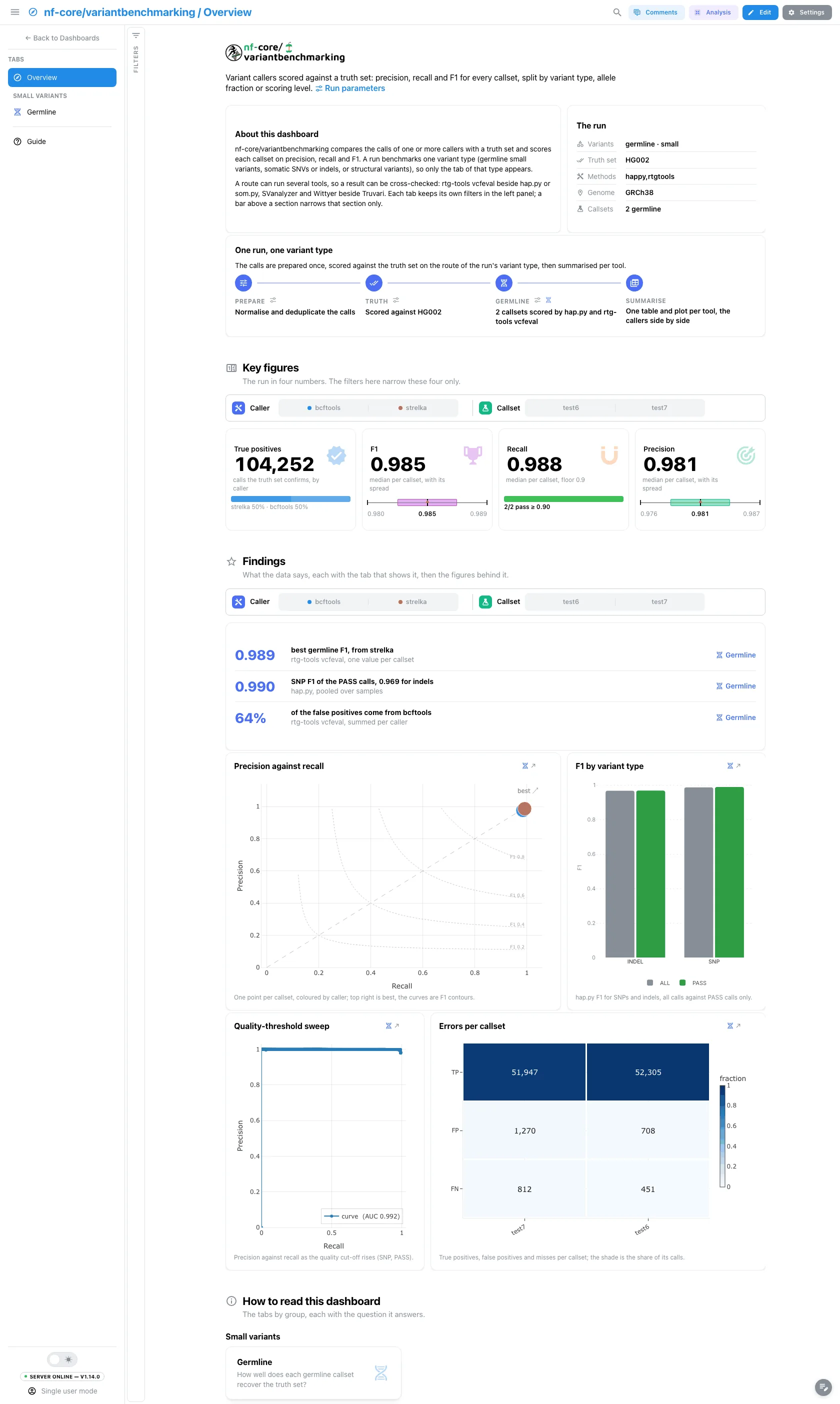
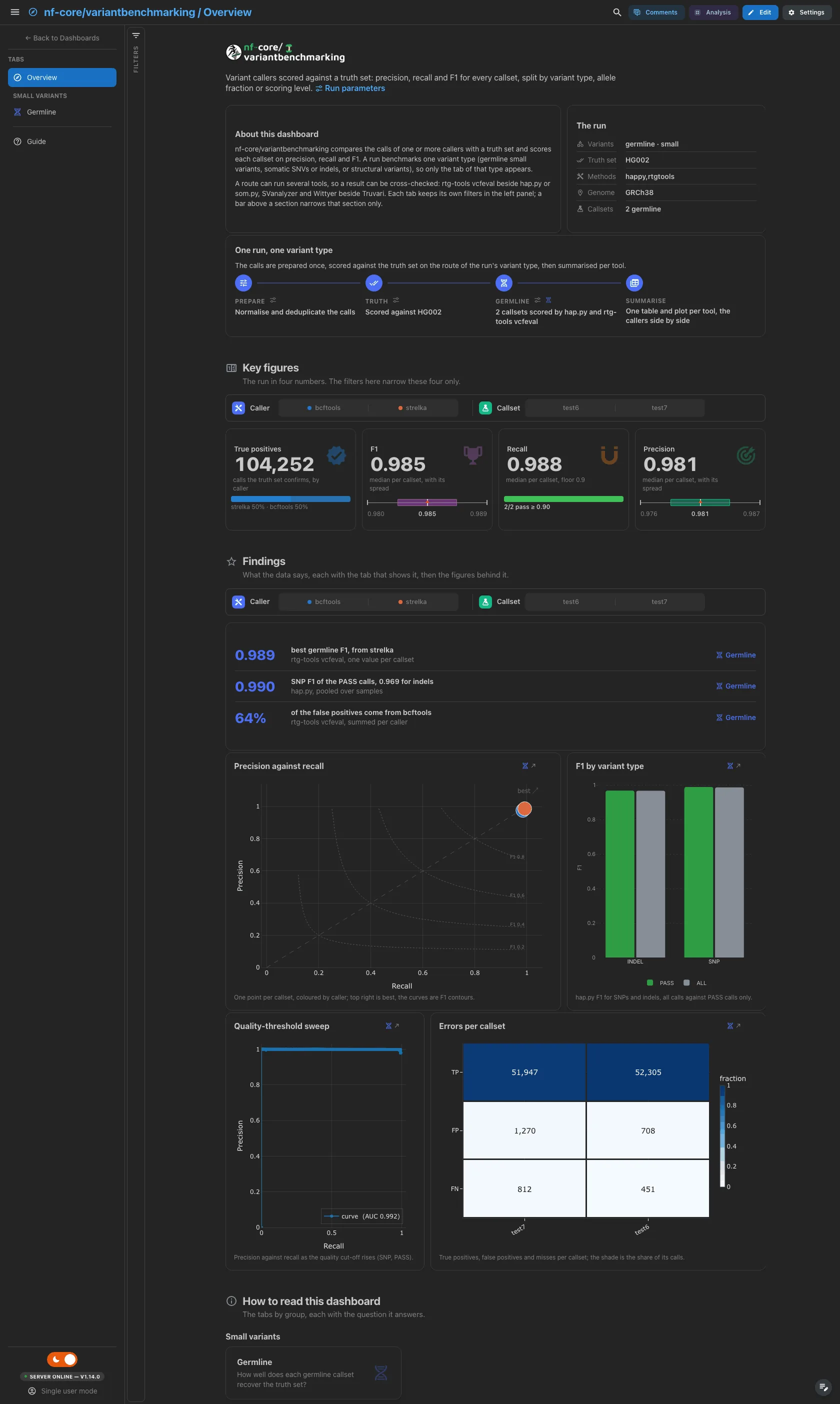
A short hero links the run parameters. The run lists the analysis and variant type, the truth set, the benchmarking methods, the genome and the callsets, and Pipeline shows the steps of the route the run took: the steps of the other routes are dropped at import. Key figures, the findings and the four figures below them come from that route as well.
Filters and components
Filters · the left panel starts collapsed. Key figures and Findings each have a filter bar (caller and callset) that narrows its own section only.
| Section | What it holds |
|---|---|
| Top | Hero, About this dashboard, The run, Pipeline |
| Key figures | 4 headline cards for the run's route: true positives, F1, recall, precision |
| Findings | Three live result rows for the route, then 4 figures from its tab |
| How to read this dashboard | The tabs by group, each with its question |
Small variants · How well does each germline callset recover the truth set?
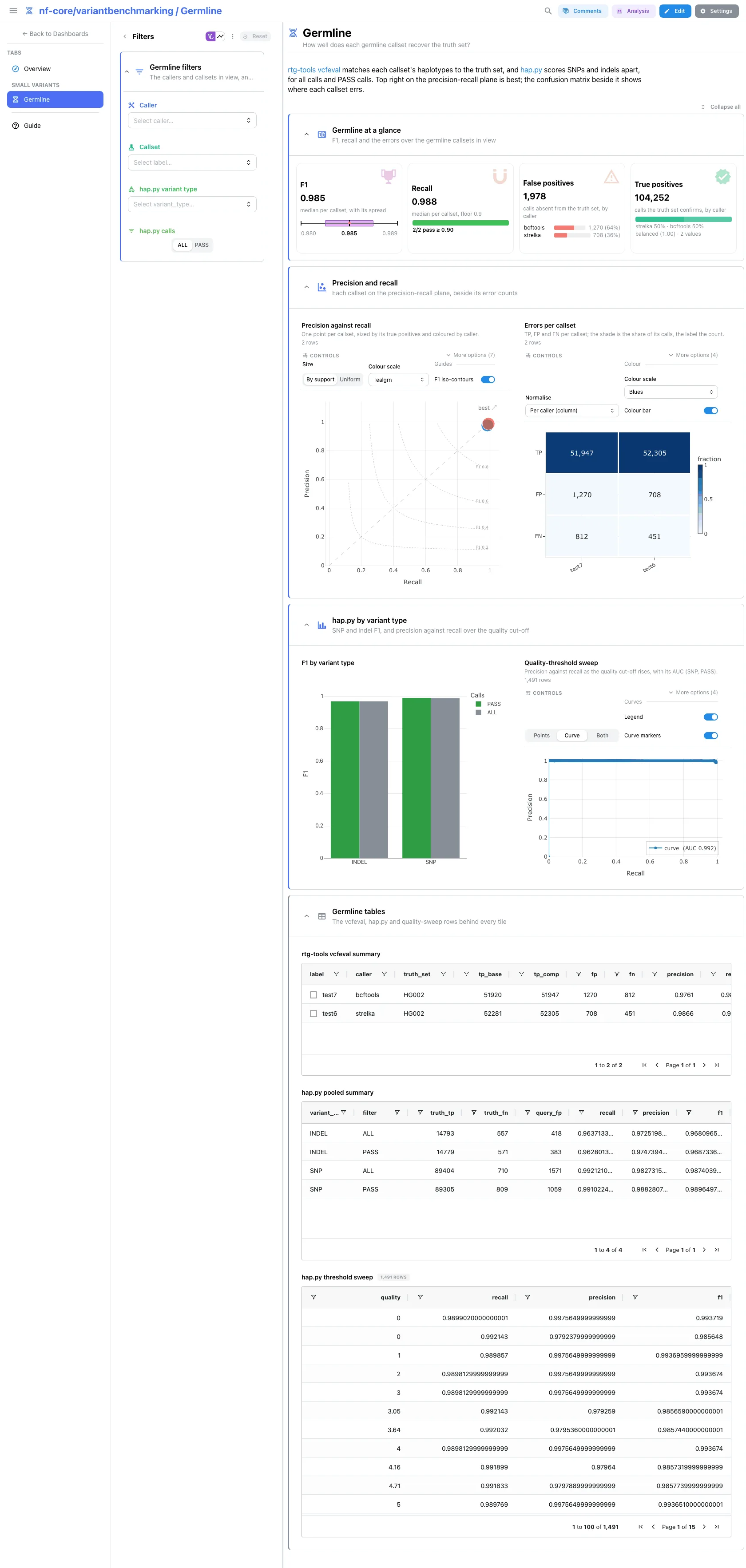
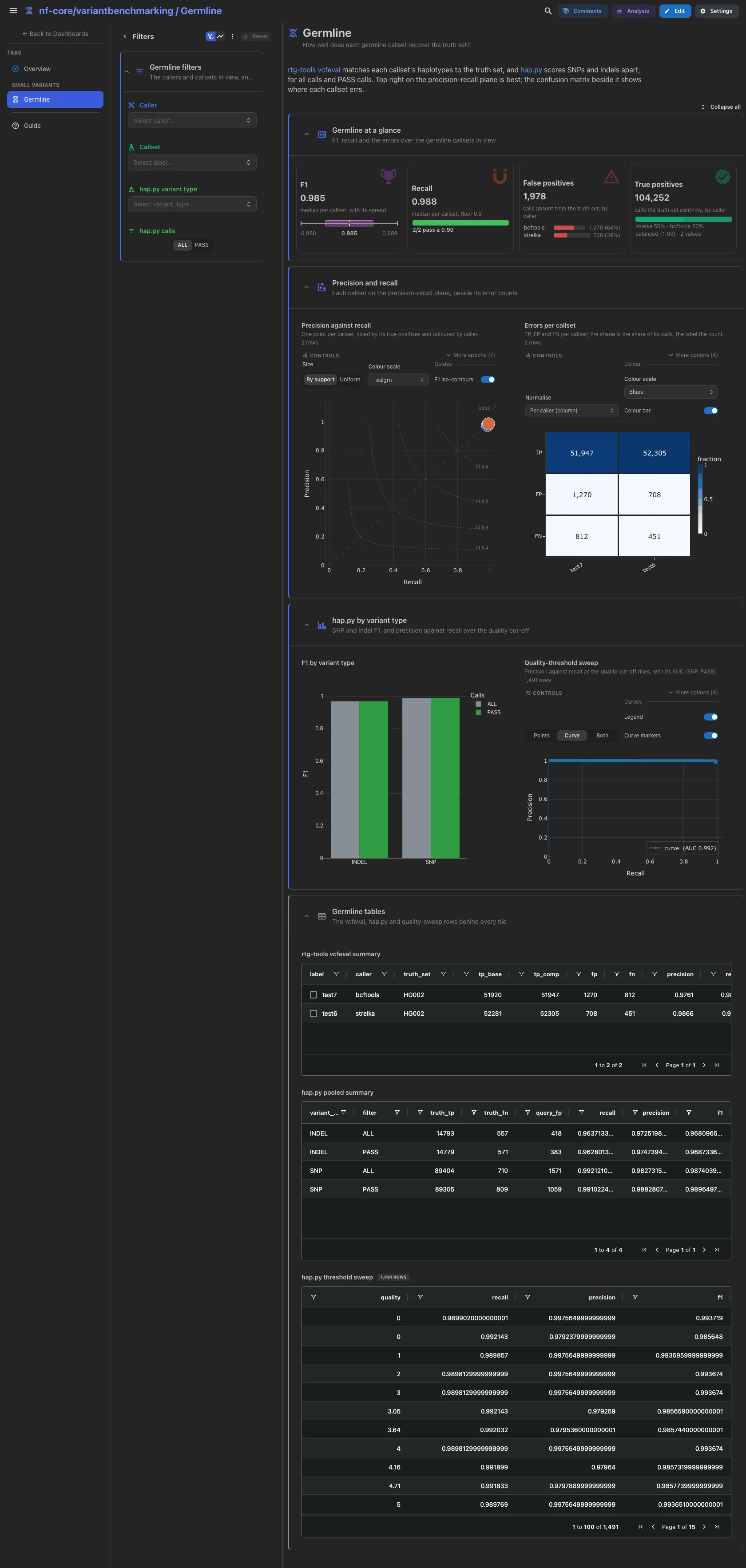
F1 with its spread, recall against a 0.9 floor, the callers with most false positives and the true positives by caller, all from rtg-tools vcfeval. Then the precision-recall scatter beside the errors per callset, and hap.py's F1 by variant type (all calls against PASS calls) beside the quality-threshold sweep.
Filters and components
Filters · Caller and Callset on germline_vcfeval_summary, hap.py
variant type and hap.py calls (ALL or PASS) on germline_happy_summary.
| Section | What it holds |
|---|---|
| Germline at a glance | 4 cards |
| Precision and recall | 2 advanced visualizations |
| hap.py by variant type | 1 bar + 1 advanced visualization |
| Germline tables (collapsed) | rtg-tools vcfeval summary, hap.py pooled summary, hap.py threshold sweep |
Small variants · How well does each somatic caller recover the truth set?
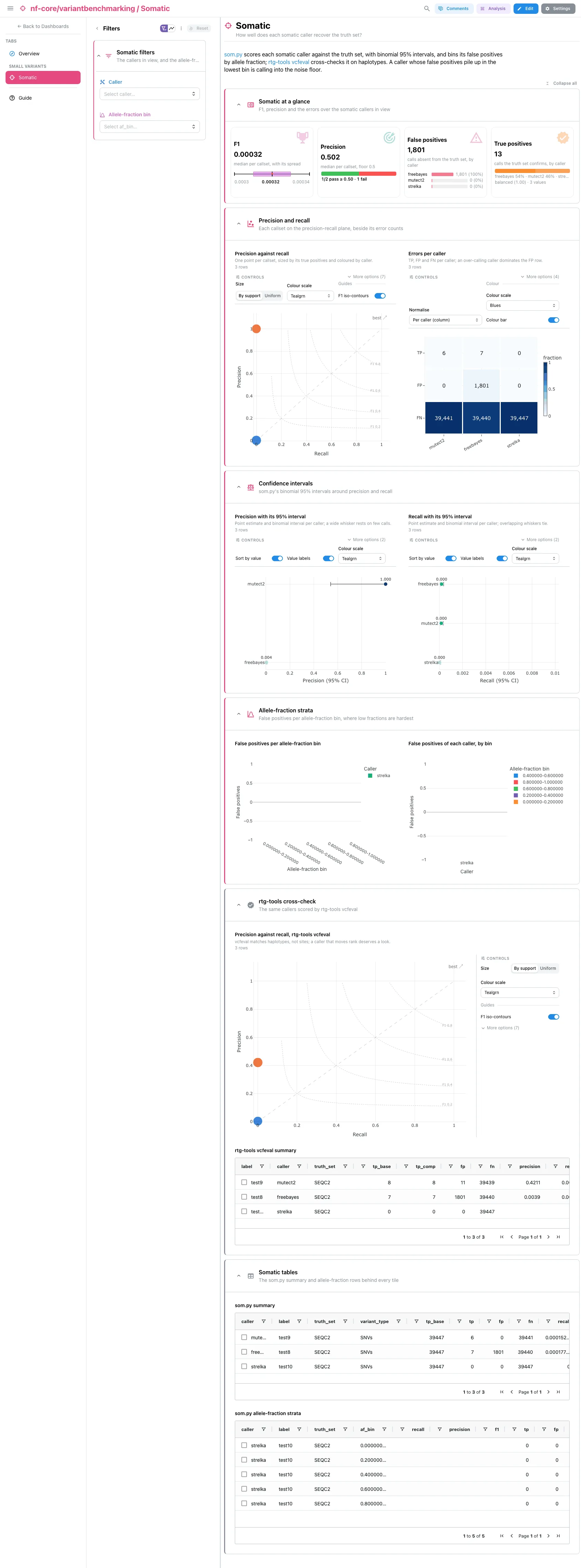
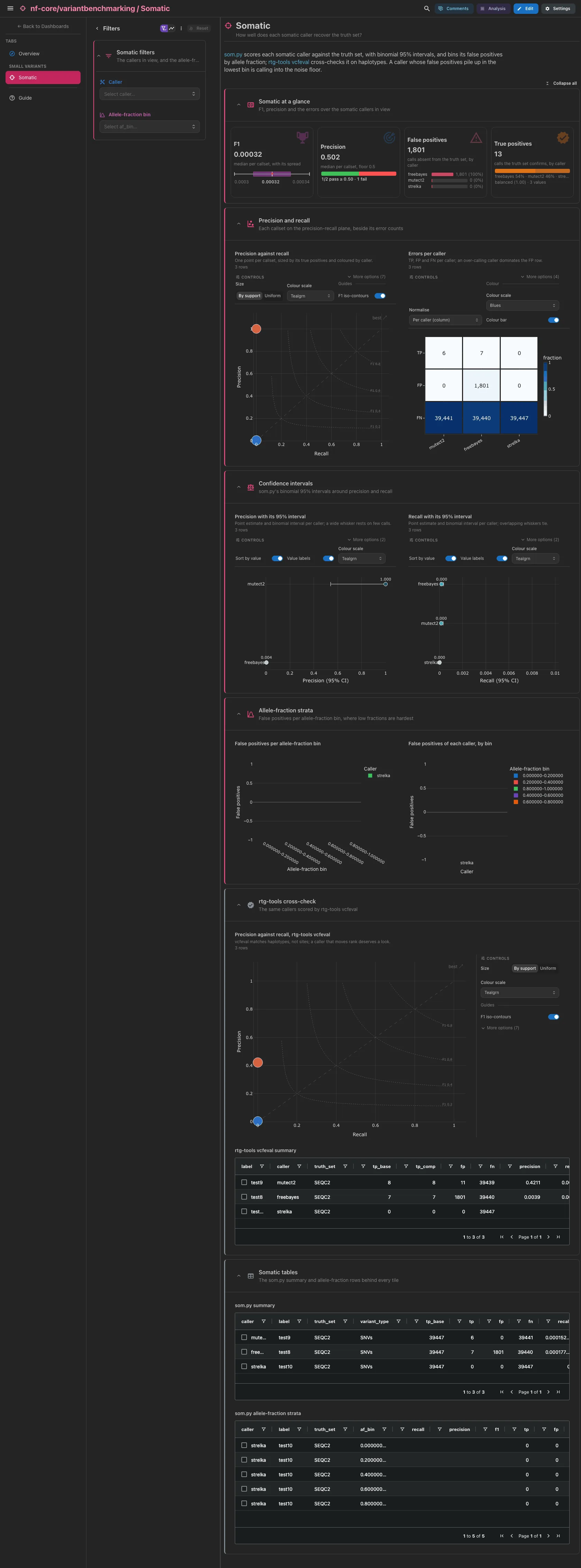
F1 with its spread, precision against a 0.5 floor, the callers with most false positives and the true positives by caller, all from som.py. Then the precision-recall scatter beside the errors per caller, precision and recall with their binomial 95% intervals, and F1 and recall per allele-fraction bin. The collapsed rtg-tools cross-check scores the same callers on haplotypes.
Filters and components
Filters · Caller on somatic_sompy_summary and Allele-fraction bin on
somatic_sompy_regions. The caller reaches the strata and the cross-check
through cross-DC links on the caller column.
| Section | What it holds |
|---|---|
| Somatic at a glance | 4 cards |
| Precision and recall | 2 advanced visualizations |
| Confidence intervals | 2 advanced visualizations |
| Allele-fraction strata | 2 bars |
| rtg-tools cross-check (collapsed) | 1 advanced visualization + rtg-tools vcfeval summary |
| Somatic tables (collapsed) | som.py summary, som.py allele-fraction strata |
Structural · How well do the structural callsets match the truth set?
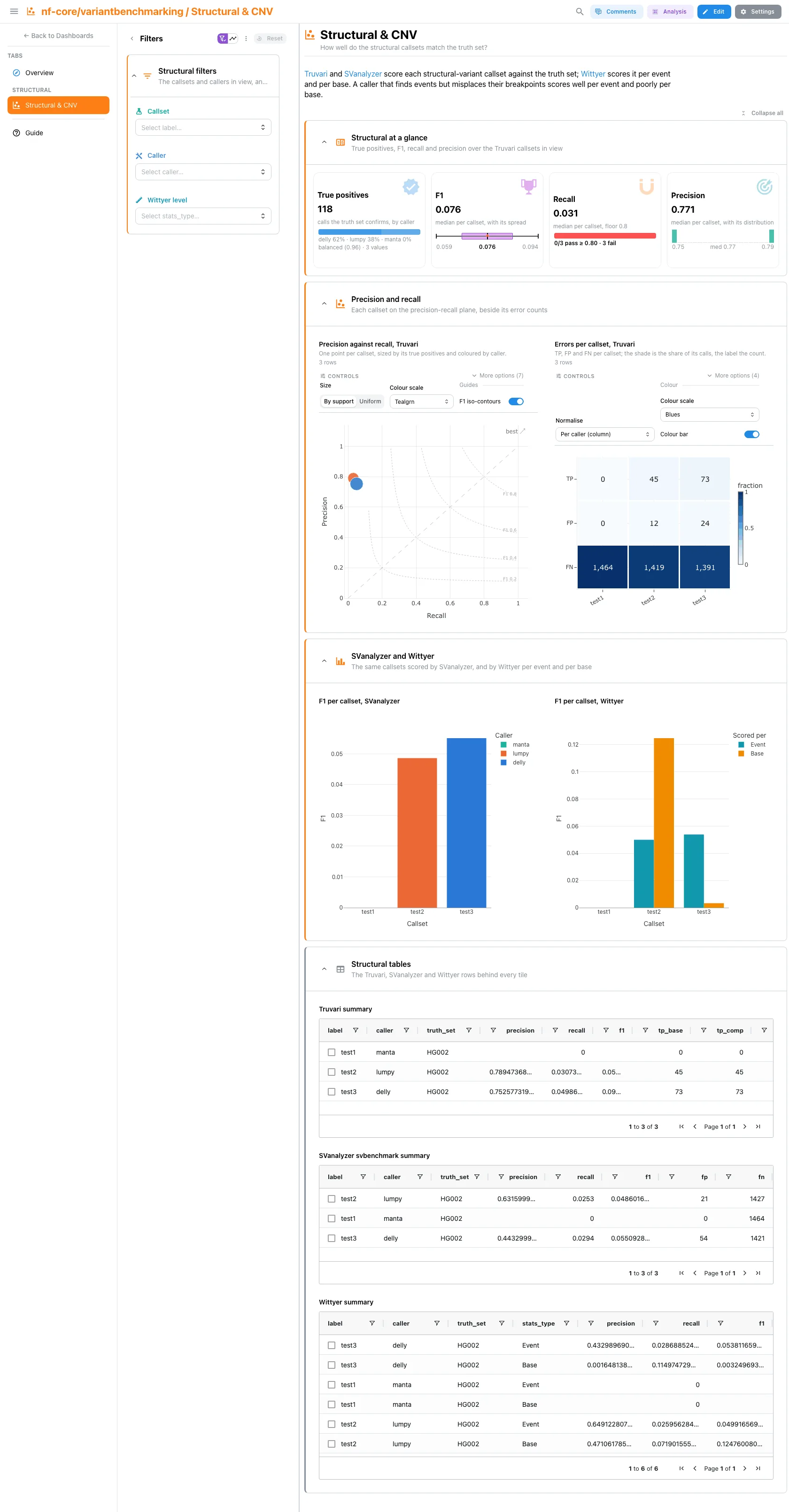
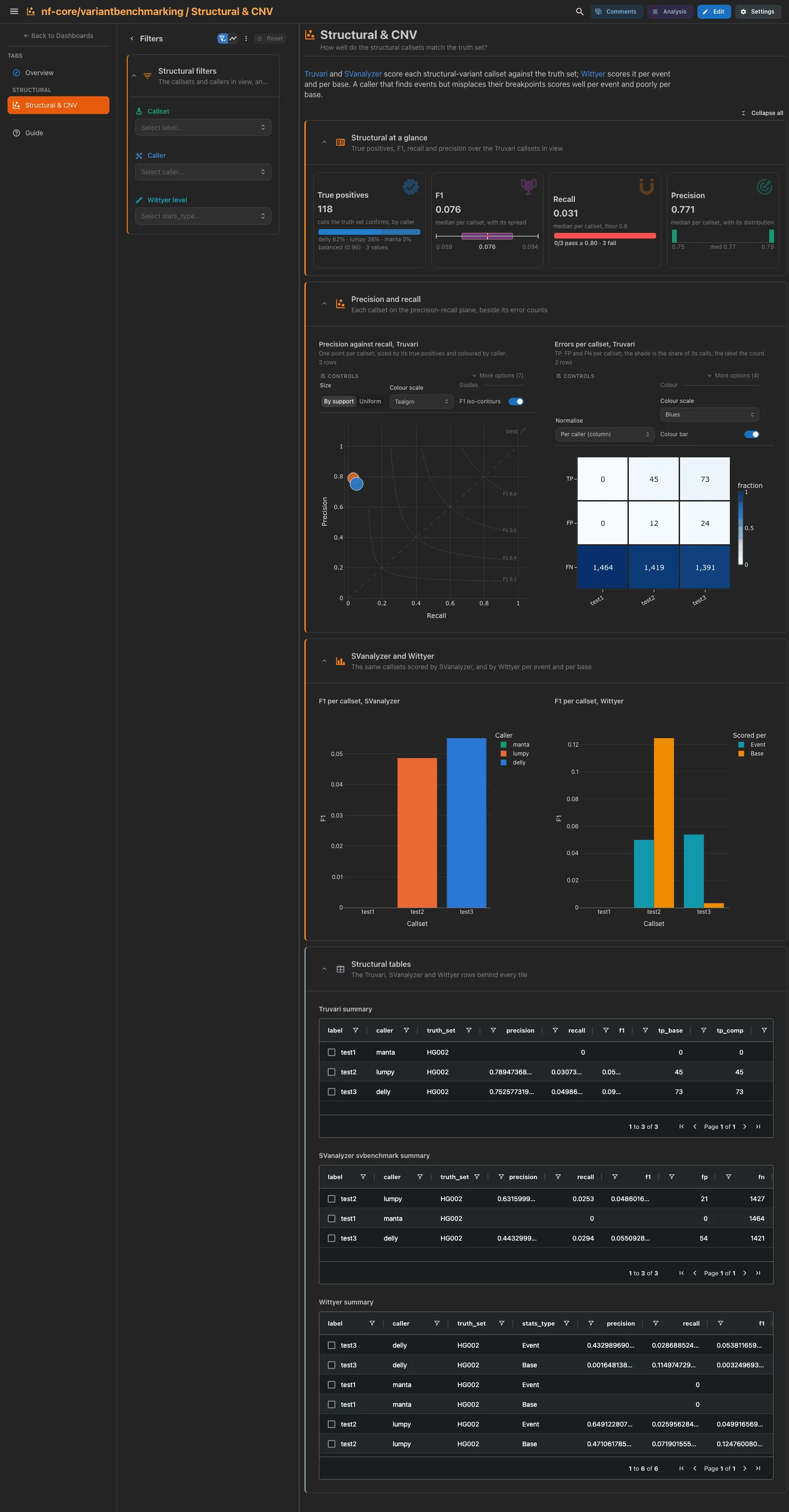
The true positives by caller, F1 with its spread, recall against a 0.8 floor and the spread of precision, all from Truvari. Then the Truvari precision-recall scatter beside its errors per callset, and the SVanalyzer F1 per callset beside the Wittyer F1 per event and per base. A callset that finds events but misplaces their breakpoints scores well per event and poorly per base. A copy-number run keeps only the Wittyer tiles.
Filters and components
Filters · Callset and Caller on sv_truvari_summary, Wittyer level on
cnv_wittyer_summary. The callset reaches SVanalyzer and Wittyer through the
links.
| Section | What it holds |
|---|---|
| Structural at a glance | 4 cards |
| Precision and recall | 2 advanced visualizations |
| SVanalyzer and Wittyer | 2 bars |
| Structural tables (collapsed) | Truvari summary, SVanalyzer svbenchmark summary, Wittyer summary |
The callset tables select rows on their identifier: label for the vcfeval,
Truvari, SVanalyzer and Wittyer tables, caller for the som.py tables and the
somatic vcfeval table. A pick narrows the tiles that read the same table; a som.py
pick also reaches its allele-fraction strata and the cross-check, and a Truvari
pick reaches the SVanalyzer and Wittyer tiles, through the links. The hap.py
pooled summary and threshold sweep have no callset column and do not select.
Per-variant-type templates
The three categories/ templates keep their own layout, one project per variant type:
a Benchmark tab over the benchmark tables, and the run's MultiQC report. The structural
category reads the MultiQC report only, since the public nf-core megatest publishes no
structural summary table.
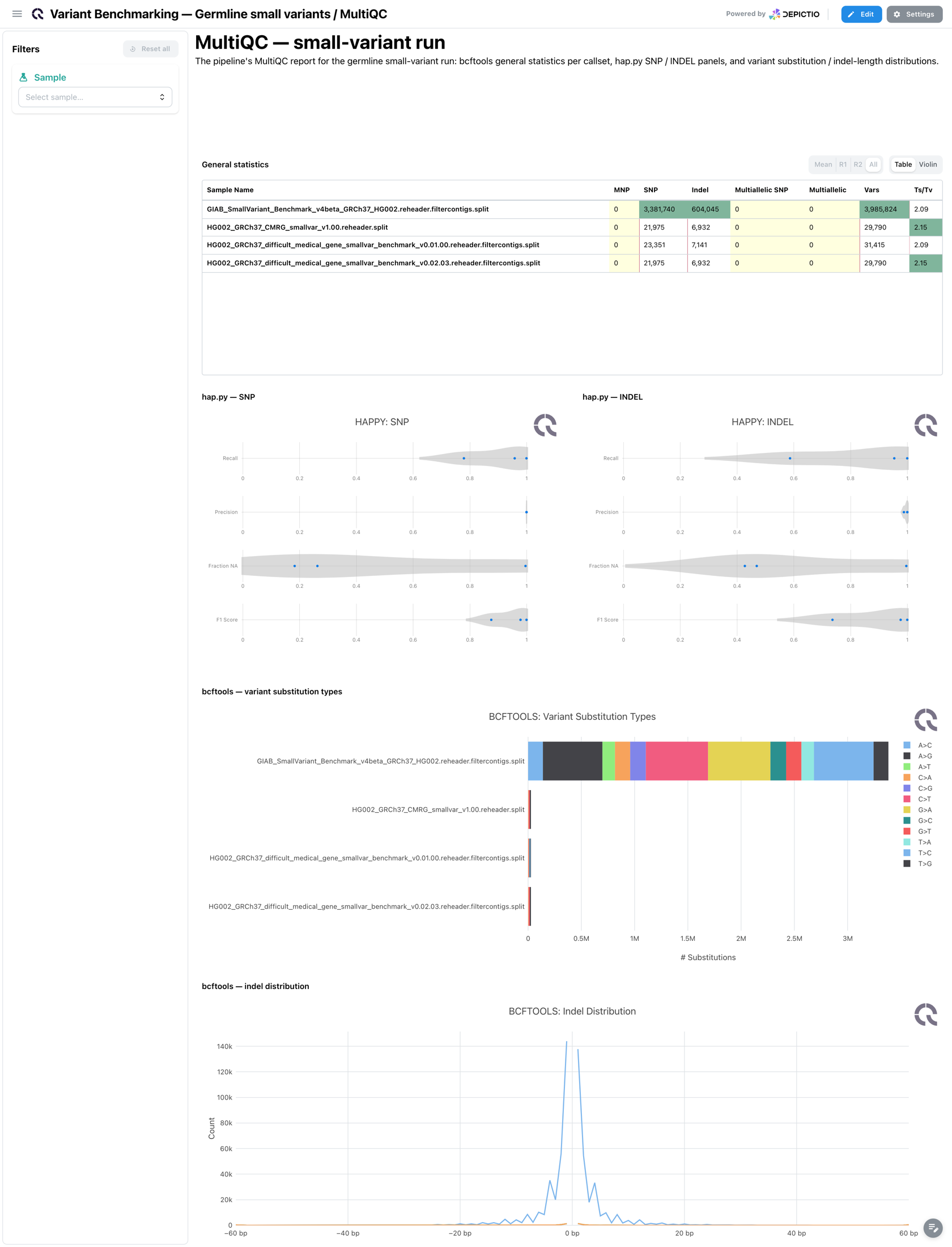
The MultiQC tab: general statistics, the hap.py SNP and INDEL panels, and the bcftools substitution types and indel lengths, collapsed.
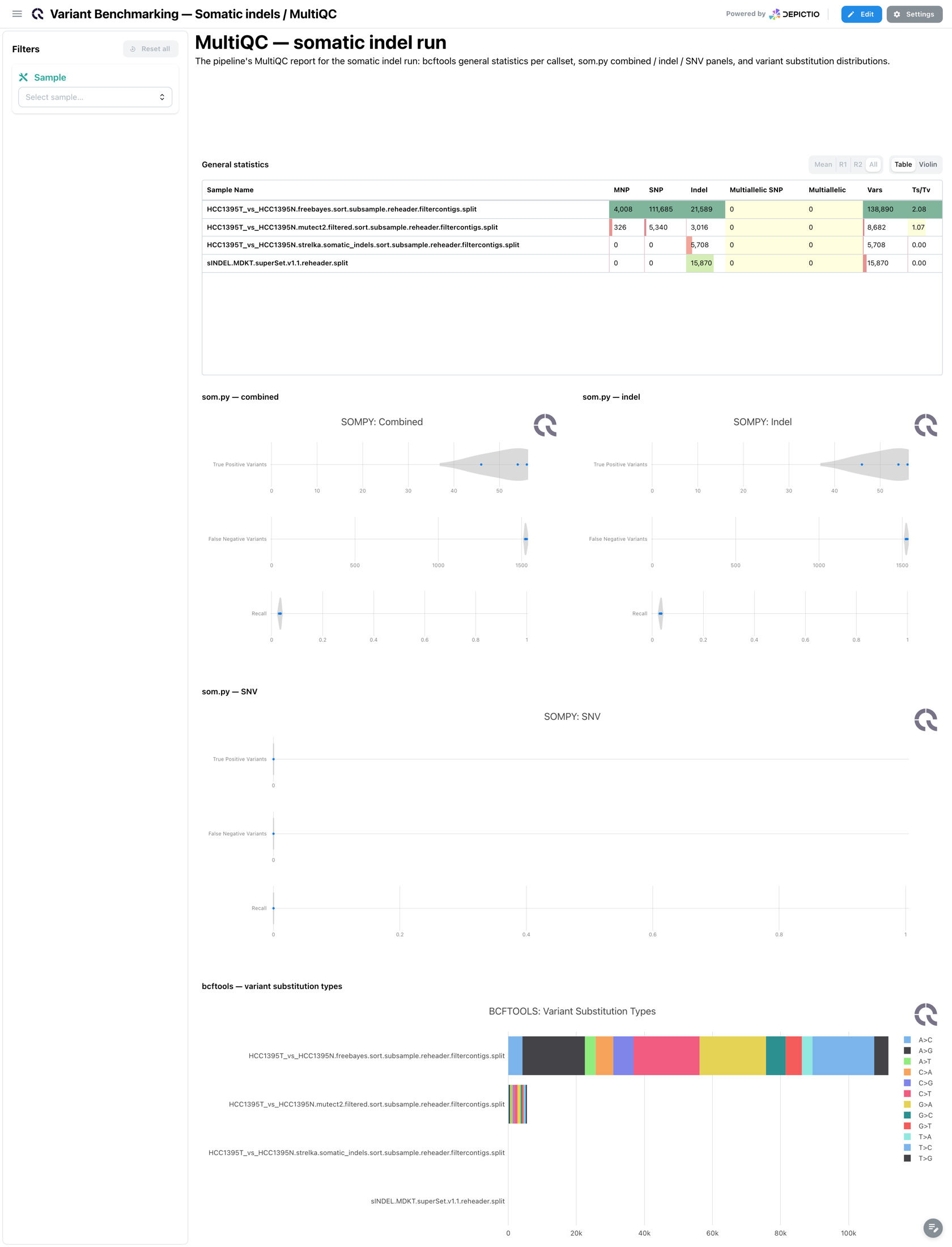
The MultiQC tab: general statistics, the som.py Combined, Indel and SNV panels, and the bcftools substitution types and variant depths, collapsed.
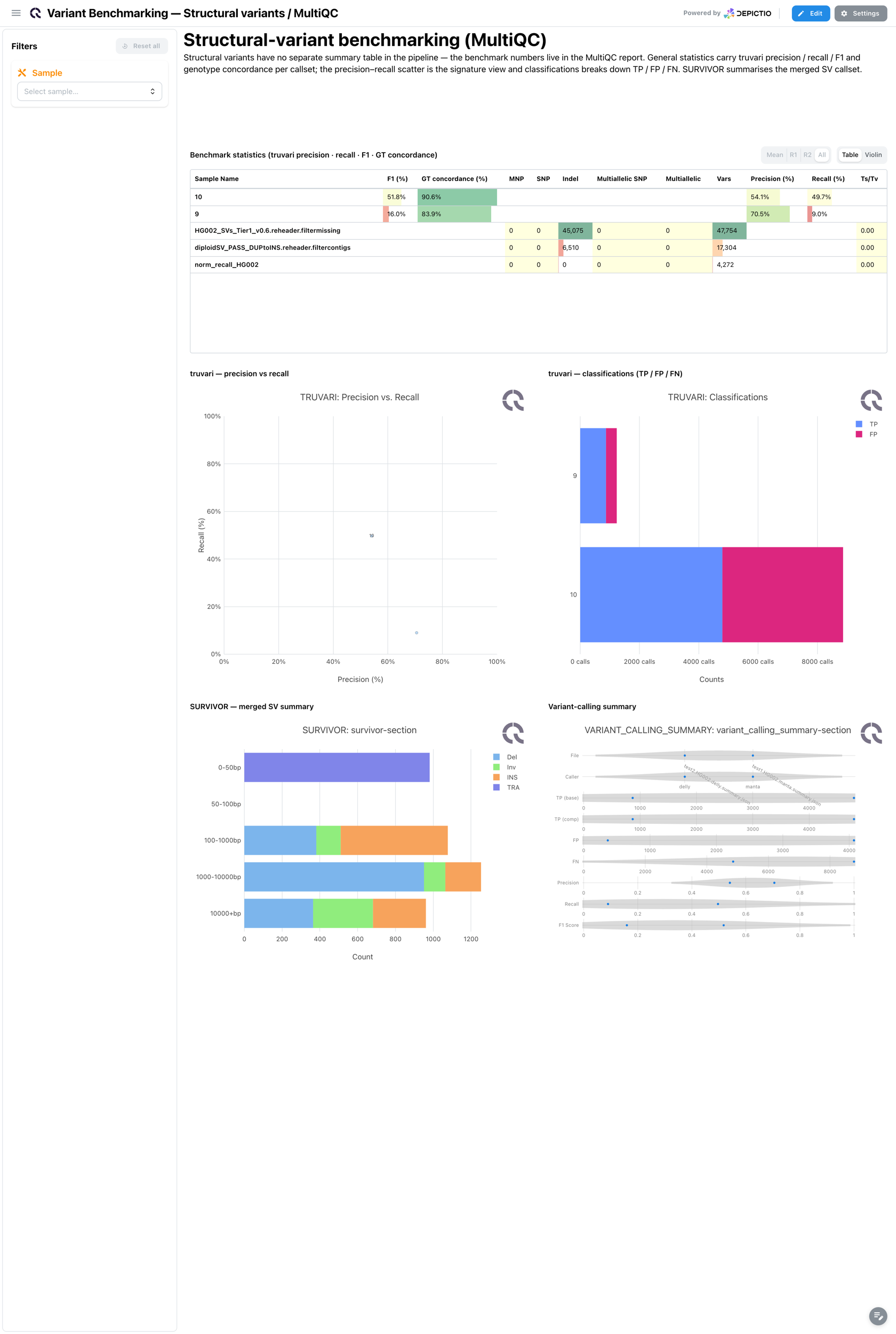
The only tab: general statistics with the Truvari precision, recall, F1 and genotype concordance, the Truvari precision-recall view and classifications, and the SURVIVOR summary, collapsed.
Benchmarking visualizations
The template introduced four visualization kinds built for benchmarking, used across the Germline, Somatic and Structural & CNV tabs. Each is bound through a catalog module, so any project reading a comparable table can reuse them.
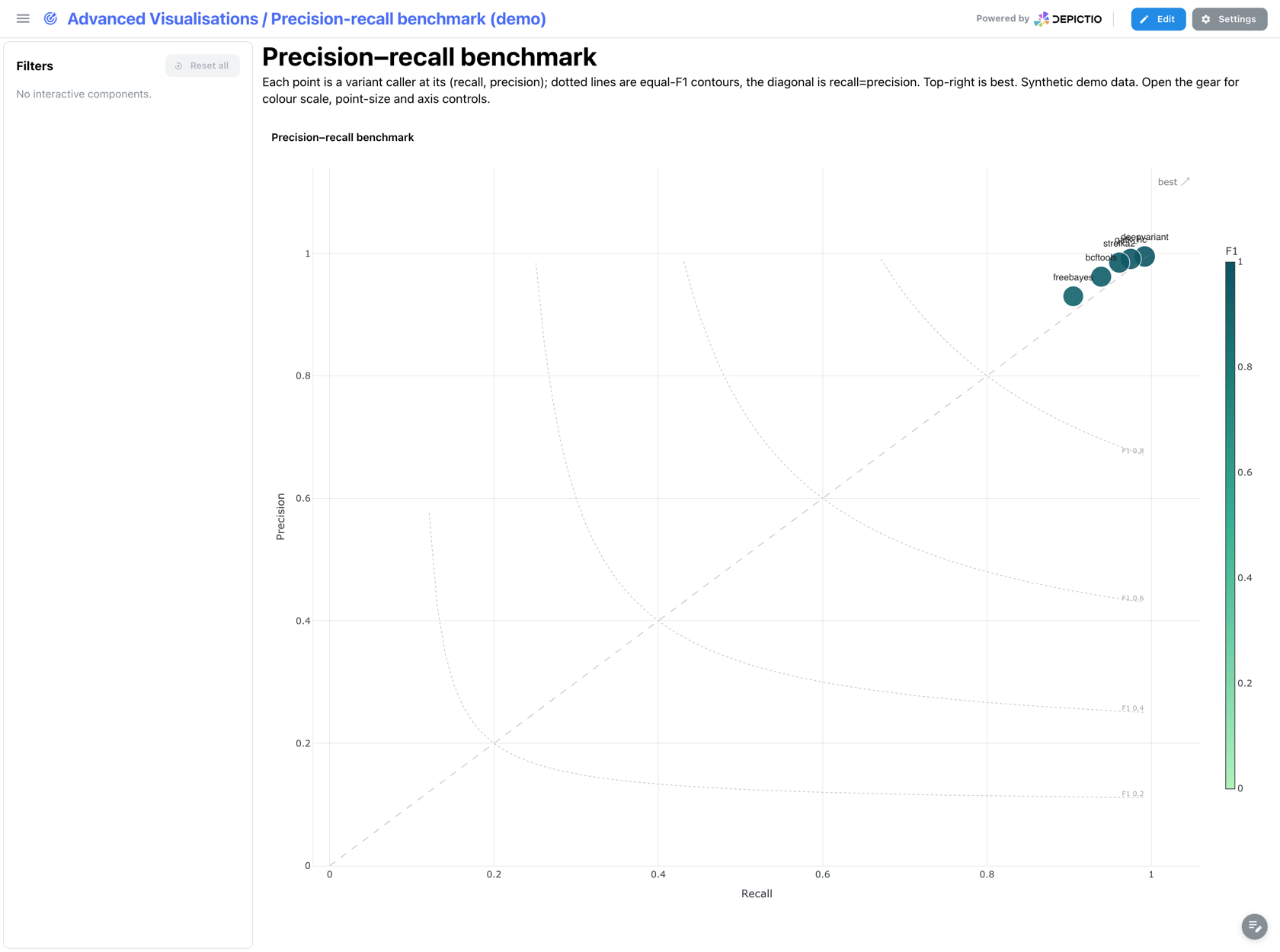
One point per callset at (recall, precision), coloured by its caller, over dotted equal-F1 contours and the recall = precision diagonal, so a callset's balance is readable at a glance.
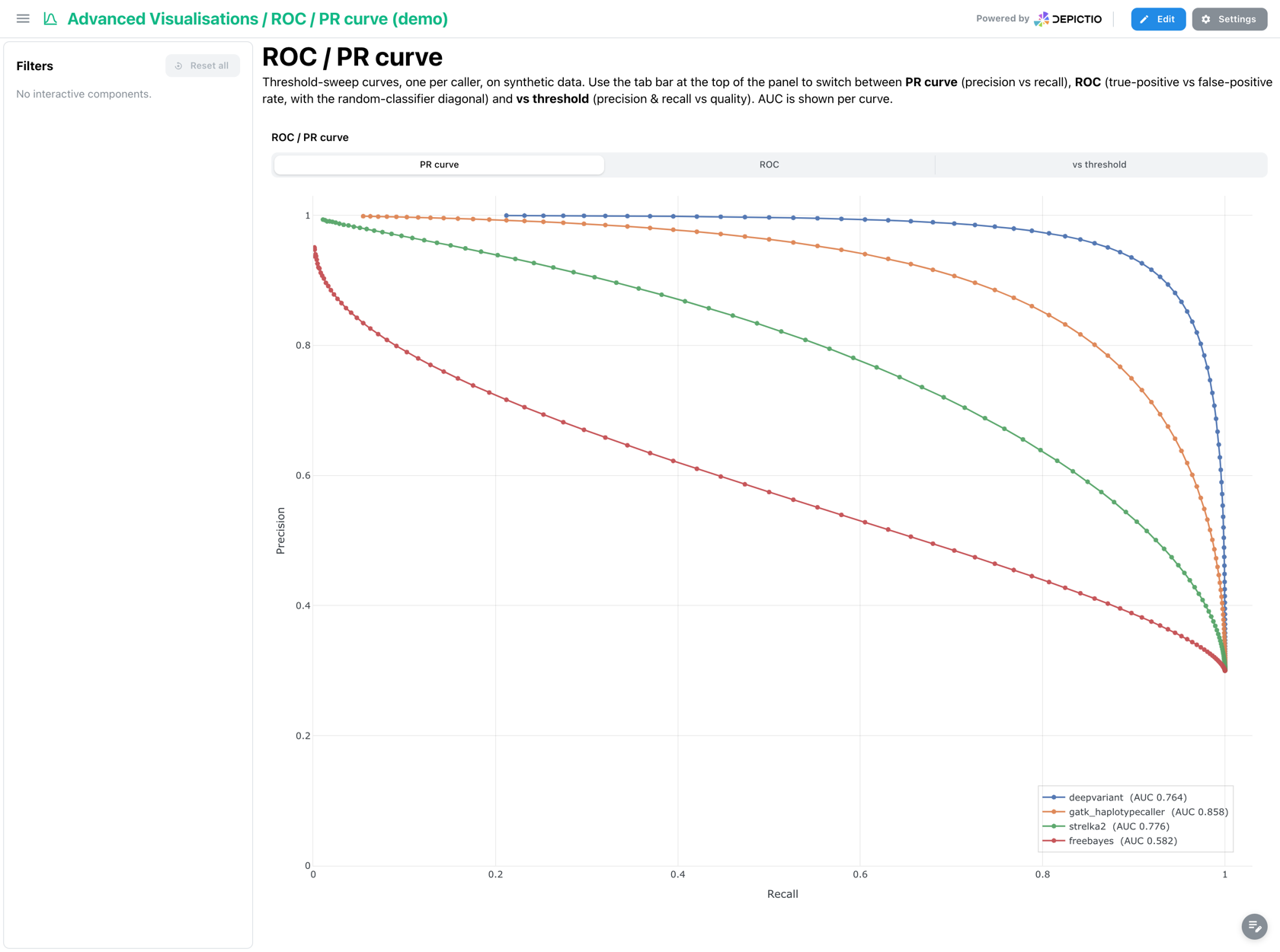
Threshold-sweep curves with a per-curve AUC. Its View switch draws the PR curve, the ROC, or precision and recall vs threshold.
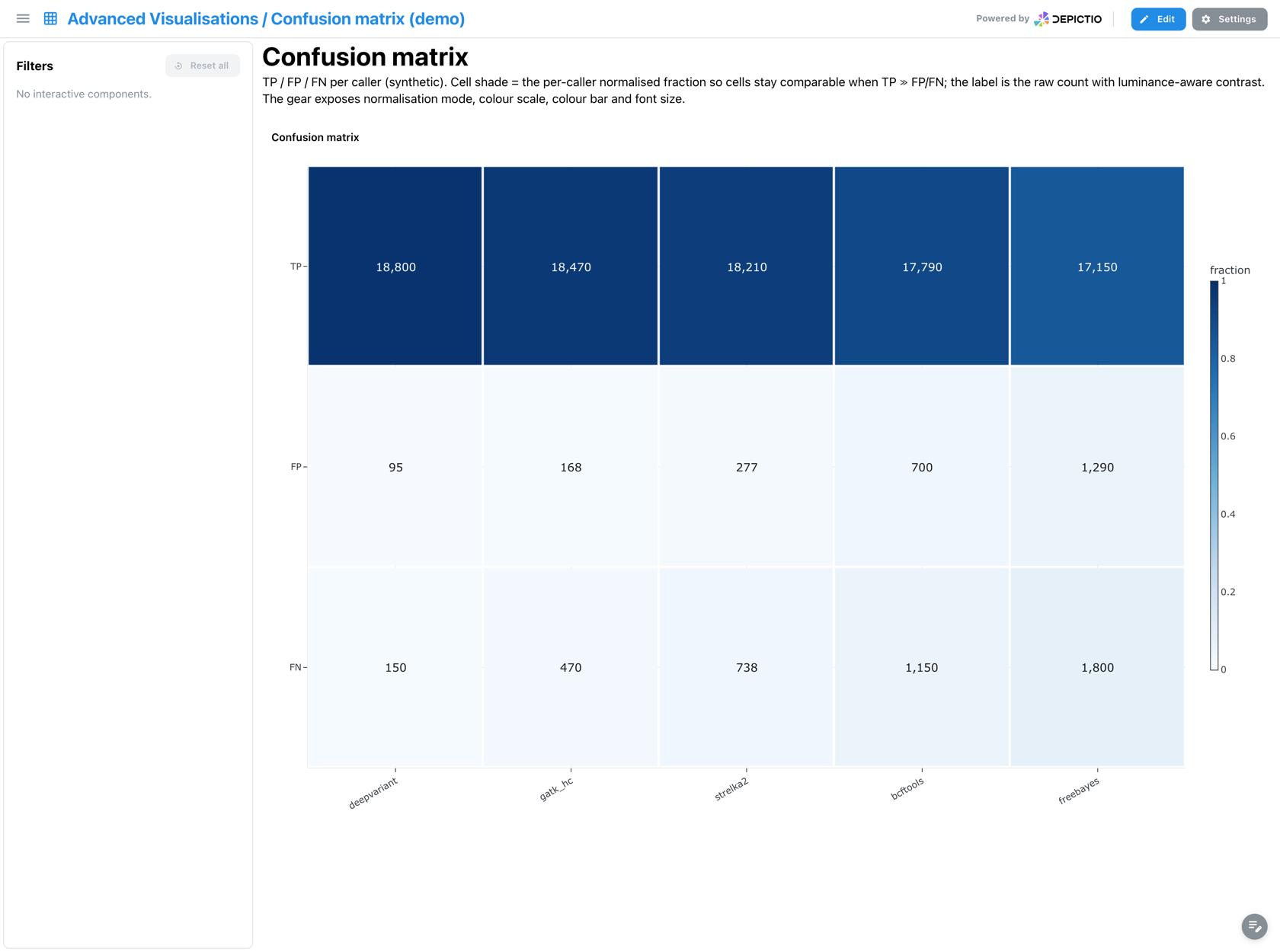
TP, FP and FN per callset. Shading is the per-callset normalised fraction while the label keeps the raw count, and the label colour follows cell luminance so it stays legible at both ends of the scale.
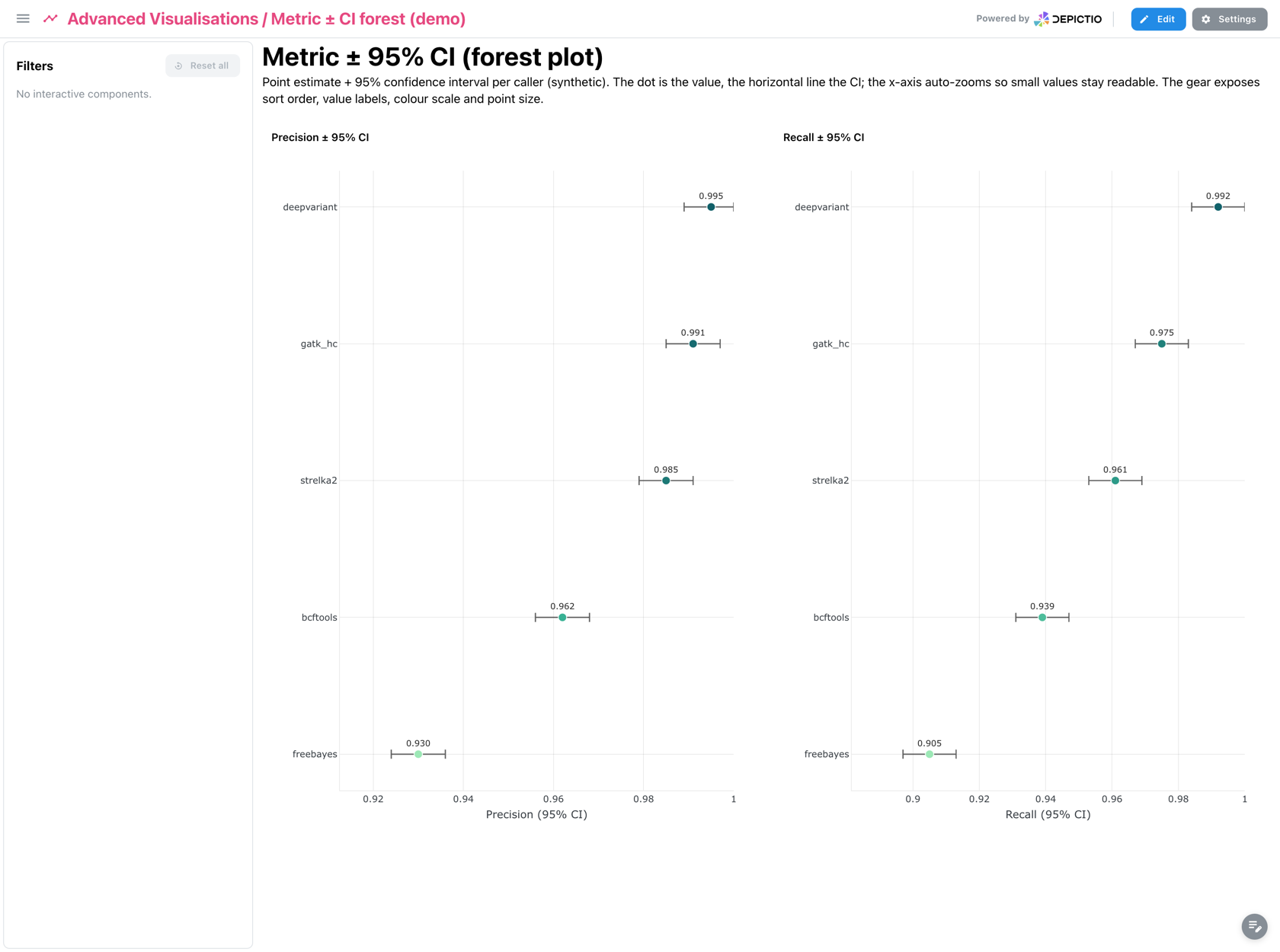
A forest plot: point estimate plus 95 % confidence interval per caller, on an x-axis that auto-zooms to the spread so overlapping intervals stay distinguishable.
Running the pipeline
Depictio reads the output of nf-core/variantbenchmarking, it does not run the pipeline. Run the pipeline first, once per variant type:
nextflow run nf-core/variantbenchmarking -r 1.4.0 \
  --input samplesheet.csv \
  --outdir results/ \
  --genome GRCh38 \
  --truth_id HG002 --truth_vcf truth.vcf.gz \
  --analysis germline \
  --variant_type small \
  -profile docker
Then point Depictio at the results, choosing the template id for the variant type that run produced:
To benchmark somatic indels as well, run the pipeline again with
--analysis somatic --variant_type indel into a second output directory, and import it
with the categories/indel template. Point the umbrella template at a root holding both
result sets instead, if you would rather have one project than two.
See nf-co.re/variantbenchmarking/usage for full pipeline documentation.
Required data structure
Point depictio ingest at the directory holding the pipeline output. A category template
requires its first table and its MultiQC report; on the umbrella template every table is
optional. The dashboard adapts to what is present.
<DATA_ROOT>/
├── small/                                                  # --variant_type small
│   ├── summary/tables/rtgtools/
│   │   └── rtgtools.summary.csv                            # required by small
│   └── <sample>/benchmarks/happy/
│       ├── *.summary.csv                                   # optional
│       └── *.roc.Locations.SNP.PASS.csv.gz                 # optional
├── indel/                                                  # --variant_type indel
│   └── summary/tables/
│       ├── sompy/sompy.summary.csv                         # required by indel
│       ├── sompy/sompy.regions.csv                         # optional, AF strata
│       └── rtgtools/rtgtools.summary.csv                   # optional, cross-check
├── sv/summary/tables/                                      # optional, umbrella only
│   ├── truvari/truvari.summary.csv
│   └── svbenchmark/svbenchmark.summary.csv
├── cnv/summary/tables/wittyer/
│   └── wittyer.summary.csv                                 # optional, umbrella only
└── multiqc/multiqc_data/
    └── multiqc.parquet                                     # required by each category
Each category template requires the MultiQC report of its own run. The umbrella template reads no MultiQC report, and shows the tab of each route it finds under the root.
Validation runs
The repository ships
download_test_data.sh,
which pulls a real run from nf-core's public megatest bucket:
bash depictio/projects/nf-core/variantbenchmarking/1.4.0/download_test_data.sh \
  /tmp/variantbenchmarking_test
It fetches the small/ and indel/ summary tables plus the hap.py per-sample files from
s3://nf-core-awsmegatests/variantbenchmarking/, then prints the follow-up commands.
The fixture suits the umbrella template
No published megatest contains a multiqc/ directory, and the script does not fetch
one, so this fixture will not satisfy the three category templates, which each
require a MultiQC report. Use it with
--template nf-core/variantbenchmarking/1.4.0, which reads no MultiQC report and
covers both variant types the fixture provides.
Additional resources
- nf-co.re/variantbenchmarking: official pipeline documentation
- nf-co.re/variantbenchmarking/1.4.0/results: AWS test results
- Template System Reference: YAML format, variables, conditionals
- Recipes: how to read, test, and write recipes
Authorship
 weber8thomas
Reviewing a template on your own data, or taking over a role here, is a contribution in itself: the contributing guide says what each one involves.