Recipes
Recipes are the data transformation layer of the Depictio CLI. They convert raw bioinformatics pipeline output files into clean, dashboard-ready Polars DataFrames — automatically, reproducibly, and with full validation.
nf-core / Nextflow / Snakemake
- wide CSV
- nested TSV
- non-standard headers
- reformat & reshape
- wide → long
- rename columns
- compute metrics
 Downstream — Depictio
- long format
- clean schema
- validated types
What is a Recipe?
In one sentence: a recipe is the reshaping step a template runs for you to turn a raw pipeline output into a tidy, dashboard-ready table. Templates bundle their recipes — you rarely write one unless you're adding support for a new pipeline output.
A recipe is a plain Python module that describes how to transform one or more raw files into a single tidy DataFrame. Each recipe lives in depictio/projects/<pipeline>/recipes/ and declares:
SOURCES: input files to read (paths relative to--data-dir, or references to other data collections viadc_ref), each with theinput_schemait reads: the columns the file must containOUTPUT_SCHEMA: required output columns and their Polars data typesOPTIONAL_OUTPUT_SCHEMA(optional): columns that may or may not be present (e.g. user-defined metadata columns)transform(sources): a pure function that takes loaded DataFrames and returns the output DataFrame
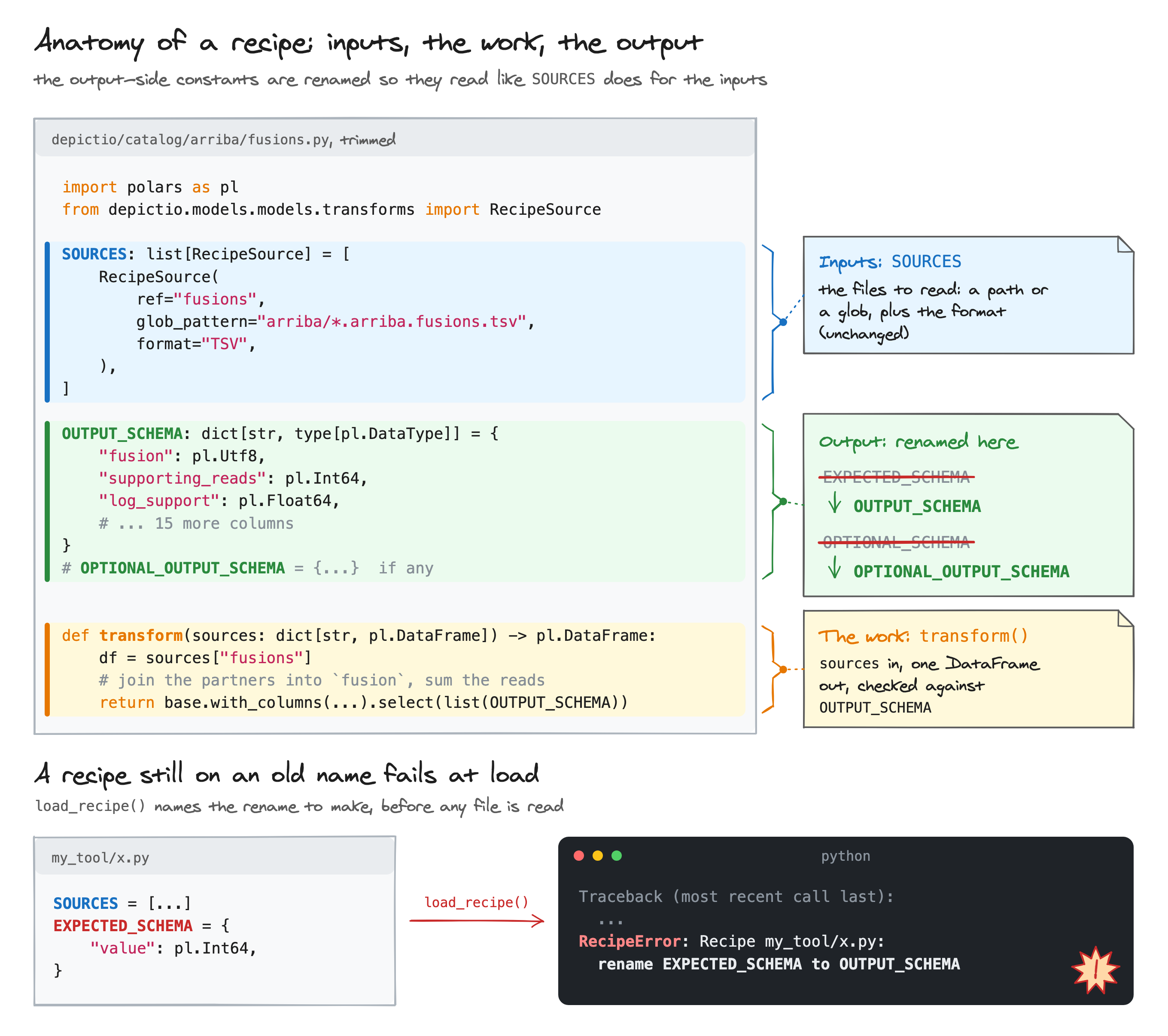
A # INPUT SCHEMA: comment line sits above SOURCES and a # OUTPUT SCHEMA: line above OUTPUT_SCHEMA, so a recipe reads as a contract from the top of the file.
Recipes are used in two ways:
- Standalone testing:
depictio dev recipe runexecutes a recipe locally against a data directory, so you can validate your data before registering a project. - Project integration: a
data_collectionwithsource: "transformed"tells the CLI to run the recipe duringdepictio ingest, storing the result as a Delta Lake table.
The 5-Checkpoint Validation Pipeline (v1.12.0+)
Every recipe execution, whether via depictio dev recipe run or depictio ingest, runs through five automatic checkpoints:
| # | Checkpoint | What it checks |
|---|---|---|
| 1 | Load | Import the recipe module; verify SOURCES, OUTPUT_SCHEMA, and a callable transform() exist |
| 2 | Resolve | Find each file under --data-dir; skip optional sources gracefully; fail fast if required files are missing |
| 3 | Input schema | Assert every column in each source's input_schema is present in the file that was read, with a compatible dtype |
| 4 | Transform | Call transform(sources), verify it returns a non-empty pl.DataFrame |
| 5 | Output schema | Assert every column in OUTPUT_SCHEMA is present with the correct dtype; validate OPTIONAL_OUTPUT_SCHEMA columns if present |
Before v1.12.0 a recipe ran four checkpoints: there was no input-schema check (3), and the output schema was named EXPECTED_SCHEMA.
If any checkpoint fails, execution stops with a clear error message pointing to the exact problem.
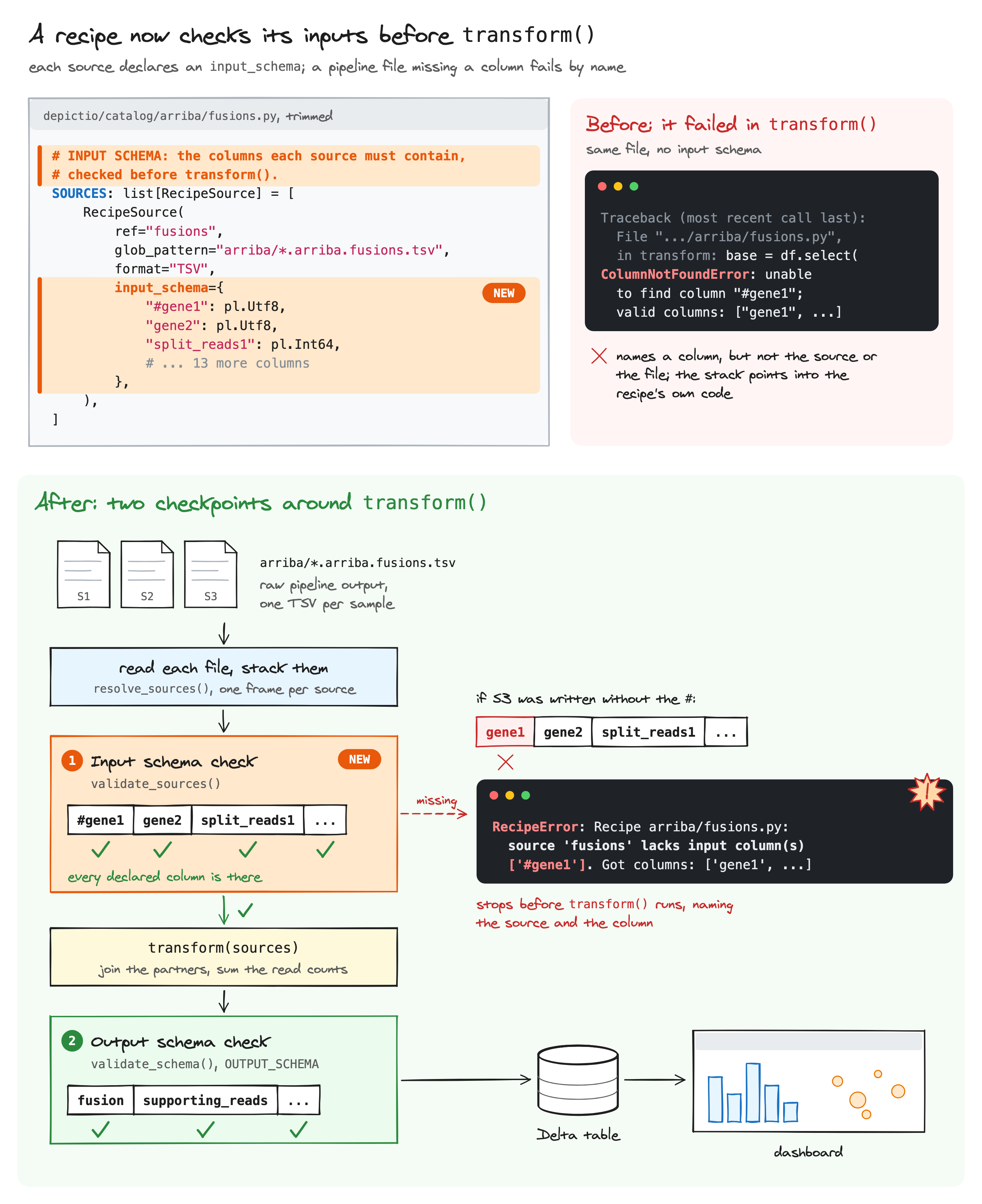
The input check is deliberately loose on types: readers infer them from the data, so a text or all-null column passes wherever the recipe casts the value itself, and one numeric type stands for another. A missing column always fails, naming the source and the column:
RecipeError: Recipe arriba/fusions.py: source 'fusions' lacks input column(s) ['#gene1']. Got columns: ['gene1', ...]
CLI Commands
The recipe commands sit in the depictio dev group, the maintainer tools that
depictio --help does not list.
Here the recipes of sylph are found, inspected, then run on nf-core/taxprofiler results:
depictio dev recipe list
List all bundled recipes.
Output:
                 Available recipes (327)
╭────────────────────────────────────────────────────────╮
│ Recipe                                                 │
├────────────────────────────────────────────────────────┤
│ adapterremoval/settings.py                             │
│ ampcombi/clusters.py                                   │
│ ampcombi/embedding.py                                  │
│ ampcombi/summary.py                                    │
…
depictio dev recipe info <name>
Show recipe details: docstring, sources, input schema and output schema. Pass --version to inspect a version-specific override.
Output:
Recipe: nf-core/ampliseq/alpha_diversity.py
Description: Transform QIIME2 alpha diversity vector to per-sample Faith PD table.

When ampliseq is run with --metadata, QIIME2 embeds metadata columns directly
into the faith_pd_vector/metadata.tsv file (e.g. habitat). This recipe handles
both cases: with and without embedded metadata columns.
                                     Sources (1)
╭──────────┬───────────────────────────────────────────────────────────────┬────────╮
│ Source   │ Location                                                      │ Format │
├──────────┼───────────────────────────────────────────────────────────────┼────────┤
│ faith_pd │ qiime2/diversity/alpha_diversity/faith_pd_vector/metadata.tsv │ tsv    │
╰──────────┴───────────────────────────────────────────────────────────────┴────────╯
    Input schema:
faith_pd (2 columns)
╭──────────┬────────╮
│ Column   │ Type   │
├──────────┼────────┤
│ id       │ String │
│ faith_pd │ String │
╰──────────┴────────╯
   Output schema (2
       columns)
╭──────────┬─────────╮
│ Column   │ Type    │
├──────────┼─────────┤
│ sample   │ String  │
│ faith_pd │ Float64 │
╰──────────┴─────────╯
When the recipe declares a non-empty OPTIONAL_OUTPUT_SCHEMA, an Optional output schema (N columns) table follows.
depictio dev recipe run <name>
Execute a recipe against local data with all 5 validation checkpoints.
Options:
| Flag | Short | Default | Description |
|---|---|---|---|
--data-dir |
-d |
required | Root directory with workflow output files |
--version |
-v |
null |
Pipeline version for version-specific recipe (e.g. 2.14.0) |
--output |
-o |
null |
Save result to .parquet or .csv file |
--head |
-n |
20 |
Number of rows to display |
dc_ref sources
Recipes that reference another data collection via dc_ref (e.g. taxonomy_rel_abundance.py) cannot be fully executed standalone. The CLI will report which sources are skipped and exit with code 0. These sources are resolved automatically during depictio ingest when all data collections are available.
Recipe Anatomy: Ampliseq Examples
The two examples below show the patterns specific to Depictio — referencing another data collection, and parameterising source paths from the template. The file parsing itself is just standard Polars; study these as a basis for writing your own recipes.
Example 1 — Cross-DC join with optional metadata (taxonomy_rel_abundance.py)
Pattern: Reference another data collection via dc_ref, join generically on a shared key. The metadata source is optional — when absent, the recipe produces core columns only.
"""Transform QIIME2 relative abundance table to long-format per-sample taxonomy table."""

import polars as pl
from depictio.models.models.transforms import RecipeSource

# INPUT SCHEMA: the columns each source must contain, checked before transform().
SOURCES: list[RecipeSource] = [
    RecipeSource(
        ref="rel_table",
        path="qiime2/rel_abundance_tables/rel-table-2.tsv",
        format="TSV",
        input_schema={"#OTU ID": pl.Utf8},
        read_kwargs={"skip_rows": 1},
    ),
    # No input_schema: the sample id column is found by name or position.
    RecipeSource(
        ref="metadata",
        dc_ref="metadata",    # references another DC by tag
        optional=True,         # absent when no metadata provided
    ),
]

# OUTPUT SCHEMA: the columns transform() returns, checked after it.
OUTPUT_SCHEMA = {
    "sample": pl.Utf8,
    "taxonomy": pl.Utf8,
    "rel_abundance": pl.Float64,
    "Kingdom": pl.Utf8,
    "Phylum": pl.Utf8,
}
# Metadata columns are user-defined; validated dynamically
OPTIONAL_OUTPUT_SCHEMA: dict[str, type[pl.DataType]] = {}


def transform(sources: dict[str, pl.DataFrame]) -> pl.DataFrame:
    df = sources["rel_table"]
    df = df.rename({"#OTU ID": "taxonomy"})
    sample_cols = [c for c in df.columns if c != "taxonomy"]
    df = df.with_columns(pl.col(sample_cols).cast(pl.Float64))
    df = df.unpivot(
        on=sample_cols, index="taxonomy", variable_name="sample", value_name="rel_abundance"
    )
    df = df.filter(pl.col("rel_abundance").is_not_null() & (pl.col("rel_abundance") > 0))
    df = df.with_columns(
        pl.col("taxonomy").str.split(";").list.get(0).alias("Kingdom"),
        pl.col("taxonomy").str.split(";").list.get(1).fill_null("Unclassified").alias("Phylum"),
    )

    # Join ALL metadata columns generically when metadata is available
    metadata = sources.get("metadata")
    if metadata is not None:
        metadata = metadata.rename({"ID": "sample"})
        df = df.join(metadata, on="sample", how="left")

    core = ["sample", "taxonomy", "rel_abundance", "Kingdom", "Phylum"]
    extra = [c for c in df.columns if c not in core]
    return df.select(core + extra)
Example 2 — Multi-file merge with source overrides (ancombc.py)
Pattern: Merge multiple slices of the same analysis into one long-format table. The recipe declares default source paths, but the template overrides them via source_overrides to parameterize the directory name with {GROUP_COL}.
"""Merge ANCOM-BC differential abundance results (5 files) into one long-format table."""

import polars as pl
from depictio.models.models.transforms import RecipeSource

# Default paths — overridden by template.yaml source_overrides with {GROUP_COL}
SOURCES = [
    RecipeSource(ref="lfc", path="qiime2/ancombc/differentials/Category-habitat-level-2/lfc_slice.csv", format="CSV"),
    RecipeSource(ref="p_val", path="qiime2/ancombc/differentials/Category-habitat-level-2/p_val_slice.csv", format="CSV"),
    RecipeSource(ref="q_val", path="qiime2/ancombc/differentials/Category-habitat-level-2/q_val_slice.csv", format="CSV"),
    RecipeSource(ref="w", path="qiime2/ancombc/differentials/Category-habitat-level-2/w_slice.csv", format="CSV"),
    RecipeSource(ref="se", path="qiime2/ancombc/differentials/Category-habitat-level-2/se_slice.csv", format="CSV"),
]

OUTPUT_SCHEMA = {
    "id": pl.Utf8, "contrast": pl.Utf8,
    "lfc": pl.Float64, "p_val": pl.Float64, "q_val": pl.Float64,
    "w": pl.Float64, "se": pl.Float64,
    "Kingdom": pl.Utf8, "Phylum": pl.Utf8,
    "neg_log10_qval": pl.Float64, "significant": pl.Boolean,
}


def transform(sources: dict[str, pl.DataFrame]) -> pl.DataFrame:
    contrast_cols = [c for c in sources["lfc"].columns if c not in ("id", "(Intercept)")]
    melted = {
        name: sources[name].select("id", *contrast_cols)
            .unpivot(on=contrast_cols, index="id", variable_name="contrast", value_name=name)
        for name in ["lfc", "p_val", "q_val", "w", "se"]
    }
    result = melted["lfc"]
    for name in ["p_val", "q_val", "w", "se"]:
        result = result.join(melted[name], on=["id", "contrast"], how="left")

    return result.with_columns(
        pl.col("id").str.split(";").list.get(0).alias("Kingdom"),
        pl.col("id").str.split(";").list.get(1).fill_null("Unclassified").alias("Phylum"),
        (-pl.col("q_val").log(base=10)).alias("neg_log10_qval"),
        (pl.col("q_val") < 0.05).alias("significant"),
    ).select("id", "contrast", "lfc", "p_val", "q_val", "w", "se",
             "Kingdom", "Phylum", "neg_log10_qval", "significant")
Source overrides
The Category-habitat-level-2 directory name in the default SOURCES paths is a fallback. In the ampliseq template, these paths are overridden to Category-{GROUP_COL}-level-2/ so they resolve dynamically based on the user's metadata grouping column.
RecipeSource Reference
RecipeSource is the Pydantic model that describes one input to a recipe.
| Field | Type | Required | Description |
|---|---|---|---|
ref |
str |
yes | Key in the sources dict passed to transform() |
path |
str |
if no dc_ref |
File path relative to --data-dir |
dc_ref |
str |
if no path |
Tag of another data collection to inject (resolved by the API) |
format |
str |
yes if path set |
CSV, TSV, or Parquet (case-insensitive) |
input_schema |
dict |
no | Columns transform() reads from this source, as column name to Polars dtype (e.g. {"#gene1": pl.Utf8}). Checked after the source is read. Leave it out, with a # No input_schema: comment giving the reason, when no column name is fixed (one column per sample, columns read by position or found by alias) |
read_kwargs |
dict |
no | Extra kwargs forwarded to the Polars reader (e.g. {"skip_rows": 1}) |
optional |
bool |
no | If true, source is skipped when unavailable instead of failing |
glob_pattern |
str |
no | Glob pattern for matching multiple files (concatenated) |
Exactly one of path, dc_ref, or glob_pattern must be set per source.
Why a RecipeSource but no RecipeTarget?
A recipe can have several inputs but always exactly one output, so only the input side needs a model.
Inputs are polymorphic — a file path, a glob, or another data collection (dc_ref) — and that
variability is what RecipeSource disambiguates. The output is always a single pl.DataFrame:
its shape is declared by OUTPUT_SCHEMA / OPTIONAL_OUTPUT_SCHEMA, and its destination is the
data collection that references the recipe (source: "transformed"). Persisting it to Delta Lake is
the CLI runner's job, not the recipe's — recipes stay pure sources → DataFrame functions.
glob_pattern (per-sample inputs)
Use glob_pattern instead of path to fan multiple per-sample files
into one DataFrame. The glob is expanded by the recipe runner relative
to the project's data_dir (typically the results directory given to depictio ingest):
SOURCES: list[RecipeSource] = [
    RecipeSource(
        ref="pangolin_raw",
        glob_pattern="variants/ivar/consensus/bcftools/pangolin/*.pangolin.csv",
        format="CSV",
    ),
]
Matched files are read individually and concatenated with
pl.concat([...], how="diagonal_relaxed"). glob_pattern is mutually
exclusive with path and dc_ref.
source_path (a key the file content lacks)
Some tools write one file per sample and leave the sample out of the file itself: the only
place it appears is the file name or the directory. Concatenating those files with
glob_pattern alone would pool every sample's rows into one table with nothing to tell
them apart.
Set source_path to a column name and the runner adds that column to every row, holding
the path of the file the row was read from, relative to the data root with / separators
(absolute when the file sits outside the data root). The recipe then derives the key from
it:
SOURCES: list[RecipeSource] = [
    RecipeSource(
        ref="calls",
        glob_pattern="caller/*.calls.tsv",
        format="TSV",
        source_path="_source_path",
    ),
]


def transform(sources: dict[str, pl.DataFrame]) -> pl.DataFrame:
    df = sources["calls"]
    # caller/S1.calls.tsv -> S1
    sample = (
        pl.col("_source_path").str.split("/").list.last().str.strip_suffix(".calls.tsv")
    )
    return df.with_columns(sample.alias("sample")).drop("_source_path")
The column is added after the file is read and before the files are concatenated, so it
works with path and glob_pattern alike. The runner refuses a source_path name the file
already has as a column, rather than overwriting real data, so pick a name no tool writes
(a leading underscore is the usual choice). It is the recipe's job to drop the column, or
keep it, in what transform() returns.
Declaring a Recipe in project.yaml
To use a recipe in a project, set source: "transformed" on the data collection and specify the recipe name under transform.recipe:
data_collections:
  - data_collection_tag: "alpha_diversity"
    description: "Per-sample alpha diversity"
    config:
      type: "Table"
      source: "transformed"
      transform:
        recipe: "nf-core/ampliseq/alpha_diversity.py"
      dc_specific_properties:
        format: "TSV"
        columns_description:
          "sample": "Sample identifier"
          "faith_pd": "Faith's Phylogenetic Diversity"
Use source_overrides to parameterize recipe source paths via template variables:
  - data_collection_tag: "ancombc_results"
    config:
      type: "Table"
      source: "transformed"
      transform:
        recipe: "nf-core/ampliseq/ancombc.py"
        source_overrides:
          lfc:
            path: "qiime2/ancombc/differentials/Category-{GROUP_COL}-level-2/lfc_slice.csv"
          # ... one override per source ref
The recipe is executed during depictio data process (the process step of depictio ingest). All 4 checkpoints run automatically. If the recipe fails, the data collection is skipped and an error is logged.
Using templates
For nf-core/ampliseq, all six recipes are pre-configured in the bundled template. Use depictio ingest /your/data --template nf-core/ampliseq/2.16.0 --var SAMPLESHEET_FILE=samplesheet.csv to set up the complete project without writing any YAML. See Templates.
Passing template parameters to a recipe (params)
source_overrides changes where a recipe reads. params changes what it does with the
data: a grouping column, an identifier column, a significance cutoff, anything the user
chooses when instantiating the template and the recipe would otherwise have to hardcode.
Declare them under transform.params as string values, usually template variables:
  - data_collection_tag: "grouped_metadata"
    config:
      type: "Table"
      source: "transformed"
      transform:
        recipe: "nf-core/<pipeline>/<recipe>.py"
        params:
          group_col: "{GROUP_COL}"
          id_col: "{METADATA_ID_COL}"
A recipe opts in by giving transform() a params keyword, and should treat every key as
optional:
def transform(
    sources: dict[str, pl.DataFrame], params: dict[str, str] | None = None
) -> pl.DataFrame:
    group_col = (params or {}).get("group_col")
    if group_col is None:
        ...  # fall back: detect a usable column, or skip the grouping
How the values reach the recipe:
- The template variables are substituted first, like everywhere else in the template.
- A value still holding an unresolved
{VAR}placeholder (the user did not set that variable) is dropped before the call, so the recipe sees the key as absent and takes its own fallback rather than receiving the literal placeholder. - A recipe whose
transform()has noparamskeyword is called exactly as before, so existing recipes need no change. - A standalone run of the recipe test harness (
depictio dev recipe run) passes no parameters, which is the same as every key being absent.
Recipe File Locations
Recipes live inside the depictio/projects/ directory, co-located with the templates that use them:
depictio/projects/
└── nf-core/
    └── ampliseq/
        ├── recipes/                          ← shared recipes (all pipeline versions)
        │   ├── alpha_diversity.py
        │   ├── alpha_rarefaction.py
        │   ├── ancombc.py
        │   ├── taxonomy_composition.py
        │   ├── taxonomy_heatmap.py
        │   └── taxonomy_rel_abundance.py
        ├── 2.14.0/
        │   ├── template.yaml
        │   └── recipes/                      ← version-specific overrides
        │       └── taxonomy_rel_abundance.py
        └── 2.16.0/
            ├── template.yaml                 ← no overrides, inherits shared
            └── dashboards/
                └── base.yaml                 ← single dashboard; adapts via
                                                template conditionals (metadata-
                                                dependent tabs/components are
                                                pruned when no metadata is given)
To add a recipe for a new pipeline, create depictio/projects/{org}/{pipeline}/recipes/{name}.py following the contract: define SOURCES (with their input_schema), OUTPUT_SCHEMA, and transform().
Version-Specific Recipes
When a pipeline output format changes between versions (column renames, file moves, schema changes), you can add a version-specific override without touching the shared recipe.
Resolution order when running pipeline version 2.14.0:
projects/{pipeline}/2.14.0/recipes/{name}.py— checked first (override)projects/{pipeline}/recipes/{name}.py— used if no override exists (shared)
Most recipes are shared across all versions. Only the ones that actually differ need an override.
To test a version-specific recipe standalone:
# Uses shared recipe
depictio dev recipe run nf-core/ampliseq/taxonomy_rel_abundance.py --data-dir /data/run

# Uses the v2.14.0 override if it exists, falls back to shared otherwise
depictio dev recipe run nf-core/ampliseq/taxonomy_rel_abundance.py \
  --data-dir /data/run \
  --version 2.14.0
Shared helpers (depictio/recipes/lib/)
The runner loads each recipe straight from its file, not as part of a Python package, so one
recipe cannot import another. When several recipes need the same parsing step (recovering a
sample id from a file name, reading a cutoff from params, a dimensionality reduction, an
empty frame with the right schema), that code lives in depictio/recipes/lib/, an ordinary
package every recipe can import:
Put a helper there when a second recipe needs it, and keep it free of anything specific to
one pipeline's layout: the helper receives frames, column names and parameters, and the
recipe keeps the paths and the output schema. Tests for a helper go under
depictio/tests/recipes/, beside the recipe edge-case tests.
Additional Resources
- Templates — pre-packaged project configs that use recipes automatically
- YAML Examples — recipe data collection patterns
- CLI Usage — full CLI command reference