0. Setup
Overview
Questions
- How do I install the Depictio command line?
- How does it know which server I use, and who I am?
Objectives
- Install the CLI in its own Python environment.
- Download your
CLI.yamland check the connection.
Install the CLI
You need Python 3.11 to 3.13 and a terminal on macOS or Linux; on Windows, use WSL2. Python 3.14 does not work yet: a dependency of the CLI does not support it. With uv, --python 3.12 picks a working Python for you.
Everything of the workshop goes in one folder in your home directory, ~/depictio-workshop: the Python environment now, the files of each episode later. Every command of the lesson is written for it.
The [multiqc] part adds  MultiQC, which reads the MultiQC report of the nf-core run in episode 2: install it with the extra today. The environment takes about 1.2 GB. Outside the workshop, if you do not ingest nf-core runs,
pip install "depictio==1.24.0" is enough: the CLI alone, a lighter install.
Check the install:
The version must read 1.24.0: the version the workshop server runs.
A new terminal
In every new terminal, activate the environment and go back to the workshop folder:
Your CLI.yaml
The CLI reads one file, ~/.depictio/CLI.yaml. You create it on the server, from your account, and download it once.
- Open the workshop server address the instructor gave you and sign in. Today's account is new: the first sign-in asks you to choose your own password. Set it first; until then the server refuses everything else, the CLI included.
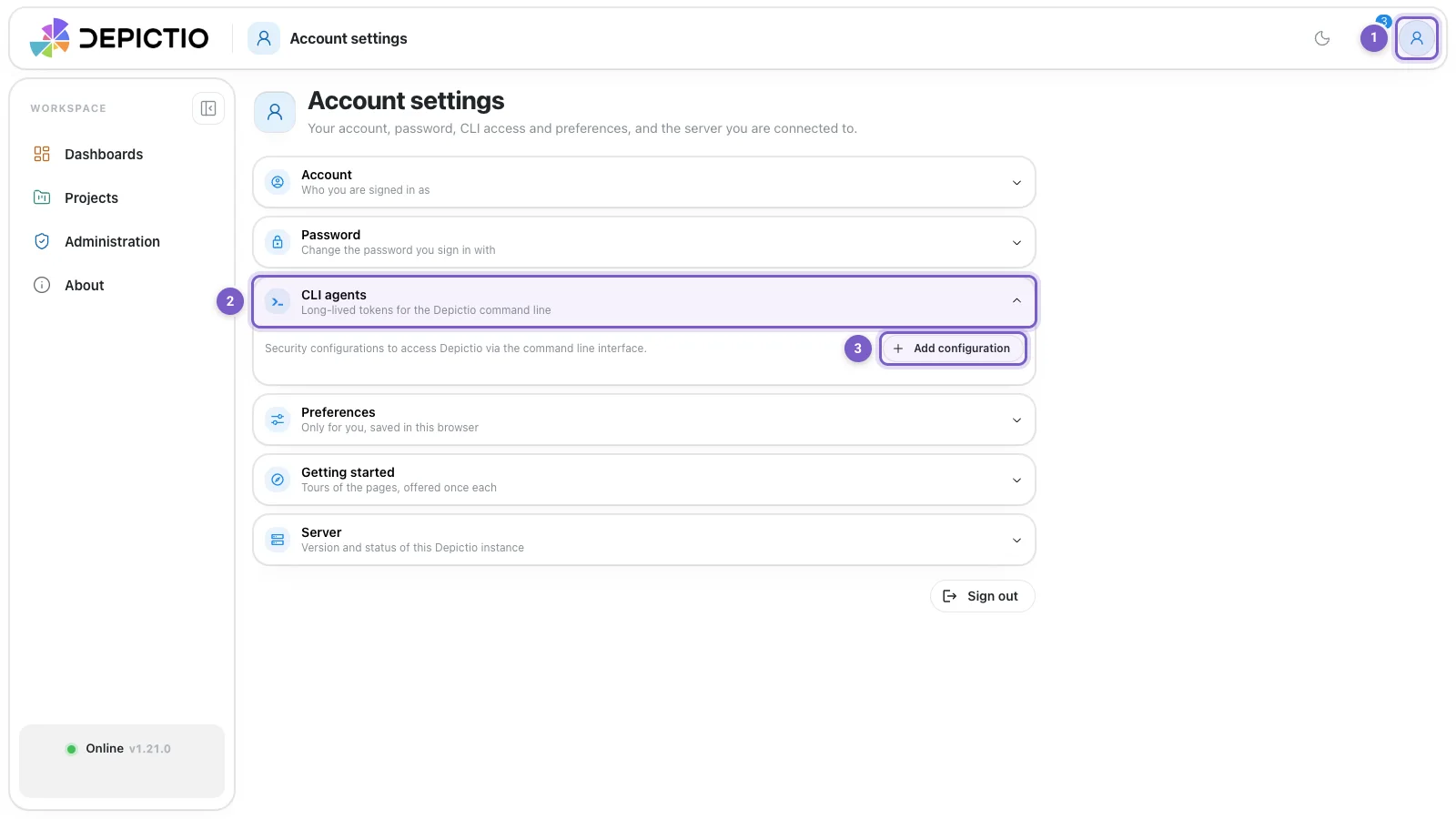
- Click your profile badge at the top right (1): Account settings opens.
-
Open CLI agents (2), then click Add configuration (3).
-
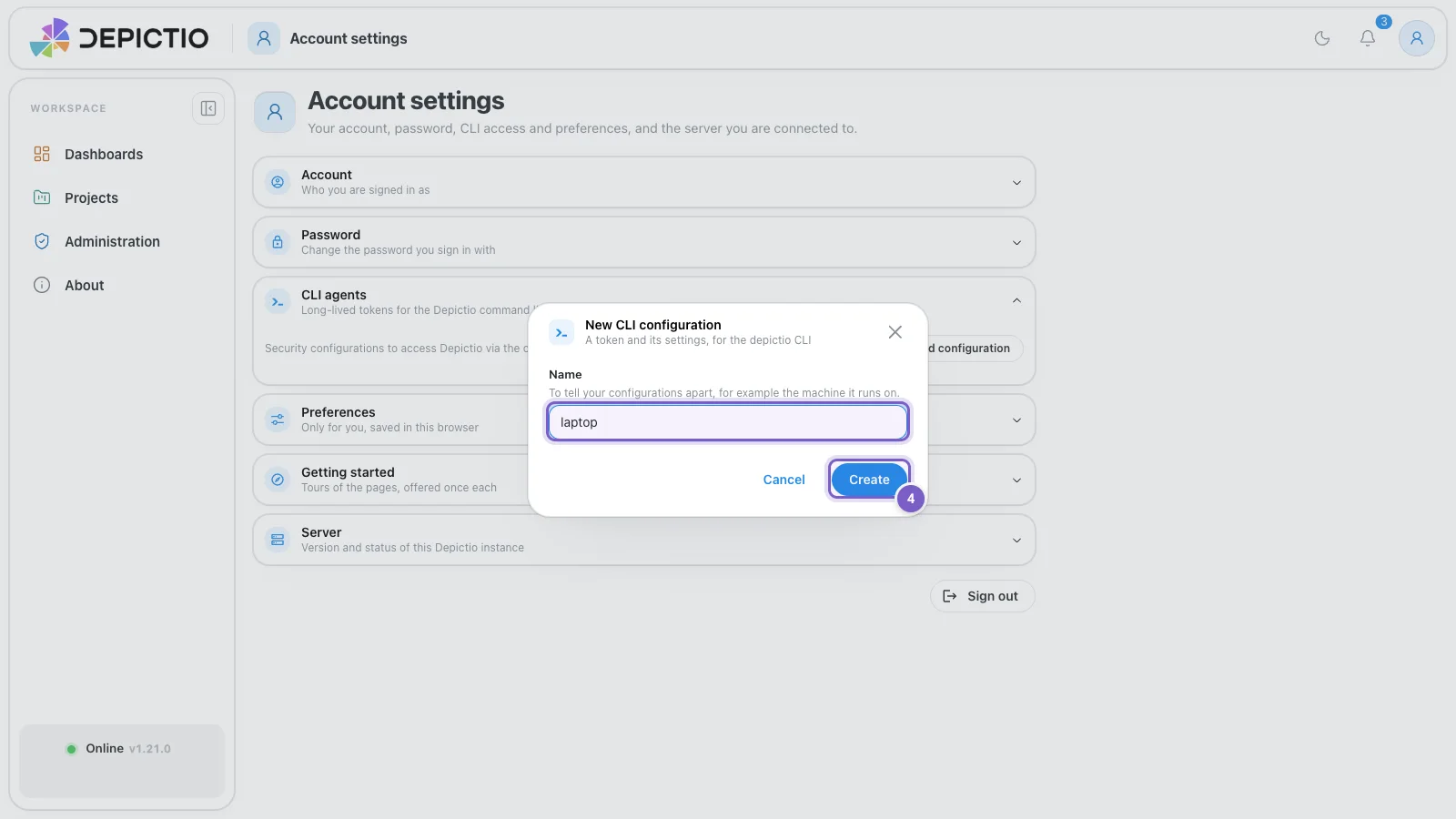
Give the configuration a Name, such as laptop, then Create (4).
-
Click Download (5), then Done (6). The file
CLI.yamllands in your Downloads folder,~/Downloads. The window shows the file only once: after Done, the server cannot show it again.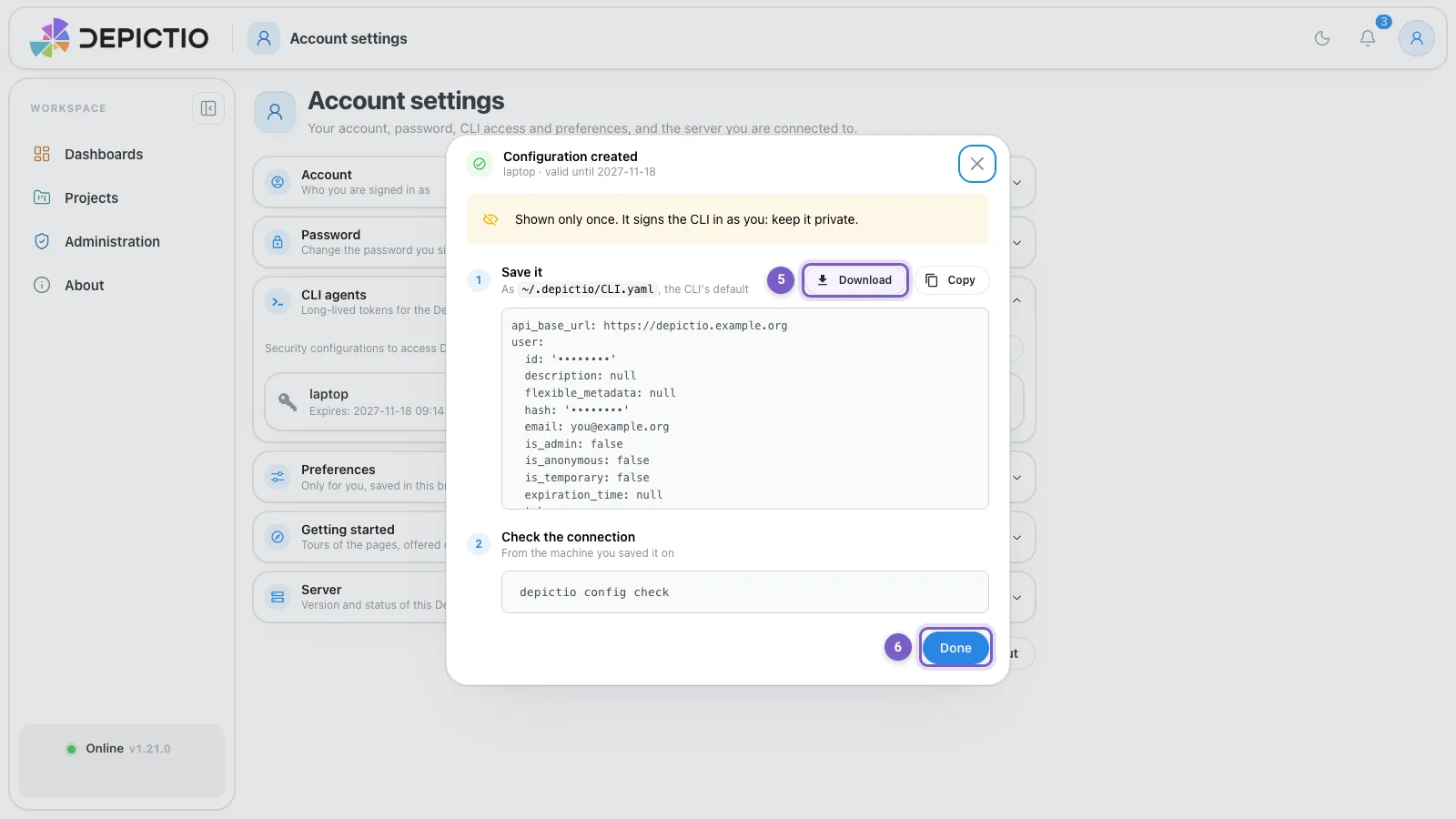
-
Move the file from
~/Downloadsto~/.depictio, the folder the CLI reads:If your Downloads folder already held a
CLI.yaml, the new file is namedCLI (1).yaml: move that one instead,mv ~/Downloads/"CLI (1).yaml" ~/.depictio/CLI.yaml.
The file has three parts:
api_base_url: https://…          # the server the CLI talks to [[1]]
user:                            # who you are [[2]]
  email: you@example.org [[2]]
  token: [[2]]
    access_token: •••            #    signs each command in as you [[2]]
    refresh_token: •••           #    renews the access token [[2]]
    expire_datetime: …           #    the configuration stops working on this date [[2]]
s3_storage:                      # where the CLI writes your tables [[3]]
  external_host: … [[3]]
  bucket: … [[3]]
  root_user: … [[3]]
  root_password: ••• [[3]]
- The server:
api_base_url, the address the CLI talks to. - You: your account and its two tokens. The access token signs each command in as you, the refresh token renews it; the configuration stops working on
expire_datetime. - The storage: where the CLI writes your tables, with its address, bucket and keys.
The CLI writes your tables itself, straight to the server's storage: that is why the storage access is in the file.
Keep it private
CLI.yaml signs the CLI in as you and opens the server's storage. Do not paste it in the chat or commit it. Lost it? Create another configuration.
Check the connection
$ depictio config check
• Server: https://… (configuration ~/.depictio/CLI.yaml)
• Checking server accessibility...
✓ Depictio CLI configuration is model-compliant. [[1]]
✓ Server accessible - User: you@example.org [[2]]
… Checking S3 storage configuration...
✓ S3 storage configuration is valid [[3]]
The three ✓ lines say:
- the file is complete;
- the server knows your account;
- the storage accepts your tables.
A line starting with ✗ names the part that fails: write it in the Zoom chat.
Challenge 0.1: until when?
Run depictio config show. Until when does your configuration work? Are your token and the storage password printed?
Solution
expire_datetime, under token, reads one year after you created the configuration: after that date, create another one. The tokens and the storage password are masked: config show is safe to share on screen, CLI.yaml is not.
Key points
- The CLI lives in its own Python environment,
~/depictio-workshop/depictio-env, at the server's version:depictio[multiqc]==1.24.0. ~/.depictio/CLI.yamlis created once in Account settings → CLI agents: the server, your token, and the storage the CLI writes to.depictio config checktests the file, the server and the storage before anything else.
Bonus · Usage statistics
The first command you run prints a short notice: the CLI sends anonymous usage data (which command ran, whether it succeeded, the operating system and the versions), never file paths, arguments, project names or credentials. To turn them off, add export DEPICTIO_TELEMETRY_ENABLED=false to your shell, or set DO_NOT_TRACK=1.