Remote data and manifests (v1.16.0+)
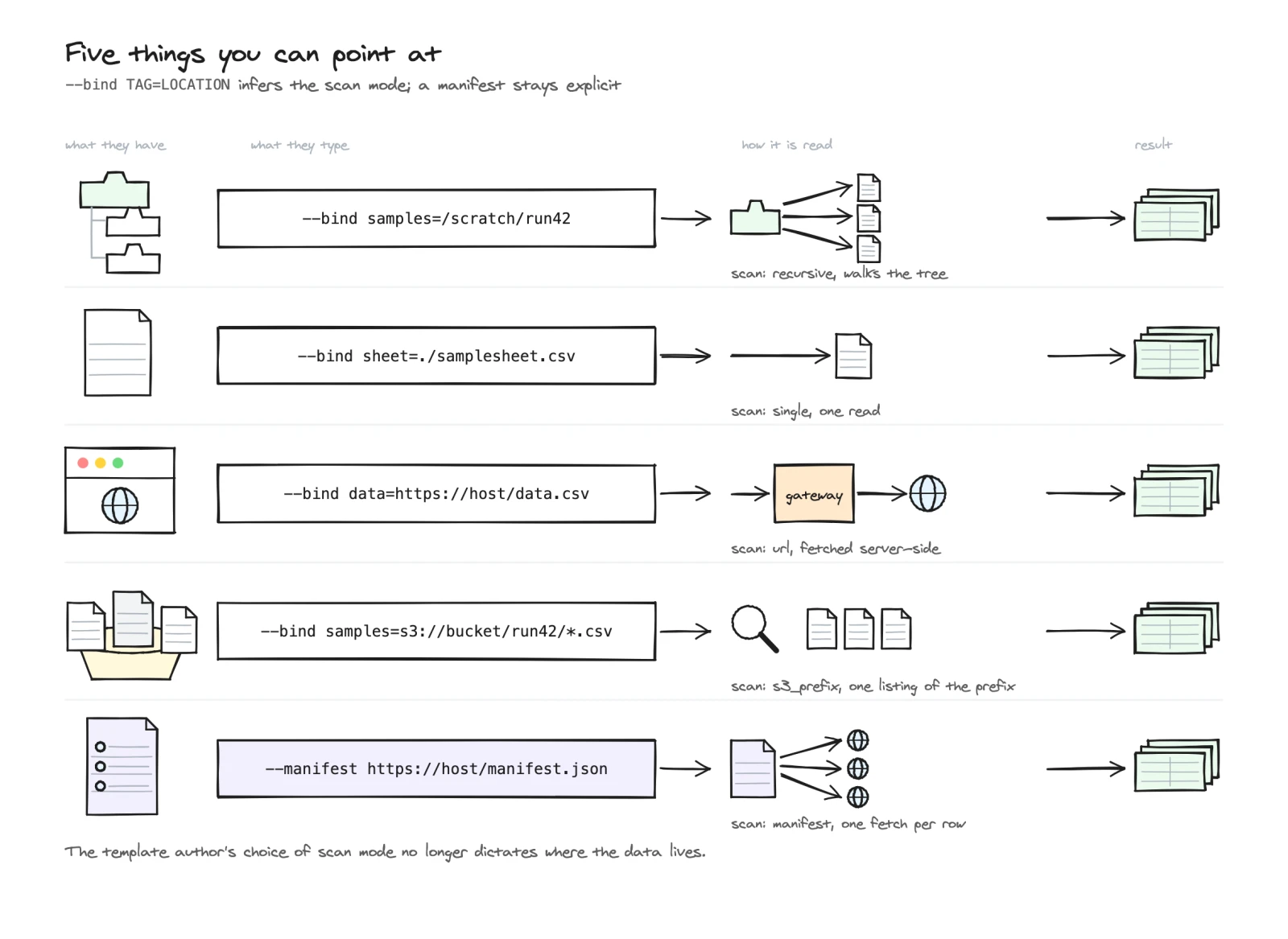
Data can stay where it is: an s3:// run folder, one file at a URL, every object under a bucket prefix, or a list of files called a data manifest. Depictio reads it there and writes Delta tables to its own storage, so dashboards, links and joins work as with local files.
Which way to use
| You have | Web UI | CLI | Scan mode |
|---|---|---|---|
| A pipeline run folder in a bucket | Read in place, Folder or bucket | depictio ingest s3://bucket/run42 |
s3_prefix, url |
| A pipeline run folder on this computer | Read in place, on a depictio local server |
depictio ingest /data/run42 |
recursive, single |
| One file on the web or in a bucket | Read in place, One file URL (guide) | --bind tag=https://host/data.csv |
url |
| Many files under one prefix | --bind tag=s3://bucket/run42/*.csv |
s3_prefix |
|
| Files of several types, in scattered places | --manifest <url or path> |
manifest |
Plain HTTPS cannot be listed: use url for one known file, or a manifest for several. The scan parameters are in the YAML reference.
A run folder on S3
depictio ingest takes an s3:// prefix as DATA_DIR. One listing of the prefix stands in for the folder, and the template is detected from the run's records as for a local folder. A folder no bundled template reads needs --template: it is not composed from the catalog.
depictio ingest s3://my-bucket/ampliseq/run42
depictio ingest s3://my-bucket/ampliseq/run42 --template nf-core/ampliseq/latest --dry-run
The template is not modified. Each collection is pointed at the prefix:
| Template declares | Read under s3:// as |
|---|---|
recursive scan |
s3_prefix scan with the template's regex (pattern_syntax: regex); max_depth and ignore are dropped |
single scan |
url scan of the file under the prefix |
Recipe (source: transformed) |
Its sources are read through the listing |
url, s3_prefix or manifest |
Unchanged |
indexed_file |
Not supported yet: a required one stops the run, an optional one is skipped. --bind it to a local folder |
Limits and edge cases
- A
sequencing-runsworkflow keeps its runs: each first-level folder matchingruns_regexis a run. Elsewhere, files carryremoteasdepictio_run_id. - MultiQC reports are downloaded to a temporary copy within
DEPICTIO_REMOTE_MAX_DOWNLOAD_BYTES; one that does not fit is skipped. - A
singlecollection pointing at a local file (--var METADATA_FILE=/data/meta.tsv) becomes aurlscan, which refuses it:--bind metadata=/data/meta.tsvinstead. - The data root listing stops at 100,000 objects, and each
s3_prefixscan at itsmax_files(10,000). - An
s3_prefixscan that matches nothing stops the run, where an empty local scan would not.
Which buckets can be read, and with which keys: Reading S3 buckets.
Preview before ingesting
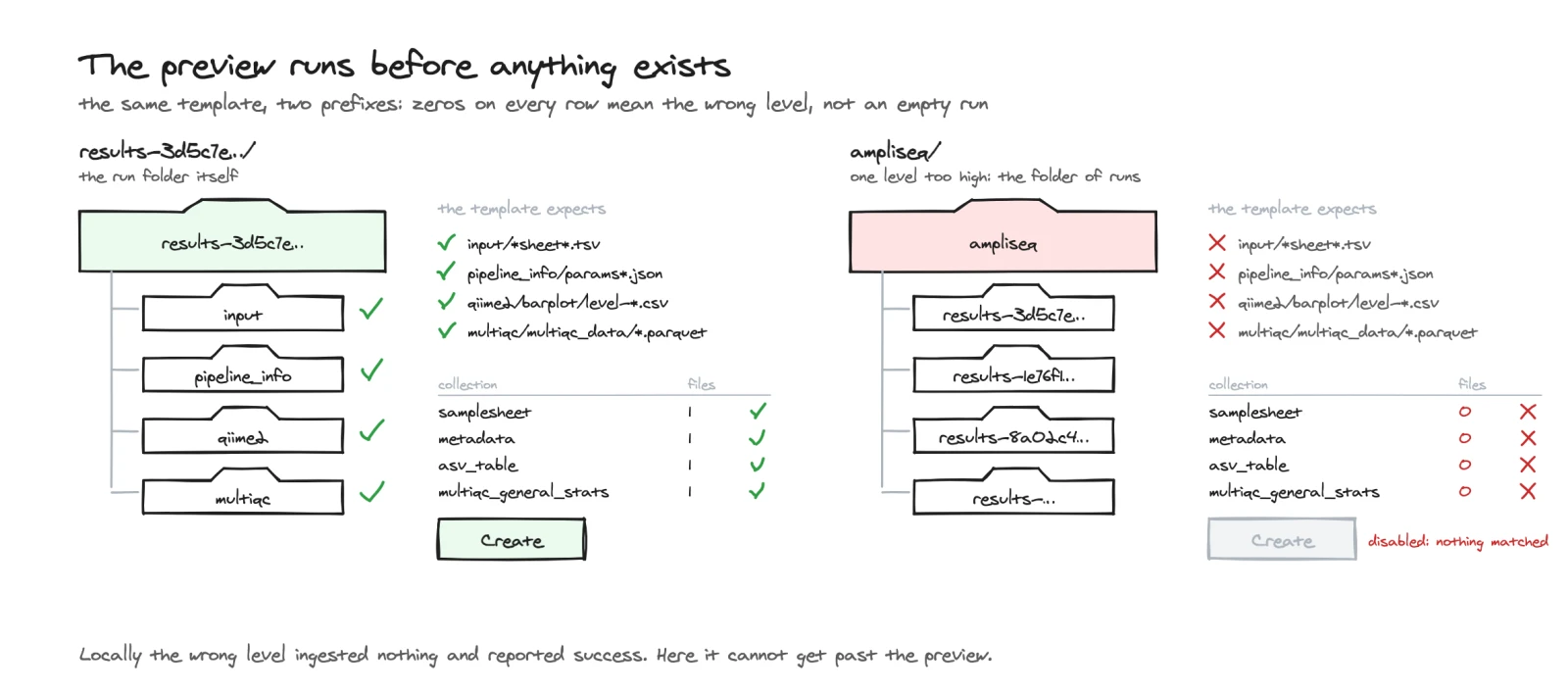
With a template and a DATA_DIR, local or s3://, --dry-run prints what each data collection finds there and creates nothing. Above the table come the template, the runs detected, the dashboards to import and the variables derived from the folder; under it the missing sources and a summary line.
| Status | Meaning |
|---|---|
ok |
It will ingest |
empty |
Its scan matched nothing |
missing |
A source it needs is not there |
pruned |
Dropped, because an optional source is absent |
Zeros on every row mean the folder is one level too high or too low. A url or manifest collection cannot be counted from the listing and shows ok with 0 files. Without a template, --dry-run lists the files each collection would match instead.
Bind a data collection to a location
--bind TAG=LOCATION points one collection at its data. It is repeatable, and the scan mode follows the location:
| Location | Mode |
|---|---|
/scratch/run42 (a folder) |
recursive, with the template's pattern |
/scratch/run42/*.csv (a local glob) |
recursive, the glob as pattern |
./samplesheet.csv |
single |
https://host/data.csv, or s3://bucket/key.csv |
url |
s3://bucket/run42/*.csv, or s3://bucket/run42/ |
s3_prefix; without the trailing /, one object, so url |
depictio ingest --template my-lab/rnaseq-qc/1 \
  --bind samples=s3://my-bucket/run42/*.samples.csv \
  --bind metadata=https://data.example.org/run42/metadata.tsv
- With
--template, the bindings stand in forDATA_DIR. A variable still needed after binding fails the run, by name. - An unknown tag is an error listing the tags that exist.
- The local folder bindings of one workflow must share a folder, otherwise Conflicting local roots for workflow ….
- With
--project-config-path, the file is left untouched: the bindings apply to this run only. --bindnever guesses a manifest from a file name: use--manifest.
Cross-filtering without a manifest
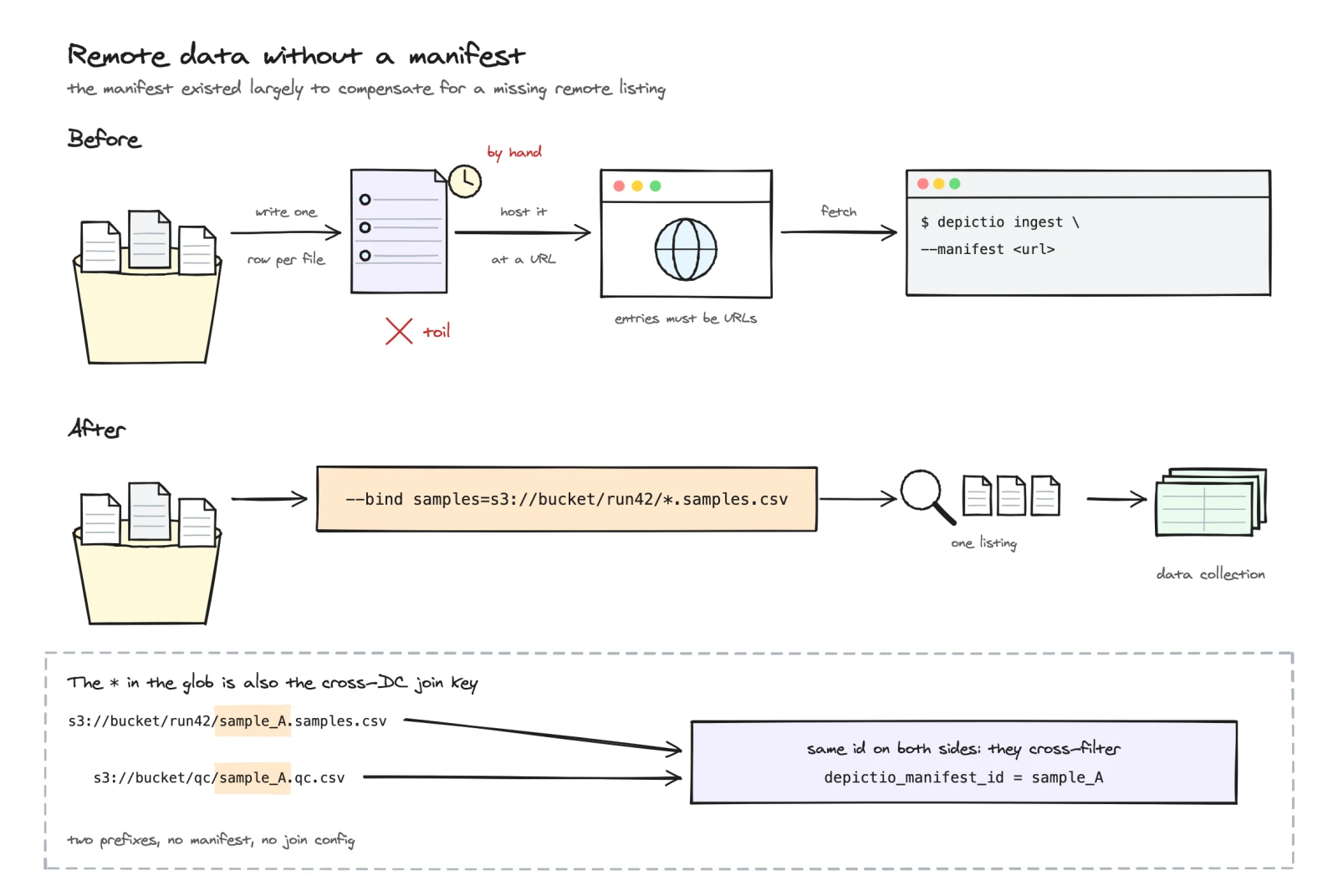
In an s3_prefix glob with a single *, what the * matches becomes each file's id (sample_A.samples.csv gives sample_A), read back as the depictio_manifest_id column. Two collections bound this way share a key, and a link with the direct resolver cross-filters them. A bare *, several wildcards, ? or [ give no id.
The data manifest contract
A manifest lists remote files, one entry per file. Its type is a data collection tag, which is all it takes to map it onto a project.
| Field | Required | Meaning |
|---|---|---|
id |
yes | Entity or sample id. Becomes depictio_manifest_id |
type |
yes | The tag of the collection the file belongs to |
url |
yes | s3:// or https://; http:// only with DEPICTIO_REMOTE_ALLOW_HTTP |
run |
no | Becomes depictio_run_id, remote when absent |
The schema is closed: other CSV columns go into an extra field. A file listed twice is refused. Entries of the same type are aggregated into one collection. Other column names are mapped with id_field, url_field, type_field and run_field (see the reference).
An nf-core samplesheet becomes a manifest in one command, each file column a type (all options). A YAML or JSON samplesheet, a list of records, is read exactly as the same CSV (v1.22.0+):
depictio manifest from-table samplesheet.csv --id-col sample --base-url s3://my-bucket/run42 -o manifest.json
Creating a project in the web UI
From a run folder
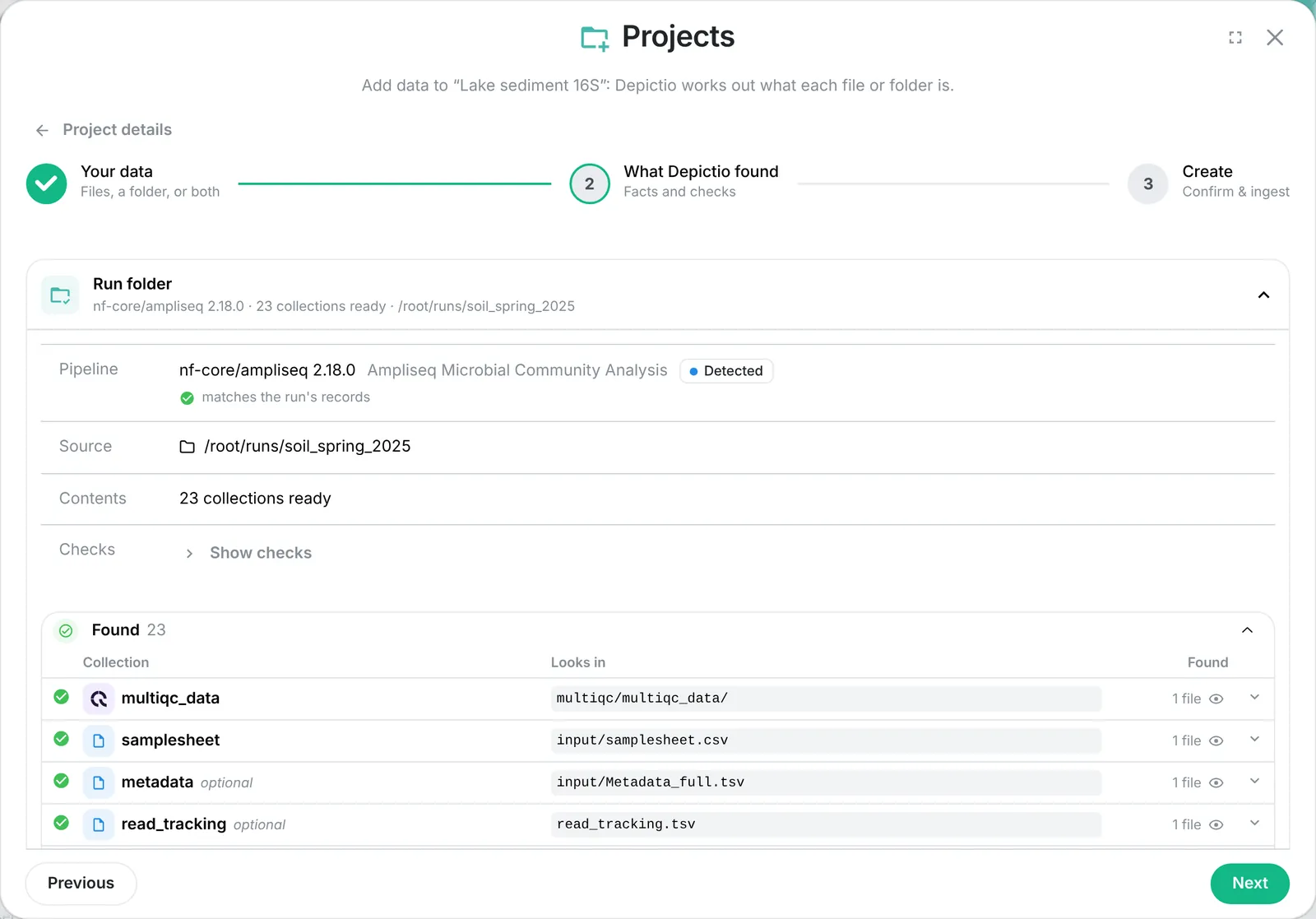
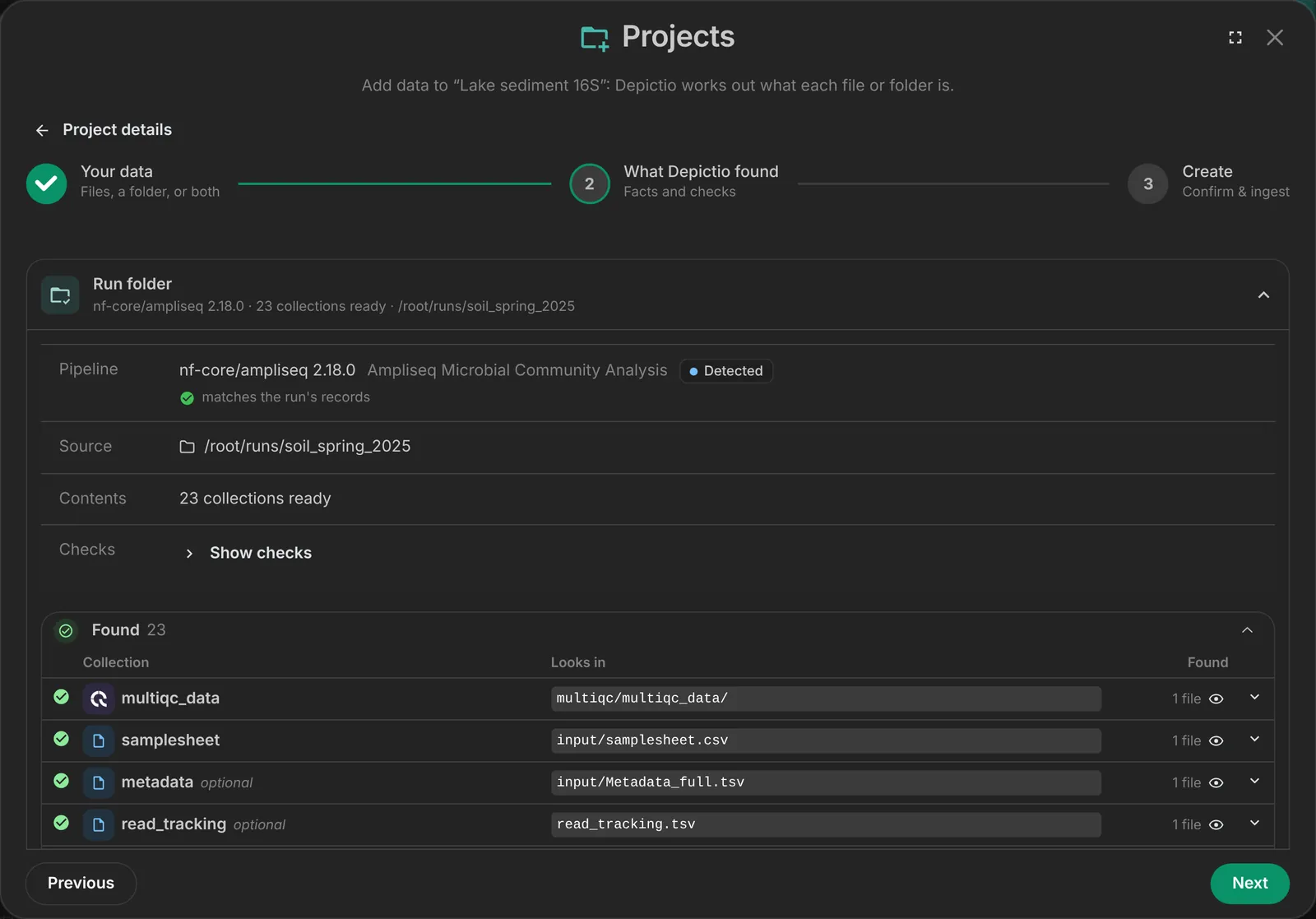
New project, Add data, then Read in place with Folder or bucket (see Create a project). Depictio recognises the pipeline from the run's records, picks the template and previews each collection before anything is created.
| Run folder | Read when |
|---|---|
s3://bucket/prefix |
The server may read the bucket (rules), or you give its keys (Private bucket) |
/path/to/run |
Only on a depictio local server, below your home folder or a folder added with --data-root-allow |
The variables and collection locations must stay inside the run folder; the CLI has no such limit.
Checks compares the run with the template, one line each: Pipeline, Version, Engine, Tasks, Folder, Input files, Samples, Collections. The verdict is Exact match, Closest available version or Different version. Each collection then shows where it Looks in and what it found: Found, Not found, Optional, not found. The eye beside a file previews its first rows. When nothing matched, Nothing to ingest in this folder blocks the next step.
Create Project imports the template's dashboards and ingests the collections in the background. Project created follows them one by one, with Open dashboard; closing it does not stop the workers. The run is recorded under the project's ingestion history and in Log & Task → Ingestion, command from_run.
Ingestion order, missing sources, time limits
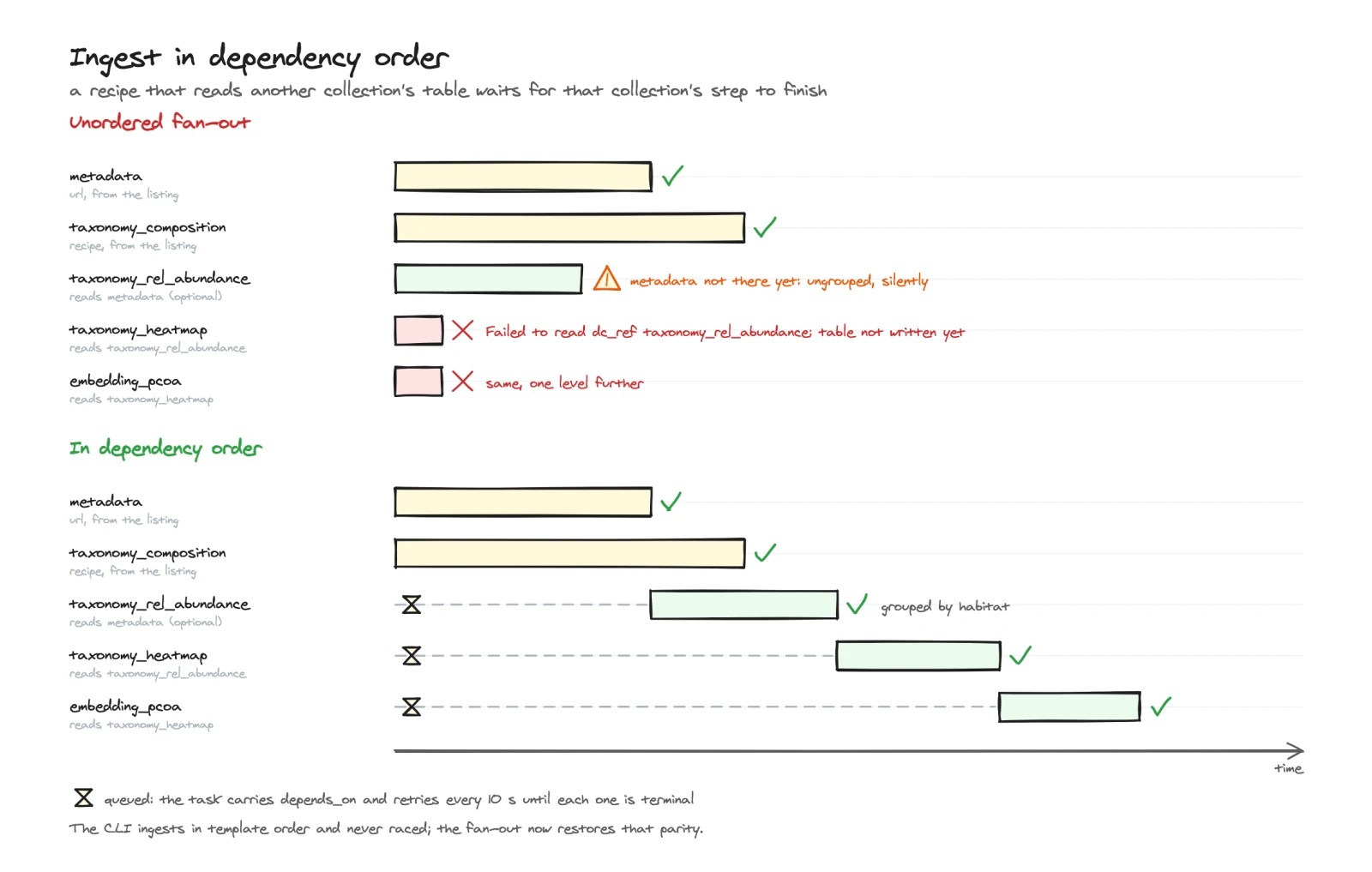
A collection whose source is missing is not sent to a worker: Failed when required, Skipped when optional. One built from another collection's table waits for it, up to 30 minutes, and each collection has 30 minutes to ingest. The server's Celery worker runs them: the ingestion worker is not needed.
The folder browser
Browse opens Choose a folder to read in place, with a This computer group (under depictio local) and an S3 group (the locations the server may list, and a private bucket once its keys are given). A folder holding pipeline_info/, or MultiQC output under multiqc/, carries a Run folder badge and explains Why this is a run folder. Pipeline runs in subfolders searches below a folder for runs, and Filter by name narrows a long folder.
Private bucket
For an s3:// folder, This bucket needs credentials opens the Private bucket fields: Endpoint (empty for Amazon S3), Region (optional, the connection test fills it in), Access key and Secret. It opens by itself when the bucket refuses the read. The keys are used for that bucket only, for every read of the creation, and become the project's storage settings: Project created confirms Storage settings saved for this project. On a public instance, only administrators can give them.
From a script
# $DEPICTIO_TOKEN: user.token.access_token from your CLI configuration
curl -X POST "$API/depictio/api/v1/projects/from_run" \
  -H "Authorization: Bearer $DEPICTIO_TOKEN" -H "Content-Type: application/json" \
  -d '{"data_root": "s3://my-bucket/ampliseq/run42", "dry_run": true}'
| Field | Default | Content |
|---|---|---|
data_root |
required | The run folder |
template_id |
detected | Such as nf-core/ampliseq/2.16.0 |
project_name, description, is_public |
derived, none, false |
|
variables |
{} |
As --var on the CLI |
dry_run |
false |
Preview only |
storage |
endpoint_url, region, access_key_id, secret_access_key of a private bucket; both keys required |
The report lists each collection as the preview does, then project_id, the imported dashboards, storage_saved and a run_id to poll at GET /projects/refresh_manifest/{run_id}. A refusal carries detail and a code such as template_not_detected or one of the S3 codes; a taken name answers 409. The folder browser uses GET /projects/templates, /local_dirs, /s3_dirs, /folder_inspect, /find_runs, POST /projects/run_file_preview and /storage_test.
From a manifest
The web UI no longer has a manifest tab (v1.21.0): use the CLI or the API.
depictio ingest --template generic/manifest-tables/1 \
  --manifest https://data.example.org/run42/manifest.json
--manifest takes an https:// URL or a local file, sets the template's MANIFEST_URL and replaces DATA_DIR.
curl -X POST "$API/depictio/api/v1/projects/from_manifest" \
  -H "Authorization: Bearer $DEPICTIO_TOKEN" -H "Content-Type: application/json" \
  -d '{"manifest_url": "https://data.example.org/run42/manifest.json",
       "template_id": "generic/manifest-tables/1", "dry_run": true}'
Also project_name and variables. The call ingests before it returns, and reports unmatched_manifest_types and pruned_optional_dcs.
POST /projects/ingest_manifest with project_id and manifest_url maps the manifest's types onto the project's tags, switches each matched collection to manifest mode and ingests it. A collection that fails gets its former scan back. dry_run reports the mapping only.
The server fetches a manifest through the gateway and checks every entry URL first: if any is refused, nothing is ingested and the 400 lists rejected_entries. An s3:// manifest is not read yet: serve it over https://.
Refreshing the data
When the files behind a project change, refresh it in place: Project settings, then Data refresh.
- Collections: All refreshable collections, or one. Only a manifest, a URL or a bucket prefix can be refreshed; with none, the section says Nothing to refresh.
- Refresh now reads again what changed, new and changed files, and leaves the rest. Read everything again rebuilds every collection.
- The progress is followed for up to 30 minutes, with Reload project at the end. Closing the dialog does not stop it, and a notification says how it ended.
Owners, editors and administrators can refresh; on a public instance, administrators only. A local folder is refreshed with the CLI, depictio ingest … --update-config. A project made from a run folder is checked against it again first: a required collection whose source is gone fails, an optional one is skipped, and neither is emptied.
| Status | API value | Meaning |
|---|---|---|
| Planned | planned |
Dry run: would be refreshed |
| Queued | dispatched |
Handed to a worker |
| Running | running |
Being ingested |
| Ingested | ingested |
Table rebuilt, a new data version |
| Failed | failed |
Details says why |
| Skipped | skipped |
Optional and absent |
From a script, POST /depictio/api/v1/projects/refresh_manifest takes project_id, and optionally data_collection_tag, dry_run, full (read everything again) and async_run (return a run_id to poll at GET …/refresh_manifest/{run_id}). An asynchronous refresh is recorded in the ingestion history, command refresh_manifest.
Run ingestion and depictio watch read local folders only: on remote data, use Data refresh.
Reading S3 buckets
An s3:// location a user gives is matched against the configuration before any request, so naming a bucket never reveals whether it exists. The first matching rule wins:
| Rule | Location | Read with |
|---|---|---|
| 1 | The bucket holding the instance's own data | Refused |
| 2 | The bucket of the project's storage settings, with keys | The project's keys |
| 3 | Listed in DEPICTIO_REMOTE_PUBLIC_S3_BUCKETS |
No credentials, on Amazon S3 |
| 4 | Anything else, when the project has storage settings | Those settings only |
| 5 | Listed in DEPICTIO_REMOTE_CREDENTIALED_S3_BUCKETS |
The server's AWS default chain (environment, IAM role, web identity) |
| 6 | Anything else | Refused |
Both lists take comma-separated bucket or bucket/prefix entries (environment reference). Anyone on the instance can read what the credentialed list names. The instance's own S3 keys are never used for a user's location. The CLI reads from its own machine: a public bucket without keys, any other with the keys of its configuration or the machine's AWS credentials.
Errors
| Code | HTTP | Meaning |
|---|---|---|
s3_refused |
422 | No rule allows the read; nothing was sent |
s3_access_denied |
422 | The bucket refused the credentials, or there were none |
s3_no_such_bucket |
422 | No such bucket on that endpoint |
s3_wrong_region |
502 | The bucket is in another region |
s3_unreachable |
502 | The storage could not be reached |
s3_error |
502 | Any other S3 error |
In the run folder flow, s3_refused and s3_access_denied open the Private bucket fields.
Project storage settings
Project settings, then Storage, for owners and administrators. Configure storage asks for:
| Field | Content |
|---|---|
| Endpoint URL | Such as https://s3.eu-west-1.amazonaws.com. Through the API, empty means Amazon S3 |
| Bucket | Required |
| Region | us-east-1 by default; Test connection detects and saves it |
| Access key ID, Secret access key | Both empty for a public bucket. The secret is stored encrypted and never shown again |
The saved settings show Secret set or No secret, with Test connection, Edit and Remove. They are read credentials only: tables are still written to the instance's storage. They are deleted with the project, never exported in a template, and kept encrypted in a backup. An endpoint on a private network must be on DEPICTIO_REMOTE_URL_ALLOWLIST, and http:// needs DEPICTIO_REMOTE_ALLOW_HTTP. API: GET, PUT, DELETE /projects/{project_id}/storage and POST …/storage/test; see Security.
The CLI reads the same fields from remote_storage_options in its configuration:
remote_storage_options:
  endpoint_url: https://s3.eu-west-1.amazonaws.com
  bucket: my-bucket
  region: eu-west-1
  access_key_id: AKIA...        # leave both keys out for a public bucket
  secret_access_key: ...
Google Cloud Storage (v1.21.0+)
GCS speaks S3 through its XML API: set endpoint_url: https://storage.googleapis.com in the project's storage settings or in remote_storage_options, with an HMAC key (Cloud Storage, Settings, Interoperability) for a private bucket. Then point a collection at s3://<bucket>/<key>.
- Reading only: GCS cannot be the instance's own storage.
- The folder browser asks for keys on a GCS bucket, since
DEPICTIO_REMOTE_PUBLIC_S3_BUCKETScovers the AWS endpoint only. - A public bucket was checked end to end; a private one with an HMAC key not yet.
Sharing a project
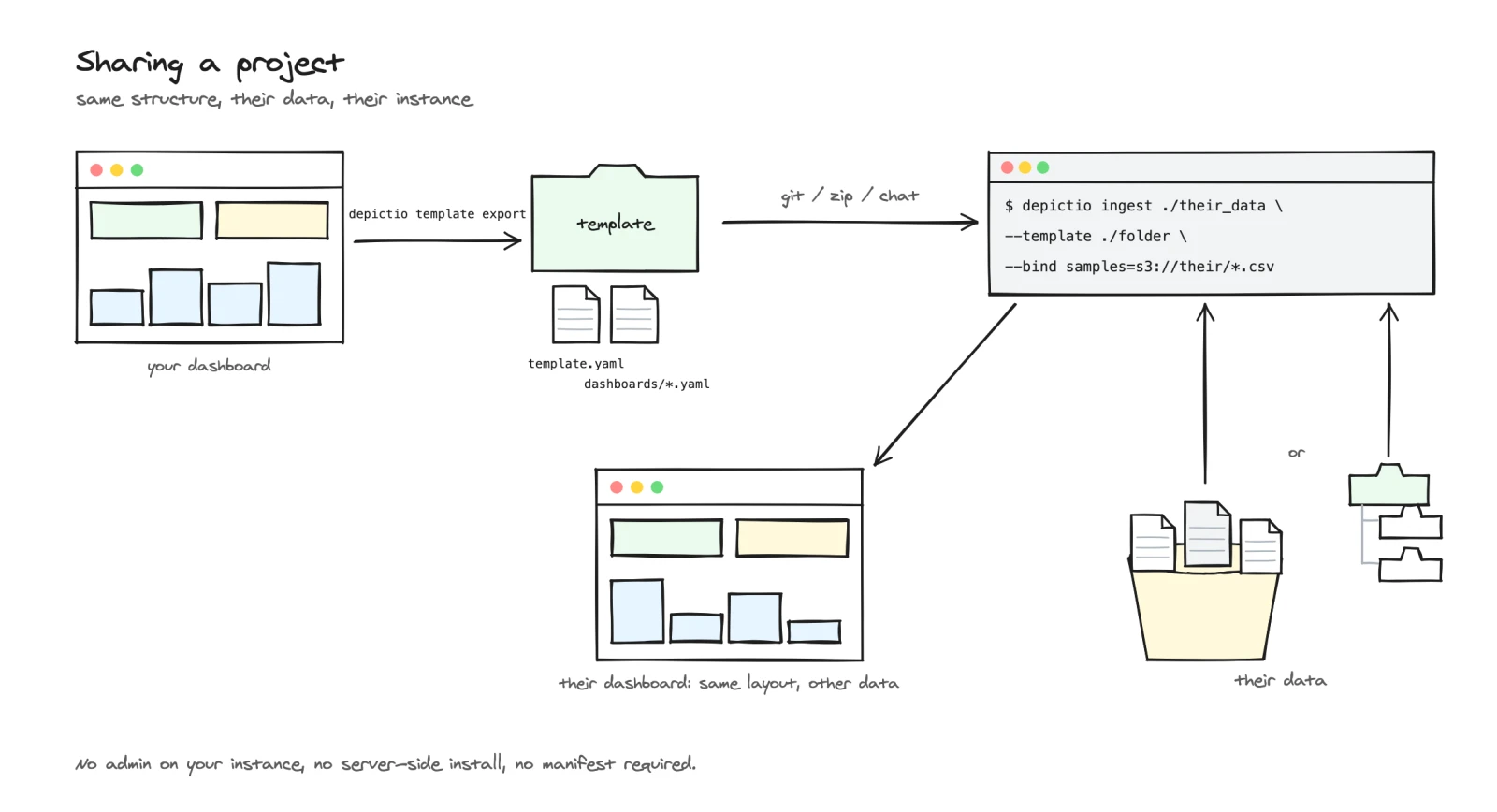
A project can be frozen into a template bundle that someone else runs on their own instance, against their own data.
- Export: Project settings, Create a template: a Template ID (
my-lab/rnaseq-qc/1), a Version, a Description (optional) and a Data root (optional). Ordepictio template export <project_id> --template-id my-lab/rnaseq-qc/1 -o ./templates. The bundle holdstemplate.yamlanddashboards/*.yaml, with the data root as{DATA_ROOT}and a manifest URL as{MANIFEST_URL}. - Send the folder by git, zip or chat.
-
Run it with each collection bound to the recipient's data:
A project read from an s3:// folder
The export checks the bundle with a local test path as {DATA_ROOT}, which s3_prefix and url collections refuse: it stops with Exported config does not round-trip through Project validation. From the CLI, --data-dir "" exports without a data root.
To copy the project itself, data included, use Export as a ZIP file or Send to another instance: see Project migration. The full export reference is on Templates.
What the server checks before fetching
Every https:// URL a user gives goes through one gateway: a scheme allowlist, DNS resolution refusing private, loopback and reserved addresses, a check at every redirect, and a streamed download with a size cap and a timeout. DEPICTIO_REMOTE_URL_ALLOWLIST pins the hosts, exclusively while set, and DEPICTIO_REMOTE_URL_DENYLIST blocks some. A refused fetch answers remote_url_rejected (400), a failed one remote_fetch_failed (502). Details on Security.
See also
- YAML reference:
url,s3_prefixandmanifestparameters - YAML examples: a remote and a manifest project
- Templates:
--manifestand--bindwith a template - CLI usage:
ingest,template export,manifest from-table - Data model: remote
Filerecords and the join key - Contributing a template: a manifest-driven template