Groups and access
What an OpenID Connect sign-in changes on the account, and how to restrict who gets in. The claim names are set in the claim mapping.
Group and profile sync
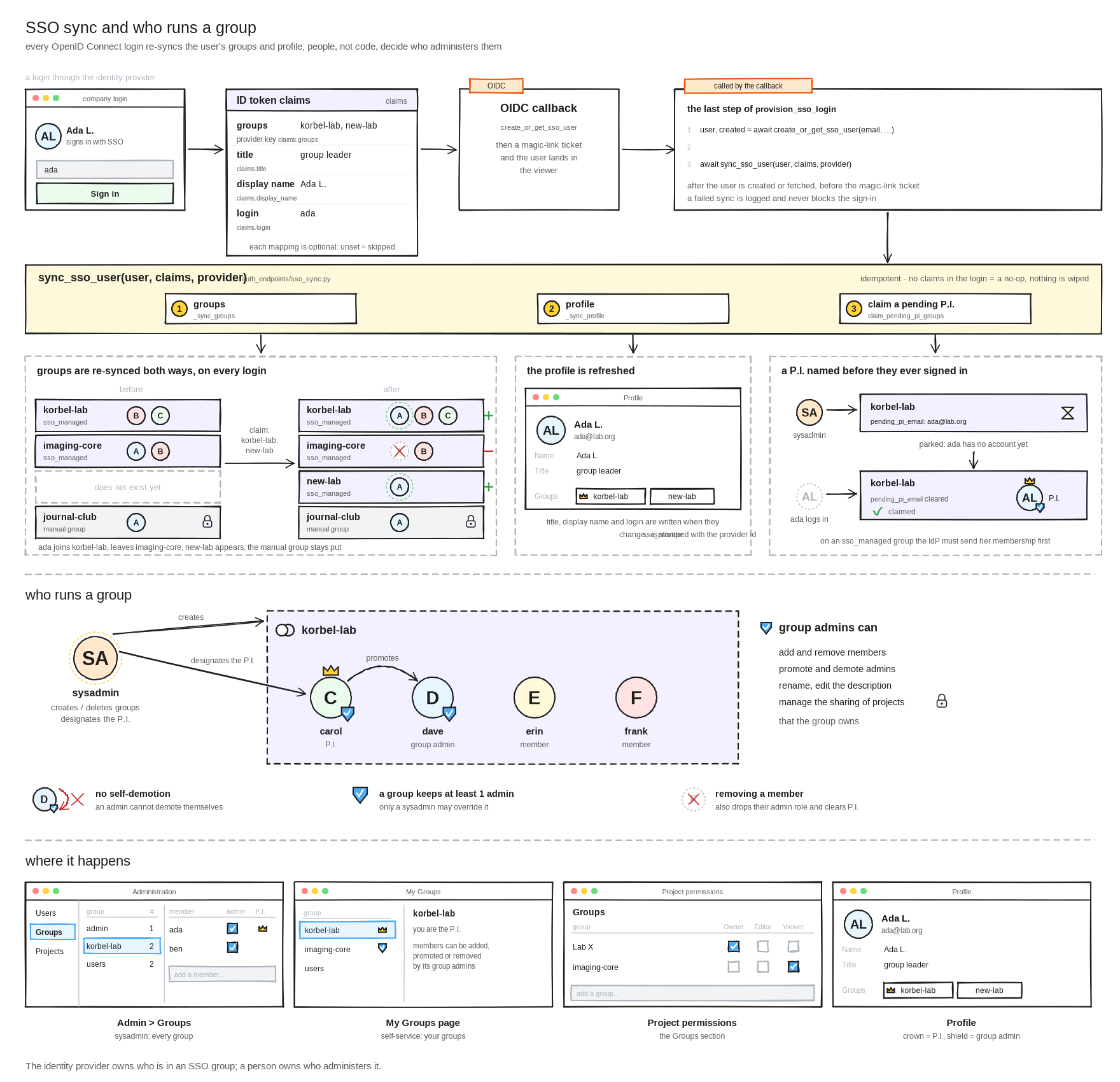
Four optional claim mappings are read at every OIDC sign-in. An unset mapping skips its step, so nothing changes until a deployment sets them.
| Claim mapping | What it does |
|---|---|
claims.groups |
Mirrors the listed groups as SSO-managed groups: created when first seen, membership re-synced both ways at every sign-in |
claims.title |
The user's title, shown in Account settings |
claims.display_name |
The user's display name |
claims.login |
The user's login |
The provider's id (or sso_provider) is stamped on the user as sso_provider, and a
profile picture is taken from claims.picture when the provider sends one.
Group claim semantics
- The claim's values are taken verbatim as group names (whitespace stripped, empty values dropped); no parsing is attempted.
- Each listed group is created if missing, marked SSO-managed, and the user is added.
- The user is then removed from every SSO-managed group that the claim does not list, including as a group admin or P.I.
- An absent claim counts as an empty list. With
claims.groupsconfigured, a login whose token carries no such claim removes the user from all SSO-managed groups: the IdP is the source of truth for SSO-managed membership. Check that your IdP puts the claim in the ID token, or in userinfo (which Depictio merges in). - Groups created by hand (manual groups) are never touched by the sync.
- A failed sync is logged and never blocks the sign-in; the next sign-in syncs again.
- A P.I. named in advance is claimed at the sign-in that first sends their group.
Registration and SSO-only mode
Closed registration
With DEPICTIO_AUTH_REGISTRATION_DISABLED=true, SSO is login-only: a known email signs
in, an unknown one is refused (registration_disabled) instead of being provisioned an
account. Administrators create the accounts. See
Registration.
SSO-only mode
DEPICTIO_AUTH_PASSWORD_LOGIN_DISABLED=true closes email and password sign-in, so single
sign-on is the only way in. It takes effect only when at least one OIDC provider is
enabled and fully configured, so a typo in the provider list gives you the password form
back instead of a locked instance. See
Password sign-in.