Features
Overview
Depictio is built to address the challenges of visualizing and analyzing large-scale bioinformatics datasets generated by production workflows like nf-core, WorkflowHub, or the Snakemake Workflow Catalog. It provides a user-friendly interface for creating interactive dashboards that can be shared with collaborators, making it easier to explore and interpret complex data.
Dashboard & Components
User-facing features for building and interacting with dashboards.
| Page | Description |
|---|---|
| Dashboards | Dashboard modes, layouts, tabs, and organization |
| Components | Guide to available component types and configuration |
| Interactive Selection Filtering | Filter components via scatter plot and table row selections |
| Comments and Annotations | Discuss components in threads and draw ranges, lines, marked points and notes on them |
| Dashboard and Data Versions | Preview, restore or bookmark any saved version of a dashboard, and read it against the data of the time |
| Component Export and Embedding | Serve one component to another website, as a Plotly spec or a self-contained page |
-
Dashboards
Learn about dashboard modes, tabs, and layouts
-
Components
Explore available component types (figures, tables, cards, etc.)
-
Interactive Selection
Filter by selecting points or rows directly on visualizations
-
Comments and Annotations
Discuss components in threads and annotate charts, tables and maps
-
Dashboard and Data Versions
Go back to any saved version of a dashboard, and to the data it showed
-
Component Export and Embedding
Put one component of a dashboard on another website, live
Data Integration
Features for connecting, filtering, and synchronizing data across collections.
| Page | Description |
|---|---|
| Cross-DC Filtering | Link data collections for interactive filtering |
| Filter Expressions | Polars expression syntax for narrowing what a component reads |
| YAML Dashboard Sync | Bidirectional YAML sync for IaC and version control |
-
Cross-DC Filtering
Link data collections for interactive filtering across components
-
Filter Expressions
Narrow a component's data with a Polars expression
-
YAML Dashboard Sync
Version control dashboards with bidirectional YAML sync
System Design
Technical architecture and security features.
| Page | Description |
|---|---|
| Architecture | Technical overview of Depictio's microservices |
| Performance & Scaling | How large data collections stay responsive, and the settings that tune it |
| Data Model | Domain objects, what is embedded where, and the MongoDB collections |
| Security | Security features and code execution restrictions |
-
Architecture
Technical overview of the microservices architecture
-
Performance & Scaling
Bounded payloads, scan-level pushdown, and benchmark numbers
-
Data Model
Domain objects, embedding vs references, and the MongoDB collections
-
Security
Security features, authentication, and code restrictions
Key Capabilities
- Interactive Dashboards for real-time data exploration
- Scalable Architecture for handling large datasets
- Cross-Collection Filtering for linked data exploration
- YAML Dashboard Sync for Infrastructure-as-Code workflows and version control
- Data Integration from multiple sources
- User Management for secure access control
- Security Features with restricted code execution and comprehensive protection
- Customizable Components for tailored visualizations
System Architecture
Depictio consists of several integrated components:
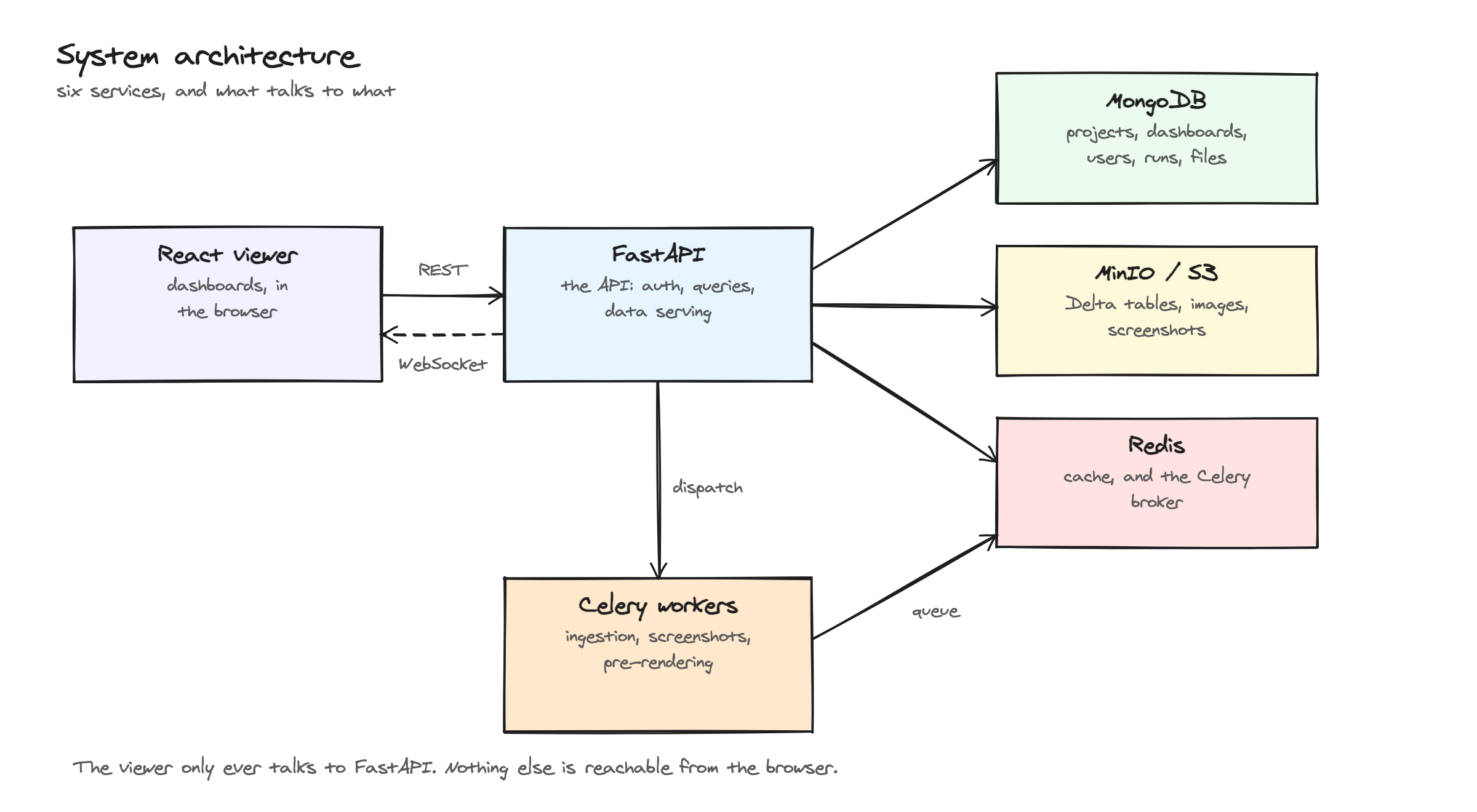
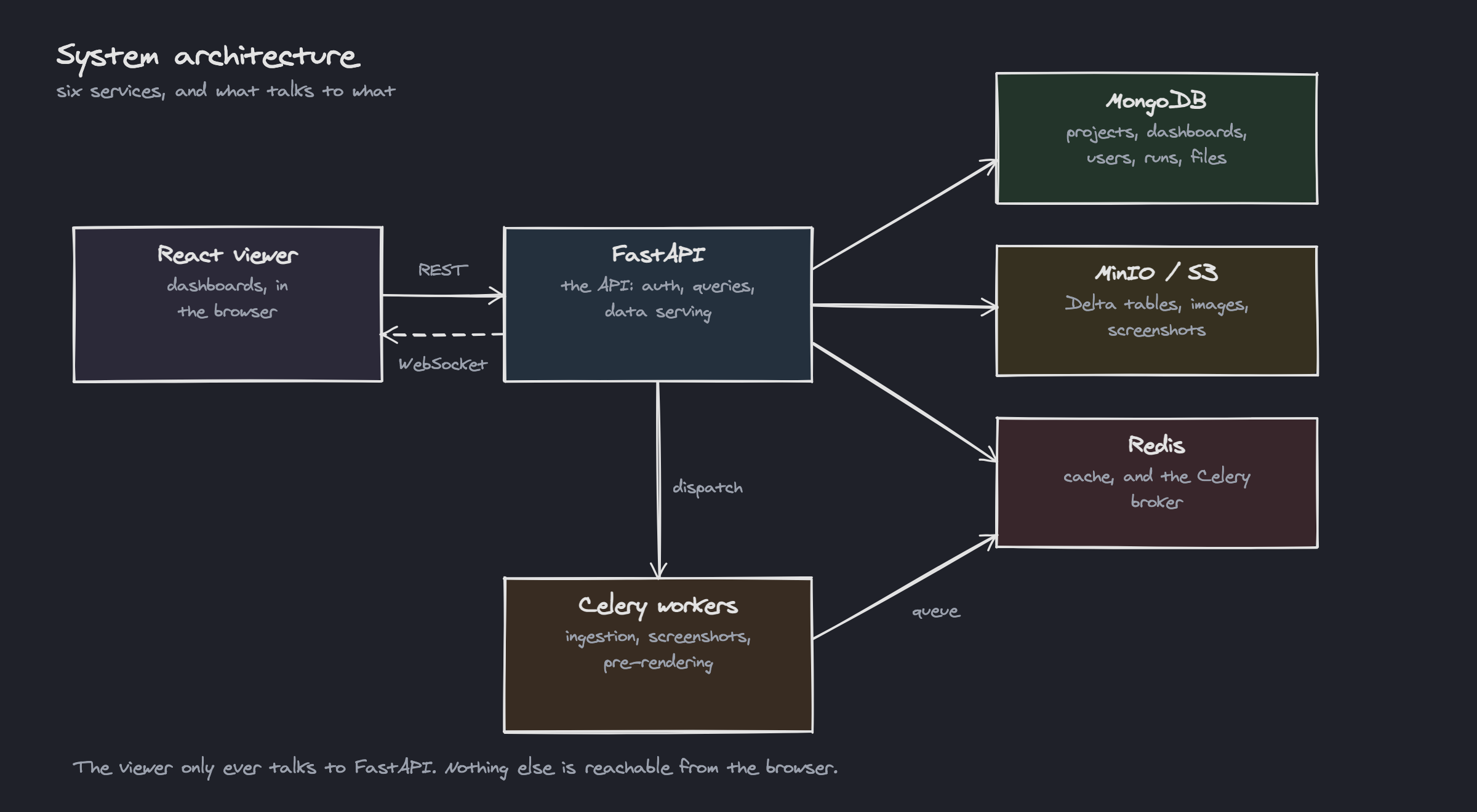
Component Connections:
| Connection | Description |
|---|---|
| React viewer → FastAPI | API calls for data retrieval, authentication, and CRUD operations |
| FastAPI → React viewer | WebSocket push for real-time dashboard refresh (optional, v1.1.4+) |
| FastAPI → MongoDB | Document storage for metadata, users, projects, and configurations |
| FastAPI → S3 | Object storage for Delta tables, files, and dashboard screenshots |
| FastAPI → Redis | Caching, session storage, and task result backend |
| FastAPI → Celery | Dispatch of long-running work: ingestion, screenshots, pre-rendering |
| Celery → Redis | Task queue and results backend for background job processing |
- Frontend (React + Vite + Mantine) - Interactive dashboard interface
- Backend API (FastAPI) - Data processing and business logic
- Database (MongoDB) - Metadata and configuration storage
- Storage (S3: SeaweedFS when bundled, or your own) - Data files and Delta Lake tables
- Cache (Redis) - Caching layer and task queue backend
- Workers (Celery) - Distributed task queue for background processing
Explore the detailed documentation to learn more about each feature and how they work together to provide a comprehensive visualization platform.