Depictio CLI Usage
Note about the CLI
depictio is the command line interface of Depictio. It ingests pipeline results into a Depictio server, from the project configuration to the dashboards, and manages projects, dashboards and backups on that server. depictio-cli is the same command under its former name, kept for existing scripts.
📚 Table of Contents
- Installation
- Quick Reference
- Global Options
- Which server a command uses
- 🚀 Commands
- 📥 Ingest Command
- 👀 Watch Command
- 💻 Local Server Commands
- 📋 Config Commands
- 📊 Data Commands
- 📈 Dashboard Commands
- 📦 Template Commands
- 🗒️ Manifest Commands
- 🗂️ Catalog Commands
- 💾 Backup Commands
- 🔄 Migrate Commands
- 🧑🍳 Recipe Commands
- 🛠️ Common Use Cases
Installation
See the installation guide for the other install options, such as the [multiqc] extra and the container image.
Quick Reference
Running depictio with no command prints a quick start. depictio --help lists the commands grouped by purpose: Get started, Projects and data, Administration and Reference. depictio commands shows every command and subcommand in one table.
| Command | Description | Access Level |
|---|---|---|
local up |
Start a complete Depictio server on this machine | All users |
local open / status / down / wipe / export |
Manage that local server | All users |
ingest <results dir> |
Ingest pipeline results, from validation to dashboards | All users |
watch <results dir> |
Ingest pipeline results, then again whenever they change | All users |
config show |
Show the CLI configuration in use | All users |
config check |
Check the server and its S3 storage, or validate a project file | All users |
config sync |
Validate a project configuration and sync it to the server | All users |
config nextflow |
Print or install the Nextflow trigger | All users |
data scan |
Scan project files | All users |
data process |
Process data collections | All users |
data join |
Run the table joins the project configuration defines | All users |
data push-images |
Upload a directory of images for an image data collection | All users |
data versions |
List the Delta commits of a data collection | All users |
data vacuum |
Remove the Delta files no retained commit needs | All users |
dashboard validate |
Validate a dashboard YAML file | All users |
dashboard import |
Import a dashboard YAML file to the server | All users |
dashboard export |
Export a dashboard to a YAML file | All users |
template export |
Export a project and its dashboards as a template bundle (v1.16.0+) | All users |
template compose |
Compose a template from what the catalog recognises in a results directory (v1.16.0+) | All users |
manifest from-table |
Write a data manifest from a samplesheet or any table (v1.16.0+) | All users |
catalog list / info / preview / gallery |
Browse the tools catalog | All users |
backup create |
Create a backup | Admin only |
backup list |
List available backups | Admin only |
backup validate |
Validate a backup against the models | Admin only |
backup restore |
Restore from a backup | Admin only |
migrate |
Migrate a project to another instance | Admin only |
commands |
Show every command and subcommand | All users |
version |
Show the installed version | All users |
Former command names, still accepted (v1.12.0+)
These names still work, out of the help, and print the name to use now.
| Former name | Now |
|---|---|
depictio run |
depictio ingest |
depictio images push |
depictio data push-images |
depictio local export-compose |
depictio local export |
--CLI-config-path (every command) |
--server |
-c/--config, with --api (dashboard commands) |
--server |
--target-config (migrate) |
--to-server |
--data-root (ingest) |
the results directory, as the argument |
--project-name (ingest) |
--project |
--skip-server-check, --skip-s3-check, --skip-sync, --skip-scan, --skip-process, --skip-join, --skip-dashboard-import |
--skip STEP, see Skipping steps |
-vl/--verbose-level |
--log-level |
Global Options
Global options go before the command: depictio -vv ingest results/.
| Option | Short | Type | Default | Description |
|---|---|---|---|---|
--verbose |
-v |
count | Show logs: -v for INFO, -vv for DEBUG |
|
--log-level |
string |
Show logs from this level up: DEBUG, INFO, WARNING, ERROR or CRITICAL. No -v needed. Formerly -vl/--verbose-level |
||
--version |
-V |
flag |
Show the version and exit | |
--help |
-h |
flag |
Show the help of any command |
Which server a command uses (v1.12.0+)
Every command that talks to a server takes --server:
--server localuses the server thatdepictio local upruns on this machine.--server <file>uses a CLI configuration file, such as theCLI.yamldownloaded from the CLI agents page of a Depictio instance.
Without --server, a command uses, in this order:
- the file that
$DEPICTIO_CLI_CONFIG_PATHnames (the variable also takeslocal); - else
~/.depictio/CLI.yaml, when that file exists; - else the local server.
This is a fixed rule on files and variables: the CLI does not check whether a local server is running, so a command reaches the same server whether one runs or not. When DEPICTIO_CLI_TOKEN or DEPICTIO_CLI_API_BASE_URL is set, step 3 does not apply: the command is meant for a remote server, and it reports the missing ~/.depictio/CLI.yaml instead.
Each command starts by naming the server it reaches and the file it read. When it reaches a server from ~/.depictio/CLI.yaml or $DEPICTIO_CLI_CONFIG_PATH while a local server is running, it says so:
depictio migrate reads from --server and writes to --to-server, which takes the same values. Its default is ~/.depictio/CLI_remote.yaml, with no fallback to the local server.
The options used before --server still work, out of the help, and print a notice: --CLI-config-path on every command, -c/--config with --api on the dashboard commands, and --target-config on migrate.
Environment variables (v1.10.0+)
These variables override parts of a CLI configuration file, so the token can stay out of the file, for example on a CI runner.
| Variable | Effect |
|---|---|
DEPICTIO_CLI_CONFIG_PATH |
The configuration to use when --server is not given: a file, or local |
DEPICTIO_CLI_TOKEN |
Replaces the token from the file |
DEPICTIO_CLI_API_BASE_URL |
Replaces api_base_url from the file |
DEPICTIO_CLI_TOKEN and DEPICTIO_CLI_API_BASE_URL never apply to --server local, whose configuration is complete as depictio local up wrote it. For depictio migrate, they apply to --server only, not to --to-server.
🚀 Commands
📥 Ingest Command
Ingest pipeline results into a Depictio server, from validation to dashboards. Formerly run, which still works and says it is now ingest.
Quick Start:
# The template is detected from the results directory
depictio ingest results/

# After a new run: refresh the project, its dashboards kept as edited in the viewer
depictio ingest results/ --update-config
The template is detected from the run's own provenance, such as the pipeline name and version a Nextflow run records. Pass --template <id> to choose one, or --project-config-path <project.yaml> for a pipeline Depictio ships no template for.
Since v1.16.0, when no bundled template fits a local results directory, the CLI composes one from what the tools catalog recognises in it, the way MultiQC builds its report: an Overview, one tab per pipeline stage and a MultiQC tab, with the files the catalog does not know listed rather than added. See Composed dashboards.
Without a template for the run's exact release, the CLI takes the highest shipped version that is not newer than the run, or the lowest one when the run predates them all. When that template was built for another major release of the pipeline, the CLI warns: outputs move between major releases, so data collections that find no files are skipped and the tabs built on them are dropped.
Here the template is detected from nf-core/taxprofiler results, previewed with --dry-run, then ingested into the local server:
Pipeline Steps:
- ✅ Check that the server answers
- ✅ Check the S3 storage configuration
- ✅ Validate the project configuration, or resolve the template
- ✅ Sync the project configuration to the server
- ✅ Scan the data files
- ✅ Process the data collections, uploading the images of a collection that sets
local_images_path - ✅ Run the table joins the project configuration defines
- ✅ Import the dashboards the project lacks, from the template or from
--dashboard
depictio ingest --help shows the essential options first. The others sit in panels, which the tables below follow.
| Parameter | Type | Default | Description |
|---|---|---|---|
DATA_DIR |
path |
The results directory to ingest, as the argument, or, from v1.16.0, an s3:// prefix holding them (see A run folder on S3). Without --template or --project-config-path, the template is detected from it. Formerly --data-root |
|
--server |
string |
see Which server a command uses | local, or a CLI configuration file. Formerly --CLI-config-path |
--template |
string |
detected, else composed | Template ID. Pin a version (nf-core/ampliseq/2.16.0), or use nf-core/ampliseq/latest, or just nf-core/ampliseq, for the newest shipped version (v1.5.2+). From v1.16.0, also the path of a template directory or YAML file, such as an exported bundle or a composed template. Without it, a local DATA_DIR that no bundled template fits is composed from the catalog (v1.16.0+). Not with --project-config-path |
--project-config-path |
string |
Project YAML, for a pipeline Depictio ships no template for. Not with --template |
|
--update-config |
flag |
false |
Refresh a project that exists, see Refreshing a project. --overwrite is the same option |
--var |
KEY=VALUE |
Template variable, repeatable | |
--dry-run |
flag |
false |
Validate the project configuration locally and list the steps that would run, without contacting the server. From v1.13.2 it also lists how many files each data collection would match. From v1.16.0, with a template and DATA_DIR, it shows what each data collection finds there instead, see Preview before ingesting |
Since v1.6.0, resolving a template also picks up any recipe seed committed beside the data: a source: transformed data collection with a {DATA_ROOT}/{dc_tag}.tsv next to it is scanned from that file instead of re-running its recipe against raw pipeline inputs the bundled projects do not ship. See Templates for full documentation.
🗂️ Project and runs
| Parameter | Type | Default | Description |
|---|---|---|---|
--manifest |
url or path |
A data manifest, as an https:// URL or a local file, in place of DATA_DIR. Needs --template, a manifest-driven one such as generic/manifest-tables/1, whose MANIFEST_URL variable it sets. Not with DATA_DIR (v1.16.0+) |
|
--project |
string |
the template's | Project name. Replaces the name the template gives, or the name in the --project-config-path file. --attach-run and --update-config find the project by it. Formerly --project-name |
--attach-run |
flag |
false |
Add the results directory to an existing project as another run, see Refreshing a project (v1.10.0+) |
--drop-missing-runs |
flag |
false |
On a refresh, remove the runs of a location added with --attach-run that is not on this machine. Without it, such a refresh stops before changing anything. Cannot be combined with --attach-run (v1.13.1+) |
--provenance-file |
path |
Extra recap file (JSON, YAML or two-column key/value TSV) listed in the project's run provenance under User provided. Repeatable (v1.8.3+) | |
--compose |
flag |
false |
Compose the template from what the catalog recognises in DATA_DIR, even when a bundled template fits. Without it, composing is the fallback when none does. Not with --template or --project-config-path. See Composed dashboards (v1.16.0+) |
--include-unknown |
flag |
false |
When composing, also ingest the tabular files the catalog does not recognise. See Files the catalog does not recognise (v1.16.0+) |
--include |
GLOB |
When composing, ingest the unrecognised files matching this glob, relative to DATA_DIR, such as 'stats/*.tsv'. Repeatable. See Adding them (v1.16.0+) |
|
--bind |
TAG=LOCATION |
Point one data collection at where its data is. Repeatable. The scan mode follows the location: a local folder or glob, a local file, an https:// URL, an s3:// prefix or glob. With --template it stands in for DATA_DIR; with --project-config-path the file is left untouched. See Bind a data collection to a location (v1.16.0+) |
📈 Dashboards
| Parameter | Type | Default | Description |
|---|---|---|---|
--dashboard |
path |
Dashboard YAML to import instead of the template's own. Repeatable. Since v1.10.0 it also works without a template | |
--dashboard-name |
string |
Title of the main dashboard. Without it, a new dashboard takes the title in its YAML and a refresh keeps the current one, even if renamed in the viewer. With it, a refresh renames the main dashboard and leaves its contents as they are. Tabs keep their titles | |
--reset-dashboards |
flag |
false |
Import the template's dashboards (or --dashboard's) over the ones the project has: the layout and components edited in the viewer are lost, the titles are kept. Implies --update-config. With --project-config-path, it needs --dashboard or --template, since a project file brings no dashboards of its own |
⚙️ Scope and steps
| Parameter | Type | Default | Description |
|---|---|---|---|
--workflow-name |
string |
Scan and process only this workflow (its tag) | |
--data-collection-tag |
string |
Scan and process only this data collection | |
--skip |
STEP |
Steps to skip, see Skipping steps | |
--continue-on-error |
flag |
false |
Carry on when a step fails. The command still exits with code 1 at the end |
--sync-changed |
flag |
false |
Re-upload only the files whose size or modification time moved since the last scan. Narrower than --update-config, which re-uploads every file |
--write-mode |
string |
overwrite |
How step 6 writes a table. overwrite rewrites it whole. replace-runs partitions it by run and rewrites only the runs in this batch, leaving the others untouched. See Data versions |
--incremental-write |
flag |
false |
With --write-mode replace-runs, rewrite only the runs that changed instead of rebuilding the whole table. Falls back to a full rebuild whenever that cannot be done safely (run removed, table not partitioned by run, column type changed) |
--skip-unchanged |
flag |
false |
Leave a data collection's table untouched when the scan found no new, changed or removed file for it. Off by default, so that ingesting again always rebuilds a project that drifted |
--repartition |
flag |
false |
Let --write-mode replace-runs partition by run a table that is not yet. This rewrites every row, so it is never done implicitly, and never by the watcher |
Since v1.15.0 the scan honours each data collection's max_depth and ignore, and
prints a warning naming the collections that set them, since it may now register
fewer files than before. ingest also takes --legacy-scan-depth, left out of its help, to ignore
them for one more release. See Limiting a recursive scan.
🔑 Automation
| Parameter | Type | Default | Description |
|---|---|---|---|
--pipeline-id |
string |
Which pipeline produced this data, as <name>/<version>. Resolves a bundled template when neither --template nor --project-config-path is given, and is ignored otherwise, so an explicit choice always wins. The Nextflow trigger fills it from the pipeline's manifest block (v1.10.0+) |
|
--result-json |
path |
Write how the ingestion ended to this file as JSON, for scripts: its status, the project and its dashboards with their ids and links. See Result file (v1.16.0+) | |
--triggered-by |
string |
manual |
What invoked this ingestion, recorded on the project and shown as a badge in its ingestion report (v1.10.0+) |
--user |
string |
Email of a user to provision and run as. Requires --provisioning-key (v1.1.3+) |
|
--provisioning-key |
string |
Shared provisioning secret. Reads DEPICTIO_AUTH_PROVISIONING_API_KEY from the environment if the flag is omitted |
With --user, the CLI runs a pipeline on behalf of a user who has no account yet: it creates-or-gets the account, runs the whole ingestion as them, and prints a passwordless login link straight to the dashboard it imported.
depictio ingest /path/to/results \
  --template nf-core/ampliseq/latest \
  --user alice@example.org \
  --provisioning-key "$DEPICTIO_AUTH_PROVISIONING_API_KEY"
The key is a server-side secret: the instance must be started with the
matching DEPICTIO_AUTH_PROVISIONING_API_KEY, otherwise the provisioning
endpoints stay disabled and the run is rejected. The CLI redacts the value
from its own logs. See
Pipeline provisioning.
⚡ Performance and debugging
| Parameter | Type | Default | Description |
|---|---|---|---|
--streaming |
flag |
false |
Stream the Delta write instead of materialising the whole table in memory. Lowers peak RSS on large ingests. Experimental, falls back to the standard write on any failure (v1.3.0+) |
--preview-recipes |
flag |
false |
Show recipe input sources and transformed output before writing to Delta Lake |
--rich-tables |
flag |
false |
Show a detailed summary of the run |
--concurrency |
int |
4 |
Parallel HTTP requests for file uploads and cleanup deletes |
--upload-chunk-size |
int |
1000 |
Files per /files/upsert_batch request |
--state-cache / --no-state-cache |
flag |
--state-cache |
Skip the runs whose file tree is unchanged since the last successful scan, from a local cache. Only applies when rescanning |
--async-upsert |
flag |
false |
Ask the server to profile each written table in the background, and poll until it finishes, instead of holding one long request open. A server without offloading enabled ignores it and answers inline. See Offloading the table profile |
| Variable | Default | Description |
|---|---|---|
DEPICTIO_INGEST_STREAMING_WRITE |
unset | Same as --streaming, as an environment toggle. |
DEPICTIO_INGEST_DC_WORKERS |
1 |
Ingest this many data collections concurrently. Clamped to 4 and to the number of data collections, so an over-large value degrades to the cap. An unparseable value logs a warning and falls back to sequential. |
DEPICTIO_INGEST_JOB_TIMEOUT_SECONDS |
3600 |
With --async-upsert, the longest wait for one server job, in seconds. 0 waits without limit. (v1.15.0+) |
Skipping steps
--skip takes step names, comma-separated or repeated: server-check, s3-check, sync, scan, process, join and dashboards. An unknown name is a usage error that lists the known ones, so a typo never runs the step it meant to skip. Skipping process skips the image upload too, and --skip dashboards cannot be combined with --reset-dashboards.
--skip replaces seven flags, which still work and print a notice: --skip-server-check, --skip-s3-check, --skip-sync, --skip-scan, --skip-process, --skip-join and --skip-dashboard-import (now --skip dashboards).
Refreshing a project (v1.12.0+)
If the project already exists, ingest changes nothing, says how to go on, and exits with code 2. Say which one you meant:
| You want | Option | What happens |
|---|---|---|
| To refresh the project with new data | --update-config |
The configuration is updated, every run is rescanned and the tables are rebuilt. The project's dashboards are kept as they are, edits made in the viewer included, and the template's dashboards it lacks are added |
| One project, many runs | --attach-run |
The results directory is added to the project as another run, and the tables are rebuilt from every run. The dashboards are kept, as with --update-config |
| To start the dashboards over | --reset-dashboards |
The template's dashboards (or --dashboard's) are imported over the project's: the layout and components edited in the viewer are lost, the titles are kept. Implies --update-config |
--overwrite is the same option as --update-config. --rescan-folders and --sync-files, which used to go with it, are part of every refresh now.
A project not on the server yet is created by --update-config, so a script can pass it every time.
Here a third run is added to a project ingested from a project YAML: a dry run, then the refresh, which keeps its dashboard:
Dashboards. Dashboards are matched by their origin, the template file or the --dashboard file they came from, not by their title. Renaming a dashboard in the viewer no longer makes the next refresh import a second copy, and the new title is kept. The summary at the end of the run lists each dashboard as created, kept or replaced, with its link.
A --dashboard file inside the template or the project file's folder is matched by its path there. One from anywhere else is matched by its absolute path (v1.13.1+, by its file name before), so moving that file makes the next refresh create a new dashboard.
Tabs (v1.13.1+). A multi-tab dashboard that a refresh keeps gains the template tabs it lacks, after its existing tabs. The summary says how many, as in kept (2 tabs added). A tab deleted in the viewer comes back on the next refresh.
What a refresh does not keep yet
A kept dashboard keeps its layout, components and title, but a refresh still resets the subtitle, the icons and the tab order edited in the viewer.
Run locations (v1.13.1+). --attach-run records its directory on the server. A refresh keeps the runs of the results directory you give, or of the locations the project file lists, plus the runs of those recorded directories. The runs of any other location are removed, with a warning for each location.
So a results directory that moved replaces the old one, and a location removed from the project file is removed from the project.
Attaching a directory that is already one of the project's locations records it, so a later refresh keeps it. A project ingested before attached runs were recorded has no record: a refresh removes its extra locations, unless you attach them again first. In v1.12.0, a refresh kept every location the project had.
Missing locations (v1.13.1+). If a location added with --attach-run is not on the machine that runs the refresh, the refresh stops with exit code 1 before it changes anything. Pass --drop-missing-runs to remove those runs from the project on purpose.
Flat workflows (v1.13.1+). A workflow whose data_location.structure is flat names each run after its directory. Two of its locations whose directories have the same name would be one run, so they are refused: rename one of the directories, or ingest it into another project.
Single-file collections. A data collection with scan.mode: single (a samplesheet, a metadata table, a tree) keeps reading the run that created the project.
Result file (v1.16.0+)
--result-json FILE writes how the ingestion ended, for a script that runs depictio ingest and then links to what it made:
{
  "status": "success",
  "project": {
    "name": "results (run42)",
    "id": "6845c5892bf43fee63e14bab",
    "url": "https://depictio.example.org/projects/6845c5892bf43fee63e14bab"
  },
  "dashboards": [
    {
      "title": "results (run42)",
      "id": "6845c5a12bf43fee63e14bb0",
      "url": "https://depictio.example.org/dashboard/6845c5a12bf43fee63e14bb0",
      "status": "created"
    }
  ],
  "template_id": "composed/results",
  "composed": {
    "template_dir": "/home/me/.depictio/composed/results-3f2a9c41d0b7",
    "tabs": ["Overview", "Quality control", "Taxonomy & diversity", "MultiQC"],
    "unrecognised": 4
  }
}
| Field | Content |
|---|---|
status |
success when every step completed, partial when a step failed under --continue-on-error, exists when the project exists and neither --update-config nor --attach-run was given (the command then exits with code 2) |
project |
name, id and url. With exists, also locations, the run directories the project already has, which tell a second ingestion of the same directory from another run that got the same project name |
dashboards |
In import order, so the first is the template's main dashboard: title, id, url, and status, what the import did to it (created, kept, replaced, or kept (2 tabs added)). With exists, the project's dashboards, without status |
template_id |
The template used, null with --project-config-path |
composed |
Only for a composed template: template_dir, its folder, tabs, and unrecognised, how many proposals for files the catalog does not recognise were left out |
A url is null when the server does not report its viewer's address, and on a dry run, which does not contact the server. A run that stops on a failed step without --continue-on-error writes no file. Writing the file never fails the ingestion: a path that cannot be written prints a warning.
Exit codes
| Code | Meaning |
|---|---|
0 |
Every step completed |
1 |
A step failed, including under --continue-on-error, the CLI configuration could not be used, a refresh stopped on a missing run location, or, from v1.16.0, the catalog recognises nothing in the DATA_DIR it was to compose from |
2 |
Nothing to do as asked: no template detected and none given (from v1.16.0, for an s3:// DATA_DIR or none, since a local one is composed), the project already exists without --update-config or --attach-run, the project --attach-run names does not exist, or a usage error |
Here the first step fails, as no server answers, and its message says how to start one:
Examples:
# Validate the configuration and preview the scan, without contacting the server
depictio ingest /data/my_ampliseq_run --dry-run
From v1.13.2 the dry run prints a table of the files each data collection would match,
counted by the scanner itself. A derived collection shows n/a (no scan), a remote one
not counted (remote), and a collection that would match nothing is named in a warning.
From v1.16.0, with a template and DATA_DIR, the dry run prints what each data collection
finds under DATA_DIR instead, recipe collections included: see
Preview before ingesting.
👀 Watch Command
depictio ingest on a loop: ingest the results directory, then again whenever its files
change. Each cycle writes new data versions of
the tables it touches.
# Rewrite only the runs that changed, on each cycle
depictio watch results/ --write-mode replace-runs --incremental-write
The project is chosen as ingest chooses it, from DATA_DIR, --template or
--project-config-path. The first cycle runs at once and refreshes the project as
ingest --update-config does, which brings it up to date with whatever changed while
nothing watched. The later cycles rescan and rewrite what moved. No cycle checks the
server and S3 or imports dashboards: run depictio ingest once first if the project
should have its dashboards.
Here a project ingested from two runs with --write-mode replace-runs is watched. A
third run lands in data/, a cycle ingests it on its own, and Ctrl-C stops the watcher
(the waits are shortened):
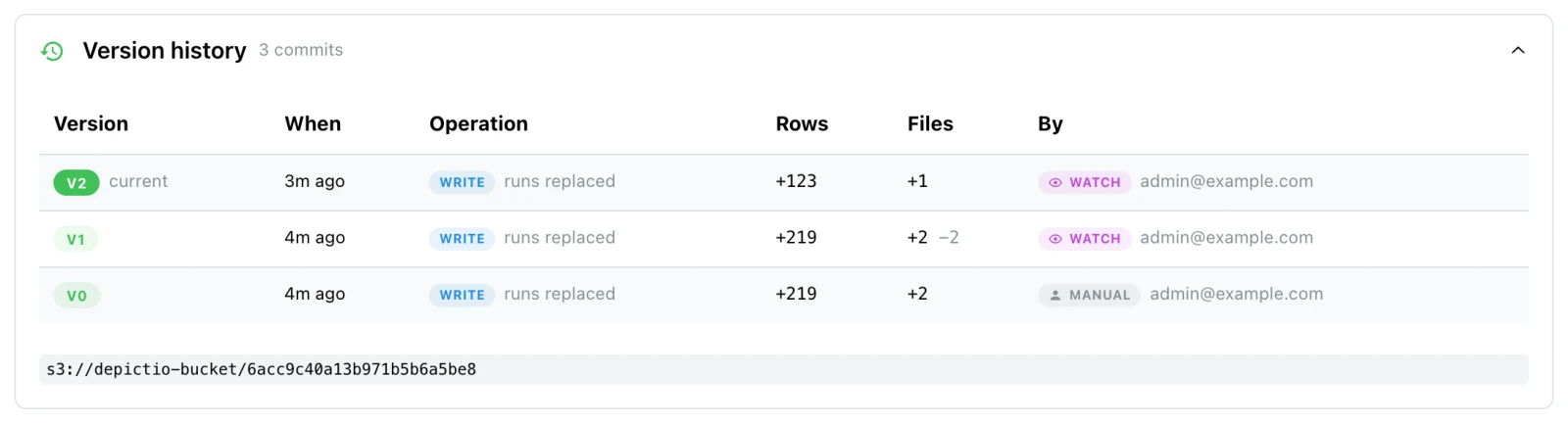
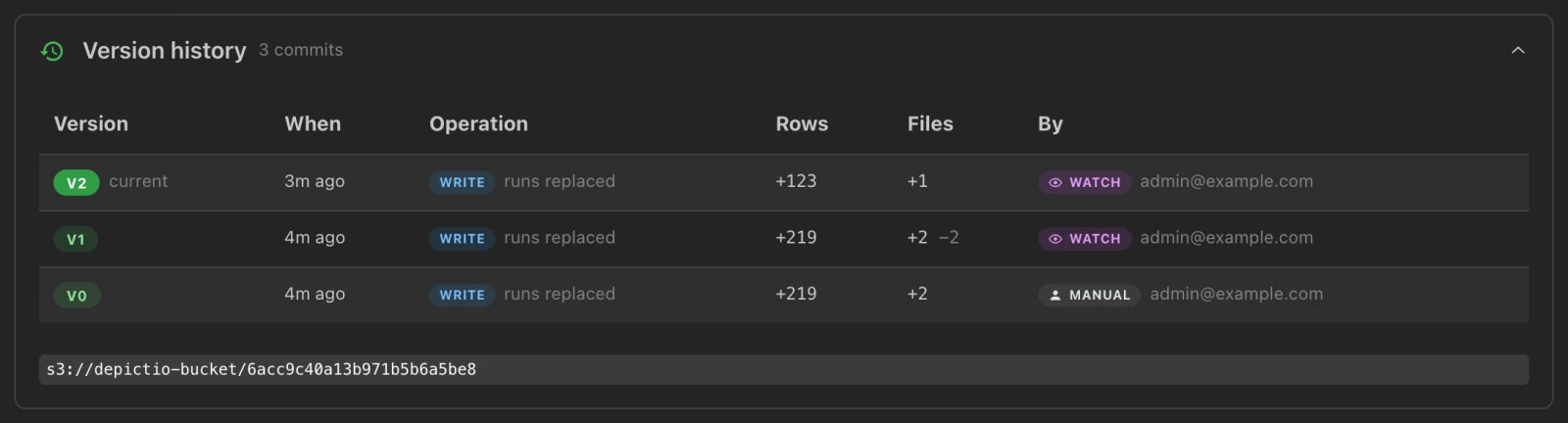
physical_features → Version history, after the watch above. V0 is the depictio ingest. V1 is the watcher's first cycle, which rewrites both runs. V2 is the cycle that ingested run_3_gentoo: runs replaced, 123 rows and one file added, the other runs left as they were.| Parameter | Type | Default | Description |
|---|---|---|---|
DATA_DIR |
path |
Directory of the pipeline results to watch. Without --template or --project-config-path, the template is detected from it. From v1.16.0, a local directory that no bundled template fits is composed from the catalog at every cycle, as ingest does without --include-unknown or --include |
|
--server |
string |
see Which server a command uses | local, or a CLI configuration file |
--template |
string |
detected, else composed | Template to build the project from, as for ingest. Not with --project-config-path |
--project-config-path |
string |
Project YAML, for a pipeline Depictio ships no template for. Not with --template |
|
--project |
string |
Project name. Replaces the name the template gives, or the name in the project file |
|
--var |
KEY=VALUE |
Template variable, repeatable | |
--mode |
string |
incremental |
incremental re-uploads only the files that changed. full re-uploads and rewrites everything on every cycle |
--full-every |
int |
Run a full cycle every N incremental ones | |
--backend |
string |
auto |
native (filesystem events only, with the watch extra), polling (a periodic walk), both, or auto: both on local disk, polling on a network filesystem, where events do not see writes made from another host |
--interval |
float |
300 |
Seconds between polling walks, also the backstop for lost events |
--debounce |
float |
30 |
Seconds of quiet before a cycle starts |
--max-delay |
float |
300 |
Ceiling on the debounce, so a tree written continuously still gets ingested |
--settle |
float |
5 |
Seconds a file must keep the same size and modification time before it is ingested |
--write-mode |
string |
overwrite |
How each cycle writes a table, as for ingest: overwrite or replace-runs |
--incremental-write |
flag |
false |
With --write-mode replace-runs, rewrite only the runs that changed. Ignored, with a warning, with overwrite |
--drop-missing-runs |
flag |
false |
Remove the runs of a location added with ingest --attach-run that is not on this host. Without it, such a project stops the first cycle |
--concurrency |
int |
4 |
Parallel HTTP requests during each cycle |
--once |
flag |
false |
Run a single cycle and exit with its status |
--max-runs |
int |
Stop after this many cycles, the first included | |
--dry-run |
flag |
false |
Report each cycle's changes without writing to the server |
With --mode incremental and the default --write-mode overwrite, the watcher warns at
start-up: a collection whose files moved still has its whole table rewritten.
--write-mode replace-runs --incremental-write rewrites only the runs that changed. An
incremental cycle leaves alone the collections whose files did not move, as long as the
previous cycle succeeded; on the first cycle, after a failure, and on every full cycle,
every table is rebuilt.
Filesystem events need the watch extra: pip install "depictio[watch]", or
uv tool install "depictio[local,watch]" next to a local server. Without it the watcher
silently polls alone, so a new file waits for the next walk, up to --interval (5
minutes by default), while its Watching … backend banner still names both or
native.
auto picks polling alone as soon as one watched location is on NFS, SMB/CIFS, Lustre,
GPFS, BeeGFS, GlusterFS, Ceph, AFS, 9p or a FUSE mount. A location of the project that
does not exist on this machine is skipped with a warning, and the watcher stops if none is
left.
Remote data (v1.16.0+). A watcher watches folders on its own machine.
An s3:// location counts as one that does not exist: with an s3:// DATA_DIR, the
first cycle ingests it as ingest would, then the watcher stops with No existing data
locations to watch in this project. and exit code 1, unless --once or --max-runs 1
asked for that single cycle. watch takes neither --bind nor --manifest. To bring
remote data up to date, refresh it from the server, see
Refreshing the data.
Stopping. Ctrl-C or SIGTERM lets the cycle in progress finish, then exits, so the watcher is safe to run under systemd or as a container.
One per project. A watcher holds a lock under ~/.depictio/state/, per server and
project, next to the scan-state cache (DEPICTIO_CLI_STATE_DIR moves both).
depictio ingest takes the same lock before its first write, so a second watcher or
ingestion on the same project stops at once with an error that names the lock file.
In the admin panel. A watcher registers with the server, sends a heartbeat every
minute, and asks every 5 seconds whether someone pressed Run now on its card in the
Watchers pane. It reaches out to the
server and never the reverse, so it works from a machine the server cannot reach, such
as an HPC login node. Its runs show Watch, or UI for one started by Run now,
as their trigger. On a server with DEPICTIO_MONITORING_ENABLED=false, the watcher
carries on without reporting.
Running a watcher as a service
The depictio repository ships two ways to keep a watcher running, both configured through environment variables:
deploy/depictio-watch@.service, a systemd template unit: one instance per project, each reading/etc/depictio/<instance>.env;deploy/docker-compose.watcher.yaml, a container running thedepictio-cliimage, configured by a.envnext to it (start fromdeploy/.env.example).
sudo cp deploy/depictio-watch@.service /etc/systemd/system/
sudo systemctl edit depictio-watch@.service    # set User=, the account it runs as
sudo install -d /etc/depictio
sudoedit /etc/depictio/myproject.env
sudo systemctl enable --now depictio-watch@myproject
journalctl -u depictio-watch@myproject -f
| Variable | systemd | Docker Compose |
|---|---|---|
DEPICTIO_CLI_CONFIG |
Required: the CLI configuration | Required |
DEPICTIO_PROJECT_CONFIG |
Required: the project YAML | Required |
DEPICTIO_DATA_ROOT |
Required: the data root on the host, mounted read-only | |
DEPICTIO_DATA_ROOT_MOUNT |
/data. Must match the paths in the project YAML |
|
DEPICTIO_WATCH_MODE |
incremental |
incremental |
DEPICTIO_WATCH_WRITE_MODE |
overwrite |
replace-runs |
DEPICTIO_WATCH_INCREMENTAL_WRITE |
0. 1 adds --incremental-write |
Not a variable: uncomment --incremental-write in the compose file |
DEPICTIO_WATCH_BACKEND |
auto |
polling, since file events do not cross a bind mount reliably |
DEPICTIO_WATCH_INTERVAL |
300 |
300 |
DEPICTIO_WATCH_DEBOUNCE |
30 |
30 |
DEPICTIO_WATCH_SETTLE |
5 |
5 |
DEPICTIO_CLI_BIN |
/usr/local/bin/depictio |
|
DEPICTIO_CLI_IMAGE |
ghcr.io/depictio/depictio-cli:latest |
|
WATCHER_NAME |
depictio-watcher, the container name |
Both give a stopping watcher 15 minutes to finish its cycle. The unit keeps the lock and
the scan-state cache in /var/lib/depictio-watch, and the compose file in a named volume,
so a restart does not rescan everything.
💻 Local Server Commands (v1.12.0+)
depictio local runs a complete Depictio server on this machine, without Docker, and manages it: up, open, down, status, wipe and export. It manages the server only: data goes in with depictio ingest, which reaches the local server with --server local, or by default when no other server is configured (see Which server a command uses).
See Python package installation for every command and option.
📋 Config Commands
Command Group: depictio config
All commands in this section are part of the config command family. Use them to check the CLI setup, sync project configurations, and hook Depictio into Nextflow.
config show
Show the CLI configuration in use.
| Parameter | Type | Default | Description |
|---|---|---|---|
--server |
string |
see above | local, or a CLI configuration file |
--project-name |
string |
Also show this project's metadata as registered on the server |
config check
Run the preflight checks. Without --project-config-path, it checks that the server answers and that its S3 storage is reachable. With --project-config-path, it validates that project configuration, which also runs the S3 storage check it depends on.
| Parameter | Type | Default | Description |
|---|---|---|---|
--server |
string |
see above | local, or a CLI configuration file |
--project-config-path |
string |
Project configuration file to validate |
# The server and its storage
depictio config check

# A project configuration
depictio config check --project-config-path ./config.yaml
config sync
Validate a project configuration and sync it to the server.
| Parameter | Type | Default | Description |
|---|---|---|---|
--server |
string |
see above | local, or a CLI configuration file |
--project-config-path |
string |
Project configuration file | |
--update |
boolean |
false |
Update the project configuration on the server |
config nextflow (v1.10.0+)
Print or install the workflow.onComplete snippet that lets a Nextflow pipeline
ingest its own results when it finishes. Full guide:
Nextflow trigger.
| Parameter | Type | Default | Description |
|---|---|---|---|
--print |
flag |
false |
Write the snippet's contents to stdout instead of its path |
--install |
flag |
false |
Enable the trigger for every pipeline on this machine, once |
--uninstall |
flag |
false |
Undo --install, leaving any other Nextflow settings alone |
--default-enabled / --default-disabled |
flag |
--default-enabled |
With --install: whether a pipeline that sets no --depictio_enabled triggers Depictio, or stays opt-in |
With no flag it prints the path of the bundled snippet, which is what makes the
$(...) form below work.
# one pipeline, one run
nextflow run nf-core/ampliseq -profile docker --outdir results \
  -c $(depictio config nextflow)

# every pipeline on this machine, once
depictio config nextflow --install
nextflow run nf-core/ampliseq -profile docker --outdir results
📊 Data Commands
Command Group: depictio data
All commands in this section are part of the data command family. They run one ingestion step at a time, which depictio ingest otherwise runs in order.
data scan
Scan the project's data folders for the files its data collections match, and register them on the server. The project configuration must already be synced.
| Parameter | Type | Default | Description |
|---|---|---|---|
--server |
string |
see above | local, or a CLI configuration file |
--project-config-path |
string |
Project configuration file | |
--workflow-name |
string |
Workflow to scan | |
--data-collection-tag |
string |
Data collection to scan | |
--rescan-folders |
boolean |
false |
Reprocess all runs for the data collection |
--sync-files |
boolean |
false |
Update files for the data collection |
--sync-changed |
boolean |
false |
Re-upload only the files whose metadata moved since the last scan. Narrower than --sync-files, which re-uploads every registered file |
--dry-run |
boolean |
false |
Report what would be registered or removed, without writing to the server |
--legacy-scan-depth |
boolean |
false |
Ignore each data collection's scan max_depth and ignore, as releases before v1.15.0 did. Deprecated, and to be removed. See Limiting a recursive scan |
--state-cache / --no-state-cache |
boolean |
--state-cache |
Skip the runs whose file tree is unchanged since the last successful scan, from a local cache. Only applies when rescanning |
--concurrency |
int |
4 |
Parallel HTTP requests for file uploads and cleanup deletes |
--upload-chunk-size |
int |
1000 |
Files per /files/upsert_batch request |
--rich-tables |
boolean |
false |
Display rich tables in the output |
data process
Build each data collection's Delta table from the files depictio data scan found.
| Parameter | Type | Default | Description |
|---|---|---|---|
--server |
string |
see above | local, or a CLI configuration file |
--project-config-path |
string |
Project configuration file | |
--overwrite |
boolean |
false |
Overwrite existing tables |
--write-mode |
string |
overwrite |
overwrite rewrites the whole table. replace-runs partitions it by run and rewrites only the runs in this batch, leaving the others untouched |
--repartition |
boolean |
false |
Let --write-mode replace-runs partition by run a table that is not yet. This rewrites every row |
--async-upsert |
boolean |
false |
Ask the server to profile the written table in the background and poll until it finishes. Servers without offloading enabled ignore it. See Offloading the table profile |
--rich-tables |
boolean |
false |
Display rich tables in the output |
--preview-recipes |
boolean |
false |
Show recipe input sources and transformed output without writing to Delta Lake |
data join
Run the table joins defined in the project configuration, on the client side, and optionally persist the results as Delta tables.
Links vs Joins
For interactive cross-DC filtering, use links (configured in YAML, resolved at runtime). Use joins only when you need a pre-computed combined dataset stored as a Delta table. See Cross-DC Filtering.
| Parameter | Short | Type | Default | Description |
|---|---|---|---|---|
--server |
string |
see above | local, or a CLI configuration file |
|
--project-config-path |
string |
Project configuration file | ||
--join-name |
-j |
string |
Join to process (all when not given) | |
--preview |
-p |
boolean |
false |
Preview join results without persisting |
--overwrite |
boolean |
false |
Overwrite existing joined tables | |
--no-auto-process |
boolean |
false |
Do not process missing source data collections |
# Preview all joins
depictio data join --project-config-path ./config.yaml --preview

# Execute a specific join
depictio data join --project-config-path ./config.yaml --join-name my_join
data push-images (v1.12.0+)
Upload a directory of images to S3 storage, for an image data collection. Formerly images push, which still works. depictio ingest does this itself for a collection that sets local_images_path, and checks the upload.
The directory structure is kept, relative to the source directory, and images already in storage are skipped unless --overwrite. Upload to the collection's s3_base_folder: its image_column paths are relative to it.
| Parameter | Short | Type | Default | Description |
|---|---|---|---|---|
source_directory |
path |
required | Directory holding the images | |
s3_destination |
string |
required | S3 destination, e.g. s3://bucket/path/to/images/ |
|
--recursive / --no-recursive |
-r / -R |
flag |
--recursive |
Include subdirectories |
--extensions |
-e |
string |
Comma-separated extensions to upload, e.g. .png,.jpg |
|
--dry-run |
-n |
flag |
false |
Show what would be uploaded |
--overwrite |
flag |
false |
Overwrite existing files in S3 | |
--concurrency |
-c |
int |
8 |
Number of parallel uploads |
--server |
string |
see above | local, or a CLI configuration file |
data versions
List the Delta commits of a data collection, with what Depictio recorded on each. The same history is on the project page, see Dataset history.
| Parameter | Type | Default | Description |
|---|---|---|---|
data_collection_tag |
string |
required | Data collection whose Delta history to list |
--server |
string |
see above | local, or a CLI configuration file |
--project-config-path |
string |
Project configuration file | |
--limit |
int |
20 |
Number of commits to show |
--json |
boolean |
false |
Emit machine-readable JSON |
Each row gives the version, its timestamp and Delta operation, then what Depictio
recorded: the write_mode, the trigger, rows_added, files_added, the number of
runs, and the ingestion_run that wrote it. The command reads the table's commit log on
S3 directly, with the storage settings of the CLI configuration.
Depictio stores that record on the commit itself, under depictio. keys:
data_collection_id, data_collection_tag and write_mode always, and when known
ingestion_run_id, project_id, trigger, cli_version, user_email, file_count,
row_count, run_count and run_tags (the first 50).
data vacuum
Remove the Delta files that no retained commit needs. Every ingestion leaves the previous commit's files behind, so a table's footprint on S3 grows until it is vacuumed, and nothing in Depictio vacuums on its own.
| Parameter | Type | Default | Description |
|---|---|---|---|
data_collection_tag |
string |
required | Data collection whose stale Delta files to remove |
--server |
string |
see above | local, or a CLI configuration file |
--project-config-path |
string |
Project configuration file | |
--retention-hours |
int |
168 |
Keep the files that commits newer than this need. Going below the default breaks readers that are mid-query |
--apply |
boolean |
false |
Delete. Without it, the command only reports what it would remove |
Vacuumed commits can no longer be read
A commit older than --retention-hours loses the files it needs. A
dashboard version pinned to it, a preview of
that version, and At version on the project page then have nothing to read.
# See what would go, then delete it
depictio data vacuum my_table --project-config-path ./config.yaml
depictio data vacuum my_table --project-config-path ./config.yaml --apply
📈 Dashboard Commands
Command Group: depictio dashboard
All commands in this section are part of the dashboard command family. Use them to manage dashboard YAML files: validate, import to server, and export from server.
Manage dashboard YAML files for the Dashboard YAML Management feature. Each command reaches the server --server names, or the default one. --server replaces the former -c/--config and --api options, which still work.
| Command | Description | Server Required |
|---|---|---|
validate |
Validate a YAML file | No, used when configured |
import |
Import YAML to server | Yes (unless --dry-run) |
export |
Export dashboard to YAML | Yes |
dashboard validate
Validate a dashboard YAML file in two passes: schema and domain constraints (always), then the columns and types against the server's data collections. Without --server, the second pass uses the default server when one is configured, reports its findings as warnings only, and is skipped when no server is configured.
| Parameter | Type | Default | Description |
|---|---|---|---|
yaml_file |
path |
required | Path to YAML dashboard file |
--server |
string |
see above | local, or a CLI configuration file: the server to check the columns against |
--offline |
boolean |
false |
Skip the server schema check |
For detailed logs, put -v before the command: depictio -v dashboard validate ....
# Schema + domain, then the default server if one is configured
depictio dashboard validate my_dashboard.yaml

# Full validation against the local server
depictio dashboard validate my_dashboard.yaml --server local

# Schema + domain only
depictio dashboard validate my_dashboard.yaml --offline
Example Output (Success):
Validating: my_dashboard.yaml
  Pass 1: schema + domain constraints
  ✓ Schema + domain OK
  Pass 2: server schema validation
  ✓ Server schema OK

✓ Validation passed
Example Output (Failure, per-component error table):
Validating: my_dashboard.yaml
  Pass 1: schema + domain constraints
✗ Schema/domain validation failed
                         Validation Errors
┏━━━━━━━━━━━━━━━┳━━━━━━━━━━━┳━━━━━━━━━━━━━━━━━━━━━━━━━━━━━━━━━━━━━━━━━━━━━━━━━━━━┓
┃ Component     ┃ Field     ┃ Message                                            ┃
┡━━━━━━━━━━━━━━━╇━━━━━━━━━━━╇━━━━━━━━━━━━━━━━━━━━━━━━━━━━━━━━━━━━━━━━━━━━━━━━━━━━┩
│ pie-chart     │ -         │ Invalid visu_type 'pie' for mode='ui'.             │
│               │           │ Valid values: scatter, line, bar, box, histogram   │
└───────────────┴───────────┴────────────────────────────────────────────────────┘
dashboard import
Import a dashboard YAML file to the server. The project is determined from the --project option, else from the YAML project_tag field.
| Parameter | Type | Default | Description |
|---|---|---|---|
yaml_file |
path |
required | Path to YAML dashboard file |
--server |
string |
see above | local, or a CLI configuration file |
--project / -p |
string |
Project ID (overrides project_tag in YAML) |
|
--overwrite |
boolean |
false |
Update an existing dashboard with the same title |
--dry-run |
boolean |
false |
Validate schema + domain only, don't import (no server needed) |
--offline |
boolean |
false |
Skip server schema check (column names not verified) |
# Validate locally without server (no config needed)
depictio dashboard import dashboard.yaml --dry-run

# Import to the default server
depictio dashboard import dashboard.yaml

# Import to the server a configuration file describes
depictio dashboard import dashboard.yaml --server ~/.depictio/admin_config.yaml

# Update existing dashboard with same title
depictio dashboard import dashboard.yaml --server local --overwrite

# Override project from YAML
depictio dashboard import dashboard.yaml --project 646b0f3c1e4a2d7f8e5b8c9a
Example Output:
Validating: dashboard.yaml
  Checks: schema + domain constraints
✓ Validation passed
  Title: Iris Dashboard Demo
  Components: 7
  Project: Iris_Dataset_Project (from YAML project_tag)

• Server: http://127.0.0.1:8058 (local server, as no ~/.depictio/CLI.yaml exists; configuration ~/.depictio/local/cli/admin_config.yaml)

Validating column names against server schema...
✓ Server schema OK

Importing dashboard (project: Iris_Dataset_Project)...
✓ Dashboard imported successfully!
  Dashboard ID: 6824cb3b89d2b72169309737
  Title: Iris Dashboard Demo
  Project ID: 650a1b2c3d4e5f6a7b8c9d0e

View at: http://127.0.0.1:8058/dashboard/6824cb3b89d2b72169309737
dashboard export
Export a dashboard from the server to a YAML file.
| Parameter | Type | Default | Description |
|---|---|---|---|
dashboard_id |
string |
required | Dashboard ID to export |
--server |
string |
see above | local, or a CLI configuration file |
--output / -o |
path |
dashboard.yaml |
Output file path |
# Export to default file
depictio dashboard export 6824cb3b89d2b72169309737

# Export to specific file
depictio dashboard export 6824cb3b89d2b72169309737 --server local -o iris_dashboard.yaml
Example Output:
• Server: http://127.0.0.1:8058 (local server, as no ~/.depictio/CLI.yaml exists; configuration ~/.depictio/local/cli/admin_config.yaml)
Exporting dashboard 6824cb3b89d2b72169309737...
✓ Dashboard exported to: iris_dashboard.yaml
For more information about dashboard YAML format and workflows, see Dashboard YAML Management.
📦 Template Commands (v1.16.0+)
Command Group: depictio template
The inverse of depictio ingest --template: freeze an existing project and its dashboards into a bundle someone else can run on their own data. See Export a project as a template. Or compose one from what the catalog recognises in a results directory.
template export
Export a project and its dashboards as a template bundle. The server builds
the bundle (runtime fields stripped, data locations re-parameterised,
dashboards exported by tag, round-trip checked); the CLI unpacks the returned
archive into a <template-id>/ directory. The command reaches the server
--server names, or the default one.
| Parameter | Type | Default | Description |
|---|---|---|---|
project_id |
string |
required | Project ID to export |
--template-id / -t |
string |
required | Template id, e.g. my-lab/rnaseq-qc/1; the bundle's directory layout |
--server |
string |
see above | local, or a CLI configuration file. Replaces -c/--config and --api, which still work |
--output-dir / -o |
path |
. |
Directory to unpack into; the bundle lands in <output-dir>/<template-id>/ |
--version |
string |
1.0.0 |
Template version |
--description |
string |
Template description | |
--data-dir |
string |
Path prefix to re-parameterise as {DATA_ROOT}, a local folder or an s3:// prefix. Defaults to the data root recorded when the project itself came from a template. --data-dir "" exports without one, which a project read from an s3:// folder needs, see Round-trip guarantee. Formerly --data-root |
depictio template export 6824cb3b89d2b72169309737 \
  --template-id my-lab/rnaseq-qc/1 \
  --server local \
  -o depictio/projects
The result is depictio/projects/my-lab/rnaseq-qc/1/ holding template.yaml
and dashboards/*.yaml; the command lists the files it wrote. Anyone can run
it in place with depictio ingest --template ./my-lab/rnaseq-qc/1, with
DATA_DIR or --bind. Archive members that would land outside the target
directory are refused before anything is written. An export the server
refuses prints its HTTP status and answer, and exits with code 1.
template compose
Compose a template from what the tools catalog recognises in a results directory, offline: nothing is ingested and no server is contacted. It prints what was recognised, the tabs and key metrics of the dashboard, what was left out and why, and the tabular files the catalog does not know with what each could show, then writes the template. This is what depictio ingest <dir> does by itself when no bundled template fits. See Composed dashboards.
| Parameter | Type | Default | Description |
|---|---|---|---|
DATA_ROOT |
path |
required | Results directory to compose a dashboard for |
--output / -o |
path |
~/.depictio/composed/<directory>-<hash>/ |
Where to write the template, to edit it and ingest with depictio ingest <dir> --template <out>. The default, below DEPICTIO_COMPOSE_HOME when it is set, is where depictio ingest keeps the templates it composes |
--include-unknown |
flag |
false |
Also include the tabular files the catalog does not recognise |
--include |
GLOB |
Include the unrecognised files matching this glob, relative to the directory. Repeatable | |
--project |
string |
<directory> (<parent directory>) |
Name of the project to create |
--verbose |
flag |
false |
List everything left out, with the reason, and every unrecognised file |
The folder holds template.yaml, dashboards/composed.yaml, and the general_stats.tsv and samples.tsv it computed from the run. When nothing is recognised or included, no template is written and the command exits with code 1, as it does for a path that is not a directory.
🗒️ Manifest Commands (v1.16.0+)
Command Group: depictio manifest
Write data manifests, the explicit file lists behind manifest-mode data collections. See Remote data and manifests for the contract.
manifest from-table
Pivot a wide sample table into a manifest. An nf-core samplesheet puts one
column per file role; a manifest puts one row per file with the role in
type, so each file column of the table becomes one manifest type, and one
data collection.
| Parameter | Type | Default | Description |
|---|---|---|---|
table |
path |
required | Wide table to pivot, CSV or TSV. A .tsv or .tab file is read as tab-separated, any other as comma-separated, unless its header holds only another separator (tab, comma, semicolon) |
--out / -o |
path |
manifest.json |
Output manifest. A .json file gets a JSON list of entries; any other extension, a CSV with id,type,url,run columns |
--id-col |
string |
auto | Entity id column. Auto-detected from conventional names (sample, id, name, ...), else the first column |
--file-cols |
string |
auto | Columns holding file locations. Repeatable. Auto-detected as the columns whose populated values all look like files |
--run-col |
string |
Column to use as the manifest run grouping |
|
--base-url |
string |
Prefix joined to relative paths, e.g. s3://my-bucket/run42. Required when the table holds local paths: a manifest entry must be a remote URL |
depictio manifest from-table samplesheet.csv \
  --id-col sample \
  --base-url s3://my-bucket/run42 \
  -o manifest.json
The command prints the detected id and file columns, the number of entries
written, and the manifest types produced. A blank file cell is an absent file,
not an error, but a blank id cell stops the command. A value that is already a
URL is kept as written; --base-url is joined to every other one, so give the
table relative paths. Local paths with no --base-url stop the command; if the
files already sit under one S3 prefix,
depictio ingest --bind TAG=s3://bucket/prefix/*.csv needs no manifest at all.
🗂️ Catalog Commands
Command Group: depictio catalog
Browse the bioinformatics tool→viz catalog by rendering its components on their bundled fixture data. Handy for previewing what a tool produces before wiring it into a dashboard. For the live, hosted version see the Depictio Tools Catalog.
depictio catalog list lists every tool and output with its recipe and render targets, and depictio catalog info <tool> shows one tool in detail.
Here a profiler is looked up in the list, then shown in detail:
catalog preview
Render a single catalog output on its fixture and serve it on a throwaway localhost server (nothing is written to disk). Pass --out to export a portable, self-contained HTML file instead.
# Serve an ephemeral preview (Ctrl-C to stop)
depictio catalog preview <output-id>

# Export a standalone HTML file instead of serving
depictio catalog preview <output-id> --out preview.html
catalog gallery
Same as preview, but renders the whole catalog as a browsable gallery.
| Parameter | Type | Default | Description |
|---|---|---|---|
--out, -o |
path |
null |
Export the self-contained HTML here instead of serving it |
--port |
int |
0 |
Port for the ephemeral server (0 = auto) |
--theme, -t |
string |
light |
Theme: light or dark |
--no-open |
flag |
false |
Do not open a browser tab automatically |
💾 Backup Commands
Command Group: depictio backup
All commands in this section are part of the backup command family. Use them to backup and restore MongoDB database and S3 data. Admin access required.
Backup and restore system data and configurations. Each command takes --server, formerly --CLI-config-path.
backup create
Create a backup of the MongoDB database.
| Parameter | Type | Default | Description |
|---|---|---|---|
--server |
string |
see above | local, or a CLI configuration file |
--dry-run |
boolean |
false |
Validate without creating backup |
--include-s3-data |
boolean |
false |
Include S3 deltatable data in backup |
--s3-backup-prefix |
string |
backup |
Prefix for S3 backup location |
backup list
List available backup files on the server.
backup validate
Validate a backup file against Pydantic models.
| Parameter | Type | Default | Description |
|---|---|---|---|
backup_id |
string |
required | Backup ID to validate (YYYYMMDD_HHMMSS) |
backup restore
Restore data from a backup file. Warning: destructive operation.
| Parameter | Type | Default | Description |
|---|---|---|---|
backup_id |
string |
required | Backup ID to restore (YYYYMMDD_HHMMSS) |
--dry-run |
boolean |
false |
Simulate restore without making changes |
--collections |
string |
Comma-separated list of collections | |
--force |
boolean |
false |
Skip confirmation prompt |
--allow-unverified |
boolean |
false |
Allow restoring a legacy backup without a checksum sidecar. Checksum mismatches are never bypassable |
--skip-validation |
boolean |
false |
Skip the server-side validation gate before restore |
The validation coverage audit, formerly backup check-coverage, is a maintainer tool: depictio dev backup check-coverage.
🔄 Migrate Commands
Admin Access Required
All migrate operations require administrator privileges on both the source and target instances.
migrate
Migrate a project from one Depictio instance to another: a non-destructive upsert that never wipes existing data on the target.
| Parameter | Type | Default | Description |
|---|---|---|---|
--project |
string |
required | Project name to migrate |
--server |
string |
see above | Source instance: local, or a CLI configuration file. Formerly --CLI-config-path |
--to-server |
string |
~/.depictio/CLI_remote.yaml |
Target instance, given the same way as --server. Formerly --target-config |
--mode |
string |
all |
Migration scope: all, metadata, dashboard, files |
--dry-run |
flag |
False |
Preview changes without writing anything |
--overwrite |
flag |
False |
Replace the project on the target if it already exists |
DEPICTIO_CLI_TOKEN and DEPICTIO_CLI_API_BASE_URL apply to --server only.
Migration modes:
| Mode | What is migrated | When to use |
|---|---|---|
all |
MongoDB documents + S3 files | First-time full migration |
metadata |
MongoDB documents only | Both instances share the same S3 storage |
dashboard |
Dashboard documents only | Project already exists on remote, updating layouts |
files |
S3 files only | MongoDB already migrated, syncing data files |
# Dry-run first (recommended before any migration)
depictio migrate \
  --project "My Project" \
  --server local \
  --to-server ~/.depictio/CLI_remote.yaml \
  --dry-run

# Full migration (MongoDB + S3)
depictio migrate \
  --project "My Project" \
  --server local \
  --to-server ~/.depictio/CLI_remote.yaml

# Metadata-only (shared S3)
depictio migrate \
  --project "My Project" \
  --server ~/.depictio/CLI_local.yaml \
  --to-server ~/.depictio/CLI_remote.yaml \
  --mode metadata

# Dashboard-only update
depictio migrate \
  --project "My Project" \
  --server ~/.depictio/CLI_local.yaml \
  --to-server ~/.depictio/CLI_remote.yaml \
  --mode dashboard
🧑🍳 Recipe Commands
Command Group: depictio dev recipe
The recipe commands are maintainer tools, in the dev group that depictio --help leaves out. Use them to discover, inspect, and locally test data transformation recipes before running them in a project. For full recipe documentation, see Recipes.
dev recipe list
List all bundled recipes.
Output:
                 Available recipes (327)
╭────────────────────────────────────────────────────────╮
│ Recipe                                                 │
├────────────────────────────────────────────────────────┤
│ adapterremoval/settings.py                             │
│ ampcombi/clusters.py                                   │
│ ampcombi/embedding.py                                  │
│ ampcombi/summary.py                                    │
…
dev recipe info <name>
Show recipe details: description, sources, and output schema.
| Parameter | Short | Type | Default | Description |
|---|---|---|---|---|
recipe_name |
string |
required | Recipe name (e.g. nf-core/ampliseq/alpha_diversity.py) |
|
--version |
-v |
string |
Pipeline version, for a version-specific recipe. Uses the shared recipe when omitted |
Output:
Recipe: nf-core/ampliseq/alpha_diversity.py
Description: Transform QIIME2 alpha diversity vector to per-sample Faith PD table.

When ampliseq is run with --metadata, QIIME2 embeds metadata columns directly
into the faith_pd_vector/metadata.tsv file (e.g. habitat). This recipe handles
both cases: with and without embedded metadata columns.
                                     Sources (1)
╭──────────┬───────────────────────────────────────────────────────────────┬────────╮
│ Source   │ Location                                                      │ Format │
├──────────┼───────────────────────────────────────────────────────────────┼────────┤
│ faith_pd │ qiime2/diversity/alpha_diversity/faith_pd_vector/metadata.tsv │ tsv    │
╰──────────┴───────────────────────────────────────────────────────────────┴────────╯
    Input schema:
faith_pd (2 columns)
╭──────────┬────────╮
│ Column   │ Type   │
├──────────┼────────┤
│ id       │ String │
│ faith_pd │ String │
╰──────────┴────────╯
   Output schema (2
       columns)
╭──────────┬─────────╮
│ Column   │ Type    │
├──────────┼─────────┤
│ sample   │ String  │
│ faith_pd │ Float64 │
╰──────────┴─────────╯
Each source that declares an input_schema gets an Input schema: <source> (N columns) table before the output schema. A non-empty OPTIONAL_OUTPUT_SCHEMA adds an Optional output schema (N columns) table.
dev recipe run <name>
Execute a recipe against a local data directory, with its validation checkpoints.
| Parameter | Short | Default | Description |
|---|---|---|---|
recipe_name |
required | Recipe name (e.g. nf-core/ampliseq/alpha_diversity.py) |
|
--data-dir |
-d |
required | Root directory with workflow output files |
--version |
-v |
Pipeline version, for a version-specific recipe | |
--output |
-o |
Save the result to a Parquet file | |
--head |
-n |
20 |
Number of rows to display |
# Run with validation output
depictio dev recipe run nf-core/ampliseq/alpha_diversity.py \
  --data-dir /data/ampliseq_results

# Save output and show first 5 rows
depictio dev recipe run nf-core/ampliseq/alpha_diversity.py \
  --data-dir /data/ampliseq_results \
  --output alpha_diversity.parquet \
  --head 5
🛠️ Common Use Cases
Let the pipeline run the CLI for you (v1.10.0+)
Everything below is a command someone has to remember. A Nextflow pipeline can
run depictio ingest itself when it completes, on the output directory it just wrote:
depictio config nextflow --install     # once per machine
nextflow run nf-core/ampliseq -profile docker --outdir results
See Nextflow trigger for the setup, custom pipelines, repeated runs and running the CLI from a container.
🚀 Quick Start
# 1. Check the server and its storage
depictio config check

# 2. Validate and sync configuration
depictio config check --project-config-path ./config.yaml
depictio config sync --project-config-path ./config.yaml

# 3. Scan and process data
depictio data scan --project-config-path ./config.yaml
depictio data process --project-config-path ./config.yaml
🔧 Development Workflow
💾 Backup Operations
Admin Access Required
All backup operations require administrator privileges.
📊 Data Management
🔄 Project Migration
Admin Access Required
Migration requires administrator privileges on both source and target instances.
# 1. Dry-run to preview what will be migrated
depictio migrate \
  --project "My Project" \
  --server ~/.depictio/CLI_local.yaml \
  --to-server ~/.depictio/CLI_remote.yaml \
  --dry-run

# 2. Run full migration (MongoDB docs + S3 files)
depictio migrate \
  --project "My Project" \
  --server ~/.depictio/CLI_local.yaml \
  --to-server ~/.depictio/CLI_remote.yaml