Data Model
A project is the unit everything else hangs off. It names one or more workflows, each workflow declares the data collections it produces, and every data collection becomes one thing a dashboard can read.
Two details are worth having in mind before reading further, because neither is visible from the object names alone:
- Almost none of that hierarchy is stored as separate documents. Workflows and data collections are fields inside the project document, not rows in their own collections. One read gets you the whole configuration.
- The configuration contains no storage paths. Nothing in a project says where its data ended up; that is recorded separately, at ingestion, and added back when the API serves the project. Which is what lets the same YAML file be ingested on a laptop and on a cluster without editing a line of it.
The two shapes of a project
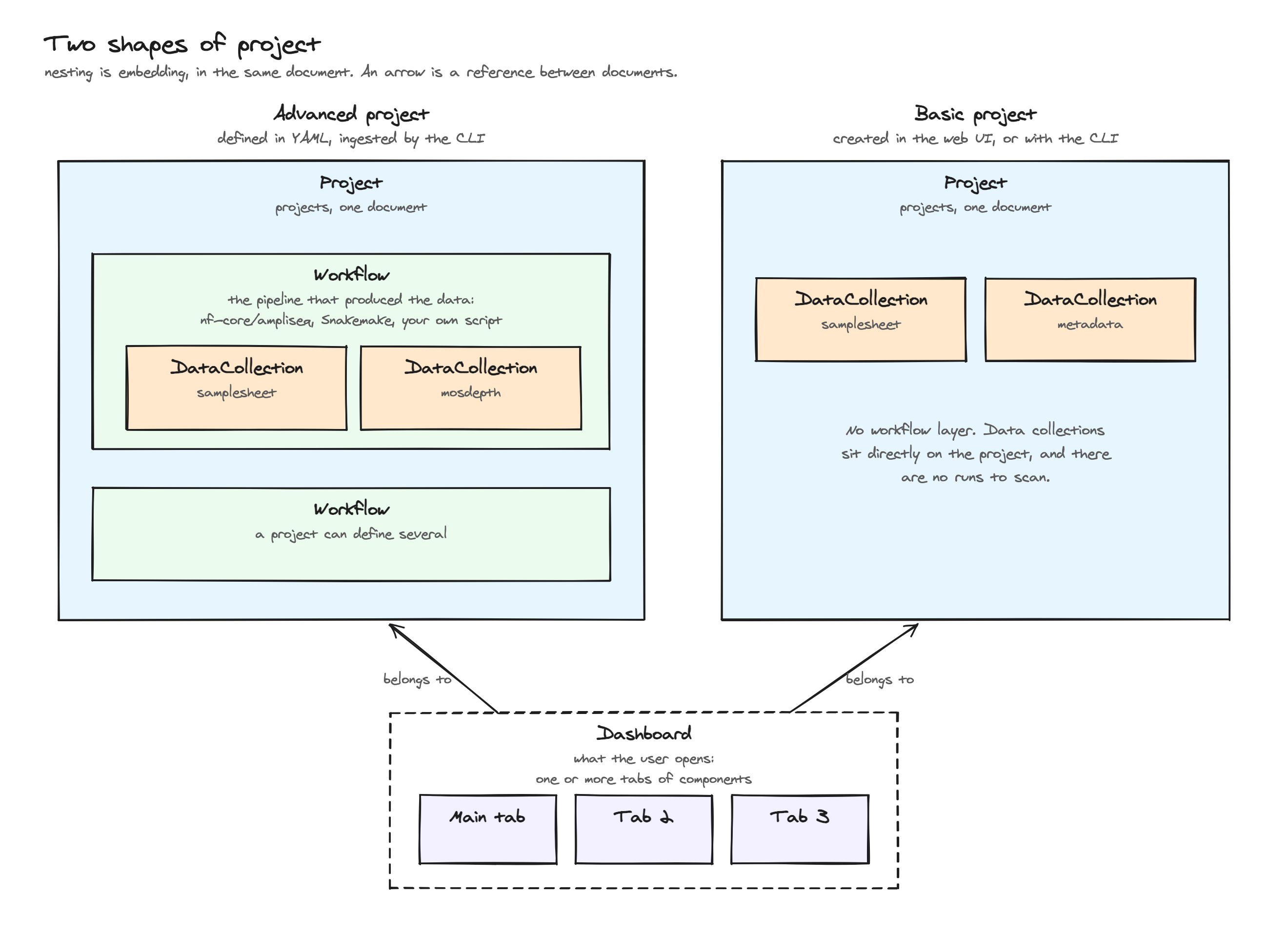
| Structure | Typical use | |
|---|---|---|
advanced |
Project Workflow DataCollection | Pipeline output. Defined in a YAML file and ingested by the CLI. |
basic |
Project DataCollection | A few files you want on a dashboard. Created in the web UI, or with the CLI. |
Nothing else changes between the two. The same data collection types, joins, links, permissions and dashboards apply either way. The workflow layer only exists to answer "which pipeline produced this, and in which of its runs".
The word workflow is used in the sense nf-core and WorkflowHub use it: the pipeline definition, not a particular execution of it. Executions are runs, and they are the subject of the next section.
The workflow records what produced it (v1.10.0+)
For a project built from a template, the engine, the pipeline version, the
engine version and the names of the tools that ran are stamped on the
workflow, read from what the pipeline wrote in its run directory
(pipeline_info/ for nf-core).
How files become dashboard data
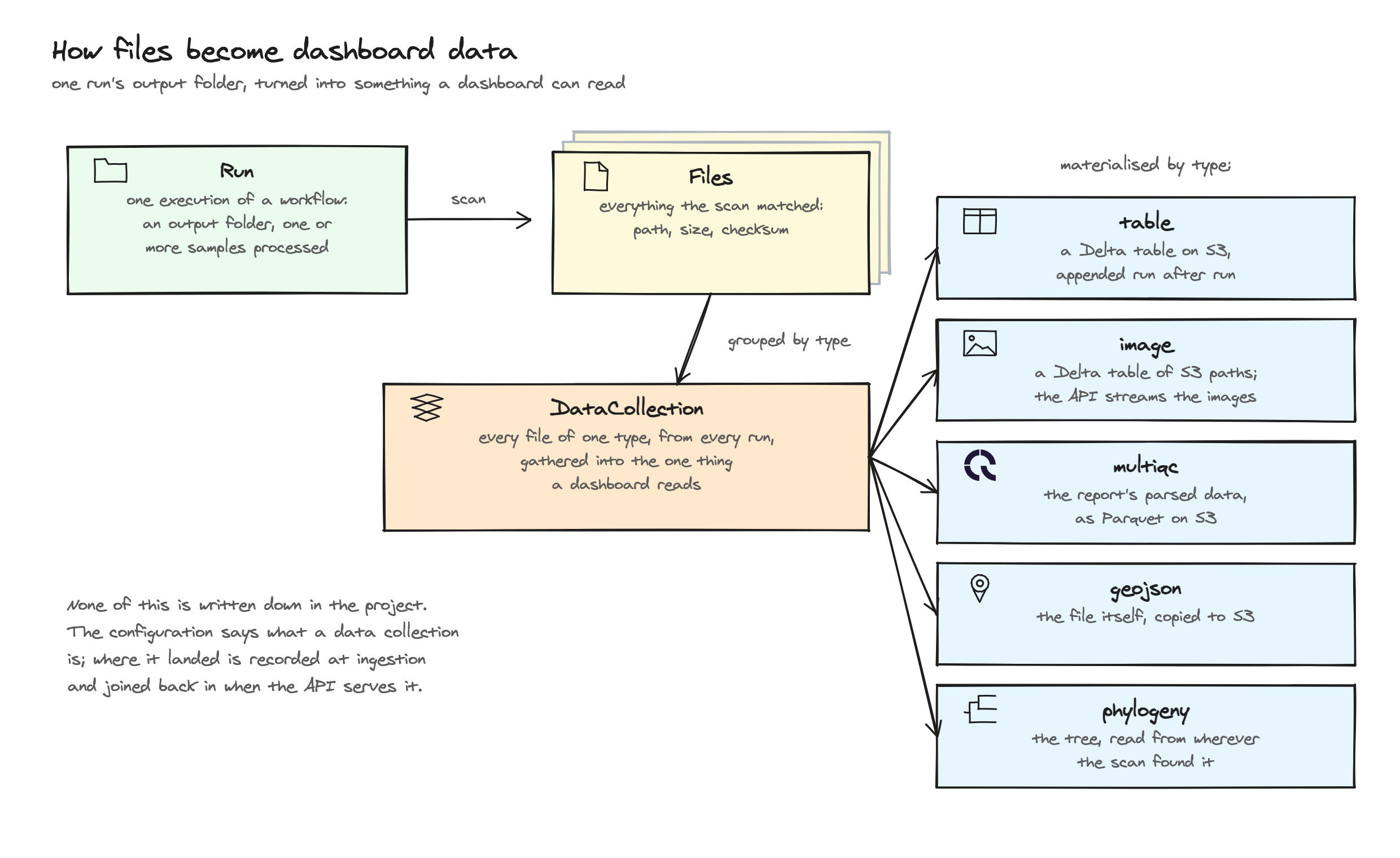
A run is one execution of a workflow: an output folder, produced by processing one or many samples. Re-running a pipeline adds a run rather than replacing one, so a project accumulates runs over time.
Each run's output folder is scanned, and every matching file becomes a File record holding its path, size and checksum. A data collection then gathers every file of the same type, across every run, into the one thing a dashboard reads. The checksum is what keeps re-ingestion incremental: an unchanged file is recognised and skipped rather than processed again.
What that "one thing" is depends on the type, and it is not always a table. Tabular data gets a Delta Lake table on S3, because Delta is what turns a re-ingestion into an append with history rather than an overwrite. A MultiQC report gets its parsed data copied as Parquet, a GeoJSON file is copied unchanged, and a phylogeny is not copied at all: the tree is read from wherever the scan found it. The types table below has the full mapping.
None of those destinations appear in the project you configured. For table-like
collections the location and the schema of each aggregation live in a separate
deltatables document; for the rest they are recorded on the file entries. Either way the
API joins them in as it serves the project, which is why delta_location and
last_aggregation show up in API responses and nowhere in your YAML.
Dashboards are versioned apart from their data, in a dashboard_versions collection:
each entry is a copy of every tab of one dashboard, plus the Delta commit each of its
data collections was at. See Dashboard and data versions.
Remote files (v1.16.0+)
Three scan modes register files that were never on a local disk: url names one
file, s3_prefix lists a bucket prefix, and manifest consumes an explicit list of
files called a Data Manifest.
The File record is the same object, with three differences:
| Field | Local scan | Remote scan |
|---|---|---|
file_location |
A path on the machine that ran the scan | The absolute URL. Existence is checked when the file is fetched, never at registration |
filesize |
Read from the filesystem | From the listing for an s3_prefix scan, and from the content length an https:// URL announces. -1 when it is not known: always for a manifest entry and an s3:// url scan |
manifest_id |
Unset | The entity id: the manifest id column, or the part of the object key an s3_prefix scan's id_regex captured. Unset for a url scan |
manifest_id is what makes remote collections filter each other without
configuration. It is injected at read time as a depictio_manifest_id column, so
every collection built from the same manifest, or from prefixes sharing a naming
pattern, carries identical canonical values in a column of the same name. A
link with the direct resolver then works with nothing to
map: the manifest id is the canonical identifier the other resolvers were designed
around.
The manifest's optional run column plays the role a run directory plays locally. It
is stored as the file's run tag and injected as depictio_run_id, with remote as the
value when the manifest has no run column, so filters and links on that column keep
working. Unlike a run directory, it creates no run record. An s3_prefix scan outside
a sequencing-runs workflow tags its files remote too, and a url scan
<tag>-url-scan. A project made from an
s3:// run folder keeps its
runs as a local one does: in a sequencing-runs workflow, each first-level
folder under the prefix that matches runs_regex becomes a run, and its files carry its
name as depictio_run_id.
Materialisation is unchanged: a remote table still becomes a Delta Lake table on the instance's own S3, fetched once at ingestion rather than read through at render time.
Data collection types
| Type | Content | Materialised as | |
|---|---|---|---|
table |
Tabular data: CSV, TSV, Parquet, Excel | A Delta Lake table on S3 | |
image |
Image files | A Delta Lake table whose image_column holds the S3 paths |
|
  |
multiqc |
MultiQC report data | The report's parsed data, as Parquet on S3 |
geojson |
GeoJSON boundaries for choropleth maps | The file, copied to S3 unchanged | |
phylogeny |
Newick or Nexus trees | Nothing. The file is read where it was found | |
indexed_file |
Indexed genomic files: VCF, BAM, bigWig, bigBed, GFF3, FASTA, or any bgzip + tabix interval file | Each file and its index, copied to S3 unchanged and read by the browser by byte range |
A table collection that declares latitude and longitude columns becomes map-capable
without changing its type. See Components.
A phylogeny collection points at a table collection for its tip annotations rather
than carrying them itself. See
Phylogeny DCs and their metadata table.
Only table and image collections keep versions: every write to their Delta table is
a commit that a dashboard can later be read against. See
Dashboard and data versions.
An indexed_file collection has no rows and no Delta table at all. It exists for files
too large or too dense to materialise as a table, such as a per-sample VCF or a coverage
bigWig: ingestion copies each file and its index sidecar (.tbi, .bai, .fai) to S3,
one object per sample, and a genome track asks the API for short-lived presigned URLs and
then fetches only the bytes covering the region in view. Since it carries no columns, it
lines up with the rest of the project through the sample id alone. See
Indexed-file DCs for the YAML.
Where a data collection came from
| Source | Meaning |
|---|---|
native |
Scanned directly from workflow output files. Requires a scan configuration. |
joined |
Produced by a join merging two other collections. |
transformed |
Produced by a Python recipe. |
aggregated |
Reserved. |
Only native collections need a scan. Derived ones are written by whatever process
creates them.
Joining and linking
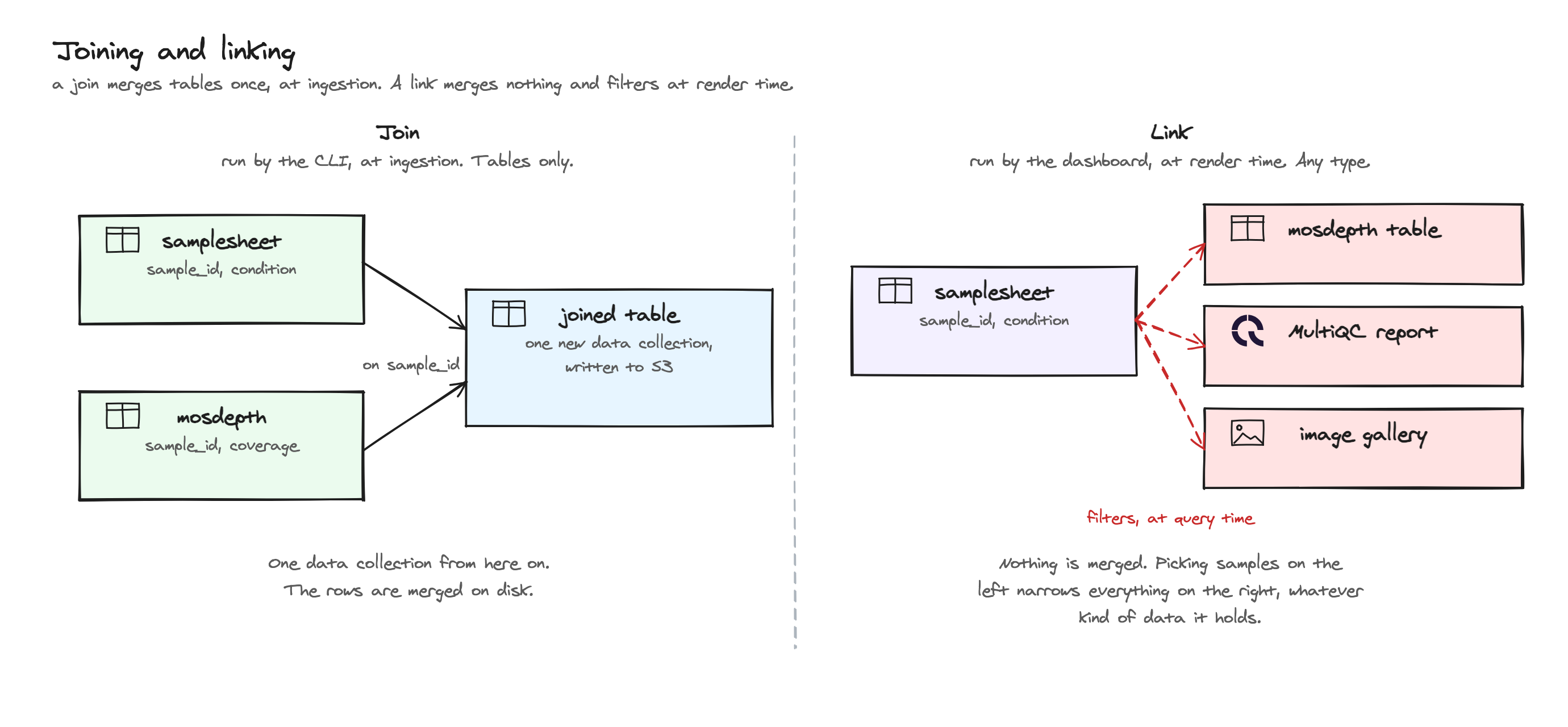
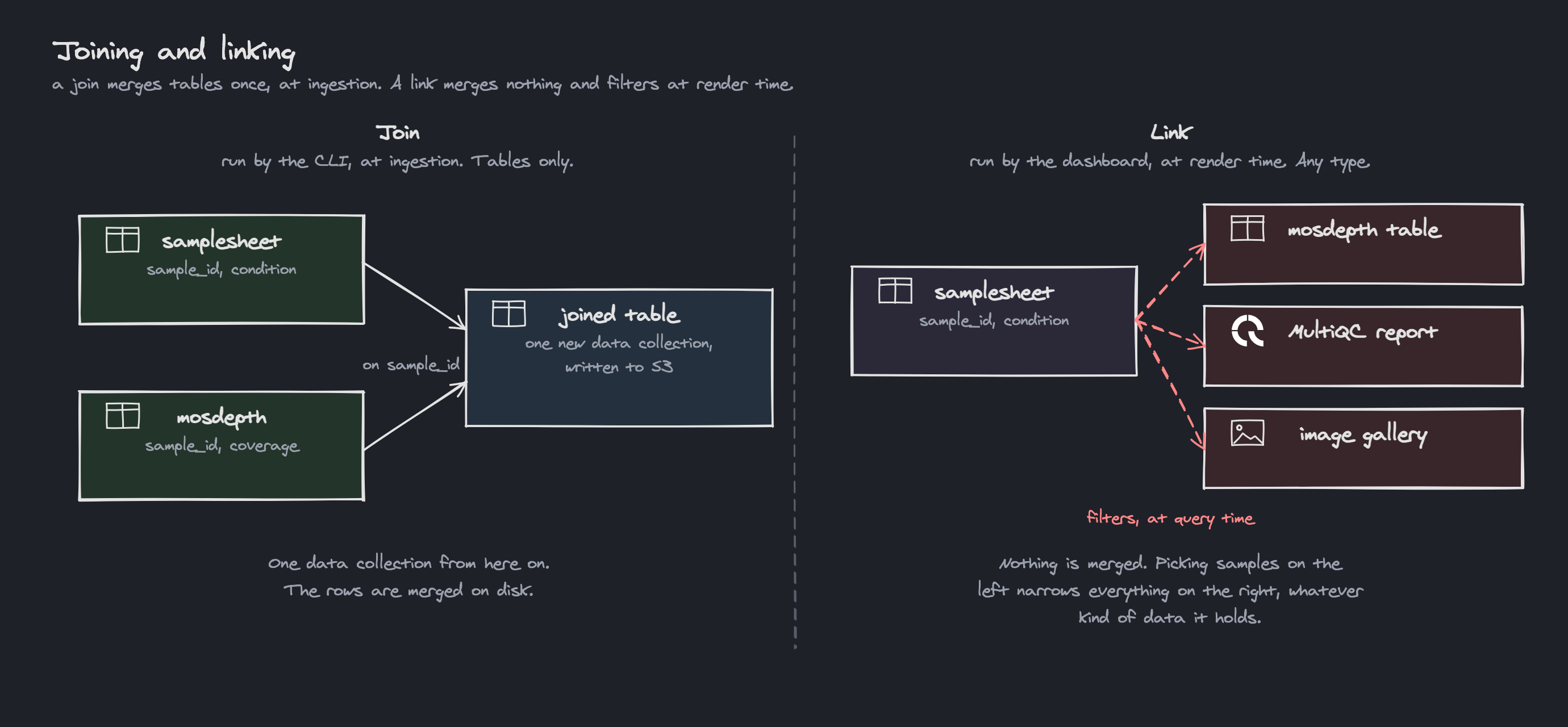
Two mechanisms that sound alike and behave nothing alike. The difference that matters most is when and to what each one applies:
- A JoinDefinition (
Project.joins) runs in the CLI, at ingestion. It reads two Delta tables, merges them on shared columns (left_dc,right_dc,on_columns,how, plus a granularity policy) and writes the result to S3 as a new data collection withsource: joined. Because it merges rows, it only works betweentablecollections. - A DCLink (
Project.links) merges nothing and writes nothing. It runs in the dashboard, at render time, propagating filters from one data collection to another and resolving identifiers between them by one of several strategies (direct,sample_mapping,pattern,regex,wildcard, orregionfor a genomic region, which only renames the coordinate columns). Since it only has to translate identifiers, it works across types: a selection on a metadata table can narrow a MultiQC report and an image gallery at the same time.
Use a join when you want one table. Use a link when you want to keep several things separate and filter them together. Cross-DC Filtering covers the resolver strategies in depth.
Legacy join configuration
A join block on an individual data collection's config still deserialises, but it is
superseded by project-level joins and is no longer read.
Access control
Permissions are not a separate document. A Permission object is embedded into every
Project, Dashboard, WorkflowRun and File, holding three disjoint sets of users:
| Tier | Can do |
|---|---|
| owners | Full control: edit, share, delete |
| editors | Modify dashboard content, run data updates |
| viewers | Read-only access to dashboards and data |
A project also carries an is_public flag, which is what opens it to readers with no
account. See Authentication Modes for how that
interacts with anonymous and unauthenticated deployments.
Related Documentation
- Architecture - Microservices stack and data flow
- Cross-DC Filtering - DCLink resolver strategies in depth
- YAML Dashboard Sync - Declarative dashboard export and import
- Contributing - How to extend the platform