

The proteinfold template reads the models an nf-core/proteinfold run wrote for each target and engine (AlphaFold2 in standard or split-MSA mode, ColabFold, ESMFold, RoseTTAFold All-Atom, ...), and follows them from their scores to the engines' agreement:
- Overview: the run in four key figures, live findings and four figures, each linked to the tab that explains it
- Model scores: the pLDDT and pTM of every model, per engine
- Structure: the picked structure in 3D over its sequence, per-residue confidence, the Ramachandran plot and the alignment it was folded from
- Predicted error: the predicted aligned error matrix beside the structure, to pick a confident domain
- Engines comparison: the engines and the models of one target, rank by rank and residue by residue
The persistent Sample filters (assembly, target, target length) sit in the
left panel and narrow every tab through the target hub.
Structures are read from the run, not resolved
The 3D and Ramachandran tiles read the top-ranked PDB that each engine
publishes under top_ranked_structures/, so nothing leaves the server and
the structure resolver
(DEPICTIO_STRUCTURE_RESOLVER_ENABLED) is not used. Those PDBs are required:
a run that published none has no structure to open.
Quick start
The results directory is the only thing you have to pass, with one
exception: proteinfold does not publish the samplesheet it ran on. The
template looks for it at {DATA_ROOT}/input/samplesheet.csv; copy it there,
or point to it:
depictio ingest /path/to/proteinfold_results \
--template nf-core/proteinfold/latest \
--var METADATA_FILE=/path/to/samplesheet.csv
| Variable | Default | Role |
|---|---|---|
METADATA_FILE |
{DATA_ROOT}/input/samplesheet.csv |
the samplesheet the run was started with |
GROUP_COL |
assembly |
column the dashboard groups and filters targets by; assembly is derived (single chain or complex), and any samplesheet column beyond id and fasta works |
GROUP_COL_DISPLAY |
Assembly |
reader-facing label of GROUP_COL in filters and cards |
depictio config nextflow --install     # once per machine
nextflow run nf-core/proteinfold -r 2.1.0 -profile docker --outdir results
No depictio ingest, and no template named: the pipeline ingests its own
output directory when it finishes and resolves this template from its own
manifest. See Nextflow trigger. The
trigger passes no --var, so put a copy of the samplesheet at
results/input/samplesheet.csv before the run.
Reference
The unit of every structure tile is the entity: one engine's top-ranked
structure of one target. Its id is the id the structures collection gives the
PDB, <engine>__<target>, with a non-default AlphaFold2 mode between the two,
so every per-structure table joins the 3D object without a lookup. The
template reads the PDBs (pLDDT sits in the B-factor column), the per-model
pLDDT, pTM, ipTM and ipSAE tables, the PAE matrix of the top-ranked model only
(_0_ for AlphaFold2 and RoseTTAFold All-Atom, _1_ for ColabFold, which numbers
its models from 1) and the integer-coded alignments of the MSA-based engines.
Model ranks are renumbered from 1, and the pLDDT bands follow AlphaFold:
very high from 90, confident from 70, low from 50, very low below.
ESMFold writes no alignment, no PAE and no TM scores, and single-chain targets write empty ipTM and ipSAE files, which read as no rows. Alignments are capped at 500 rows, and a profile longer than 200 residues is averaged over equal windows. The MultiQC reports repeat the residue table and cannot be bound generically, so the template has no MultiQC tab.
Self-adapting layout
The dashboard adapts to whatever the run actually produced: components bound to pruned or unparsed data collections are hidden, tabs left with no real visualizations are dropped entirely, and the remaining components are re-packed so there are no empty rows. The PAE matrices, the score files and the alignments are optional: a run that wrote no PAE drops the assess step of the Overview pipeline with them.
Template variables
Variables you provide when running the template: DATA_ROOT is the results directory given to depictio ingest, the others are set with --var NAME=value:
| Variable | Required | Description |
|---|---|---|
DATA_ROOT |
✓ | proteinfold output directory (one directory per engine, e.g. alphafold2/, colabfold/, esmfold/, plus multiqc/ and pipeline_info/). |
METADATA_FILE |
— | The samplesheet the run was started with (--input: id, fasta, any extra design columns). Defaults to input/samplesheet.csv under DATA_ROOT. |
METADATA_ID_COL |
— | Samplesheet id column. proteinfold fixes it to id (the target name every output file carries); recorded for auto-detection only. |
GROUP_COL |
— | Target hub column the dashboard groups and filters targets by. Defaults to assembly (single chain or complex, derived from the structures); any samplesheet column works. |
GROUP_COL_DISPLAY |
— | Reader-facing label of GROUP_COL, used in filter and card titles. |
Data collections
11 data collections — 7 required 4 optional · 9 direct 2 derived.
Origin tells you whether a collection is real pipeline data or a reshape of it: direct = a pipeline output (scanned, or a recipe that reads raw files); derived = a recipe that reshapes one or more direct collections into the layout a visualization needs (no new measurement). Reads shows what produces it: a recipe .py transform, whose name links to its source on GitHub, or a raw file scanned off disk. (A direct collection can still have a recipe — one that merely parses/cleans the raw file; derived means the recipe reshapes another collection.)
| Tag | Origin | Type | Reads | Status |
|---|---|---|---|---|
targets |
direct | Table | recipe nf-core/proteinfold/targets.py |
required |
proteinfold_structures |
direct | indexed_file | file .*/top_ranked_structures/[^/]+.pdb$ |
required |
proteinfold_pae_matrices |
direct | indexed_file | file (?:.*/)?(?<![/])(?:(?P<cf_engine>colabfold)/(?P<cf_target>[/]+)/paes/(?P=cf_target)_1_pae.tsv|(?!colabfold/)(?P<engine>[/]+)/(?:standard/|(?P<mode>split_msa_prediction)/)?(?P<target>[/]+)/paes/(?P=target)_0_pae.tsv)$ |
optional |
proteinfold_residues |
direct | Table | recipe proteinfold/residues.py |
required |
proteinfold_engine_plddt |
direct | Table | recipe proteinfold/engine_plddt.py |
required |
proteinfold_scores_raw |
direct | Table | file ^(?!.chainwise)._(?:ptm|iptm|ipsae).tsv$ |
optional |
proteinfold_models |
derived | Table | recipe proteinfold/models.py |
required |
proteinfold_structure_scores |
derived | Table | recipe nf-core/proteinfold/structures.py |
required |
proteinfold_plddt_ranks |
direct | Table | recipe proteinfold/plddt_ranks.py |
required |
proteinfold_pae |
direct | Table | recipe proteinfold/pae.py |
optional |
proteinfold_msa |
direct | Table | recipe proteinfold/msa.py |
optional |
Cross-DC links
13 links — selecting a value in the source collection filters the target. The join column is shown after the source.
| Source · column | Target | Filters | |
|---|---|---|---|
targets · target |
→ | proteinfold_residues |
Filter the residue table by target |
targets · target |
→ | proteinfold_engine_plddt |
Filter the per-engine confidence curves by target |
targets · target |
→ | proteinfold_models |
Filter the models by target |
targets · target |
→ | proteinfold_structure_scores |
Filter the structure table by target |
targets · target |
→ | proteinfold_plddt_ranks |
Filter the per-model confidence curves by target |
targets · target |
→ | proteinfold_pae |
Filter the PAE matrices by target |
targets · target |
→ | proteinfold_msa |
Filter the alignments by target |
proteinfold_residues · target |
→ | proteinfold_engine_plddt |
Follow the picked structure's target on the per-engine curves |
proteinfold_residues · target |
→ | proteinfold_structure_scores |
Follow the picked target on the structure table |
proteinfold_residues · entity |
→ | proteinfold_msa |
Narrow the alignment to the picked structure |
proteinfold_residues · entity |
→ | proteinfold_pae |
Narrow the PAE matrix to the picked structure |
proteinfold_pae · entity |
→ | proteinfold_models |
Follow the picked PAE matrix on the model scores |
proteinfold_models · entity |
→ | proteinfold_plddt_ranks |
Follow the engines and models in scope on the per-engine curves |
Recipes
Each recipe reshapes raw pipeline output into a tidy table. The name links to its source; Output lists the validated OUTPUT_SCHEMA columns.
| Recipe | Transforms | Output |
|---|---|---|
nf-core/proteinfold/structures.py |
Structure table for nf-core/proteinfold: one row per top-ranked structure. | entity, structure, engine, target, n_chains, n_residues, mean_plddt, confident_pct, very_low_pct, n_models, ptm, iptm |
nf-core/proteinfold/targets.py |
Target hub for nf-core/proteinfold: one row per target of the samplesheet. | target, assembly, n_chains, n_residues, n_engines, engines, sequence, fasta |
proteinfold/engine_plddt.py |
Per-residue confidence of each engine's top-ranked model, one curve per engine. | target, series, chain, position, plddt |
proteinfold/models.py |
Confidence of every predicted model, one row per structure entity and model rank. | model_id, structure, entity, engine, target, model_rank, is_top, n_residues, mean_plddt, confident_pct, very_low_pct, ptm, iptm, ipsae |
proteinfold/msa.py |
The multiple sequence alignment each MSA-based engine folded from. | msa_id, seq_id, rank, aligned_sequence, identity, coverage, chains, entity, engine, target, depth |
proteinfold/pae.py |
Predicted aligned error of every top-ranked model, binned to a fixed grid. | entity, engine, target, bin, residue_range, mean_pae, b01, b02, b03, b04, b05, b06, b07, b08, b09, b10, b11, b12, b13, b14, b15, b16, b17, b18, b19, b20, b21, b22, b23, b24, b25, b26, b27, b28, b29, b30, b31, b32, b33, b34, b35, b36, b37, b38, b39, b40, b41, b42, b43, b44, b45, b46, b47, b48, b49, b50, b51, b52, b53, b54, b55, b56, b57, b58, b59, b60, b61, b62, b63, b64 |
proteinfold/plddt_ranks.py |
Per-residue pLDDT of each engine's models: the top-ranked curve and their spread. | entity, engine, target, n_models, residue_index, plddt, plddt_min, plddt_max |
proteinfold/residues.py |
Per-residue confidence of every top-ranked structure, one row per residue. | entity, engine, target, chain, position, residue, value, category, confidently_placed |
Dashboard tabs
One dashboard: the Overview, then four child tabs in two groups, read from how far a model can be trusted to whether the engines agree. Each tab below carries the same icon and colour the dashboard gives it, so the page and the app read alike.
| Group | Tabs |
|---|---|
| Data & QC | Model scores |
| Structure | Structure, Predicted error, Engines comparison |
Each child tab opens with a short intro and a strip of four cards, then at most three open sections; tables and record cards follow, collapsed. The Sample sheet (the targets of the samplesheet) is pinned, collapsed, to the bottom of every child tab. The pLDDT bands take AlphaFold's own colours.
Protein structure prediction, from the sequence to the model each engine builds.
A short hero links the run parameters. About this dashboard says how to move through the tabs, The run counts the targets, engines, models and residues and prints the requested mode, and Pipeline walks six steps (targets, align, fold, score, assess, compare), each linked to its parameters and its tab. The findings are live values that follow the filters: the structures and engines, the median mean pLDDT with the share of residues under 50, the mean PAE and the models ranked.
Filters and components
Filters · the left panel starts collapsed. Key figures has its own filter bar (assembly and target), Findings another (assembly and engine): each narrows its own section only.
| Section | What it holds |
|---|---|
| Top | Hero, About this dashboard, The run, Pipeline |
| Key figures | 4 headline cards: targets by assembly, top-ranked structures by engine, mean pLDDT, residues at pLDDT 70 or more |
| Findings | Live result rows, then 4 figures: the first structure in 3D, the mean pLDDT per engine, the PAE matrix of the first structure and the top model of each engine per target |
| How to read this dashboard | The tabs by group, each with its question |
Data & QC · How far can each engine's top-ranked models be trusted?
The models predicted, the mean pLDDT of the top models, the share of residues at pLDDT 70 or more and the pTM of the top models. Then every model's mean pLDDT against its pTM, and the mean pLDDT of every model per engine. pLDDT scores each residue and pTM the whole fold, so a high pLDDT with a low pTM is a set of confident pieces placed loosely. Engines that write no TM score (ESMFold, RoseTTAFold All-Atom) are absent from the scatter and the pTM card.
Filters and components
Filters · Engine and Model rank on proteinfold_models.
| Section | What it holds |
|---|---|
| Models at a glance | 4 cards |
| Confidence and fold quality | 1 advanced visualization |
| Engines compared | Mean pLDDT of every model, per engine |
Structure · Where along each structure is the prediction confident?
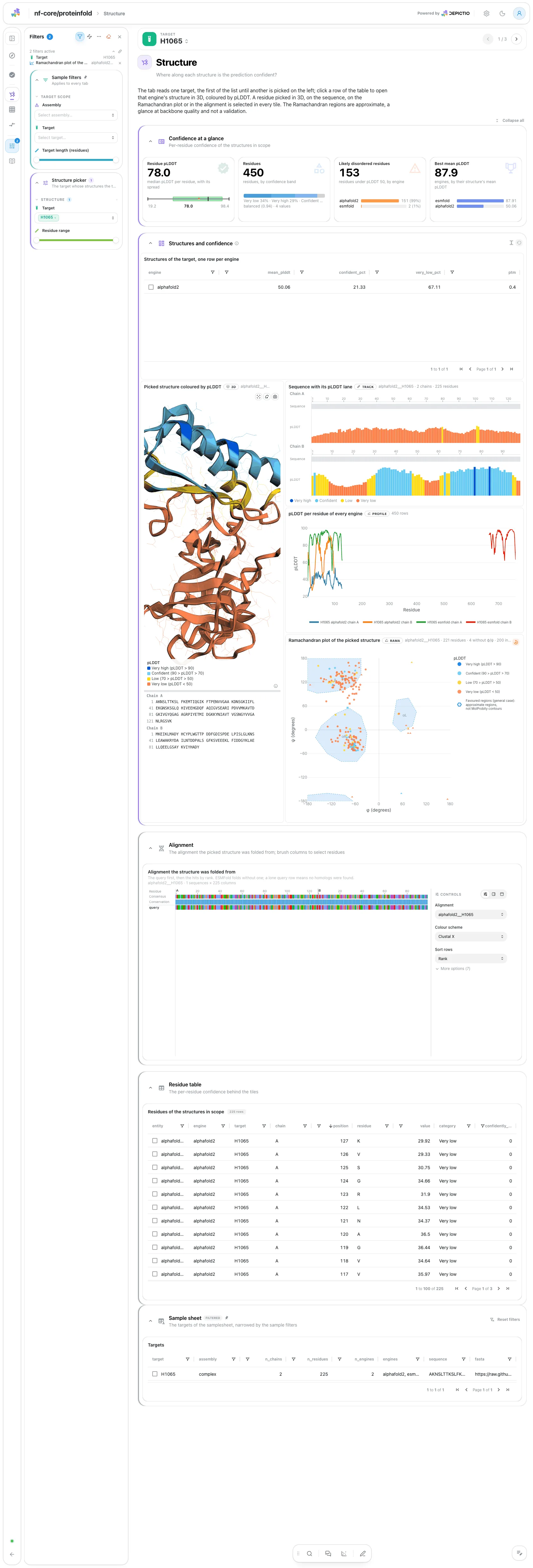
The tab reads one target: its Target filter always holds a value and opens
on the first. The strip gives the median residue pLDDT, the residues by
confidence band, the likely disordered residues and the best mean pLDDT. Then
a linked view holds the picked
structure in 3D, coloured by
pLDDT over its written sequence, on the left. Stacked on the right are a table
with one row per engine's top-ranked structure, which picks the structure, the
sequence with its pLDDT lane, the pLDDT profile of every engine and the
Ramachandran plot of the
picked structure (phi and psi computed in the browser, coloured by pLDDT). A
click on a residue in 3D, on a letter or a brush on the track selects the same
residues in all of them. The alignment the structure was folded from and the
residue table are collapsed.
Filters and components
Filters · Target and Residue range on proteinfold_residues.
| Section | What it holds |
|---|---|
| Confidence at a glance | 4 cards |
| Structures and confidence (linked view) | Structures of the target, one row per engine, then 4 advanced visualizations: the structure, the sequence track, the Ramachandran plot and the pLDDT per engine |
| Alignment (collapsed) | Alignment the structure was folded from |
| Residue table (collapsed) | Residues of the structures in scope |
A lone query row in the alignment
It is the data, not a filter: the engine found or used no homologs. ESMFold folds without an alignment, so its structure opens the tile on an empty state.
Structure · Which domains and chains does the model place confidently?
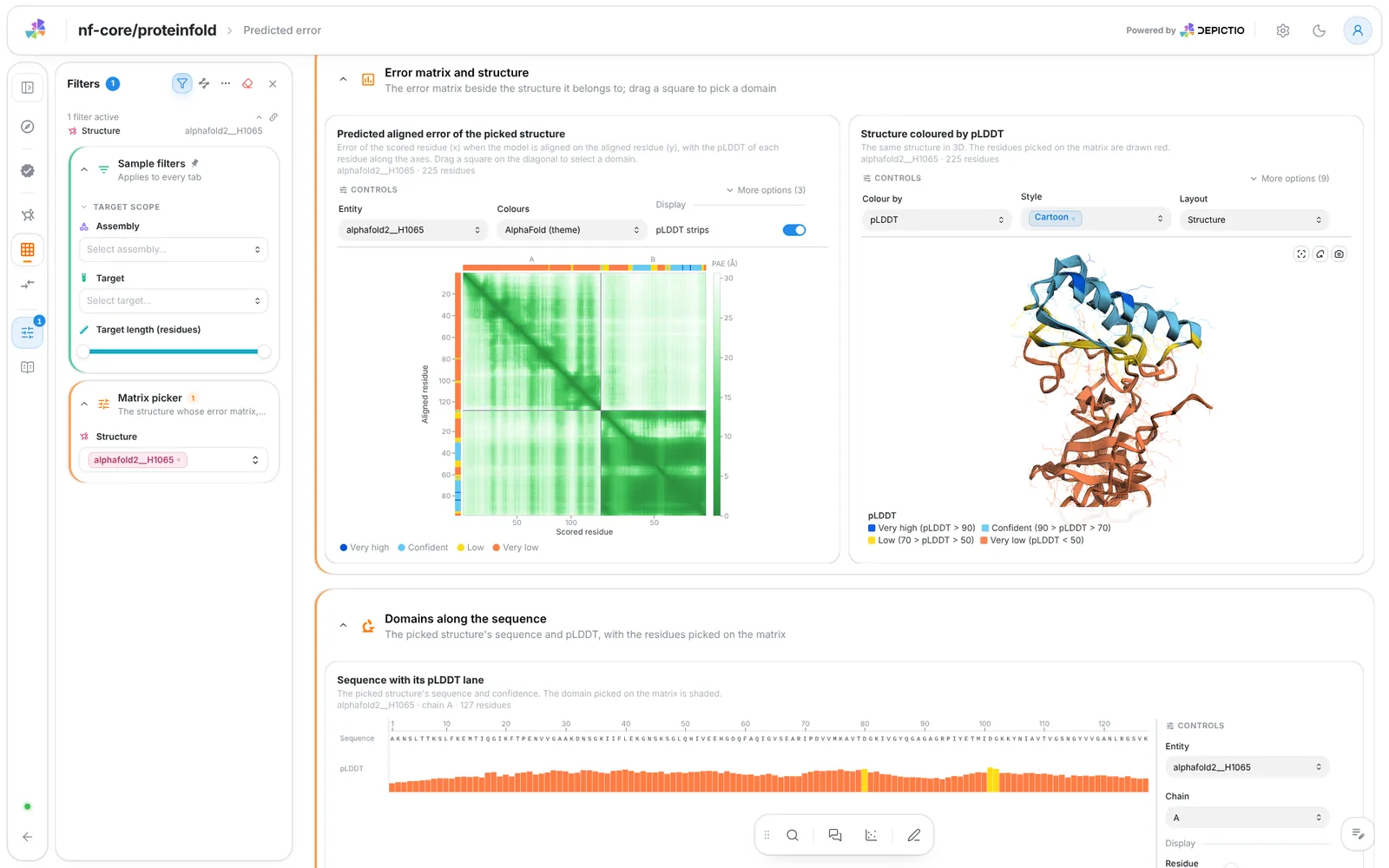
The tab reads one structure. The strip gives its mean PAE, the pLDDT of its residues, and the pTM and ipTM of its top-ranked model against AlphaFold's cut-offs (pTM 0.5; ipTM 0.8 and 0.6). Then the PAE matrix beside the same structure in 3D, coloured by pLDDT, and the sequence with its pLDDT lane below. A diagonal brush on the matrix selects a square as a residue range: the structure draws it red and the sequence track shades it, so a confident domain is picked in 3D. Dark blocks off the diagonal are domains or chains placed confidently relative to each other; on a complex the chain boundaries are marked.
Filters and components
Filters · a Structure picker on proteinfold_residues. It always
holds a value and does not offer ESMFold's structures, which have no
matrix. There is no engine filter: the structure id carries its engine.
| Section | What it holds |
|---|---|
| Error at a glance | 4 cards |
| Error matrix and structure | 2 advanced visualizations: the matrix and the structure |
| Domains along the sequence | 1 advanced visualization, the sequence track |
Structure · Do the engines and their models agree on each target?
The models in scope, split by engine, the median mean pLDDT per model, the weakest model's mean pLDDT against the 70 and 50 cut-offs, and the pTM per model. Then the mean pLDDT of each engine's top-ranked model, the mean pLDDT by model rank, one line per engine (a steep fall from the first model means the ranking was decisive), and the per-residue profile: one curve per engine, the line the top-ranked model and the band the lowest to the highest of its models. A wide band marks residues the engine's models disagree on, and curves that part mark residues the engines disagree on. The models table and its record card are collapsed.
Filters and components
Filters · Target compared (one at a time), Engines compared and
Model rank on proteinfold_models.
| Section | What it holds |
|---|---|
| Models at a glance | 4 cards |
| Best model per engine | Mean pLDDT of each engine's top-ranked model |
| Rank and agreement | Mean pLDDT by model rank, and 1 advanced visualization |
| Model detail (collapsed) | Models, Model record |
Tables and point views select on entity, the structure id, so a pick narrows
the other tiles of its collection and follows the project links to the rest. The
three single-unit pickers (the target of Structure and Engines comparison, the
structure of Predicted error) always hold exactly one value, so the tiles that
show one structure at a time agree on it.
Running the pipeline
Depictio reads the output of nf-core/proteinfold, it does not run the pipeline. Run the pipeline first:
nextflow run nf-core/proteinfold -r 2.1.0 \
  --input samplesheet.csv \
  --mode alphafold2,colabfold,esmfold \
  --outdir results \
  -profile docker
The samplesheet is id,fasta; extra columns are kept and can become the
grouping column. --mode takes one or several engines, and each needs its own
databases and weights: see the usage documentation. Then point Depictio at the
results, naming the samplesheet the pipeline did not publish:
depictio ingest results/ \
  --template nf-core/proteinfold/latest \
  --var METADATA_FILE=samplesheet.csv
See nf-co.re/proteinfold/usage for full pipeline documentation.
Required data structure
Point depictio ingest at the directory holding the pipeline output. Depictio
scans recursively and matches on file name; the engine, its AlphaFold2 mode and
the target are read off the path.
<DATA_ROOT>/
├── input/
│   └── samplesheet.csv                         # --var METADATA_FILE (not published by the pipeline)
├── pipeline_info/
│   ├── params_*.json
│   └── *software*versions*.yml
└── <engine>[/<mode>]/                          # alphafold2/standard, colabfold, esmfold, ...
    ├── top_ranked_structures/<target>.pdb      # required: pLDDT in the B-factor
    ├── <target>_plddt.tsv                      # per-model pLDDT
    ├── <target>_{ptm,iptm,ipsae}.tsv           # optional; ipTM and ipSAE empty for one chain
    ├── <target>/paes/<target>_0_pae.tsv        # optional; _1_ for colabfold
    └── <target>/<target>_<engine>_msa.tsv      # optional; MSA-based engines only
Validation runs
The repository ships
download_test_data.sh,
which fetches the subset of nf-core's AWS megatest run that the template needs
and copies the vendored samplesheet into input/:
bash depictio/projects/nf-core/proteinfold/2.1.0/download_test_data.sh \
  /tmp/proteinfold_test
depictio ingest /tmp/proteinfold_test \
  --template nf-core/proteinfold/latest
The run is
s3://nf-core-awsmegatests/proteinfold/results-a414fd1368009500b66761e37e7cde80366a45e9/,
a 2.1.0 development run (the 2.0.0 release run is empty): eleven test_full
runs gathered under one prefix, AlphaFold2 (standard and split-MSA), ColabFold,
ESMFold and RoseTTAFold All-Atom on two monomer targets, and AlphaFold2
multimer and ESMFold on one heterodimer. The script fetches the top-ranked PAE
matrix of each engine and target only.
Additional resources
- nf-co.re/proteinfold: official pipeline documentation
- nf-co.re/proteinfold/results: AWS test results
- Template System Reference: YAML format, variables, conditionals
- Recipes: how to read, test, and write recipes
Authorship
 weber8thomas
Reviewing a template on your own data, or taking over a role here, is a contribution in itself: the contributing guide says what each one involves.