Telemetry
Depictio sends an anonymous, aggregate daily report so the project can tell how many installations exist and which features are used. Container images and the Helm chart are hosted on GitHub Container Registry, which publishes no pull counts, so this is the only signal available.
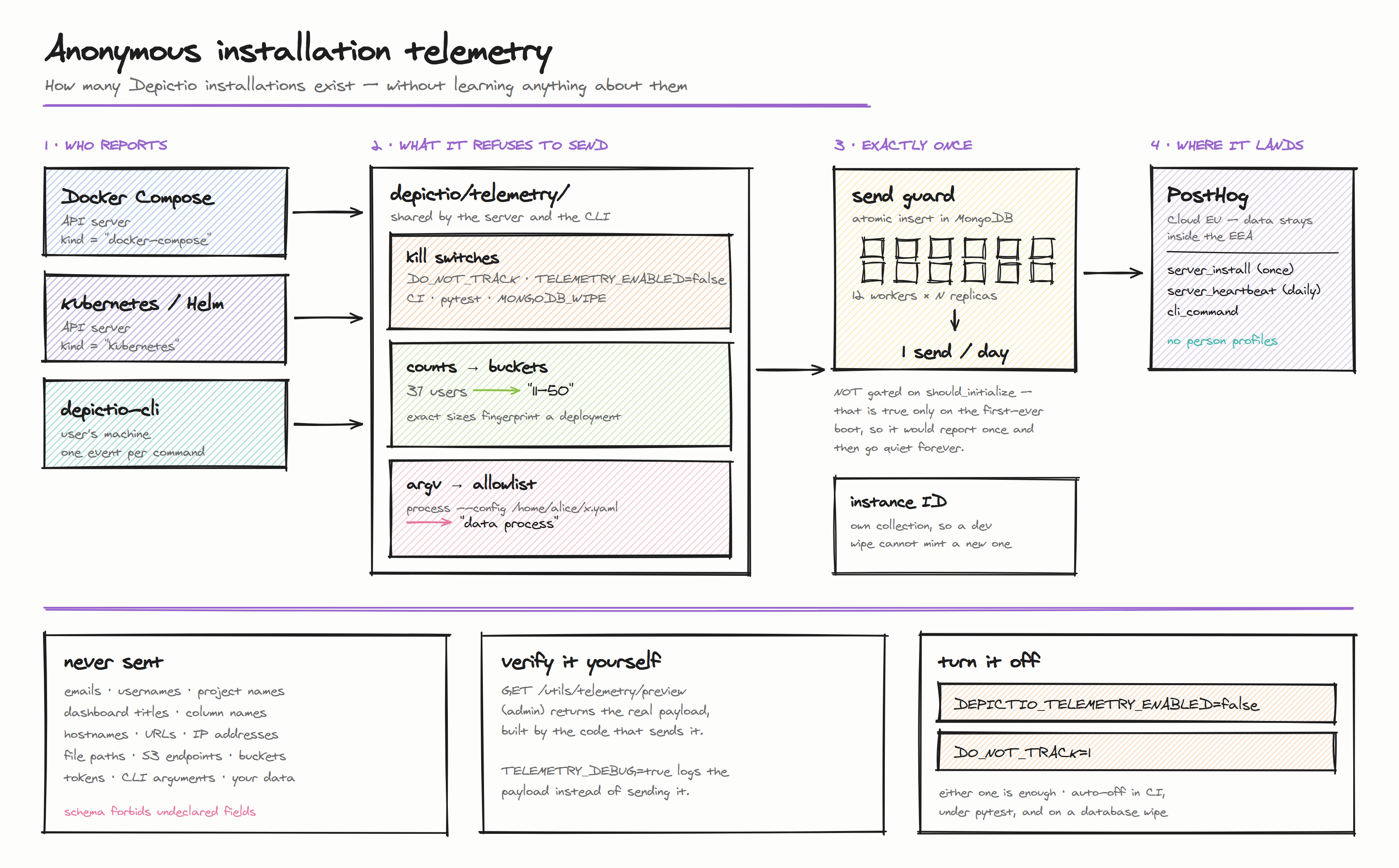
Enabled by default
Telemetry is on unless you turn it off. Nothing personal, and nothing about your data, is ever transmitted.
What is sent
A random installation ID (a UUID generated on first boot, not derived from anything about you or your machine), plus:
- Depictio version, and how it was deployed (
kubernetes,docker-compose,docker,devcontainer,local) - OS family, CPU architecture, Python version, worker count
- Which optional features are switched on, as booleans
- Deployment size as coarse buckets (
11-50 users,2-5 projects), never exact counts
The full field-by-field payload reference is generated from the schema and lives in the main repository: docs/telemetry.md.
What is never sent
Email addresses, usernames, project/dashboard/workflow/column names, hostnames, URLs, IP addresses, file paths, S3 endpoints or bucket names, tokens, CLI arguments, or any of your data in any form.
The payload schema forbids undeclared fields, so a future change cannot quietly add one: it would have to be declared in the schema, where it appears in the generated reference and trips a test.
Verify it yourself
As an admin on your own deployment:
curl -H "Authorization: Bearer $YOUR_TOKEN" \
  https://your-depictio/depictio/api/v1/utils/telemetry/preview
This returns the exact payload, built by the same code that sends it, plus whether telemetry is currently active. Reading it does not consume the day's report.
To observe without transmitting, set DEPICTIO_TELEMETRY_DEBUG=true: every payload is written to the application log instead of being sent.
Turning it off
Either of these is enough:
DEPICTIO_TELEMETRY_ENABLED=false   # Depictio-specific
DO_NOT_TRACK=1                     # cross-tool convention (consoledonottrack.com)
For Docker Compose, put either in your .env. For Kubernetes:
To keep the installation count but drop the size metrics, set DEPICTIO_TELEMETRY_INCLUDE_USAGE_METRICS=false.
Automatically disabled
No configuration needed: telemetry suppresses itself in CI (CI, GITHUB_ACTIONS, GITLAB_CI and similar), under pytest, with DEPICTIO_DEV_MODE=true, and when the deployment booted with DEPICTIO_MONGODB_WIPE.
Configuration reference
| Variable | Default | Effect |
|---|---|---|
DEPICTIO_TELEMETRY_ENABLED |
true |
Master switch. |
DO_NOT_TRACK |
unset | Cross-tool opt-out; any meaningful value disables telemetry. |
DEPICTIO_TELEMETRY_INCLUDE_USAGE_METRICS |
true |
Include the bucketed deployment-size block. |
DEPICTIO_TELEMETRY_DEBUG |
false |
Log payloads instead of sending them. |
DEPICTIO_TELEMETRY_INTERVAL_HOURS |
24 |
Hours between heartbeat attempts. |
DEPICTIO_TELEMETRY_DEPLOYMENT_KIND |
auto-detected | Override the reported deployment kind. |
DEPICTIO_TELEMETRY_ENDPOINT |
PostHog Cloud EU | Point events at your own collector. |
DEPICTIO_TELEMETRY_STATE_DIR |
~/.depictio |
Where the CLI stores its anonymous ID. |
Where it goes
PostHog Cloud's EU region, so event data stays inside the EEA. Every event is flagged $process_person_profile: false: no person profile is stored for your installation, only counts.
Three similarly-named systems, only the first sends anything to us
DEPICTIO_TELEMETRY_*: this page. Anonymous installation counting. Enabled by default.DEPICTIO_ANALYTICS_*: per-user session tracking stored in your MongoDB and shown in your admin UI. Never transmitted. Disabled by default.DEPICTIO_GOOGLE_ANALYTICS_*: optional GA4 tracking in the frontend. Data goes to your GA4 property. Disabled by default.