

The mhcquant template follows an nf-core/mhcquant run from the spectra to the peptides each sample presents:
- Overview: the run in four key figures, live findings and four figures, each linked to the tab that explains it
- Data & QC: the sections mhcquant writes into its own MultiQC report, and how consistently the replicate injections of a sample quantify the same peptides
- Search: the spectra, PSMs and peptides of each raw file, how the raw search behaves as the FDR threshold moves, and whether the peptides elute and ionise as predicted
- Immunopeptidome: the length profile and anchor motifs that point to the MHC class, and the peptides the conditions share with the proteins they come from
The persistent Sample filters (condition, sample, raw file) sit in the left
panel and apply to every tab, and the collapsed Sample sheet and Reference
tables sections are pinned to the bottom of every child tab.
The samplesheet is not in the output
mhcquant does not publish the samplesheet it ran on, and the samplesheet is
the hub every other collection links to. The template reads the file named by
METADATA_FILE, which defaults to input/samplesheet.tsv under the data
root: copy the sheet you passed to --input there, or point the variable at
it. The CLI's metadata auto-detection picks the first non-id column of the
sheet as the grouping column, so pass --var GROUP_COL=Condition unless
Condition already comes second.
No binding predictions
mhcquant 3.2.0 no longer runs MHCflurry or any other binding predictor, so the template has no binder-rank view. The MHC signature tab reads the class and the presenting alleles from peptide lengths and positional motifs instead.
Quick start
depictio ingest /path/to/mhcquant_results \
  --template nf-core/mhcquant/latest \
  --var METADATA_FILE=/path/to/samplesheet.tsv \
  --var GROUP_COL=Condition
METADATA_FILE can be left out when the sheet already sits at
input/samplesheet.tsv under the data root. A run started without
--quantify has no replicate intensities: add --var NO_QUANTIFICATION=true
and the replicate collections are dropped, with the Reproducibility tab. A
run without --annotate_ions takes --var NO_ION_ANNOTATION=true.
depictio config nextflow --install     # once per machine
nextflow run nf-core/mhcquant -r 3.2.0 -profile docker --outdir results
No depictio ingest, and no template named: the pipeline ingests its own
output directory when it finishes and resolves this template from its own
manifest. See Nextflow trigger.
Reference
The template reads the samplesheet, the MultiQC report, the per-sample peptide
tables at the output root, the Comet pin files that precede rescoring and the
fragment-ion annotations. Every other collection (sample summary, length
distribution, composition, motif matrix, replicate pairs and detection, source
proteins, condition sharing) is a recipe over the peptide table. 42 of its 58
tiles carry a use: catalog reference (mhcquant/*, openms/*, multiqc/*),
so a tile says where its panel comes from.
Self-adapting layout
The dashboard adapts to whatever the run actually produced: components bound to pruned or unparsed data collections are hidden, tabs left with no real visualizations are dropped entirely, and the remaining components are re-packed so there are no empty rows.
Template variables
Variables you provide when running the template: DATA_ROOT is the results directory given to depictio ingest, the others are set with --var NAME=value:
| Variable | Required | Description |
|---|---|---|
DATA_ROOT |
✓ | mhcquant output directory (the per-sample |
METADATA_FILE |
— | The samplesheet the run was started with (--input: ID, Sample, Condition, ReplicateFileName, optional Fasta and SearchPreset). Defaults to input/samplesheet.tsv under DATA_ROOT. |
METADATA_ID_COL |
— | Samplesheet id column. mhcquant fixes it to ID (one per raw file); the template joins on the derived sample_id and run_id keys instead, so this only records the auto-detected value. |
GROUP_COL |
— | Samplesheet column the dashboard groups and filters samples by. Defaults to Condition, the column the mhcquant input schema requires. |
GROUP_COL_DISPLAY |
— | Reader-facing label of GROUP_COL, used in filter and card titles. |
NO_QUANTIFICATION |
— | Set (--var NO_QUANTIFICATION=true) for a run without --quantify: the peptide tables carry no replicate intensities, so the replicate collections and the Reproducibility tab are removed. |
NO_ION_ANNOTATION |
— | Set (--var NO_ION_ANNOTATION=true) for a run without --annotate_ions: intermediate_results/ion_annotations/ is absent, so the fragment-ion collection is removed. |
Data collections
15 data collections — 11 required 4 optional · 6 direct 9 derived.
Origin tells you whether a collection is real pipeline data or a reshape of it: direct = a pipeline output (scanned, or a recipe that reads raw files); derived = a recipe that reshapes one or more direct collections into the layout a visualization needs (no new measurement). Reads shows what produces it: a recipe .py transform, whose name links to its source on GitHub, or a raw file scanned off disk. (A direct collection can still have a recipe — one that merely parses/cleans the raw file; derived means the recipe reshapes another collection.)
| Tag | Origin | Type | Reads | Status |
|---|---|---|---|---|
samples |
direct | Table | recipe nf-core/mhcquant/samples.py |
required |
multiqc_data |
direct |  MultiQC MultiQC |
file (?:.*/)?multiqc(?:/[^/]+)?/multiqc_data/multiqc.parquet$ |
required |
mhcquant_fragment_ions |
direct | Table | recipe mhcquant/fragment_ions.py |
optional |
mhcquant_peptides |
derived | Table | recipe mhcquant/peptides.py |
required |
mhcquant_length_distribution |
derived | Table | recipe mhcquant/length_distribution.py |
required |
mhcquant_peptide_composition |
derived | Table | recipe mhcquant/peptide_composition.py |
required |
mhcquant_motif_matrix |
derived | Table | recipe mhcquant/motif_matrix.py |
required |
mhcquant_replicate_intensity |
direct | Table | recipe mhcquant/replicate_intensity.py |
optional |
mhcquant_sample_summary |
derived | Table | recipe mhcquant/sample_summary.py |
required |
mhcquant_replicate_pairs |
derived | Table | recipe mhcquant/replicate_pairs.py |
optional |
mhcquant_replicate_detection |
derived | Table | recipe mhcquant/replicate_detection.py |
optional |
mhcquant_source_proteins |
derived | Table | recipe mhcquant/source_proteins.py |
required |
peptide_condition_sharing |
derived | Table | recipe nf-core/mhcquant/condition_sharing.py |
required |
openms_comet_psms |
direct | Table | recipe openms/comet_psms.py |
required |
openms_comet_fdr_curve |
direct | Table | recipe openms/comet_fdr_curve.py |
required |
Conditional routes
Rows are data collections; columns are the variables you set or params.json flags auto-detected from the run. Each filled cell is the effect of setting that variable; an empty cell means that variable leaves the collection unchanged. (11 collections are unaffected by any variable — present on every run.)
+ included− removed⇄ repointed
| Data collection | NO_QUANTIFICATION |
NO_ION_ANNOTATION |
|---|---|---|
mhcquant_fragment_ions |
− | |
mhcquant_replicate_intensity |
− | |
mhcquant_replicate_pairs |
− | |
mhcquant_replicate_detection |
− |
Cross-DC links
16 links — selecting a value in the source collection filters the target. The join column is shown after the source.
| Source · column | Target | Filters | |
|---|---|---|---|
samples · sample_id |
→ | multiqc_data |
Filter the MultiQC panels by samplesheet samples |
samples · sample_id |
→ | mhcquant_peptides |
Filter the peptides by samplesheet samples |
samples · sample_id |
→ | mhcquant_fragment_ions |
Filter the fragment-ion summary by samplesheet samples |
samples · sample_id |
→ | mhcquant_sample_summary |
Filter the per-sample summary by samplesheet samples |
samples · sample_id |
→ | mhcquant_length_distribution |
Filter the length distribution by samplesheet samples |
samples · sample_id |
→ | mhcquant_peptide_composition |
Filter the peptide composition by samplesheet samples |
samples · sample_id |
→ | mhcquant_motif_matrix |
Filter the motif matrix by samplesheet samples |
samples · sample_id |
→ | mhcquant_replicate_intensity |
Filter the replicate intensities by samplesheet samples |
samples · sample_id |
→ | mhcquant_replicate_pairs |
Filter the replicate pairs by samplesheet samples |
samples · sample_id |
→ | mhcquant_replicate_detection |
Filter the replicate detection matrix by samplesheet samples |
samples · sample_id |
→ | mhcquant_source_proteins |
Filter the source proteins by samplesheet samples |
samples · run_id |
→ | openms_comet_psms |
Filter the Comet search yield by samplesheet raw files |
samples · run_id |
→ | openms_comet_fdr_curve |
Filter the Comet FDR curves by samplesheet raw files |
mhcquant_peptides · length_class |
→ | mhcquant_length_distribution |
Carry a peptide-length selection to the length distribution |
mhcquant_peptides · length_class |
→ | mhcquant_motif_matrix |
Carry a peptide-length selection to the motif matrix |
mhcquant_peptides · sequence |
→ | peptide_condition_sharing |
Carry the peptides left by the sample and peptide filters to the condition sharing table |
Recipes
Each recipe reshapes raw pipeline output into a tidy table. The name links to its source; Output lists the validated OUTPUT_SCHEMA columns.
| Recipe | Transforms | Output |
|---|---|---|
mhcquant/fragment_ions.py |
Fragment-ion annotation summary, one row per sample and peptidoform. | sample, peptide, fragment_ions, b_ions, y_ions, other_ions, fragment_error_ppm, matched_intensity |
mhcquant/length_distribution.py |
Peptide length distribution per sample, the class I / class II signature. | sample, length, length_class, length_window, peptides, fraction |
mhcquant/motif_matrix.py |
Amino-acid frequency per peptide position, per sample and length. | row_id, sample, length_class, position, peptides, A, C, D, E, F, G, H, I, K, L, M, N, P, Q, R, S, T, V, W, Y |
mhcquant/peptide_composition.py |
Per-sample composition of the identified peptides, three ways. | sample, rank, category, peptides |
mhcquant/peptides.py |
Identified peptides, one row per sample and precursor (peptidoform and charge). | sample, peptide, sequence, length, length_class, length_window, modification_state, score, score_type, psms, rt_min, predicted_rt_min, rt_error_min, mz, charge, charge_state, neutral_mass, gravy, anchor_p2, anchor_c_term, protein, protein_entry, proteins, n_proteins, aa_before, aa_after, start, spectrum_correlation, log10_intensity, replicates_quantified, replicates_total, fragment_ions, fragment_error_ppm |
mhcquant/replicate_detection.py |
Replicate membership matrix, one row per sample and peptidoform. | sample, peptide, replicates_detected |
mhcquant/replicate_intensity.py |
Peptide intensity per raw replicate, long format. | sample, peptide, sequence, replicate, replicate_label, detected, log10_intensity |
mhcquant/replicate_pairs.py |
Replicate-against-replicate peptide intensities, one row per peptide and pair. | sample, peptide, pair, intensity_a, intensity_b |
mhcquant/sample_summary.py |
Identification yield and immunopeptidome signature, one row per sample. | sample, psms, peptides, peptidoforms, proteins, modified_fraction, median_length, ninemer_fraction, class_i_fraction, class_ii_fraction, median_score, median_abs_rt_error_min, replicates, all_replicates_fraction, replicate_median_r, replicate_min_r |
mhcquant/source_proteins.py |
Source proteins of the presented peptides, one row per sample and protein. | sample, protein, protein_entry, peptides, shared_peptides, psms, best_score, log10_intensity, peptide_list |
nf-core/mhcquant/condition_sharing.py |
Peptides shared between conditions, one row per peptide sequence. | sequence, length, length_class, samples_detected, conditions_detected, sharing, conditions |
nf-core/mhcquant/samples.py |
Sample hub for nf-core/mhcquant: the run's samplesheet, one row per MS raw file. | sample_id, run_id, replicate, raw_file, Sample, Condition |
openms/comet_fdr_curve.py |
Identifications against FDR threshold per raw file, from the Comet search. | run_id, q_value, accepted_psms, xcorr_threshold |
openms/comet_psms.py |
Comet database search yield per raw file, before rescoring. | run_id, spectra_searched, target_psms, decoy_psms, psms_1pct_fdr, psms_5pct_fdr, identification_rate, median_xcorr_target, median_xcorr_decoy, median_mass_error_ppm, median_peptide_length |
Dashboard tabs
One dashboard: the Overview, then six child tabs in three groups, read as a funnel from the spectra to the peptides each sample presents. Each tab below carries the same icon and colour the dashboard gives it, so the page and the app read alike.
| Group | Tabs |
|---|---|
| Data & QC | MultiQC, Reproducibility |
| Search | Identification, Physico-chemical checks |
| Immunopeptidome | MHC signature, Peptides and proteins |
Each child tab opens with a short intro and a strip of four cards, then at most
three open sections; tables and record cards follow, collapsed. The design comes
from the samplesheet: one row per raw file with its sample, its condition
(GROUP_COL, Condition by default) and its search database. The persistent
Sample filters (condition, sample, raw file) sit in the left panel and narrow
every tab: the links carry a pick to every sample-level table by sample_id and
to the Comet tables by run_id. The Sample sheet and the Reference tables
(the per-sample summary) are pinned, collapsed, to the bottom of every child tab.
Immunopeptidomics, from the spectra to the peptides each sample presents.
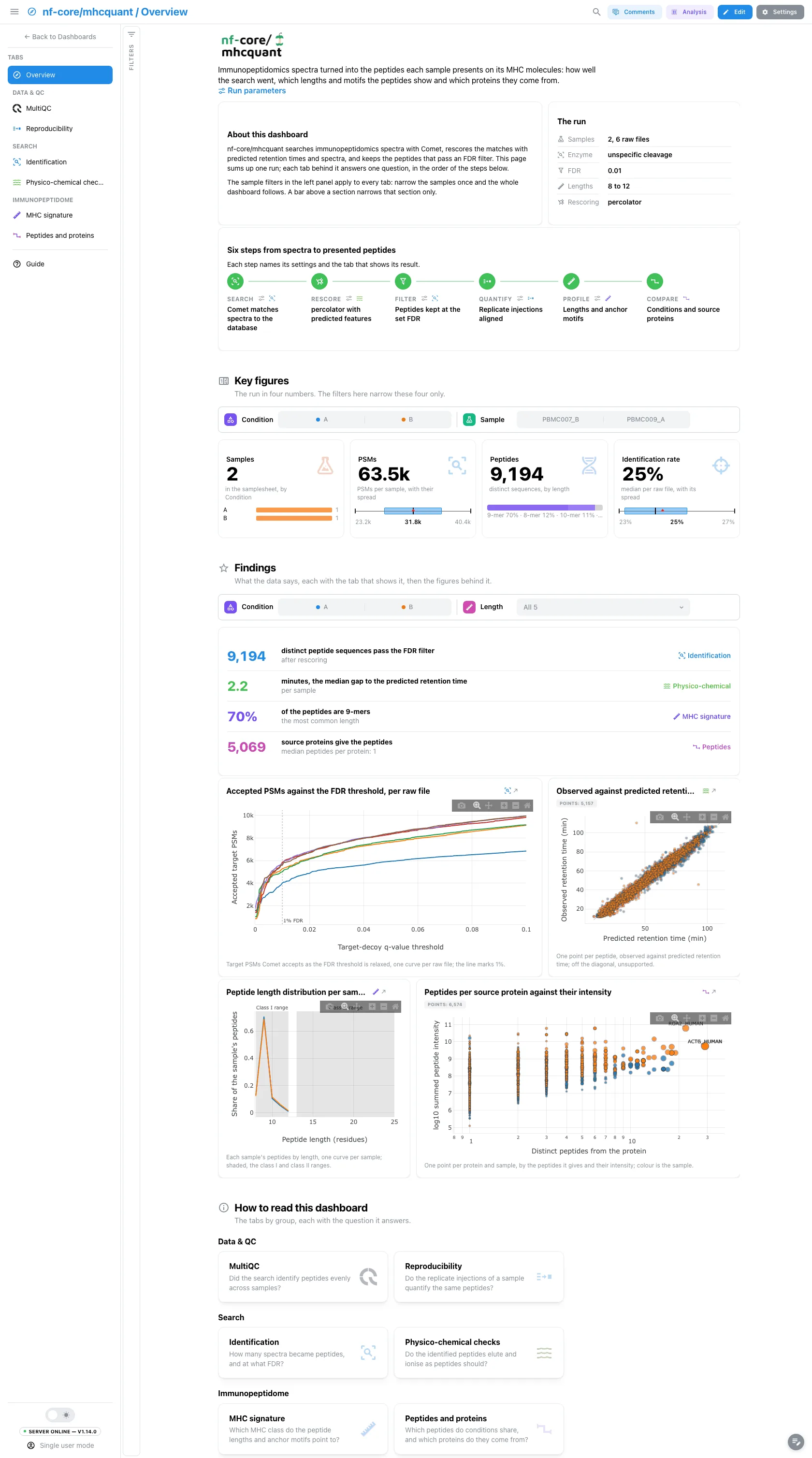
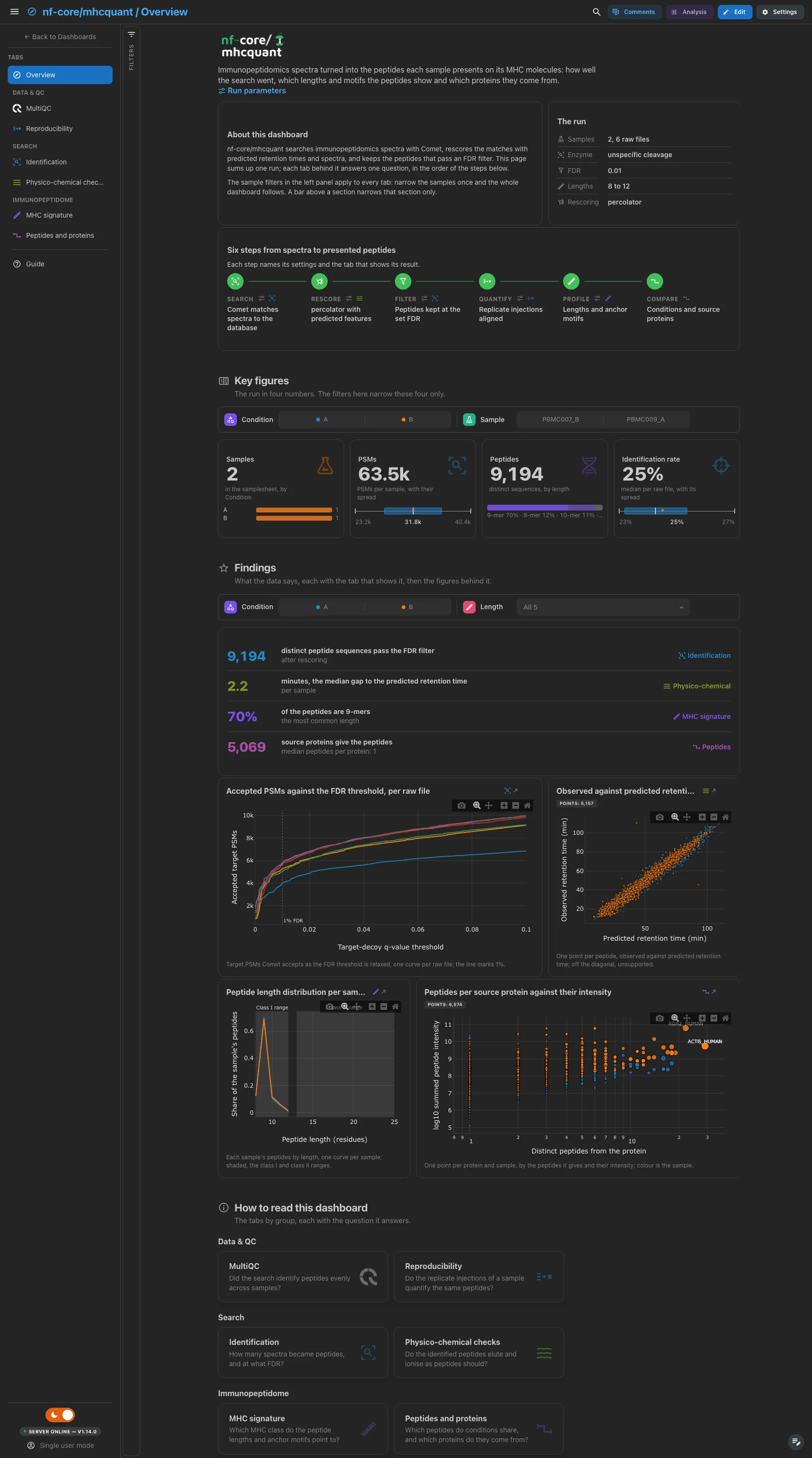
A short hero links the run parameters. About this dashboard says how the two filter levels work, The run lists the samples and raw files, the enzyme, the FDR threshold, the peptide length bounds and the rescoring engine, and Pipeline walks the six steps from the search to the comparison of conditions, each linked to its parameters and its tab. The key figures read collections every route writes, so a route never leaves a gap in them. The findings are live values: they follow the filters.
Filters and components
Filters · the left panel starts collapsed. Key figures has its own filter bar (the condition and the sample), and so does Findings (the condition and the peptide length): each narrows its own section only.
| Section | What it holds |
|---|---|
| Top | Hero, About this dashboard, The run, Pipeline |
| Key figures | 4 headline cards: samples, PSMs, peptides, identification rate |
| Findings | Live result rows, then 4 figures: the accepted PSMs against the FDR threshold, the observed against predicted retention time, the length profile and the source proteins |
| How to read this dashboard | The tabs by group, each with its question |
Data & QC · Did the search identify peptides evenly across samples?
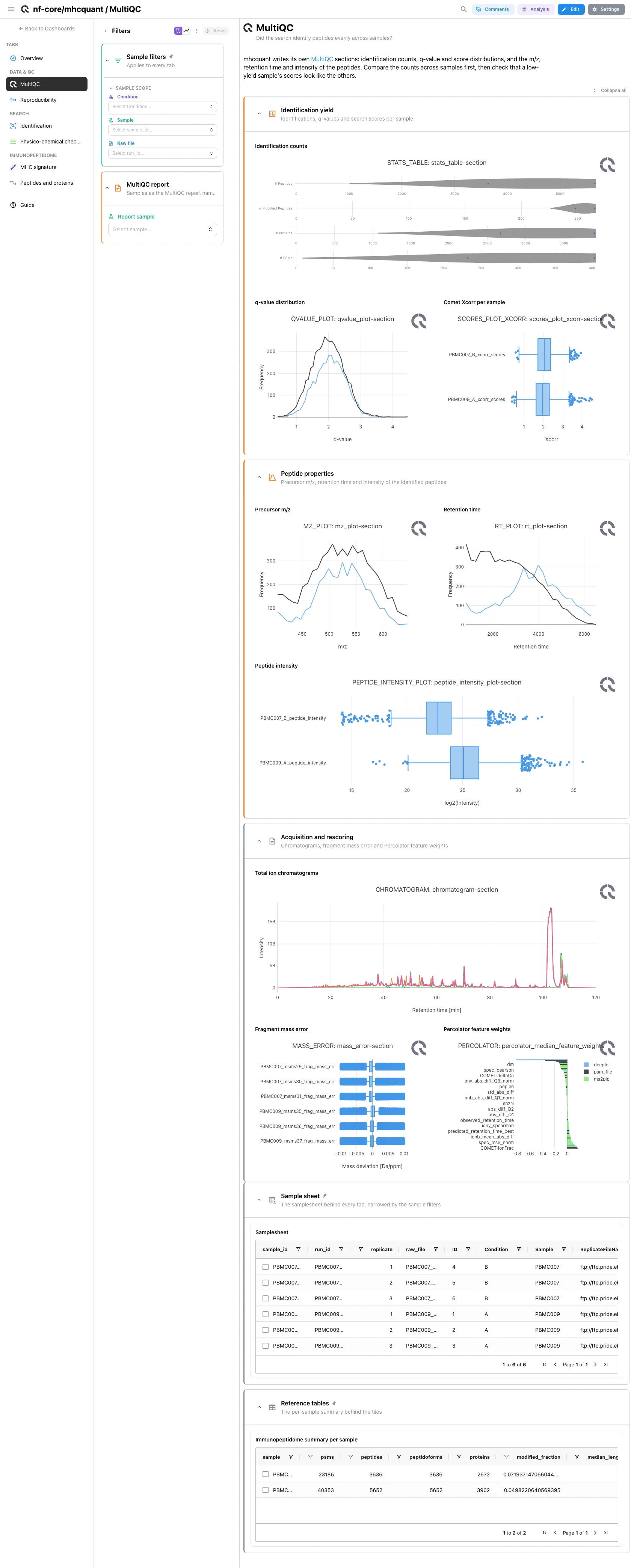
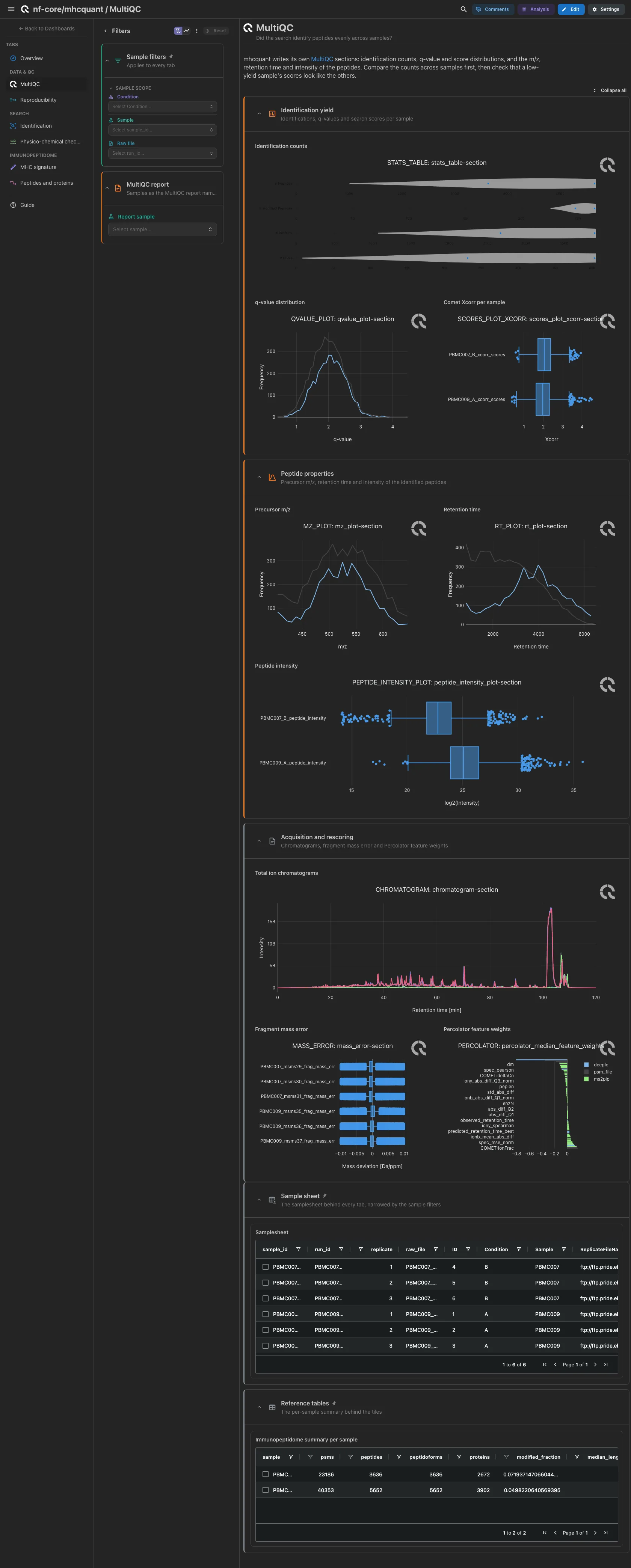
MultiQC panels only: the sections mhcquant writes into its own report. Open: identification counts, the q-value and Comet Xcorr distributions, then precursor m/z, retention time and peptide intensity. Compare the counts across samples first, then check that a low-yield sample's scores look like the others. The total ion chromatograms, the fragment mass error and the Percolator feature weights are collapsed, for when the cause is the acquisition or the rescoring model.
Filters and components
Filters · Report sample, read from the MultiQC report.
| Section | What it holds |
|---|---|
| Identification yield | 3 MultiQC panels |
| Peptide properties | 3 MultiQC panels |
| Acquisition and rescoring (collapsed) | 3 MultiQC panels |
Data & QC · Do the replicate injections of a sample quantify the same peptides?
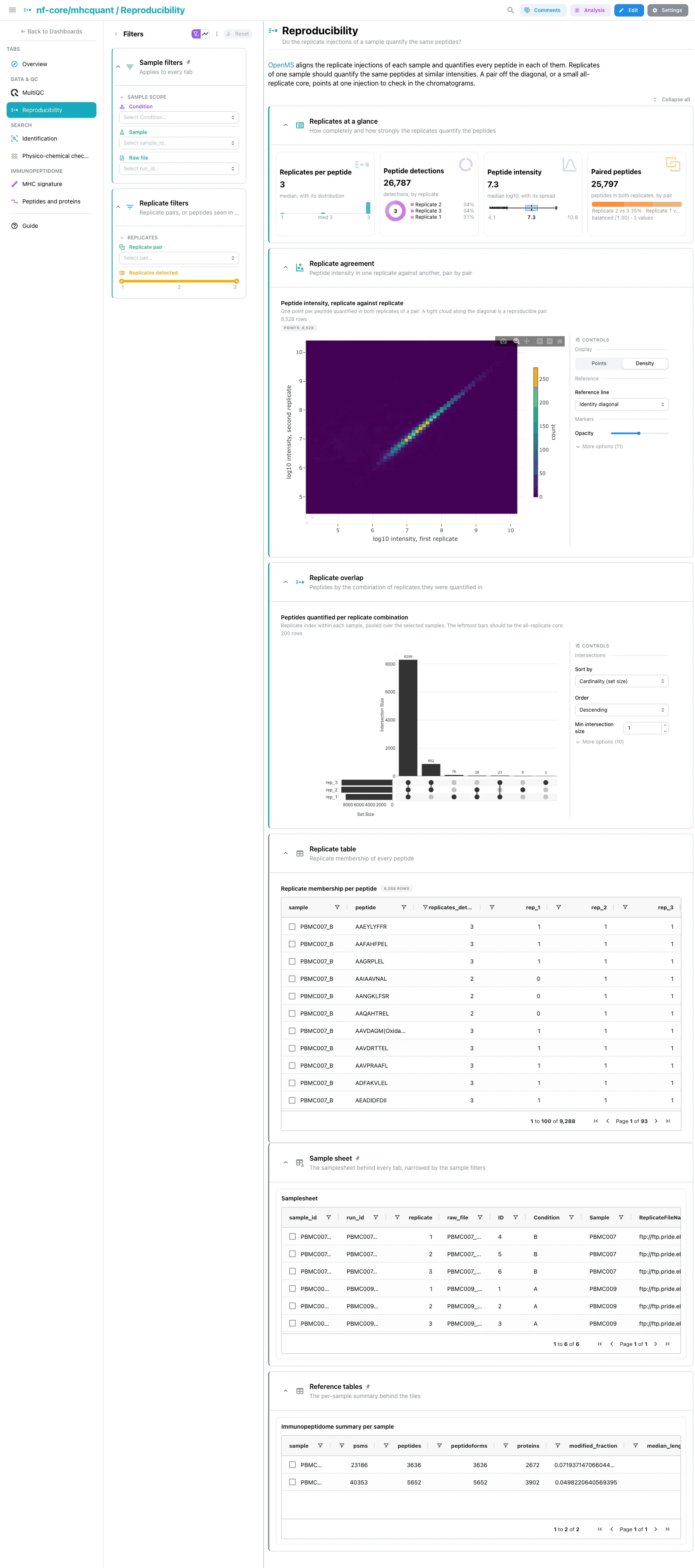
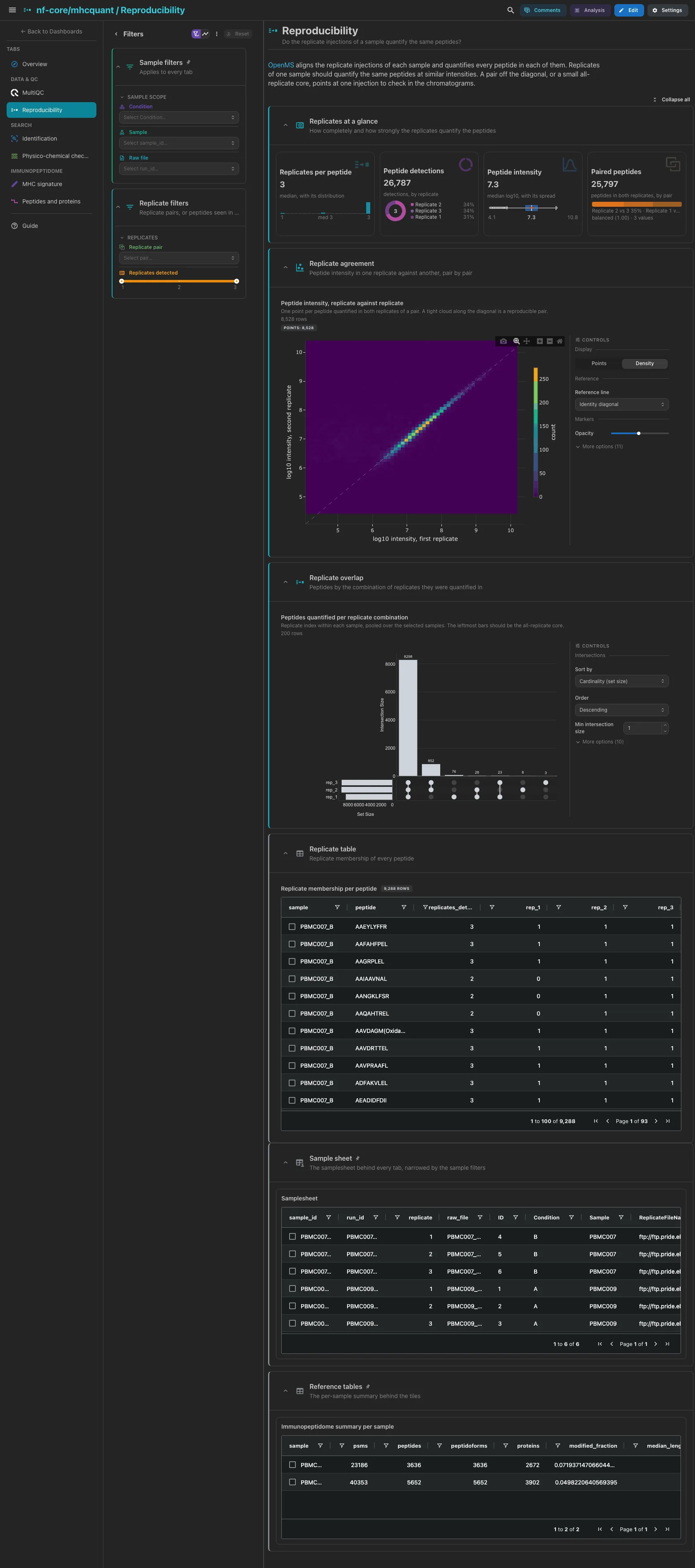
OpenMS aligns the replicate injections of each sample and quantifies every
peptide in each. The replicates per peptide, the peptide detections as a ring by
replicate, the median log10 intensity and the peptides quantified in both
replicates of a pair. Then the intensity scatter for every replicate pair and
the UpSet of the replicate combinations: a pair off the diagonal, or a small
all-replicate core, points at one injection to check. Replicate labels follow
the samplesheet ID order within a sample. The membership table is collapsed.
Filters and components
Filters · Replicate pair on mhcquant_replicate_pairs and a
Replicates detected range on mhcquant_replicate_detection.
| Section | What it holds |
|---|---|
| Replicates at a glance | 4 cards |
| Replicate agreement | 1 advanced visualization |
| Replicate overlap | 1 advanced visualization |
| Replicate table (collapsed) | Replicate membership per peptide |
Only with --quantify
Every tile here binds a replicate collection. A run without --quantify
takes --var NO_QUANTIFICATION=true: the tab is dropped, and the replicate
columns of the per-sample summary stay empty.
Search · How many spectra became peptides, and at what FDR?
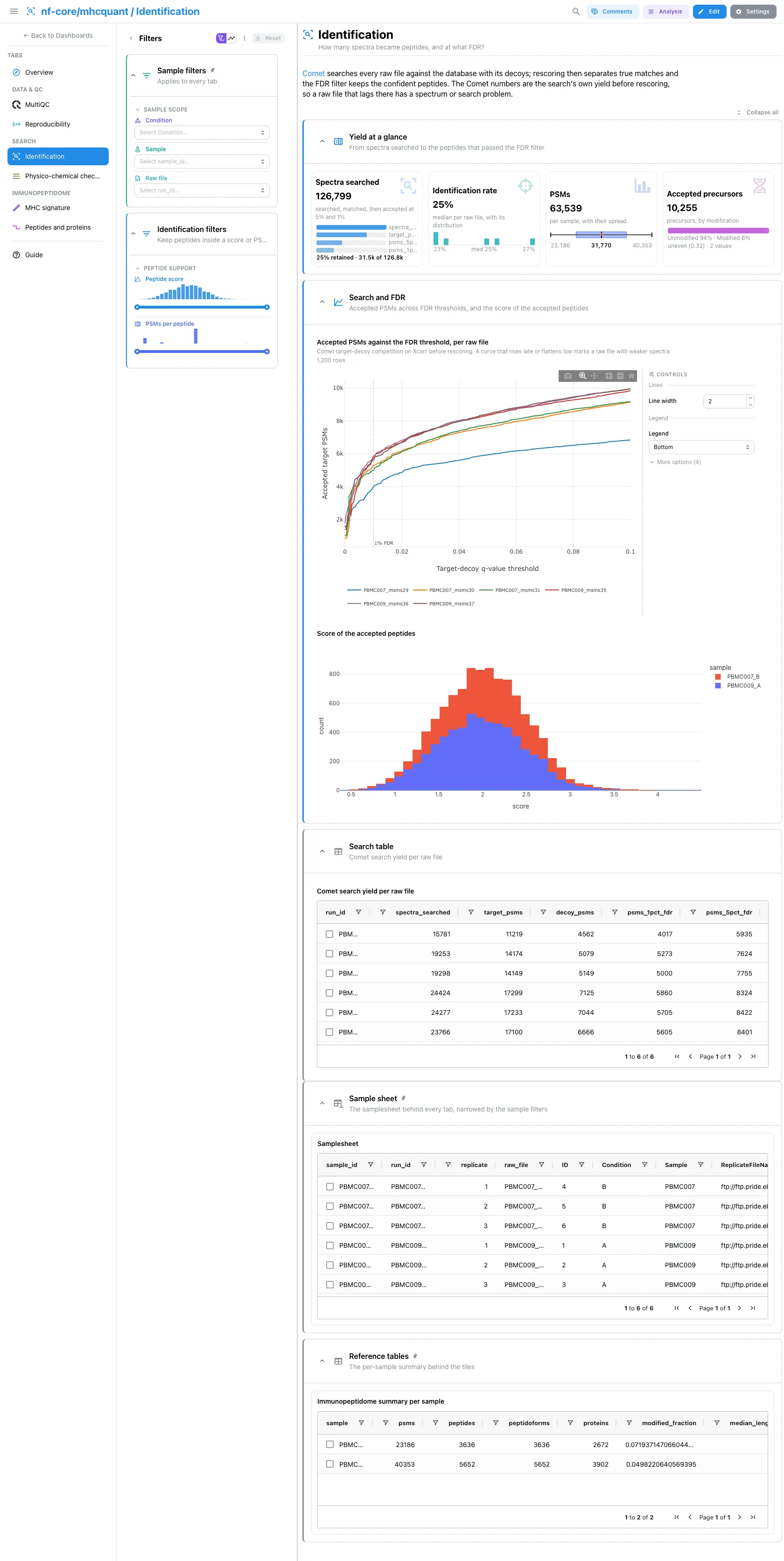
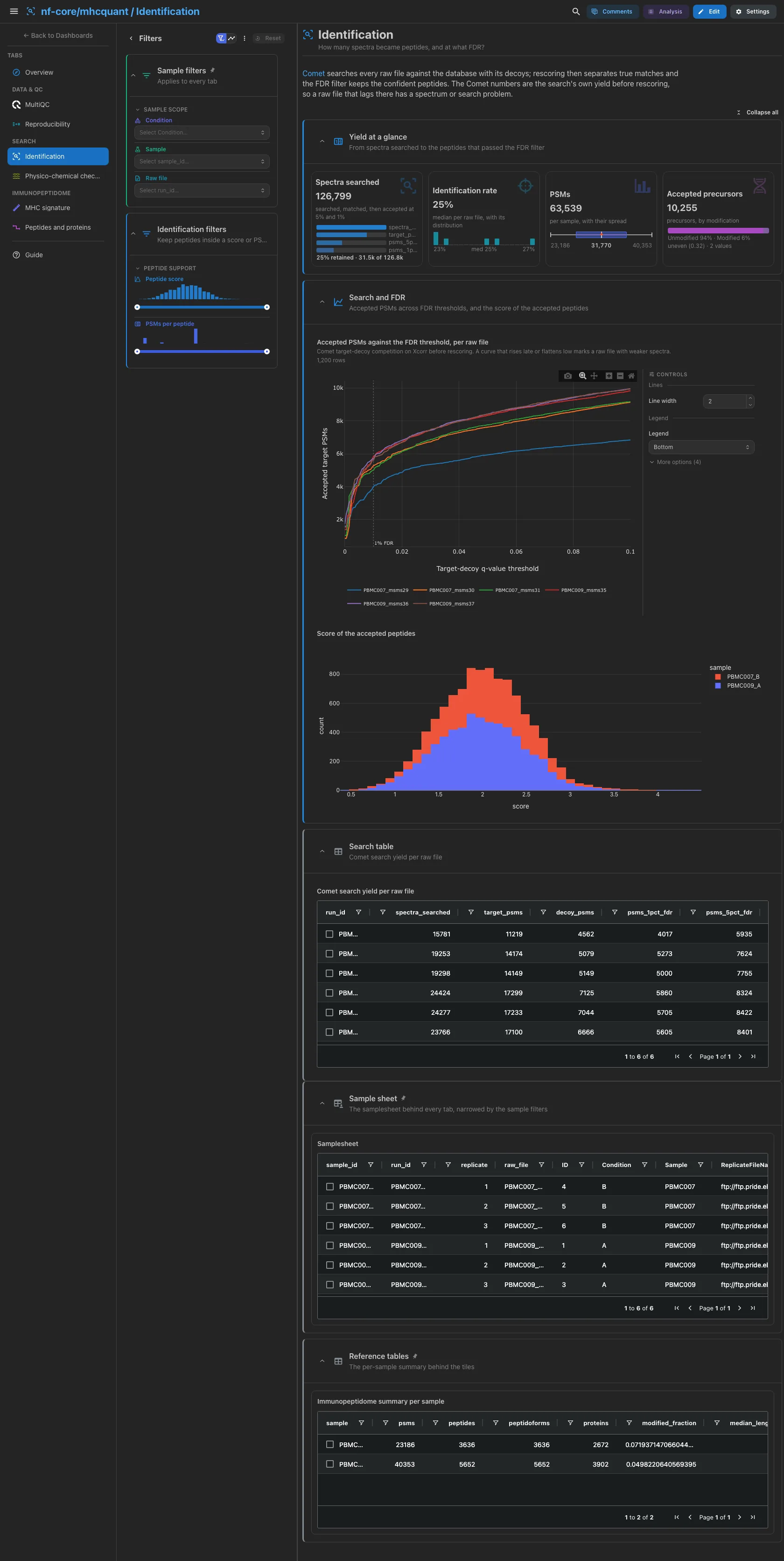
The spectra searched, as a funnel to the target matches and the PSMs accepted at 5% and 1% FDR; the identification rate per raw file; the PSMs that passed the pipeline's filter; the accepted precursors by modification. Then the accepted PSMs against the q-value threshold, one curve per raw file, and the score of the accepted peptides by sample. The Comet numbers come from the pin files, before MS2Rescore and Percolator, so they describe the raw search, not the final FDR. The Comet search table is collapsed.
Filters and components
Filters · Peptide score and PSMs per peptide ranges on
mhcquant_peptides.
| Section | What it holds |
|---|---|
| Yield at a glance | 4 cards |
| Search and FDR | 1 advanced visualization + Score of the accepted peptides |
| Search table (collapsed) | Comet search yield per raw file |
Search · Do the identified peptides elute and ionise as peptides should?
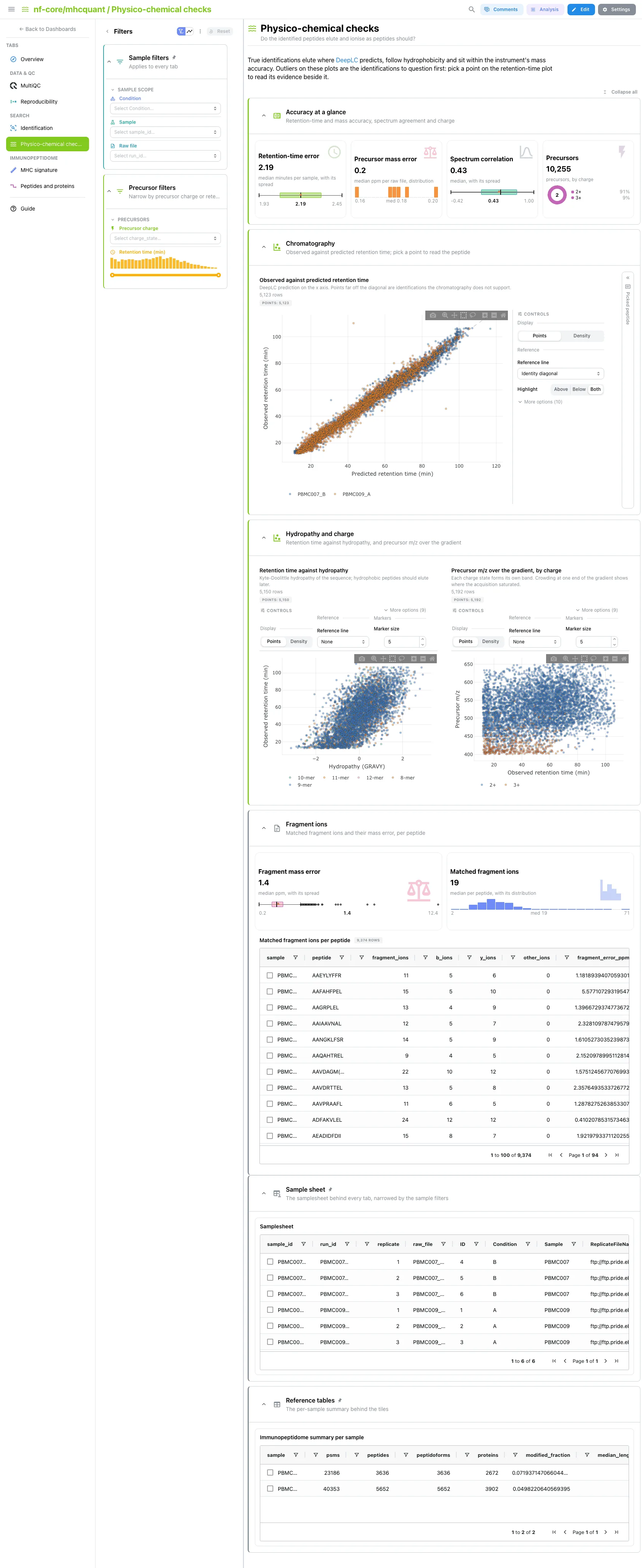
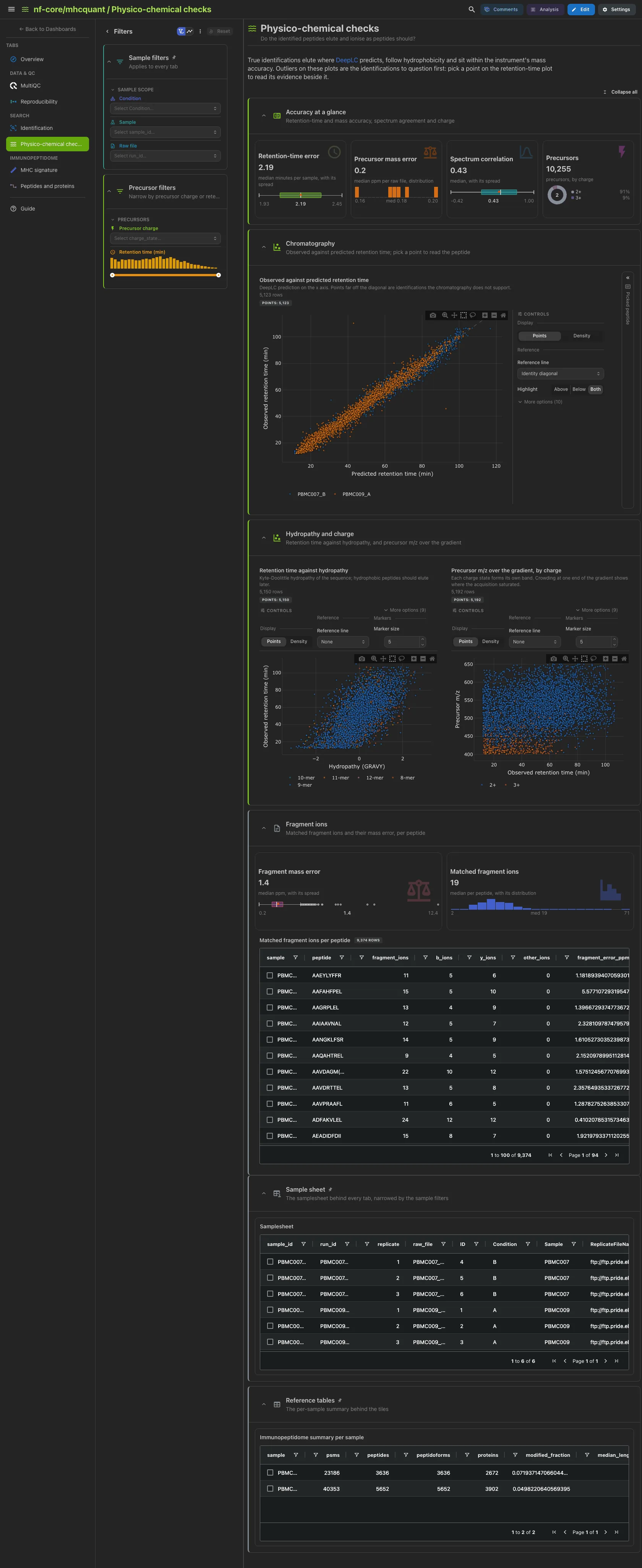
The retention-time error per sample, the precursor mass error per raw file, the correlation with the MS2PIP-predicted spectrum and the precursors by charge. Then the observed against DeepLC-predicted retention time, with the record of a picked peptide beside it, and side by side retention time against Kyte-Doolittle hydropathy and precursor m/z over the gradient by charge. Outliers on these plots are the identifications to question first. The fragment-ion cards and table are collapsed.
Filters and components
Filters · Precursor charge and a Retention time (min) range on
mhcquant_peptides.
| Section | What it holds |
|---|---|
| Accuracy at a glance | 4 cards |
| Chromatography | 1 advanced visualization + a peptide record card |
| Hydropathy and charge | 2 advanced visualizations |
| Fragment ions (collapsed) | 2 cards, Matched fragment ions per peptide |
Only with --annotate_ions
A run without --annotate_ions takes --var NO_ION_ANNOTATION=true, and
the Fragment ions section is dropped.
Immunopeptidome · Which MHC class do the peptide lengths and anchor motifs point to?
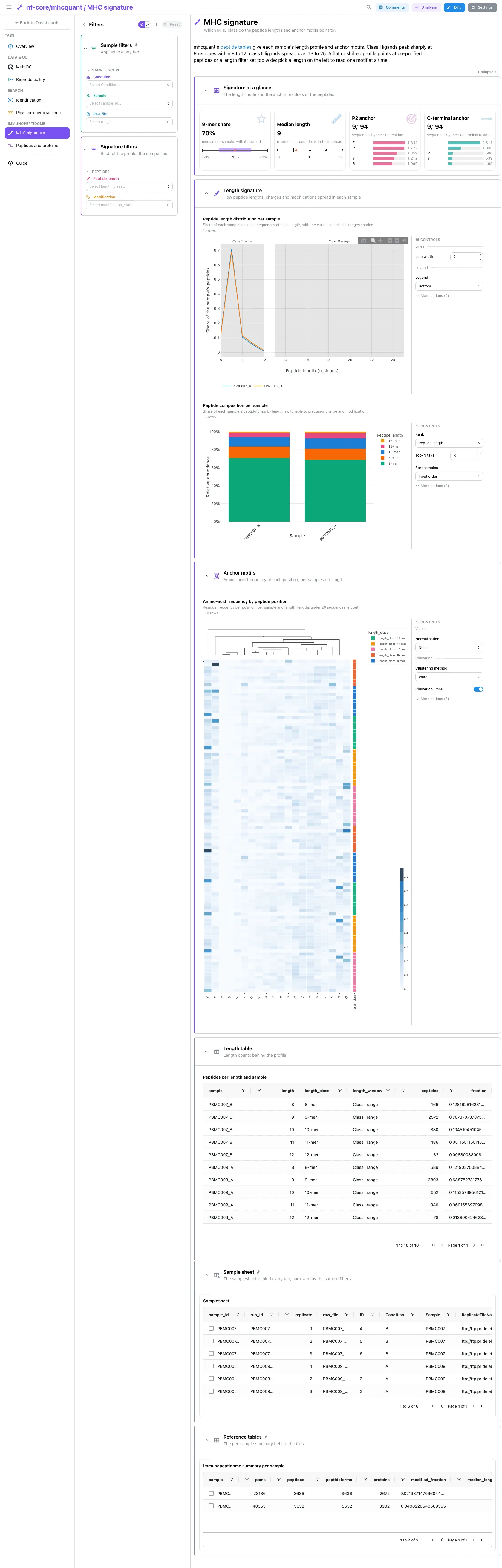
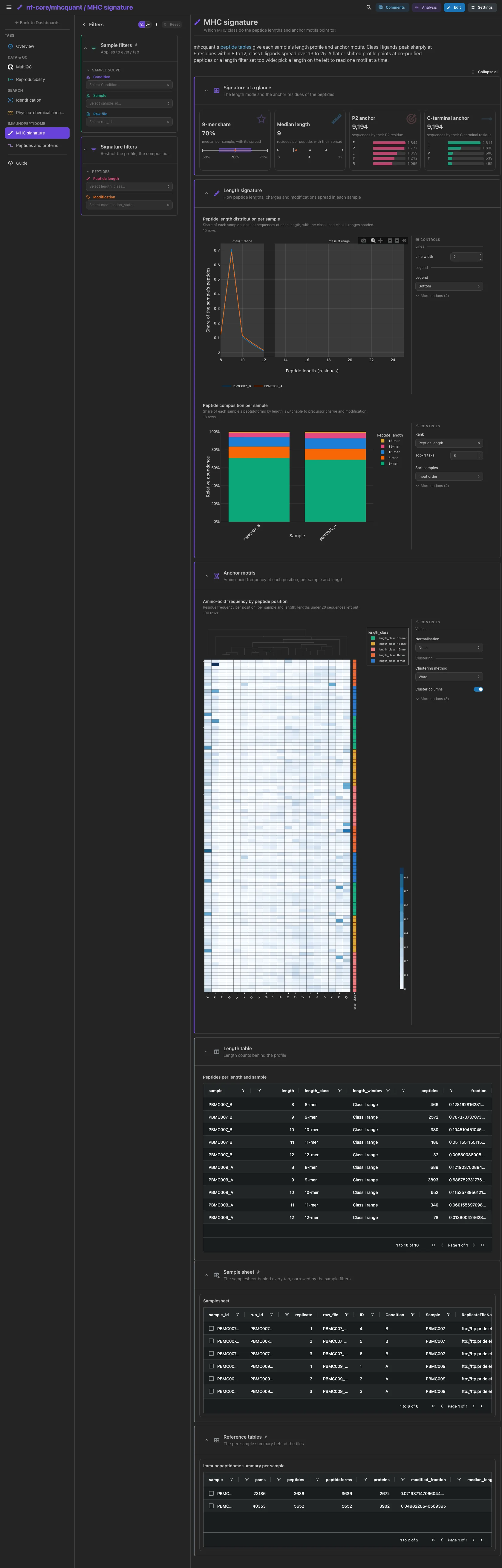
The 9-mer share per sample, the median peptide length, and the distinct sequences ranked by their P2 and C-terminal residues, the two class I anchors. Then the length profile with the class I (8 to 12) and class II (13 to 25) ranges shaded, the composition per sample by length, switchable to charge and modification, and the amino-acid frequency at each position per sample and length, where the anchor motifs show. A flat or shifted length profile points at co-purified peptides or a length filter set too wide. The length table is collapsed.
Filters and components
Filters · Peptide length and Modification on mhcquant_peptides,
which also narrow the length profile and the motif heatmap through the
project links.
| Section | What it holds |
|---|---|
| Signature at a glance | 4 cards |
| Length signature | 2 advanced visualizations |
| Anchor motifs | 1 advanced visualization |
| Length table (collapsed) | Peptides per length and sample |
Immunopeptidome · Which peptides do conditions share, and which proteins do they come from?
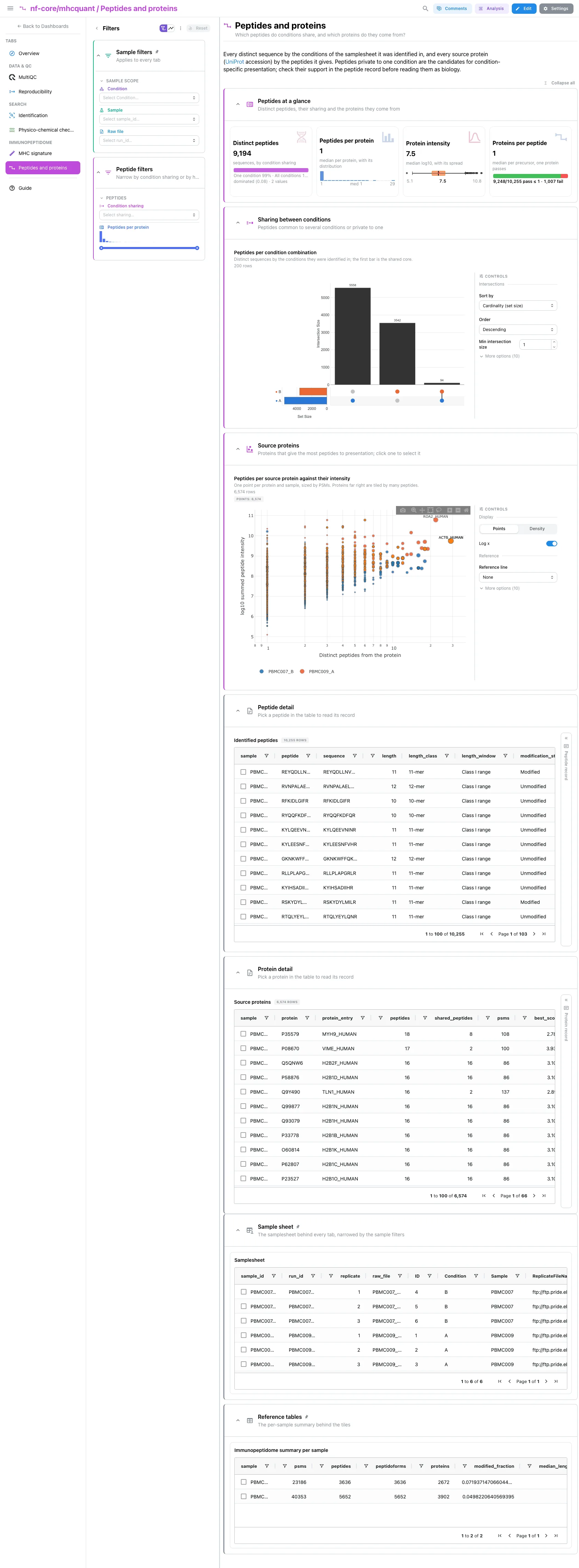
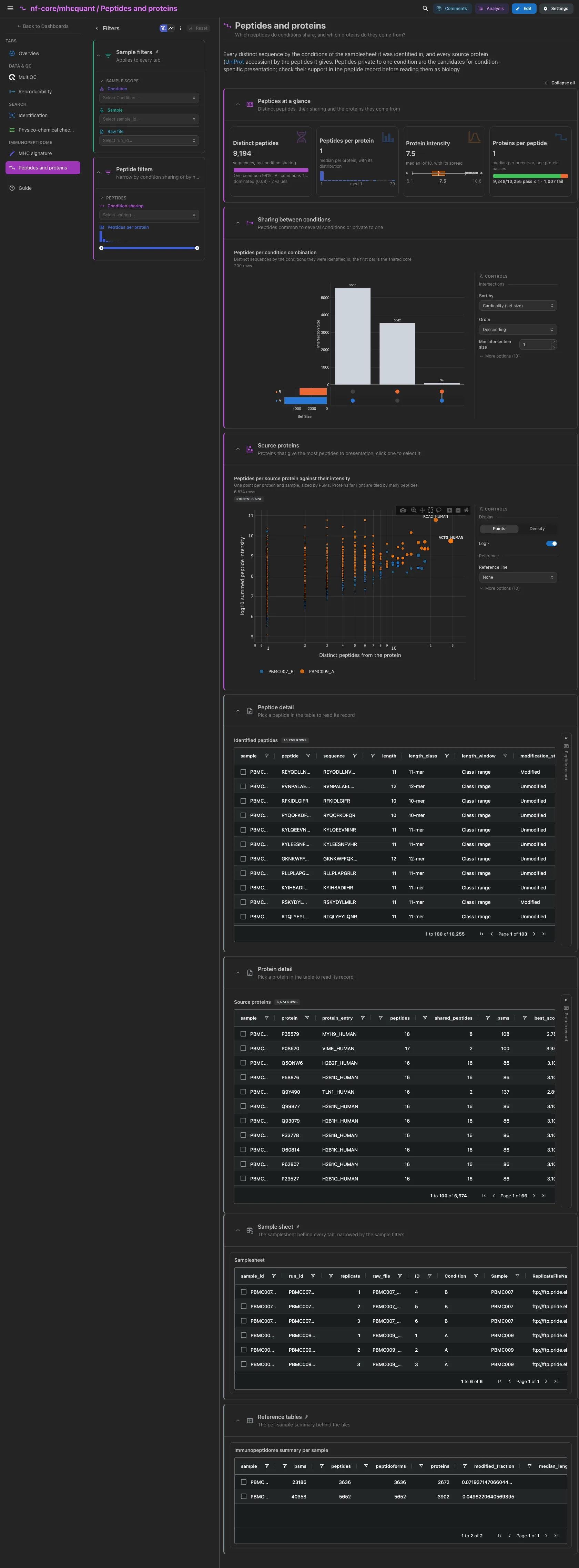
The distinct sequences by condition sharing, the peptides per source protein, the protein intensity and the source proteins per peptide. Then the UpSet of the conditions each sequence was identified in, and the source proteins by the peptides they give against their intensity; a click selects the protein. Peptides private to one condition are the candidates for condition-specific presentation: check their support in the peptide record first. The peptide and protein tables are collapsed, each with a record card for the selected row.
Filters and components
Filters · Condition sharing on peptide_condition_sharing and a
Peptides per protein range on mhcquant_source_proteins.
| Section | What it holds |
|---|---|
| Peptides at a glance | 4 cards |
| Sharing between conditions | 1 advanced visualization |
| Source proteins | 1 advanced visualization |
| Peptide detail (collapsed) | Identified peptides + a peptide record card |
| Protein detail (collapsed) | Source proteins + a protein record card |
One condition
On a run with a single condition, the sharing split and the UpSet show a single set.
Tables and scatters select on their entity column: the sample sheet on
sample_id, which the links carry to every collection and to the MultiQC panels,
and the pinned per-sample summary on sample; the Comet table on raw files
(run_id) and the replicate membership table on peptides; the peptide table and
the three scatters of Physico-chemical checks on sequence, which also reaches the
condition-sharing collection; the source-protein scatter and table on protein;
the fragment-ion table on peptide. A pick narrows every tile that reads the same
collection or one linked from it, and each record card waits beside its table or
scatter for a picked row or point. The length table and the replicate-pair scatter
select nothing.
Running the pipeline
Depictio reads the output of nf-core/mhcquant, it does not run the pipeline. Run the pipeline first, with quantification and ion annotation if you want the Reproducibility tab and the fragment checks:
nextflow run nf-core/mhcquant -r 3.2.0 \
  --input samplesheet.tsv \
  --fasta proteome.fasta \
  --quantify --annotate_ions \
  --outdir results -profile docker
Then point Depictio at the results, with the samplesheet you started from:
depictio ingest results/ --template nf-core/mhcquant/latest \
  --var METADATA_FILE=samplesheet.tsv --var GROUP_COL=Condition
See nf-co.re/mhcquant/usage for full pipeline documentation.
Required data structure
Point depictio ingest at the directory holding the pipeline output. Depictio scans
recursively and matches on file name.
<DATA_ROOT>/
├── input/
│   └── samplesheet.tsv                        # the hub (METADATA_FILE default): ID, Sample, Condition, ReplicateFileName
├── <Sample>_<Condition>.tsv                   # one FDR-filtered peptide table per sample
├── multiqc/multiqc_data/
│   └── multiqc.parquet                        # mhcquant custom-content sections
├── intermediate_results/
│   ├── comet/*_pin.tsv                        # Comet PSMs per raw file, before rescoring
│   └── ion_annotations/*_matching_ions.tsv    # optional, --annotate_ions
└── pipeline_info/
    ├── params_*.json
    └── *software*versions*.yml
The replicate intensities are the intensity_<k> columns of the peptide tables,
present only with --quantify. The mzTab exports, the OpenMS XML intermediates
and the spectral library are not read.
Validation runs
The template was validated against the AWS megatest of the 3.2.0 release
(results-6ec12c97f7889a3e1f09ab89930723045c6bac68, test_full profile: a
PRIDE immunopeptidomics dataset of two samples with three raw replicates each,
one sample per condition), and the screenshots above come from it. With one
sample per condition, the sharing UpSet on that run is dominated by private
peptides. megatest.yaml lists the tables-only subset the template needs, and
the download script also places the vendored samplesheet under input/:
bash depictio/projects/nf-core/mhcquant/3.2.0/download_test_data.sh /tmp/mhcquant_test
depictio ingest /tmp/mhcquant_test --template nf-core/mhcquant/latest \
  --var GROUP_COL=Condition
Do not pass --project when ingesting: the dashboard is attached to the
project by name, so renaming it breaks a later depictio dashboard import.
Re-ingesting accumulates dashboards, so delete the project before repeating a run.
Additional resources
- nf-co.re/mhcquant: official pipeline documentation
- nf-co.re/mhcquant/3.2.0/results: AWS test results
- Template System Reference: YAML format, variables, conditionals
- Recipes: how to read, test, and write recipes
Authorship
 weber8thomas
Reviewing a template on your own data, or taking over a role here, is a contribution in itself: the contributing guide says what each one involves.