

The crisprseq template follows the targeted analysis of nf-core/crisprseq. The pipeline aligns each amplicon library to its reference, the CIGAR parser calls every read wild type, template-based (HDR) or an indel, and the template pools the libraries per guide:
- Overview: the run in four key figures, live findings and four figures, each linked to the tab that explains it
- Data & QC: raw, clustered and aligned reads per library, so no editing rate rests on a handful of reads
- Edit outcomes: edited, frameshift and in-frame reads per library, and the clonality call
- Guides: editing and frameshift share per guide, and the repair outcomes each one leaves
- Indel spectrum: the size distribution and the deletion and insertion positions around the cut site of one guide
- Substitutions: substitution and gap rates by offset from the cut site, for every guide and for the picked one
The targeted analysis only
The template reads --analysis targeted. The screening analysis (count
tables, MAGeCK, BAGEL2) writes different outputs and is not covered. The
pipeline writes no MultiQC report, so there is no MultiQC tab either.
A library is a sample, a guide is a protospacer
A library is a samplesheet sample. Its guide is the protospacer column,
upper-cased. A run that set one protospacer for all libraries with
--protospacer gets a single guide named run protospacer.
Quick start
The results directory (cigar/, clonality/, pipeline_info/) is what you
pass. crisprseq does not publish the samplesheet it ran on, so the template
reads input/samplesheet.csv under that directory by default. Copy your
--input sheet there, or name it. A sheet you name needs the grouping column
pinned, because the CLI otherwise takes the first column after the id, which
is fastq_1 in a pipeline samplesheet:
depictio ingest /path/to/crisprseq_results \
--template nf-core/crisprseq/latest \
--var METADATA_FILE=/path/to/samplesheet.csv \
--var GROUP_COL=protospacer
| Variable | Default | Role |
|---|---|---|
METADATA_FILE |
{DATA_ROOT}/input/samplesheet.csv |
The samplesheet the run started with |
GROUP_COL |
protospacer |
Sheet column the dashboard groups and filters libraries by |
GROUP_COL_DISPLAY |
Protospacer |
The label of GROUP_COL in filter and card titles |
SKIP_CLONALITY |
unset | Set it to true for a run with --skip_clonality |
depictio config nextflow --install     # once per machine
nextflow run nf-core/crisprseq -r 2.3.0 -profile docker \
  --analysis targeted --input samplesheet.csv --outdir results
No depictio ingest, and no template named: the pipeline ingests its own
output directory when it finishes and resolves this template from its own
manifest. See Nextflow trigger. The
trigger passes no --var, so put a copy of the samplesheet at
results/input/samplesheet.csv before the run, and ingest by hand for a
--skip_clonality run.
Reference
The CIGAR parser writes one small file per library under cigar/ (reads summary,
edit counts, indel QC, per-read indels, substitution rates and the cut site), and
the clonality classifier one under clonality/. The recipes read them by glob, so
a run of thousands of libraries stays a handful of tables. Profiles along the
amplicon (indel sizes, deletion and insertion position, substitution and gap
rates) are summarised per guide: the mean library, with the median and the first
and third quartile beside it. That is about 24,500 rows per profile on the
reference run, against 250,000 to 1.1 million per library and position. The
per-library indel alleles stay a collection, because the guide tables and the
allele table read them.
Three definitions the tiles share:
- Edited reads are the classified reads that are not wild type, and every rate uses the classified reads as its denominator. A frameshift is an insertion or deletion whose length is not a multiple of 3.
- Offset is the position minus the cut site the pipeline reports. If its convention does not match the strand of a guide, the signature shifts by a constant and the shape still reads correctly.
- A per-guide profile is drawn as the mean library, with a band from the first to the third quartile of the guide's libraries. The mean, not the median, is the curve, because at most sizes and offsets most libraries carry no indel and the median sits on zero.
Template variables
Variables you provide when running the template: DATA_ROOT is the results directory given to depictio ingest, the others are set with --var NAME=value:
| Variable | Required | Description |
|---|---|---|
DATA_ROOT |
✓ | crisprseq output directory (cigar/, clonality/, pipeline_info/). |
METADATA_FILE |
— | The samplesheet the run was started with (--input: sample, fastq_1, fastq_2, reference, protospacer, template). Defaults to input/samplesheet.csv under DATA_ROOT. |
METADATA_ID_COL |
— | Samplesheet id column. The crisprseq input schema fixes it to sample. |
GROUP_COL |
— | Samplesheet column the dashboard groups and filters libraries by. Defaults to protospacer, the guide each library was edited with. |
GROUP_COL_DISPLAY |
— | Reader-facing label of GROUP_COL, used in filter and card titles. |
SKIP_CLONALITY |
— | Set (--var SKIP_CLONALITY=true) for a run with --skip_clonality: clonality/ is absent, so the clonality collection is removed. |
Data collections
12 data collections — 11 required 1 optional · 5 direct 7 derived.
Origin tells you whether a collection is real pipeline data or a reshape of it: direct = a pipeline output (scanned, or a recipe that reads raw files); derived = a recipe that reshapes one or more direct collections into the layout a visualization needs (no new measurement). Reads shows what produces it: a recipe .py transform, whose name links to its source on GitHub, or a raw file scanned off disk. (A direct collection can still have a recipe — one that merely parses/cleans the raw file; derived means the recipe reshapes another collection.)
| Tag | Origin | Type | Reads | Status |
|---|---|---|---|---|
samples |
direct | Table | recipe nf-core/crisprseq/samples.py |
required |
crisprseq_edit_summary |
direct | Table | recipe crisprseq/edit_summary.py |
required |
crisprseq_edit_outcomes |
direct | Table | recipe crisprseq/edit_outcomes.py |
required |
crisprseq_clonality |
direct | Table | recipe crisprseq/clonality.py |
optional |
crisprseq_indels |
direct | Table | recipe crisprseq/indels.py |
required |
guide_summary |
derived | Table | recipe nf-core/crisprseq/guide_summary.py |
required |
guide_outcomes |
derived | Table | recipe nf-core/crisprseq/guide_outcomes.py |
required |
guide_alleles |
derived | Table | recipe nf-core/crisprseq/guide_alleles.py |
required |
guide_indel_sizes |
derived | Table | recipe nf-core/crisprseq/guide_indel_sizes.py |
required |
guide_cut_site_profile |
derived | Table | recipe nf-core/crisprseq/guide_cut_site_profile.py |
required |
guide_substitution_profile |
derived | Table | recipe nf-core/crisprseq/guide_substitution_profile.py |
required |
guide_substitutions |
derived | Table | recipe nf-core/crisprseq/guide_substitutions.py |
required |
Conditional routes
Rows are data collections; columns are the variables you set or params.json flags auto-detected from the run. Each filled cell is the effect of setting that variable; an empty cell means that variable leaves the collection unchanged. (11 collections are unaffected by any variable — present on every run.)
+ included− removed⇄ repointed
| Data collection | SKIP_CLONALITY |
|---|---|
crisprseq_clonality |
− |
Cross-DC links
11 links — selecting a value in the source collection filters the target. The join column is shown after the source.
| Source · column | Target | Filters | |
|---|---|---|---|
samples · sample |
→ | crisprseq_edit_summary |
Filter the per-library edit summary by samplesheet libraries |
samples · sample |
→ | crisprseq_edit_outcomes |
Filter the per-library outcome composition by samplesheet libraries |
samples · sample |
→ | crisprseq_clonality |
Filter the clonality calls by samplesheet libraries |
samples · sample |
→ | crisprseq_indels |
Filter the indel alleles by samplesheet libraries |
samples · guide |
→ | guide_summary |
Filter the guide summary by the guides of the selected libraries |
samples · guide |
→ | guide_outcomes |
Filter the guide outcome composition by the guides of the selected libraries |
samples · guide |
→ | guide_indel_sizes |
Filter the guide indel size profiles by the guides of the selected libraries |
samples · guide |
→ | guide_cut_site_profile |
Filter the guide cut-site profiles by the guides of the selected libraries |
samples · guide |
→ | guide_substitutions |
Filter the guide substitution matrix by the guides of the selected libraries |
samples · guide |
→ | guide_alleles |
Filter the guide alleles by the guides of the selected libraries |
samples · guide |
→ | guide_substitution_profile |
Filter the guide substitution profiles by the guides of the selected libraries |
Recipes
Each recipe reshapes raw pipeline output into a tidy table. The name links to its source; Output lists the validated OUTPUT_SCHEMA columns.
| Recipe | Transforms | Output |
|---|---|---|
crisprseq/clonality.py |
Clonality call per library, from the crisprseq clonality classifier. | sample, classification, clonality, class_confidence, total_reads, wt_pct, deletion_pct, insertion_pct, delins_pct, inframe_pct, frameshift_pct, indel_peaks, max_peak_pct, mean_peak_pct, peak_occupancy |
crisprseq/edit_outcomes.py |
Edit outcome composition, one row per library and outcome class. | sample, outcome, level, reads, pct |
crisprseq/edit_summary.py |
Read accounting and edit outcome rates, one row per library. | sample, classified_reads, edited_pct, indel_pct, frameshift_pct, inframe_pct, template_based_pct, frameshift_of_indels_pct, raw_reads, clustered_reads, aligned_pct, quality_filtered_pct, merged_pct, edited_reads, wt_reads, template_based_reads, delins_reads, ins_inframe_reads, ins_frameshift_reads, del_inframe_reads, del_frameshift_reads, wt_failing_filter, indels_failing_filter, indels_above_error_in_peak, indels_above_error_outside_peak, indels_below_error_in_peak, indels_below_error_outside_peak |
crisprseq/indels.py |
Indel alleles per library, relative to the cut site. | sample, allele, indel_type, start, length, size, offset, frame, peak, reads, pct_reads, pct_indel_reads, rank, cut_site |
nf-core/crisprseq/guide_alleles.py |
The indel alleles of each guide, pooled over its libraries. | guide, allele, libraries, pct_reads, reads, indel_type, size, offset, frame, peak, median_pct_reads, rank |
nf-core/crisprseq/guide_cut_site_profile.py |
Indel position profile around the cut site per guide: mean library and interquartile band. | guide, offset, mean_deletion_pct, median_deletion_pct, q1_deletion_pct, q3_deletion_pct, mean_insertion_pct, median_insertion_pct, q1_insertion_pct, q3_insertion_pct, libraries_with_signal |
nf-core/crisprseq/guide_indel_sizes.py |
Indel size distribution per guide: the mean library with its interquartile band. | guide, size, mean_pct_reads, median_pct_reads, q1_pct_reads, q3_pct_reads, libraries_with_signal |
nf-core/crisprseq/guide_outcomes.py |
Edit outcome composition per guide. | guide, outcome, level, reads, pct |
nf-core/crisprseq/guide_substitution_profile.py |
Substitution and gap rate around the cut site per guide: mean library and interquartile band. | profile_guide, offset, mean_substitution_pct, median_substitution_pct, q1_substitution_pct, q3_substitution_pct, mean_gap_pct, median_gap_pct, q1_gap_pct, q3_gap_pct, libraries |
nf-core/crisprseq/guide_substitutions.py |
Substitution rate per guide and position, as a guide by offset matrix. | guide, libraries, -20, -19, -18, -17, -16, -15, -14, -13, -12, -11, -10, -9, -8, -7, -6, -5, -4, -3, -2, -1, 0, +1, +2, +3, +4, +5, +6, +7, +8, +9, +10, +11, +12, +13, +14, +15, +16, +17, +18, +19, +20 |
nf-core/crisprseq/guide_summary.py |
Editing outcome per guide, one row per protospacer. | guide, edit_class, libraries, median_edited_pct, median_frameshift_of_indels_pct, median_frameshift_pct, median_inframe_pct, median_template_based_pct, min_edited_pct, max_edited_pct, dominant_indel_size, dominant_indel_share_pct, classification_mix, classified_reads |
nf-core/crisprseq/samples.py |
Sample hub for nf-core/crisprseq (targeted): the run's samplesheet, one row per library. | sample, guide, has_template |
Dashboard tabs
One dashboard: the Overview, then five child tabs in three groups, read as a funnel from the reads to the repair each guide leaves. Each tab below carries the same icon and colour the dashboard gives it, so the page and the app read alike.
| Group | Tabs |
|---|---|
| Data & QC | Read QC |
| Editing | Edit outcomes, Guides |
| Repair signature | Indel spectrum, Substitutions |
Each child tab opens with a short intro and a strip of four cards, then at most
three open sections; tables and record cards follow, collapsed. The persistent
Sample filters (protospacer, library, donor template) sit in the left panel and
narrow every tab through the samplesheet links. Guide-level tiles follow them
through the guide link, so they show the guides of the selected libraries (a
guide's means stay over all of its libraries). The Sample sheet and the
per-library summary are pinned, collapsed, to the bottom of every child tab.
Targeted gene editing, from amplicon reads to the repair each guide leaves.
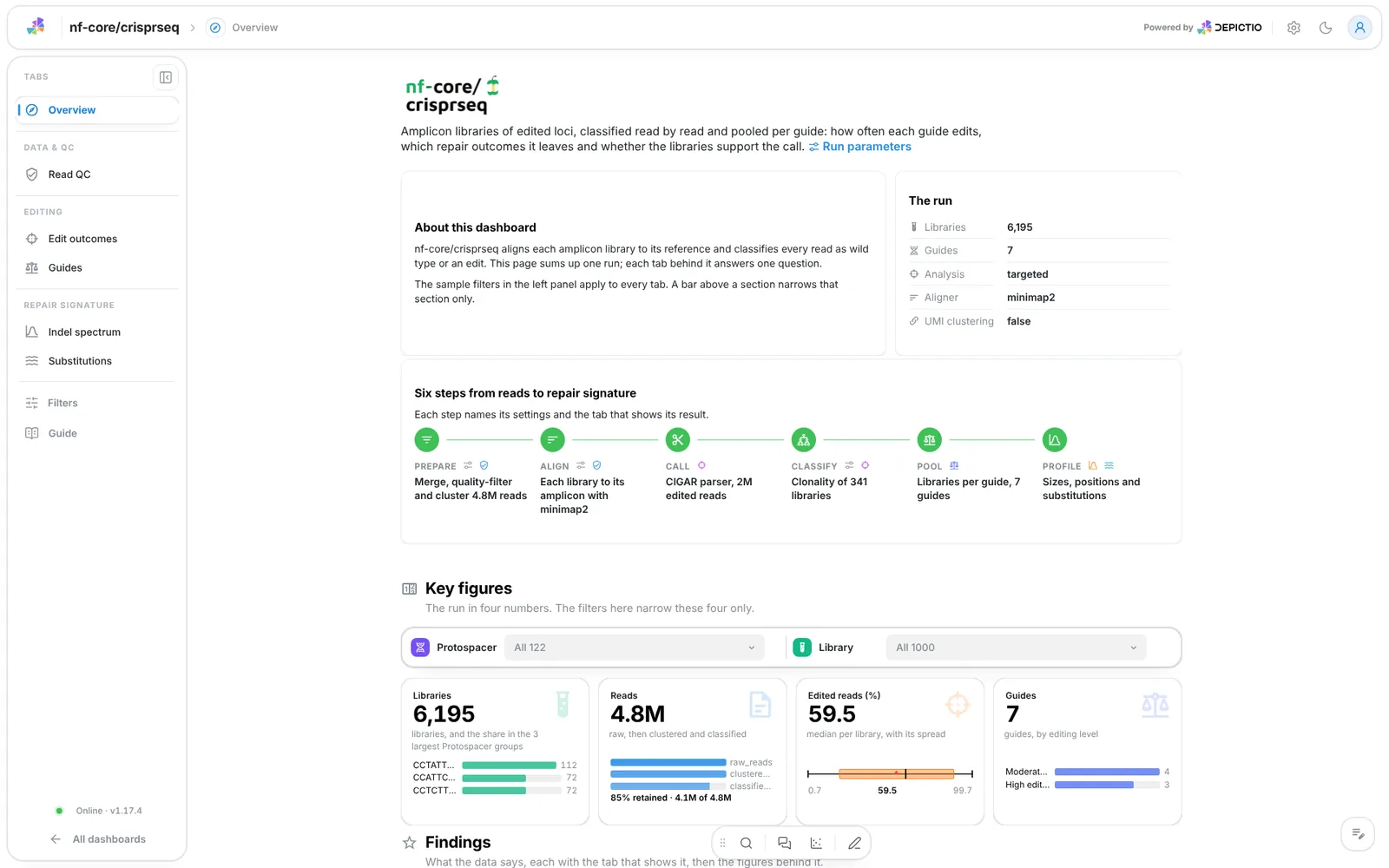
A short hero links the run parameters. About this dashboard says how the two
filter levels work, The run lists the libraries, guides, analysis, aligner
and UMI clustering, and Pipeline walks six steps (prepare, align, call,
classify, pool, profile), each linked to its settings and its tab. The
findings are live values and follow the filters: the median frameshift share of
the indel reads, the guides that edit half of their reads or more, the indel
size most guides repair to, and the most substituted offset. A run with
--skip_clonality loses the Classify step.
Filters and components
Filters · the left panel starts collapsed. Key figures and Findings each have their own filter bar (protospacer and library): each narrows its own section only.
| Section | What it holds |
|---|---|
| Top | Hero, About this dashboard, The run, Pipeline |
| Key figures | 4 headline cards: libraries, reads, edited reads, guides |
| Findings | Live result rows, then 4 figures: frameshift share against editing per library, editing against frameshift share per guide, the indel allele map and the guide by offset substitution matrix |
| How to read this dashboard | The tabs by group, each with its question |
Data & QC · Did each library have enough reads and alignment to call editing?
Raw reads per library, the clustered reads with the share the CIGAR parser classified, the aligned share and the indel reads the filters dropped. Then raw reads against the aligned share per library, one point each; a lasso on it narrows the other tiles. A library with few classified reads or a low aligned share gives an editing rate that rests on a handful of reads, so read this tab before the outcome tabs.
Filters and components
Filters · Raw reads and Aligned reads (%) ranges on
crisprseq_edit_summary.
| Section | What it holds |
|---|---|
| Reads at a glance | 4 cards |
| Depth and alignment | 1 advanced visualization |
Editing · Which libraries carry disruptive edits, and how were they called?
Edited reads, the frameshift share of the indels, in-frame reads and the reads by outcome. A knockout needs edits that shift the reading frame, so the frameshift share against editing per library is the main figure: the upper right holds the likely knockouts, and a click on a library opens its record beside it. The Clonality section shows the classifier's zygosity class and clonality label per library, its confidence and the indel peaks per library. The clonality and outcome tables are collapsed.
Filters and components
Filters · a Frameshift share of indels (%) range on
crisprseq_edit_summary, and Zygosity class and Clonality on
crisprseq_clonality.
| Section | What it holds |
|---|---|
| Outcomes at a glance | 4 cards |
| Library detail | Frameshift share against editing, Library record |
| Clonality | 4 cards |
| Outcome tables (collapsed) | Clonality call per library, Reads per outcome class |
Without clonality
A run with --skip_clonality needs SKIP_CLONALITY=true. The clonality
collection goes, and with it the Clonality section, its filters and its
table.
Editing · Which guides edit well, and which edits disrupt the reading frame?
Each guide is summarised by the median over its libraries, so one failed library does not move it. Guide editing, frameshift share, libraries per guide and the share of the dominant indel size (how predictable the repair is). Then editing against frameshift share per guide, coloured by editing level and sized by its libraries, and the repair outcomes of every guide as stacked bars. The editing level is High from 50 percent, Moderate from 10, Low from 1, else Unedited. The guide table and the guide record are collapsed.
Filters and components
Filters · Editing level and Libraries per guide on guide_summary.
| Section | What it holds |
|---|---|
| Guides at a glance | 4 cards |
| Guide comparison | 1 advanced visualization |
| Outcome composition | Repair outcomes per guide |
| Guide detail (collapsed) | Guides, Guide record |
Repair signature · What is the repair signature of one guide's cut?
The tab reads one guide: the first of the list until another is picked, and the pick cannot be cleared. The dominant indel size, its share, the frameshift share and the alleles by type. Then the indel size distribution (deletions negative, insertions positive) and the deletion coverage and insertion position around the cut site, each as the mean library with its band. The deletion profile should peak near offset 0; a peak far from it points at a misplaced cut site, a second site in the amplicon or an amplicon-end artefact. The allele map (start against size) and the allele tables are collapsed.
Filters and components
Filters · Guide on the samplesheet, so it narrows every collection
of the tab, then Indel type, Frame and Main indel peak on
guide_alleles and an Indel size (bp) range on guide_indel_sizes.
| Section | What it holds |
|---|---|
| Signature at a glance | 4 cards |
| Size signature | 1 advanced visualization |
| Position around the cut site | 2 advanced visualizations: deletion coverage and insertion position |
| Allele map (collapsed) | 1 advanced visualization |
| Indel tables (collapsed) | Indel alleles of the guide, Indel alleles per library |
Repair signature · Where around the cut do bases change or drop out?
The peak substitution rate and the peak gap rate (each with the offsets that carry the most), the background rate and the libraries behind an offset. Then the guide by offset substitution matrix over every guide in scope (rows clustered, offsets in order, log(1 + rate) colour scale), and the substitution and gap profiles of the picked guide. A base editor leaves a band of substitutions a few bases upstream of the cut, while a nuclease leaves the matrix flat with a gap peak at the cut. A substitution rate is the share of reads at a position that carry a base other than the dominant one, which stands in for the reference. The per-offset table is collapsed.
Filters and components
Filters · Guide and an Offset from the cut site (bp) range on
guide_substitution_profile. The Guide pick narrows the cards and the
profiles, not the matrix, which stays at the scope of the sample filters.
| Section | What it holds |
|---|---|
| Substitutions at a glance | 4 cards |
| Substitutions per guide | 1 advanced visualization: the matrix |
| Guide profile | 2 advanced visualizations: substitution and gap rate |
| Substitution tables (collapsed) | Substitution and gap rate per offset |
Running the pipeline
Depictio reads the output of nf-core/crisprseq, it does not run the pipeline.
Run the targeted analysis first; its --input sheet needs only sample, and the
protospacer column is what keys every guide:
nextflow run nf-core/crisprseq -r 2.3.0 \
  --analysis targeted \
  --input samplesheet.csv \
  --outdir results -profile docker
Then point Depictio at the results, with the samplesheet the run started with:
depictio ingest results/ \
  --template nf-core/crisprseq/latest \
  --var METADATA_FILE=samplesheet.csv \
  --var GROUP_COL=protospacer
See nf-co.re/crisprseq/usage for full pipeline documentation.
Required data structure
Point depictio ingest at the output directory of one run. Depictio scans
recursively and matches on file name; the library is the prefix of every file.
<DATA_ROOT>/
├── input/samplesheet.csv                          # not published by the pipeline: copy it here, or --var METADATA_FILE
├── pipeline_info/
│   ├── params*.json
│   └── *software*versions*.yml
├── cigar/                                         # one set of files per library
│   ├── <sample>_reads-summary.csv
│   ├── <sample>_edits.csv
│   ├── <sample>_QC-indels.csv
│   ├── <sample>_indels.csv                        # one row per indel read, the heavy input
│   ├── <sample>_subs-perc.csv
│   └── <sample>_cutSite.json
└── clonality/<sample>_edits_classified.csv        # optional, absent with --skip_clonality
Validation runs
The template was validated against the AWS megatest of the 2.3.0 release,
results-0e9f915c4a3c89d02a66ec58e2decbc832323c8b, on its test_full profile:
6,195 single-end amplicon libraries, 122 protospacers over 223 amplicons, no
donor template. megatest.yaml lists the tables-only subset the template needs,
about 2.3 GB over some 43,000 small files, so the fetch takes a while. The script
copies the samplesheet under input/. The live check used a subset of that run,
341 libraries over 7 guides:
bash depictio/projects/nf-core/crisprseq/2.3.0/download_test_data.sh /tmp/crisprseq_test
depictio ingest /tmp/crisprseq_test --template nf-core/crisprseq/latest
Do not pass --project when ingesting: the dashboard is attached to the
project by name, so renaming it breaks a later depictio dashboard import.
Re-ingesting accumulates dashboards, so delete the project before repeating a run.
Additional resources
- nf-co.re/crisprseq: official pipeline documentation
- nf-co.re/crisprseq/2.3.0/results: AWS test results
- Template System Reference: YAML format, variables, conditionals
- Recipes: how to read, test, and write recipes
Authorship
 weber8thomas
Reviewing a template on your own data, or taking over a role here, is a contribution in itself: the contributing guide says what each one involves.