Remote data and manifests (v1.16.0+)
A project's data does not have to be on the machine that ingests it. A whole
pipeline run can be read from an s3:// prefix, and a single data collection
can point at one file at a URL, at every object under an S3 prefix, or at an
explicit list of files called a data manifest. The web UI creates a project
from a run folder or from a manifest with no CLI involved.
Everything downstream is unchanged. Remote files are materialised to Delta Lake on the instance's own S3 exactly like local files, and dashboards, links and joins do not know the difference.
Which way to use
| You have | CLI | Web UI |
|---|---|---|
| The results folder of a pipeline run, in a bucket | depictio ingest s3://bucket/run42 |
From a run folder |
| The results folder of a pipeline run, on this computer | depictio ingest /data/run42 |
From a run folder, on a depictio local server |
| One file on the web or in a bucket | --bind tag=https://host/data.csv (scan mode url) |
Create Data Collection, Remote URL, see the Web UI guide |
| Many files under one bucket prefix, one naming pattern | --bind tag=s3://bucket/run42/*.csv (scan mode s3_prefix) |
|
| A list of files of several types, in scattered places | --manifest <url or path> (scan mode manifest) |
From Manifest |
A local directory, glob or file keeps the recursive and single scan modes.
The scan modes and their parameters are in the
YAML reference.
Only S3 prefixes can be listed
Plain HTTPS has no listing operation, so an https:// prefix cannot be
enumerated. Use url for one known file, or a manifest to list several.
A run folder on S3
depictio ingest takes an s3:// prefix as DATA_DIR. The listing of the
objects under the prefix stands in for the folder: every question template
resolution asks a directory (does this file exist, which files match this
pattern, which runs are under here) is answered from that one listing.
# The template is detected from the run's own records, as for a local folder
depictio ingest s3://my-bucket/ampliseq/run42

# Check what each data collection finds there first
depictio ingest s3://my-bucket/ampliseq/run42 --template nf-core/ampliseq/latest --dry-run
Unlike a local folder, an s3:// folder that no bundled template reads is not
composed from the catalog: pass --template.
No template is modified for this. Each data collection is pointed at the prefix as follows:
| Template declares | Under an s3:// data root |
|---|---|
recursive scan |
s3_prefix scan of the prefix, with the template's own regex (pattern_syntax: regex) |
single scan |
url scan of the file under the prefix |
Recipe collection (source: transformed) |
Its sources are read through the listing |
url, s3_prefix or manifest scan |
Unchanged |
indexed_file collection |
Not supported yet: a required one stops the run, an optional one is skipped with a warning. --bind it to a local folder |
- A
sequencing-runsworkflow keeps its runs: each first-level folder under the prefix that matchesruns_regexbecomes a run, and its files carry its name asdepictio_run_id. In any other workflow, they carryremote. - A MultiQC report under the prefix is downloaded to a temporary copy, parsed,
and removed. The reports of one data collection share one download budget,
DEPICTIO_REMOTE_MAX_DOWNLOAD_BYTES; a report that does not fit is reported and skipped, and the others are processed. - A template variable may point outside the prefix. A URL is read as it is.
On the CLI, a recipe reads a local file such as
--var METADATA_FILE=/data/meta.tsvfrom this computer, but asinglecollection naming one becomes aurlscan like the others, which refuses a local path: bind that collection to its file instead,--bind metadata=/data/meta.tsv. - The listing of the data root stops at 100,000 objects. Past that, the preview warns that its counts are a lower bound.
- Each
s3_prefixscan lists the prefix again and keeps at most 10,000 matching objects, itsmax_files, with a warning when it stops there. The scan boundsmax_depthandignoreof arecursivecollection are not carried over. - Unlike an empty local scan, an
s3_prefixscan that matches nothing stops the run, with No object under '…' matches pattern '…' for data collection '…'. The preview shows such a collection asemptybeforehand.
Which buckets can be read, and with which credentials, is described under Reading S3 buckets.
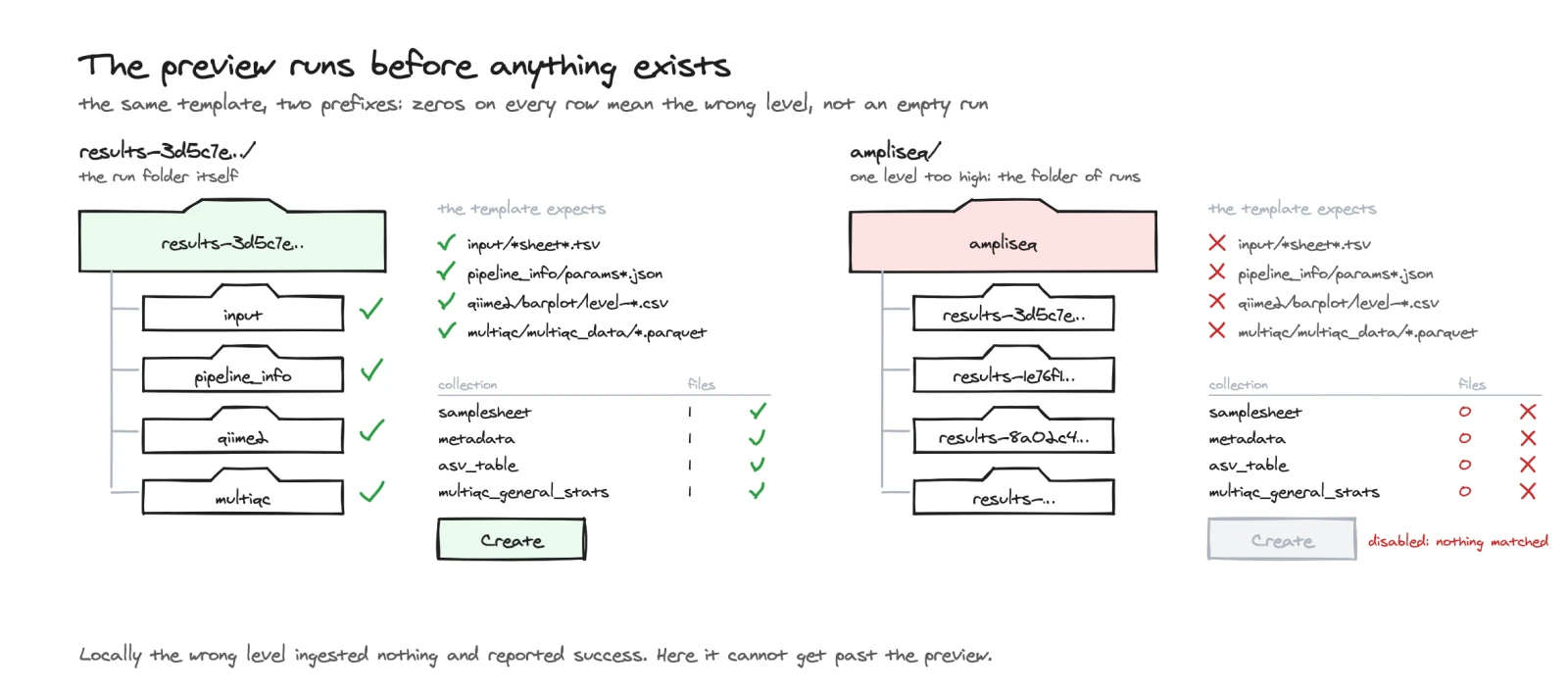
Preview before ingesting
With a template and DATA_DIR, local or s3://, --dry-run resolves the
template against the folder and prints what each data collection finds there,
before anything is created. For an s3:// folder it lists the prefix, so it
needs read access to the bucket, but it writes nothing.
| Column | Content |
|---|---|
| Data collection | The tag |
| Kind | scan (it reads files) or recipe (a recipe builds it) |
| Mode | The scan mode, - for a recipe |
| Files | Files matched, or inputs found for a recipe |
| Status | ok, empty, missing or pruned |
| Status | Meaning |
|---|---|
ok |
It will ingest |
empty |
Its scan matched nothing |
missing |
A source it needs is not there; the sources are listed under the table, relative to the data root |
pruned |
Dropped, because an optional source is absent |
Above the table come the template, the data root, the project name, the runs
detected and the dashboards to import, then the variables Depictio derived
from the folder: the samplesheet and metadata files, the grouping columns, and
the SKIP_* and IS_* flags that decide which collections exist. Under it
come the missing sources, then a summary line such as 20 data collection(s)
will ingest, 0 empty, 3 missing sources. A url or manifest collection, or
one pointed at another bucket, cannot be counted from the listing: it shows
ok with 0 files.
A folder one level too high or too low reads as zeros on every row, and the sources it looked for are listed as not found. The web UI shows the same preview and does not let such a project be created.
Without a template and DATA_DIR, with --bind alone or
--project-config-path, the dry run prints the
files each data collection would match
instead, not counted (remote) for a remote collection.
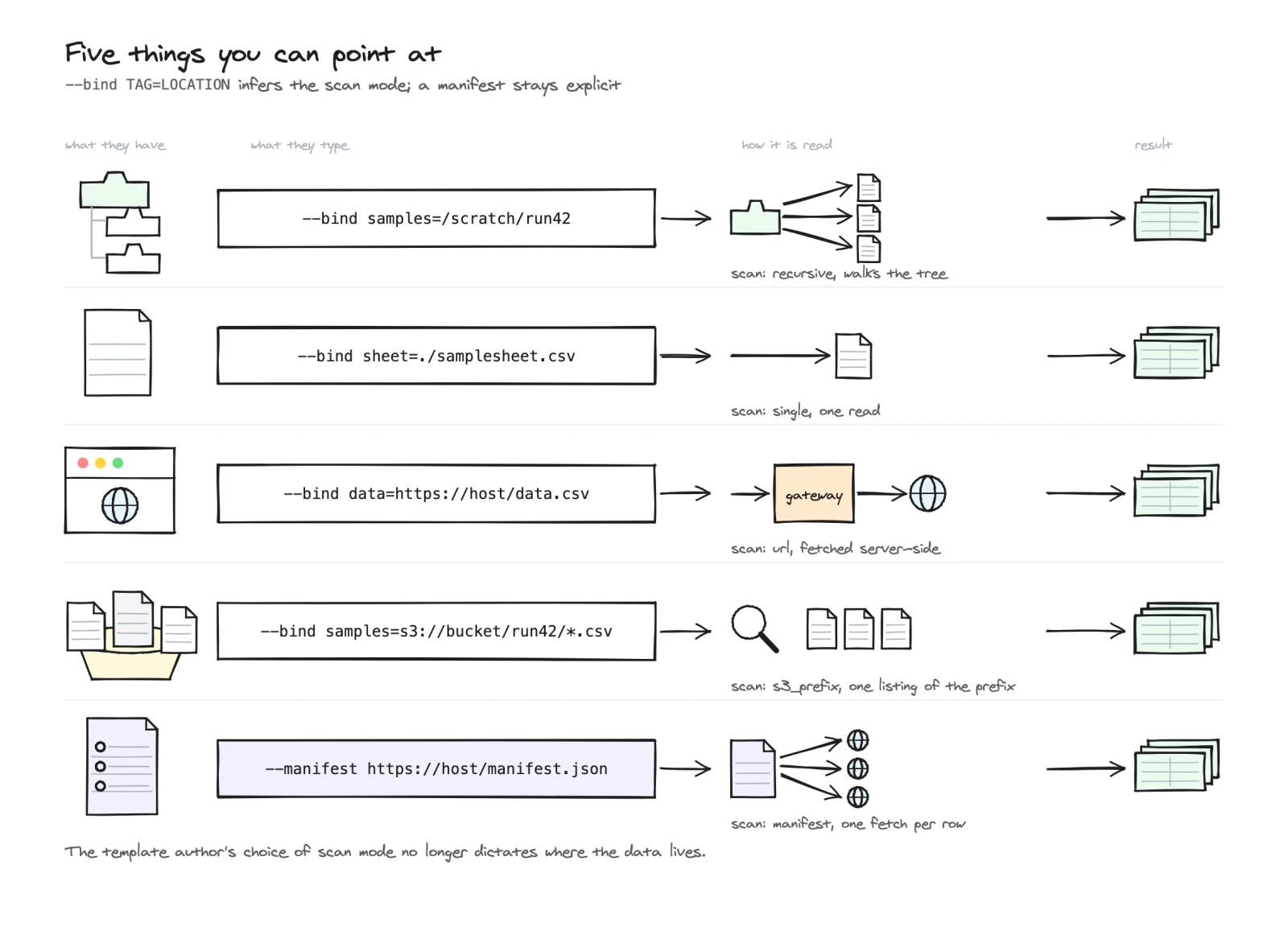
Bind a data collection to a location
depictio ingest --bind TAG=LOCATION points one data collection at where its
data is. It is repeatable, and the scan mode is inferred from the location,
never typed:
| Location shape | Inferred mode | Notes |
|---|---|---|
/scratch/run42 (a directory) |
recursive |
Keeps the pattern the template already declares for that collection, not its max_depth and ignore |
/scratch/run42/*.csv (a local glob) |
recursive |
The glob becomes the pattern |
./samplesheet.csv (a local file) |
single |
|
https://host/data.csv, or a bare s3://bucket/key.csv |
url |
|
s3://bucket/run42/*.csv, or s3://bucket/run42/ |
s3_prefix |
The glob is applied to the key relative to the prefix. Without the trailing /, s3://bucket/run42 names one object, a url |
With --template, --bind stands in for DATA_DIR or --manifest, so a
template can be run with neither. A template variable you did not supply is
left unresolved on the bet that a binding replaces whatever used it; if one is
still needed, the run fails naming it.
# A template that expects a local tree, run against a bucket instead
depictio ingest --template my-lab/rnaseq-qc/1 \
  --bind samples=s3://my-bucket/run42/*.samples.csv \
  --bind metadata=https://data.example.org/run42/metadata.tsv
- A tag that matches no data collection is an error that lists the tags that exist.
- The folder and glob bindings of one workflow must share a directory, since
the folder a workflow walks is one per workflow: otherwise the run stops
with Conflicting local roots for workflow …. For the same reason, such a
binding is refused while another
recursivecollection of that workflow, not bound, walks a different folder: bind it to the same folder too. A local file binding has no such limit. - With
--project-config-path, the file on disk is left untouched: the bindings apply to that run only. - With
--dry-runandDATA_DIR, the preview shows the configuration with the bindings applied.
Manifests stay explicit. A local .csv is data far more often than it is a
manifest, so --bind never guesses one from a file name: use --manifest.
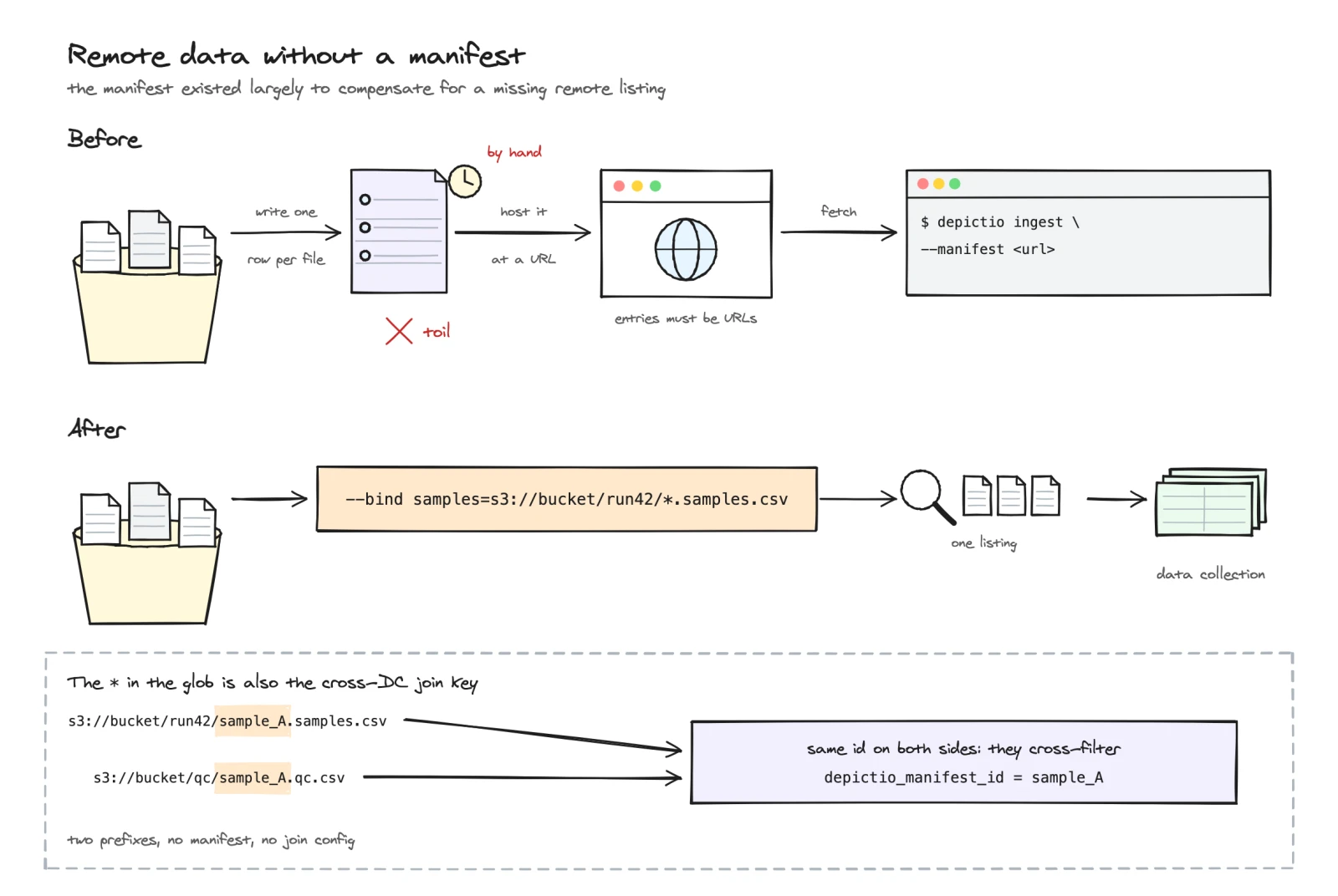
Cross-filtering without a manifest
When an s3_prefix binding uses a glob with a single *, the part the *
matched becomes the entity id of each file (sample_A.samples.csv yields
sample_A, and so does a nested run1/sample_A.samples.csv: the capture
stops at a /). That id is read back as the depictio_manifest_id column, so two
collections bound to two prefixes share a key column with no manifest: a
link with the direct
resolver on it cross-filters them with nothing to map. A bare *, or a glob
with several wildcards or a ? or [, gives no id, since nothing in it is
clearly the key.
The data manifest contract
A manifest is a flat index of remote files: one entry per file, keyed by an
entity or sample id and a type whose value is a data collection tag.
That one convention maps a manifest onto a project with no further
configuration.
| Field | Required | Meaning |
|---|---|---|
id |
yes | Entity or sample id. Becomes the depictio_manifest_id column |
type |
yes | The tag of the data collection this file belongs to |
url |
yes | Absolute s3:// or https:// URL. http:// only when the instance sets DEPICTIO_REMOTE_ALLOW_HTTP |
run |
no | Run grouping. Becomes depictio_run_id; remote when absent |
The schema is closed. In a CSV, any other column is folded into an extra
field; in JSON, extra is the only open field. A version field ("1") gates
schema evolution. A file listed twice (same id, type and url) is refused,
since it would put its rows in the table twice.
A .json source, or content starting with { or [, is read as JSON, anything
else as CSV. In JSON, version is the string "1" and the extra values are
strings. Spaces around CSV column names, blank lines and a UTF-8 byte order
mark are ignored. Other column names are remapped with the id_field, url_field, type_field and
run_field scan parameters (see the reference),
so an existing index does not have to be rewritten.
One entry is one file. Several entries of the same type are aggregated into
one data collection, like several scanned files.
Writing a manifest from a sample table
An nf-core samplesheet is one pivot away from a manifest: both map an entity id
to its files, but a samplesheet holds one column per file role, a manifest
one row per file with the role in type.
depictio manifest from-table samplesheet.csv \
  --id-col sample \
  --base-url s3://my-bucket/run42 \
  -o manifest.json
Each file column becomes one type, so the output tells you which data
collection tags the manifest expects. All options:
manifest from-table.
Creating a project in the web UI
Projects, + New Project: the dialog has four tabs, Create New, Import, From Manifest and From a run folder. The last two read the data on the server, with the same three steps: Source, Preview (a dry run, nothing is created) and Create.
From a run folder
Point at the results folder of one pipeline run; Depictio recognises the pipeline from the run's Nextflow or Snakemake records, picks the matching template and shows what each data collection will get before anything is created.
| Run folder | Read when |
|---|---|
s3://bucket/prefix |
The server may read the bucket (see Reading S3 buckets), or its details are given under Private bucket |
/path/to/run or ~/path/to/run |
Only on a depictio local server, below your home folder or a folder added with depictio local up --data-root-allow, for an administrator using the web UI on that computer. At most 100,000 files |
The template variables you give, and the location each scanned collection resolves to, must be in the run folder: one that points elsewhere, even a URL, is refused. The CLI has no such limit.
Source. Type or paste the Run folder, or Browse to it. As soon as
the folder is read, Depictio recognises the pipeline from the run's records (a
Nextflow run's pipeline_info/ versions file, or, for an older DSL1 nf-core
run, its pipeline_info/software_versions.csv) and runs the preview on its
own. A Checks card then compares the run with the template, one line each:
| Check | What it says |
|---|---|
| Pipeline | The pipeline the run's records name, and the template that reads it |
| Version | The pipeline version that made the run, next to the version the template was written for (one value when both agree) |
| Engine | The workflow engine and its version, such as Nextflow |
| Tasks | How the run's tasks ended (completed, failed, cached), read from its execution trace; opens onto the trace file |
| Folder | One run or several, of one pipeline version, and whether the folder was listed in full; opens onto the runs found |
| Input files | The files the template is pointed at, such as the samplesheet: found, not found or not set |
| Collections | What the template finds in the folder; opens onto every data collection, as in the Preview step |
Each line is marked Passes, Differs, Needs a look, Fails, Optional, absent or Cannot be checked. A verdict sums them up: Exact match, Closest available version (no template exists for the run's version, the nearest one is used), Different version, Different pipeline or No matching template. The browser keeps the answer for two minutes per folder and template, so the folder browser and the Source step do not read the same folder twice.
| Field | Content |
|---|---|
| Pipeline | Filled in from the folder, marked Detected. Empty: Depictio recognises it. Change it if the detection is wrong; Use the detected template then puts it back |
| Template version | Each version of the template, newest first, marked Matches this run, Closest to this run or Newest, and Detected for the one picked from the folder |
| Project Name (Optional) | Defaults to a name derived from the template |
| Advanced: template settings (N) | The template's variables, folded. Depictio works them out from the run folder; give one a value only to override it |
Pipeline lists one entry per pipeline among the templates that read a data root, grouped by source (nf-core first), plus the detected one whatever it reads. The web UI does not compose a dashboard from the catalog as the CLI does: a folder no template reads needs one picked here. A folder that cannot be read on its own, in a bucket that is neither public nor one the server is set up to read, opens the Private bucket section. Next stays disabled while something is missing, and says what, for instance No template matches this folder: pick the pipeline below. or A project with this name already exists.
Preview. A summary card counts the collections that are ready (3 of 23 collections ready) above the same Checks, then lists the collections in three groups:
| Group | Meaning |
|---|---|
| Not found | Found nothing in this folder. The project can still be created: they stay empty until their files exist |
| Found | Found in the run folder and ingested when the project is created |
| Optional, not found | The template can do without them; they are skipped. Folded |
Each line names the collection, where it Looks in (relative to the run folder, the real path on hover; for a search of the whole folder, the folder holding every file it found) and how much it found. A click opens what it looked for and found: the rule of a scan and the first files it matched, or, for a table built by a recipe, the recipe and what each of its inputs found. A collection is marked Found, Not found (a source it needs is not there), Its folder holds no matching file, Optional, not found or Left out (a template setting turns it off for this run). A source that cannot be counted ahead, such as a URL, reads At ingestion. Template settings lists what the template resolved for this folder.
When no pipeline was given and none is recognised, the step says Pipeline not recognised, pick one, and Pick a pipeline goes back to Source. A bucket that refuses the read offers Give the bucket's connection details.
File previews. The eye beside a collection, an input file or any file found opens it onto its first rows, below its line: a table for a CSV, TSV or parquet file (the first 20 rows), the first lines of a text file, and in plain words why not for a report or a binary file. The server reads the start of the file only (64 KB, or a parquet file's schema and first rows), with the same checks as the preview.
When no data collection matched anything, the preview says Nothing to ingest in this folder and Next stays disabled: a run folder set one level too high, or too low, is the usual cause.
Create. Create Project inserts the project and imports the template's dashboards; the data collections are ingested in the background. With private bucket details, the step says they are saved as the project's storage settings. The Project created dialog follows the ingestion collection by collection (statuses as in Refreshing the data), with Stay on projects and Open dashboard. Closing it only stops watching: the workers keep going, and the project's Ingestion tab shows the outcome.
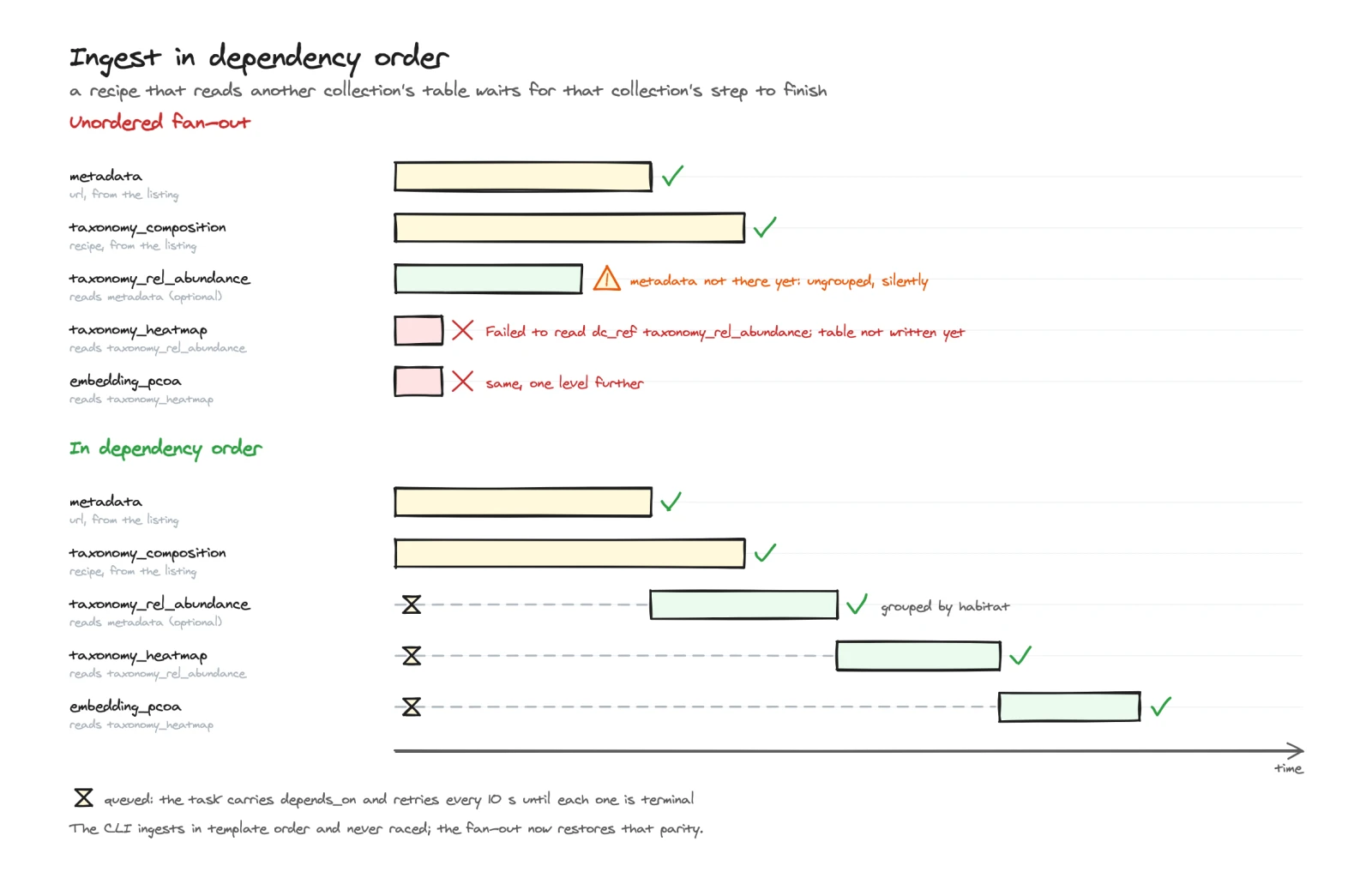
A collection whose source is missing (Not found) is not sent to a worker. The dialog shows it Failed when the template needs it, and Skipped when it is optional or only reads optional collections that are absent. One whose folder holds no matching file is sent all the same, and its worker reports what the scan finds. A collection built from another collection's table waits for that table, checking every 10 seconds for up to 30 minutes, and each collection has 30 minutes to ingest.
The ingestion is recorded as an ingestion run, with one step per collection:
the project's Ingestion tab lists it under
History, and the admin
Log & Task → Ingestion pane
shows it with the source Server, the instance Web UI and the command
from_run. The collections are ingested by the server's Celery worker: the
ingestion worker and
DEPICTIO_JOBS_ENABLED are not needed.
The folder browser
Browse opens Choose the run folder. It is offered when the server lets the web UI read folders on this computer or list S3 locations, or once a private bucket's details are given.
- The tree has a This computer group (under
depictio local) and an S3 group (the locations the server may list, and the private bucket whose details were given). Folders that look like runs carry a Run folder badge. Recent keeps the last five folders chosen per source. - The path bar takes a typed path and suggests the folders below it.
- Selecting a folder shows the same Checks as the Source step, Why this
is a run folder (its
pipeline_infoand MultiQC records, with a preview of the run's engine, parameters, tools and report files; a parameter whose name looks like a secret reads(hidden)), Run folders below this one with Find run folders here, and its Contents, with Filter by name past 12 entries. Every file of the contents opens onto its first rows with the eye, as in the Preview. - Select this folder fills in the run folder. A folder that does not look like a run can still be selected, after a note saying so.
A folder is a run folder when it holds a pipeline_info/ folder, or a
multiqc/ folder with MultiQC output in it or one level down. Find run
folders here looks through at most six levels and 5,000 folders below a local
folder, or 20,000 objects below an S3 prefix, stops at 100 run folders, and
never looks inside a run folder or a Nextflow work/ folder. It names the
template of the first 50 run folders it finds on this computer, none on S3.
A folder of this computer lists at most 500 sub-folders, and leaves out hidden
ones (a name starting with ., __pycache__, node_modules, __MACOSX). An
S3 folder is read from one page of the listing, at most 1,000 objects; when
more exist, the list says The first N of M entries.
Private bucket
For an s3:// run folder, the switch This bucket needs credentials opens
the Private bucket section; it opens by itself when the server is refused
access to the bucket. The folder browser does the same: a bucket refused there
shows the section under the path bar, and the tree opens on the folder once
Test connection passes. The details belong to one bucket at a time: while
they are given for one bucket, another bucket refused in the browser shows the
switch closed, and turning it on replaces them. Turning the switch off drops
them, and a later refusal of that bucket does not open the section again;
typing a run folder in another bucket drops them too. On a public instance,
only administrators can turn the switch on.
| Field | Content |
|---|---|
| Endpoint | The address of the storage service. Empty for Amazon S3 |
| Region | Optional: Test connection fills it in |
| Access key | Required |
| Secret | Required |
The details are used for that bucket only, for every read of the creation (detection, browsing, preview), and become the new project's storage settings: Project created confirms Storage settings saved for this project. They are not kept anywhere else.
From a script
POST /depictio/api/v1/projects/from_run runs the same three steps:
# $DEPICTIO_TOKEN: user.token.access_token from your CLI configuration
curl -X POST "$API/depictio/api/v1/projects/from_run" \
  -H "Authorization: Bearer $DEPICTIO_TOKEN" \
  -H "Content-Type: application/json" \
  -d '{"data_root": "s3://my-bucket/ampliseq/run42", "dry_run": true}'
| Field | Default | Content |
|---|---|---|
data_root |
required | The run folder |
template_id |
detected | The template, such as nf-core/ampliseq/2.16.0 |
project_name |
derived from the template | |
variables |
{} |
Template variables, as --var on the CLI |
dry_run |
false |
Preview only: nothing is created |
storage |
A private bucket's endpoint_url, region, access_key_id and secret_access_key, for an s3:// run folder. Both keys are required, even for a dry run. Ignored for a local folder |
The report names the template and how it was chosen
(detected_template.match: exact or closest; null when template_id was
given), lists each data collection as the preview does, with the
resolved_variables, detected_runs, input_files, run_info and whether
the listing was truncated, then the imported dashboards, project_id,
storage_saved and a run_id: poll
GET /depictio/api/v1/projects/refresh_manifest/{run_id} for the ingestion,
as for a refresh.
Most refusals answer with detail and a code, such as
template_not_detected, data_root_unsupported, local_folders_off,
local_run_too_large, non_loopback_host, local_admin_only, or one of the
S3 codes. A variable or a collection outside the run folder
answers 422 with detail only. So does storage without both keys, here and
on every route below that takes it, before anything is read: Give the
bucket's access key and secret: a bucket without credentials is read only when
an administrator allows it. A project name already taken answers 409, on the
real request only: a dry run does not check it. The API creates the project
even when no collection found anything; only the web UI stops there.
The web UI reads the run folder through a few more routes, under the same rules:
| Route | Returns |
|---|---|
GET /projects/templates |
The template catalog, each template marked run_folder_capable and manifest_capable |
GET /projects/local_dirs, GET or POST /projects/s3_dirs |
The sub-folders of a folder, local or s3://; POST carries storage for a private bucket |
GET or POST /projects/folder_inspect |
One folder: its contents, run records, detected template and checks |
GET or POST /projects/find_runs |
The run folders below a folder |
POST /projects/run_file_preview |
The first rows or lines of one file of a run folder |
POST /projects/storage_test |
Tests a private bucket's details for an s3:// location, without saving anything |
From a manifest
The From Manifest tab:
- Source: the Manifest URL, a Template among those that read a manifest, Project Name (Optional) and the template's other variables.
- Preview: a dry run. It shows how many entries each data collection receives, the manifest types no collection reads, the optional collections left out because the manifest has no rows of their type, and how many dashboards it imports.
- Create: the server fetches and ingests the data, imports the dashboards and opens the first one. When a collection or a dashboard failed, the manifest has types no collection reads, or optional collections were left out, Project created with notes lists them first, with Stay on projects and Open dashboard.
depictio ingest --template generic/manifest-tables/1 \
  --manifest https://data.example.org/run42/manifest.json
--manifest takes an https:// URL or a local file, and sets the
template's MANIFEST_URL variable. It replaces DATA_DIR.
curl -X POST "$API/depictio/api/v1/projects/from_manifest" \
  -H "Authorization: Bearer $DEPICTIO_TOKEN" \
  -H "Content-Type: application/json" \
  -d '{"manifest_url": "https://data.example.org/run42/manifest.json",
       "template_id": "generic/manifest-tables/1",
       "dry_run": true}'
Body fields: manifest_url, template_id, optional project_name,
variables and dry_run. The report carries the project id, the
ingestion result of each collection, the imported dashboards,
unmatched_manifest_types and pruned_optional_dcs. Unlike
from_run, the call ingests the data before it returns.
On the server, the manifest is fetched through the
gateway, up to 50 MiB, and every
entry URL is checked before any file is fetched: when some are refused,
nothing is ingested, and the 400 lists them under rejected_entries. The CLI
fetches the manifest itself, up to DEPICTIO_REMOTE_MAX_DOWNLOAD_BYTES. An
s3:// manifest is not read yet, on the CLI or the server: serve it over
https://.
To add a manifest to a project that exists, POST /projects/ingest_manifest
with project_id and manifest_url maps the manifest's type values onto the
project's data collection tags, switches each matched collection to manifest
mode and ingests it; id_field, url_field, type_field and run_field
name other columns. A collection that fails to ingest gets its former scan and
files back. Its report lists the matched collections, the manifest types no
tag matched and the tags the manifest says nothing about, which are left
untouched. dry_run reports the mapping only.
Refreshing the data
When the files behind a project change, refresh it in place rather than creating it again. On the project page, Project settings, then Data refresh:
- Collections lists the collections whose source is a manifest, a URL or a bucket prefix. Leave All refreshable collections, or pick one.
- Refresh now re-reads each collection from its source and rebuilds its table. A manifest is fetched again and the entries it lists now are used.
- The status of each collection is followed until the refresh ends, for 30 minutes at most. Reload project shows the new data. Closing the dialog does not stop the refresh, nor following it: a notification says how it ended, Data refresh completed or Data refresh finished with errors, or Stopped following the data refresh after 30 minutes. The project's Ingestion tab shows the outcome too.
- With a single refreshable collection there is no picker. With none, the section says Nothing to refresh and Refresh now is disabled.
Project owners, editors and administrators can refresh; on a public instance,
administrators only. On a depictio local server, a refresh needs an
administrator using the web UI on that computer, as every read of a local
folder does.
What the server can read again:
| Source | Refreshed by the server |
|---|---|
A manifest, an https:// or s3:// URL, an S3 prefix |
Yes |
A recipe collection in a project made from an s3:// run folder |
Yes. The panel does not list it, but refreshes it with All refreshable collections |
| A local folder or file | No: refresh it with the CLI, depictio ingest … --update-config. On a depictio local server, the API also refreshes one below an allowed folder; the panel does not list it |
| A manifest read from a local file | No: the server fetches a manifest by URL only |
Before anything is re-ingested, a pre-flight protects the tables that exist:
- A manifest collection whose type the manifest no longer lists is reported failed and left as it is, instead of being emptied.
- A project made from a run folder is checked against that folder again, as at creation: a required collection whose source is gone fails, an optional one is skipped, and neither is touched.
| Status | API value | Meaning |
|---|---|---|
| Planned | planned |
Dry run: would be refreshed |
| Queued | dispatched |
Handed to a worker |
| Running | running |
Being ingested |
| Ingested | ingested |
Table rebuilt |
| Failed | failed |
Not ingested; Details says why |
| Skipped | skipped |
Optional and absent, or only reads optional collections that are absent |
The same refresh, from a script:
# $DEPICTIO_TOKEN: user.token.access_token from your CLI configuration
curl -X POST "$API/depictio/api/v1/projects/refresh_manifest" \
  -H "Authorization: Bearer $DEPICTIO_TOKEN" \
  -H "Content-Type: application/json" \
  -d '{"project_id": "<project_id>", "async_run": true}'

curl "$API/depictio/api/v1/projects/refresh_manifest/<run_id>" \
  -H "Authorization: Bearer $DEPICTIO_TOKEN"
| Field | Default | Content |
|---|---|---|
project_id |
required | |
data_collection_tag |
every refreshable collection | One collection only |
dry_run |
false |
Run the pre-flight and report what would be refreshed, with each manifest collection's entry count and, for a project made from a run folder, each collection's file count |
async_run |
false |
Hand each collection to a worker and return a run_id to poll; otherwise the call returns when every collection is done |
Both calls return project_id, run_id, dry_run, refreshed, one row per
collection (data_collection_tag, data_collection_id, entries, status,
message), and success. When an asynchronous refresh starts, success says
whether every collection passed the pre-flight and was handed to a worker; on
the poll, it is true only once the run has ended without a failed collection.
Only the user who started a refresh, or an administrator, can poll it. A project with nothing the server can re-read, or
a data_collection_tag that is not refreshable, answers 422. The endpoint
keeps its name from when only manifests could be refreshed.
An asynchronous refresh, which is what Refresh now starts, is recorded as
an ingestion run with one step per collection, like a
creation from a run folder: it shows in the project's
Ingestion history and in
Log & Task → Ingestion, with
the command refresh_manifest. A synchronous one leaves no run. Each refreshed
collection is rewritten in full, so it gets a new
data version even when its files
did not change.
Two other ways to re-ingest a project do not apply to remote data:
- Run ingestion re-reads only
folders inside
DEPICTIO_INGESTION_ALLOWED_DATA_ROOTS. Ans3://orhttps://location is never one, so on a project made from a run folder on S3, from a manifest or with a Remote URL collection, the button stays disabled: its data paths are outside the directories the server may ingest from.depictio localdoes not offer the button. depictio watchwatches folders on its own machine. With ans3://DATA_DIRit ingests once, then stops with No existing data locations to watch in this project. It takes neither--bindnor--manifest.
Reading S3 buckets
An s3:// location a user gives, whether a run folder, a url or s3_prefix
scan or a manifest entry, is matched against the configuration before any
request is sent, so naming a bucket never reveals whether it exists. The server
uses the first rule that matches:
| Rule | Location | Read with |
|---|---|---|
| 1 | In the bucket that holds the instance's own data | Refused |
| 2 | In the bucket of the project's storage settings, when they hold an access key | The project's keys |
| 3 | Listed in DEPICTIO_REMOTE_PUBLIC_S3_BUCKETS |
No credentials, on Amazon S3 |
| 4 | Any other location, when the project has storage settings | Those settings only: their endpoint, and their keys if they hold any |
| 5 | Listed in DEPICTIO_REMOTE_CREDENTIALED_S3_BUCKETS |
The server's own credentials: the AWS default chain (environment, IAM role, web identity) |
| 6 | Anything else | Refused |
- The instance's own S3 keys are never used for a location a user gives.
- Each list takes comma-separated
bucketorbucket/prefixentries. Anyone on the instance can read what the credentialed list names: list only data every user may see. See the environment reference. - While a project is created from a private bucket, the details given under Private bucket replace rules 2 to 6: the run folder is read with them or not at all.
- Browse lists the locations of both lists, and the private bucket whose details were given. The instance's own bucket is never listed.
On the CLI, depictio ingest reads from the machine it runs on. A bucket on
DEPICTIO_REMOTE_PUBLIC_S3_BUCKETS in its environment is read without
credentials; any other with the S3 endpoint and keys of the CLI configuration,
or, when it holds none, with the machine's AWS default credentials. A project
ingested this way is refreshed by the server under the rules above: give it
storage settings, or have its bucket listed, before refreshing it from the web
UI.
Errors
A refused or failed read answers with detail and a code:
| Code | HTTP | Meaning |
|---|---|---|
s3_refused |
422 | No rule allows the read. Nothing was sent |
s3_access_denied |
422 | The bucket refused the credentials, or none were available |
s3_no_such_bucket |
422 | No such bucket on that endpoint |
s3_wrong_region |
502 | The bucket answered from another region |
s3_unreachable |
502 | The storage could not be reached |
s3_error |
502 | Any other S3 error |
In the run-folder flow and its folder browser, s3_refused and
s3_access_denied open the Private bucket
section, so the bucket's details can be given there.
Project storage settings
On the project page, Project settings, then Storage, for project owners and administrators. Configure storage opens the form:
| Field | Content |
|---|---|
| Endpoint URL | The S3-compatible service, such as https://s3.eu-west-1.amazonaws.com. Required in the form; through the API, an empty endpoint means Amazon S3 |
| Bucket | Required. The connection test checks it can be read |
| Region | us-east-1 by default: the connection test finds the bucket's region and saves it |
| Access key ID | Leave both keys empty for a bucket anyone may read |
| Secret access key | Stored encrypted and never shown again |
- Test connection reads the bucket and reports, for instance, Region detected: eu-west-1. It is saved on this project.
- The saved settings show a Secret set or No secret badge, the Bucket and the Region, with Test connection, Edit and Remove. The endpoint and the access key ID are folded under Connection details.
- On an edit, an empty secret keeps the stored one, as long as the access key, the endpoint and the bucket are unchanged. A new access key needs its secret: Enter the secret for this access key.
- The instance's own bucket is refused. Any other endpoint than the instance's
own storage goes through the gateway
checks: an endpoint on a private network must be on
DEPICTIO_REMOTE_URL_ALLOWLIST, and while that list is set, every endpoint must be on it. Anhttp://endpoint also needsDEPICTIO_REMOTE_ALLOW_HTTP. The stored endpoint is checked again at every read, so tightening these settings later stops it: reads then answer 409, … is no longer allowed on this instance. - They are read credentials only: tables are still written to the instance's storage. They are deleted with the project and never exported in a template. An instance backup includes them, with the secret still encrypted.
API: GET, PUT and DELETE /projects/{project_id}/storage, and
POST /projects/{project_id}/storage/test. How the secret is stored is on the
Security page.
Sharing a project
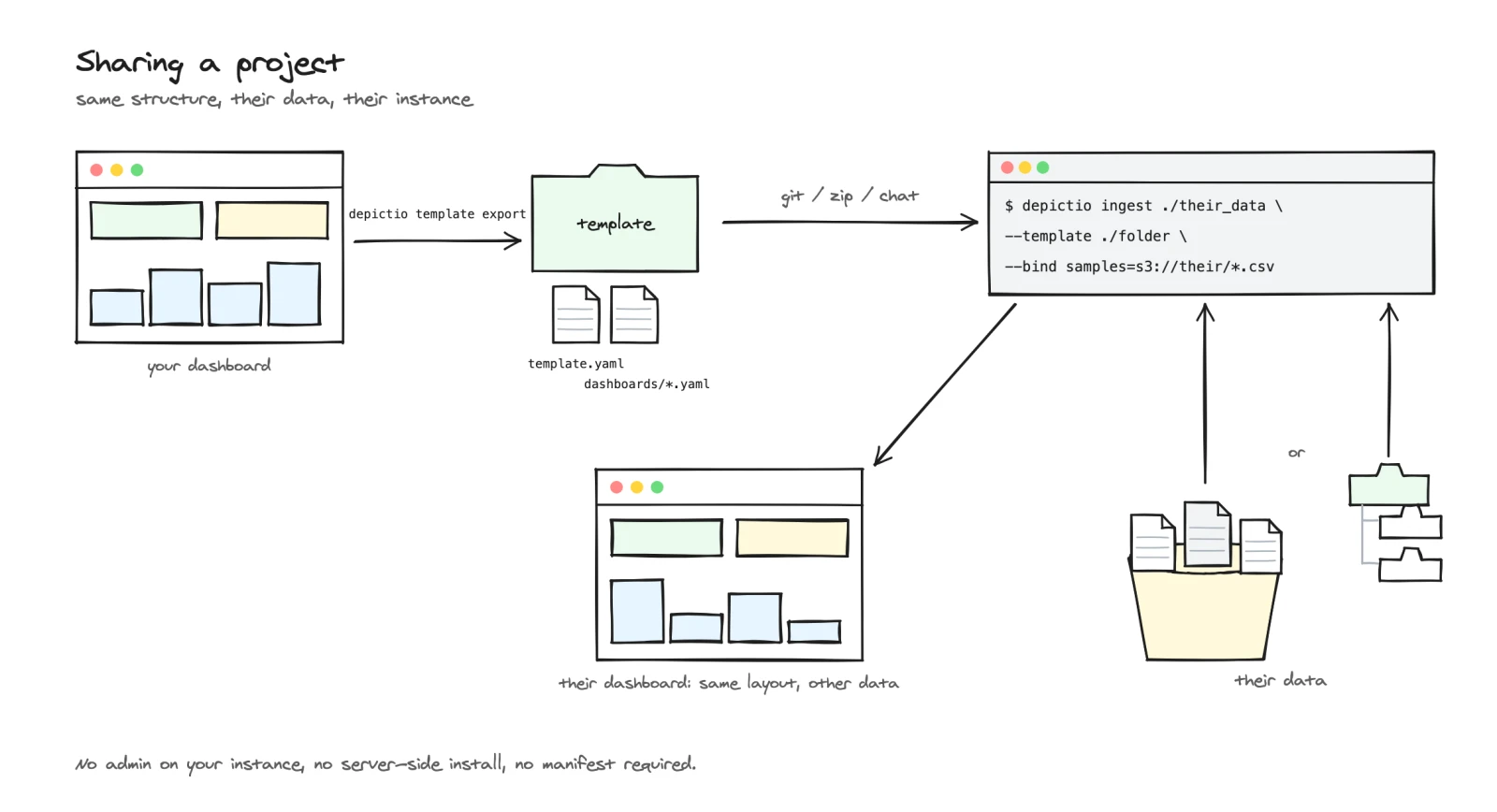
A project built interactively can be frozen into a template bundle and run by someone else, on their own instance, against their own data.
-
Export. On the project page, Project settings, then Export: a Template ID such as
my-lab/rnaseq-qc/1, a Version (1.0.0), a Description (optional) and a Data root (optional). Export downloads the bundle as a zip named after the template ID,/becoming_. From the CLI:The bundle holds
template.yamlanddashboards/*.yaml. Runtime state is stripped, a stored manifest URL becomes{MANIFEST_URL}, the data root becomes{DATA_ROOT}(by default, the folder ors3://prefix the project was made from), and storage settings are never included.A project read from an
s3://folderBefore the bundle is written, the export instantiates it with a local test path as
{DATA_ROOT}. Ans3_prefixorurlcollection does not accept a local path, so with ans3://data root, the default for a project made from a run folder on S3, the export stops with Exported config does not round-trip through Project validation. From the CLI,--data-dir ""exports without a data root, keeping thes3://locations as they are; the web form has no such choice, as an empty Data root means the default. -
Send the folder by git, zip or chat.
-
Run it with the path form of
--template, against the recipient's run folder or with each data collection bound to their data:
Owners, editors and administrators can export; on a public instance, administrators only. The Templates page has the full export reference.
What the server checks before fetching
Every user-supplied https:// URL the server fetches passes one gateway: a
scheme allowlist, DNS resolution with rejection of private, loopback,
link-local and reserved ranges, re-validation on every redirect hop, and a
streamed download with a size cap and a timeout. Administrators can pin the
set of hosts with DEPICTIO_REMOTE_URL_ALLOWLIST, which is exclusive while set.
An s3:// location follows the rules under Reading S3 buckets,
and a folder on the server's disk is read only under depictio local. The
details, including the residual risk the gateway does not cover, are on the
Security page.
When a fetch the API runs itself, such as a Remote URL collection's, is
refused or fails, the answer carries detail and a code:
| Code | HTTP | Meaning |
|---|---|---|
remote_url_rejected |
400 | Refused: the scheme, the host, its address or the allow and deny lists, a host that does not resolve, too many redirects, or a file past the size cap |
remote_fetch_failed |
502 | The URL passed the checks but answered with an error, or not at all |
See Also
- YAML reference: the
url,s3_prefixandmanifestscan parameters - YAML examples: a remote and a manifest example
- Templates:
--manifestand--bindwith a template, exporting a project - CLI usage:
ingest,template export,manifest from-table - Python package installation:
depictio local, and--data-root-allowfor run folders on this computer - Data model: remote
Filerecords and the join key - Contributing a template: authoring a manifest-driven template