Single sign-on (SAML) (v1.18.0+)
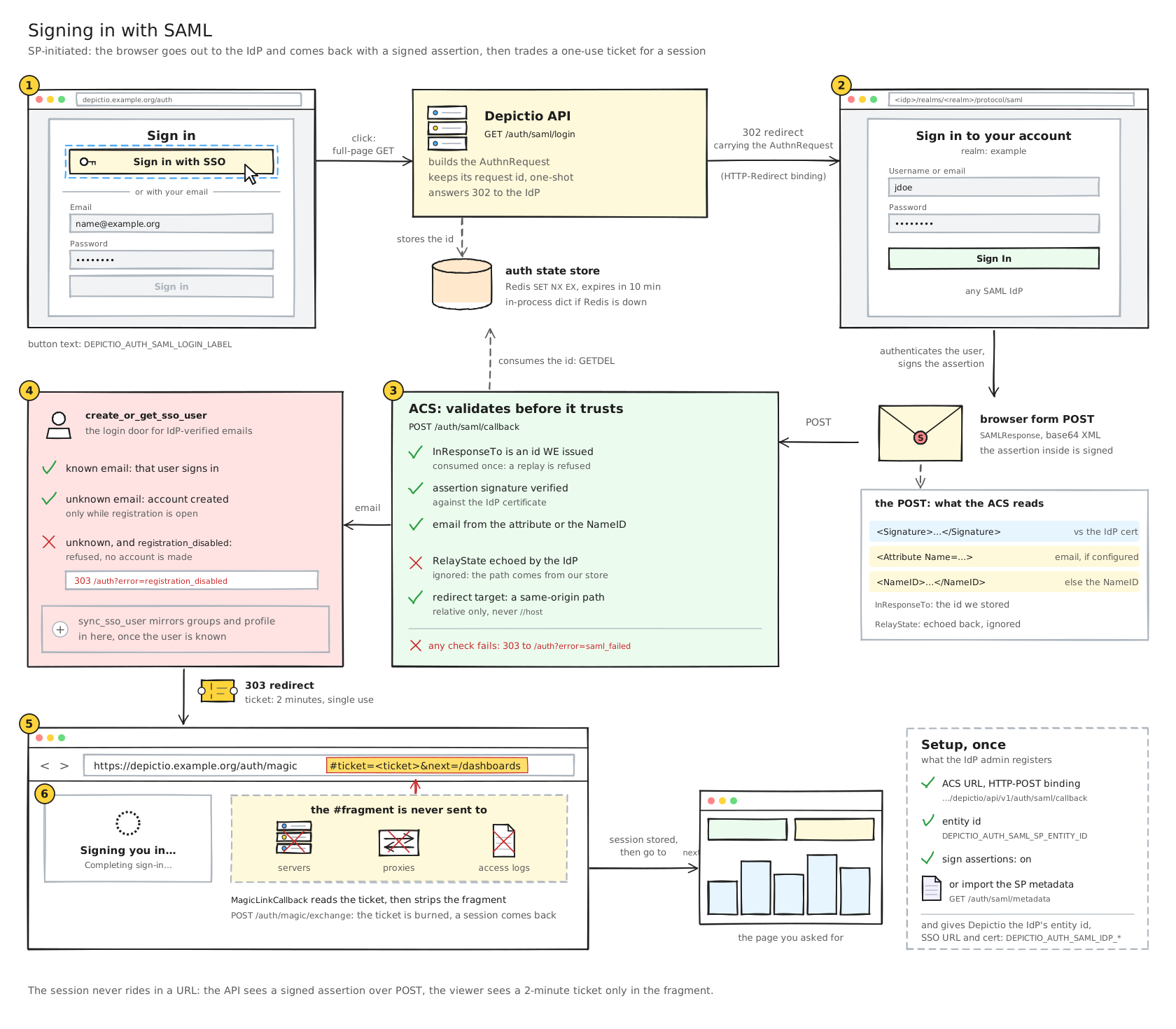
Depictio can send its users to their institution's identity provider (IdP) and take them back signed in. The flow is SP-initiated SAML 2.0: the sign-in page shows an SSO button, the browser goes to the IdP and comes back with a signed assertion. It was validated against a Keycloak realm, but nothing in it is specific to Keycloak.
SAML is off until DEPICTIO_AUTH_SAML_ENABLED turns it on, and sits beside
Google OAuth and password sign-in.
Use v1.19.0 or later
SAML sign-in works end to end from v1.19.0. Every SAML route answers 500 on the 1.18.0
API image (an lxml / xmlsec mismatch), no image was published for 1.18.1, and
1.19.0 also fixes how the callback reads the identity provider's response.
Set it up
- Register Depictio with the IdP. Import the service-provider metadata from
GET /depictio/api/v1/auth/saml/metadata, or enter the Client ID (the SP entity ID) and the ACS URL,<API URL>/depictio/api/v1/auth/saml/callback. - Give Depictio the IdP side: its entity ID, its SSO URL (HTTP-Redirect binding) and its signing certificate.
- Turn it on and restart the API.
DEPICTIO_AUTH_SAML_ENABLED=true
DEPICTIO_AUTH_SAML_IDP_ENTITY_ID=https://sso.example.org/realms/myrealm
DEPICTIO_AUTH_SAML_IDP_SSO_URL=https://sso.example.org/realms/myrealm/protocol/saml
DEPICTIO_AUTH_SAML_IDP_CERT=/run/secrets/idp.pem     # inline PEM or a path
DEPICTIO_AUTH_SAML_SP_ENTITY_ID=depictio
DEPICTIO_AUTH_SAML_LOGIN_LABEL="Sign in with your institution"
The other settings (SP_BASE_URL, NAME_ID_FORMAT, ATTRIBUTE_EMAIL, …) are in the
Environment Reference. The email comes from the NameID
unless DEPICTIO_AUTH_SAML_ATTRIBUTE_EMAIL names an attribute.
A first SAML sign-in creates the account, unless registration is closed. A new account has no project access until someone grants it.
To make SSO the only way in, set DEPICTIO_AUTH_PASSWORD_LOGIN_DISABLED: since v1.19.0 SAML
counts as single sign-on for it. See
Password sign-in.
The image and the package
The API Docker image ships the native xmlsec / libxml2 libraries. A Python install
needs the saml extra: pip install "depictio[server,saml]".
On Kubernetes
DEPICTIO_AUTH_SAML_ENABLED goes under backend.env; the IdP and SP values go under the
top-level auth: block. Keep the IdP side (entity ID, SSO URL, certificate) in the
environment's secrets values rather than in the repository. The backend ConfigMap also
exports DEPICTIO_VIEWER_PUBLIC_URL, which the hand-off back to the viewer needs.
backend:
  env:
    DEPICTIO_AUTH_SAML_ENABLED: "true"
auth:
  DEPICTIO_AUTH_SAML_SP_ENTITY_ID: depictio
  DEPICTIO_AUTH_SAML_LOGIN_LABEL: Sign in with your institution
  DEPICTIO_AUTH_SAML_ATTRIBUTE_GROUPS: groups   # optional, see below
Group and profile sync
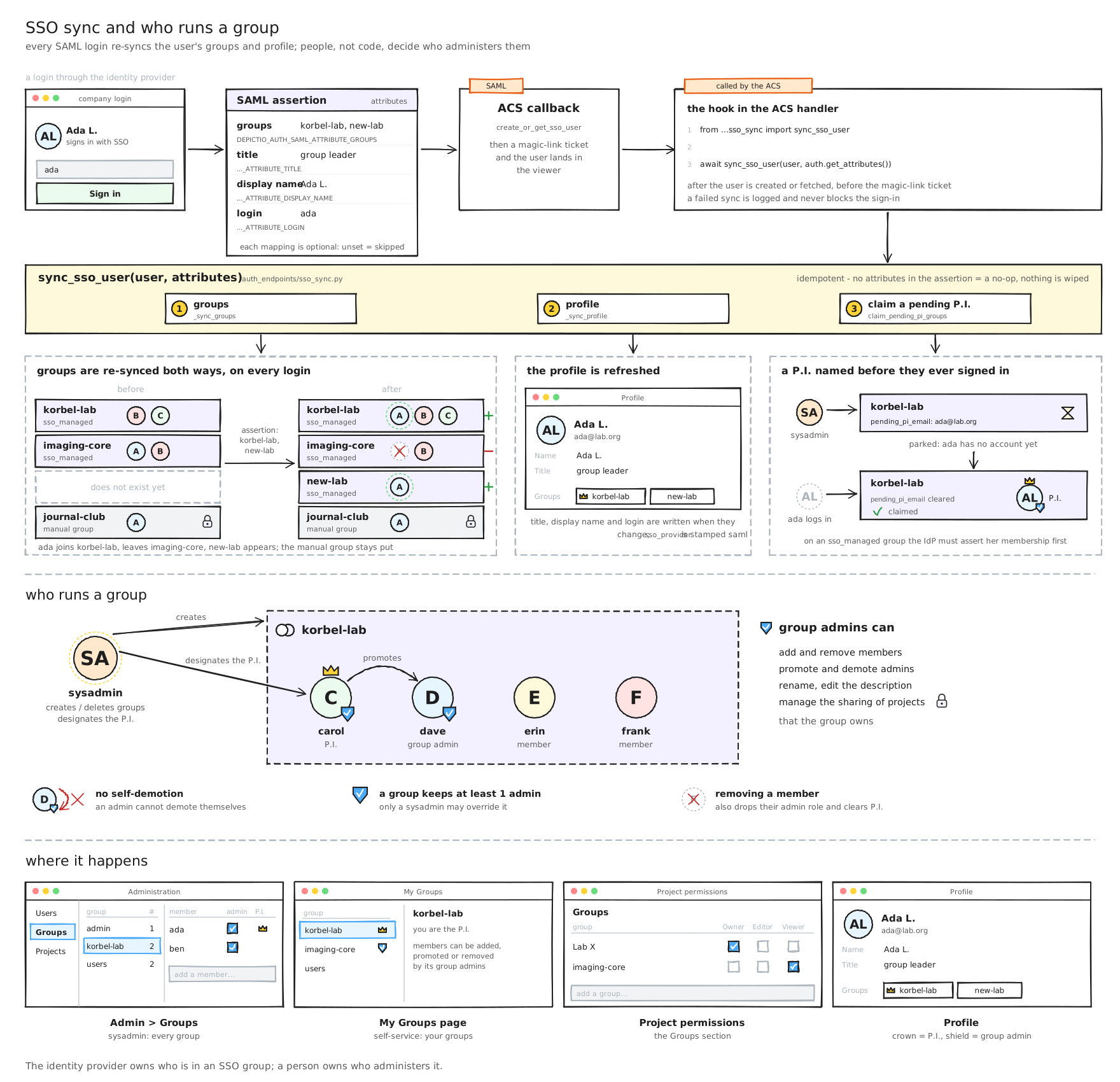
Four optional settings name the assertion attributes Depictio reads at every SAML sign-in. An unset one skips its step, so nothing changes until a deployment sets them.
| Variable | What it does |
|---|---|
DEPICTIO_AUTH_SAML_ATTRIBUTE_GROUPS |
Mirrors the listed groups as SSO-managed groups: created when first seen, membership re-synced both ways at every sign-in |
DEPICTIO_AUTH_SAML_ATTRIBUTE_TITLE |
The user's title, shown in Account settings |
DEPICTIO_AUTH_SAML_ATTRIBUTE_DISPLAY_NAME |
The user's display name |
DEPICTIO_AUTH_SAML_ATTRIBUTE_LOGIN |
The user's login |
- Groups created by hand are never touched by the sync.
- Attribute names are matched exactly first, then ignoring case, so
Groupsandgroupsboth work. - A failed sync is logged and never blocks the sign-in; the next sign-in syncs again.
- A P.I. named in advance is claimed at the sign-in that first asserts their group.
Security
- A response is accepted only if it answers a request this instance made, and only once: the request IDs live in a one-shot store shared by the API workers (Redis, with an in-process fallback).
- The return path the IdP echoes back is never trusted; a redirect stays on this site.
- The browser is handed a single-use ticket in the URL fragment, redeemed by the viewer.
See SAML sign-in on the Security page.