

The isoseq template follows a PacBio Iso-Seq run from the raw consensus reads to the transcriptome TAMA merges, and classifies every isoform against the reference annotation:
- Overview: the run in four key figures, live findings and four figures, each linked to the tab that explains it
- Data & QC: the CCS and primer reports of every chunk from MultiQC, the read funnel from ZMWs to non-chimeric reads, and the insert and poly(A) tail length curves
- Isoforms: structural categories (FSM, ISM, NIC, NNC and the rest) by isoform and by read, and the length against read support of every isoform
- Genes: the genes that carry the isoform diversity, and the isoform structures of one gene beside its reference transcripts
Reference annotation and design table
Structural categories compare each isoform with REFERENCE_GTF, which
defaults to the GTF uLTRA indexed (ULTRA_INDEX/genome.gtf). A minimap2 run
does not publish it: pass the GTF the run used, or every isoform is
unclassified. The pipeline has no design column either, so the design is an
optional table (METADATA_FILE); without it the hub carries one constant group.
Quick start
The results directory is the only thing you have to pass. The recipes sum
the per-chunk files (<sample>_<N>.chunk<X>.*) back into libraries, one per
samplesheet row, and the libraries into samples.
depictio ingest /path/to/isoseq_results \
--template nf-core/isoseq/latest \
--var METADATA_FILE=design.tsv \
--var GROUP_COL=tissue \
--var REFERENCE_GTF=/path/to/genes.gtf
METADATA_FILE takes the sample id in its first column (or a sample
column) and one column per factor; GROUP_COL picks the factor the filters and
colours use. A run with --skip_multiqc needs --var SKIP_MULTIQC=true, which
drops the MultiQC tab.
depictio config nextflow --install     # once per machine
nextflow run nf-core/isoseq -r 3.0.1 -profile docker --outdir results
No depictio ingest, and no template named: the pipeline ingests its own
output directory when it finishes and resolves this template from its own
manifest. See Nextflow trigger.
Reference
The template reads the per-chunk reports of every step (CCS, isoseq refine, TAMA
poly(A) clean-up and collapse), the TAMA merge annotation of each sample, the
reference annotation and the MultiQC report. Recipes reshape them into a sample
hub, one row per isoform with its read support and structural category, one row
per gene, and the exon blocks the structure view draws. The pooled all_samples
annotation of --tama_merge_all is left out so no isoform is counted twice.
Self-adapting layout
The dashboard adapts to whatever the run actually produced: components bound
to pruned or unparsed data collections are hidden, tabs left with no real
visualizations are dropped entirely, and the remaining components are
re-packed so there are no empty rows. A run started from lima, refine or
mapping has no CCS or refine reports, so the Reads tab keeps what the run
wrote and the Overview lines that cite them go.
Template variables
Variables you provide when running the template: DATA_ROOT is the results directory given to depictio ingest, the others are set with --var NAME=value:
| Variable | Required | Description |
|---|---|---|
DATA_ROOT |
✓ | Root directory of one isoseq run (01_PBCCS/ to 09_GSTAMA_MERGE/, ULTRA_INDEX/, multiqc/, pipeline_info/) |
METADATA_FILE |
— | Optional design table (TSV or CSV): sample id in the first column (or a column named sample), one column per factor. Joined into the sample hub: enables the design factors, the group filter and the group breakdowns. |
METADATA_ID_COL |
— | Design table sample-id column. Auto-detected as the first column; defaults to 'sample'. |
GROUP_COL |
— | Design column the dashboards group and filter by. Auto-detected as the first factor column of METADATA_FILE. |
REFERENCE_GTF |
— | Reference annotation the isoforms are classified against (GTF with gene_id, transcript_id and optionally gene_name). Defaults to the GTF uLTRA indexed; pass it for a minimap2 run. |
SKIP_MULTIQC |
— | Set (--var SKIP_MULTIQC=true) for a run with --skip_multiqc: no report, so the MultiQC collection is pruned. |
Auto-detected (set from the run's metadata / params.json; the route flags drive Conditional routes below): GROUP_COL_DISPLAY
Data collections
13 data collections — 7 required 6 optional · 8 direct 5 derived.
Origin tells you whether a collection is real pipeline data or a reshape of it: direct = a pipeline output (scanned, or a recipe that reads raw files); derived = a recipe that reshapes one or more direct collections into the layout a visualization needs (no new measurement). Reads shows what produces it: a recipe .py transform, whose name links to its source on GitHub, or a raw file scanned off disk. (A direct collection can still have a recipe — one that merely parses/cleans the raw file; derived means the recipe reshapes another collection.)
| Tag | Origin | Type | Reads | Status |
|---|---|---|---|---|
metadata |
direct | Table | file {METADATA_FILE} |
optional |
multiqc_data |
direct |  MultiQC |
file (?:.*/)?multiqc(?:/[^/]+)?/multiqc_data/multiqc.parquet$ |
required |
pbccs_zmw_yield |
direct | Table | recipe pbccs/zmw_yield.py |
optional |
pbccs_zmw_outcomes |
direct | Table | recipe pbccs/zmw_outcomes.py |
optional |
isoseq_refine_summary |
direct | Table | recipe isoseq/refine_summary.py |
optional |
isoseq_insert_length |
direct | Table | recipe isoseq/insert_length.py |
optional |
tama_polya_tails |
direct | Table | recipe tama/polya_tails.py |
optional |
tama_merge_bed_raw |
direct | Table | file ^(?!.*_(?:collapsed|trans_read).bed$)(?!all_samples.bed$).+.bed$ |
required |
tama_transcripts |
derived | Table | recipe tama/transcripts.py |
required |
tama_transcript_blocks |
derived | Table | recipe tama/transcript_blocks.py |
required |
tama_genes |
derived | Table | recipe tama/genes.py |
required |
tama_category_composition |
derived | Table | recipe tama/category_composition.py |
required |
samples |
derived | Table | recipe nf-core/isoseq/samples.py |
required |
Conditional routes
Rows are data collections; columns are the variables you set or params.json flags auto-detected from the run. Each filled cell is the effect of setting that variable; an empty cell means that variable leaves the collection unchanged. (11 collections are unaffected by any variable — present on every run.)
+ included− removed⇄ repointed
| Data collection | METADATA_FILE |
SKIP_MULTIQC |
|---|---|---|
metadata |
+ | |
multiqc_data |
− |
Cross-DC links
12 links — selecting a value in the source collection filters the target. The join column is shown after the source.
| Source · column | Target | Filters | |
|---|---|---|---|
samples · sample |
→ | multiqc_data |
Filter the MultiQC panels (one sample per CCS chunk) by the sample hub selection |
samples · sample |
→ | pbccs_zmw_yield |
Filter the CCS yield by the sample hub selection |
samples · sample |
→ | pbccs_zmw_outcomes |
Filter the CCS outcomes by the sample hub selection |
samples · sample |
→ | isoseq_refine_summary |
Filter the refine yield by the sample hub selection |
samples · sample |
→ | isoseq_insert_length |
Filter the insert length curves by the sample hub selection |
samples · sample |
→ | tama_polya_tails |
Filter the poly(A) curves by the sample hub selection |
samples · sample |
→ | tama_transcripts |
Filter the isoforms by the sample hub selection |
samples · sample |
→ | tama_genes |
Filter the genes by the sample hub selection |
samples · sample |
→ | tama_category_composition |
Filter the category composition by the sample hub selection |
tama_transcripts · gene_id |
→ | tama_genes |
Keep the genes of the isoforms an isoform filter keeps |
tama_transcripts · gene_id |
→ | tama_transcript_blocks |
Keep the structure lanes (isoforms and reference) of the genes an isoform filter keeps |
tama_genes · gene_id |
→ | tama_transcript_blocks |
Draw the structure lanes of the genes picked in the gene table |
Recipes
Each recipe reshapes raw pipeline output into a tidy table. The name links to its source; Output lists the validated OUTPUT_SCHEMA columns.
| Recipe | Transforms | Output |
|---|---|---|
isoseq/insert_length.py |
FLNC insert length distribution per sample, from isoseq refine's per-read report. |
sample, length_bp, reads, pct, cumulative_pct |
isoseq/refine_summary.py |
Full-length read yield of isoseq refine per library: FL, FLNC and FLNC with poly(A). |
sample, library, fl_reads, flnc_reads, flnc_polya_reads, chimeric_reads, pct_flnc, pct_polya |
nf-core/isoseq/samples.py |
Sample hub for nf-core/isoseq: one row per sample, the read funnel and the transcriptome. | sample, libraries, zmw_input, ccs_reads, ccs_pass_pct, fl_reads, flnc_reads, flnc_pct, collapsed_reads, collapsed_pct, median_insert_bp, isoforms, genes, annotated_genes, fsm_pct, novel_isoform_pct, novel_read_pct |
pbccs/zmw_outcomes.py |
Where every ZMW of a library went in CCS: passed, or the filter that removed it. | sample, library, rank, outcome, zmws, pct_of_input |
pbccs/zmw_yield.py |
CCS yield per library: how many ZMWs went in and how many became HiFi reads. | sample, library, chunks, zmw_input, zmw_passed, zmw_filtered, pct_passed, too_few_passes, poor_snr, draft_failures, other_filtered |
tama/category_composition.py |
Structural category composition per sample, by isoform and by read. | sample, level, structural_category, count, pct |
tama/genes.py |
Genes of the TAMA merge transcriptome: how many isoforms each carries, and how novel they are. | gene_name, sample, gene_status, isoforms, read_support, dominant_isoform_pct, top_category, novel_isoforms, fsm_isoforms, ism_isoforms, nic_isoforms, nnc_isoforms, chrom, start, end, strand, gene_id |
tama/polya_tails.py |
Poly(A) tail lengths TAMA trimmed from the FLNC reads, per sample. | sample, tail_length, reads, pct |
tama/transcript_blocks.py |
Exon blocks of the TAMA merge isoforms, beside the reference isoforms of their genes. | transcript_id, gene_id, gene_name, chrom, start, end, feature, strand, transcript_class, sample, expression |
tama/transcripts.py |
The TAMA merge transcriptome: one row per isoform, its read support and its class. | transcript_id, gene_name, sample, structural_category, exon_structure, read_support, transcript_length, exons, junctions, known_junctions, chrom, start, end, strand, ref_transcript_id, source_models, gene_id, tama_gene_id |
Dashboard tabs
One dashboard: the Overview, then four child tabs in two groups, read as a funnel from the consensus reads to the isoforms and the genes they belong to. Each tab below carries the same icon and colour the dashboard gives it, so the page and the app read alike.
| Group | Tabs |
|---|---|
| Data & QC | MultiQC, Reads |
| Transcriptome | Isoforms, Genes |
Each child tab opens with a short intro and a strip of four cards, then at most three open sections; tables and record cards follow, collapsed. The persistent Sample filters (design group and sample) narrow every tab through the sample hub, and the collapsed Sample sheet is pinned to the bottom of each child tab.
PacBio Iso-Seq reads, from circular consensus to the isoforms TAMA builds.
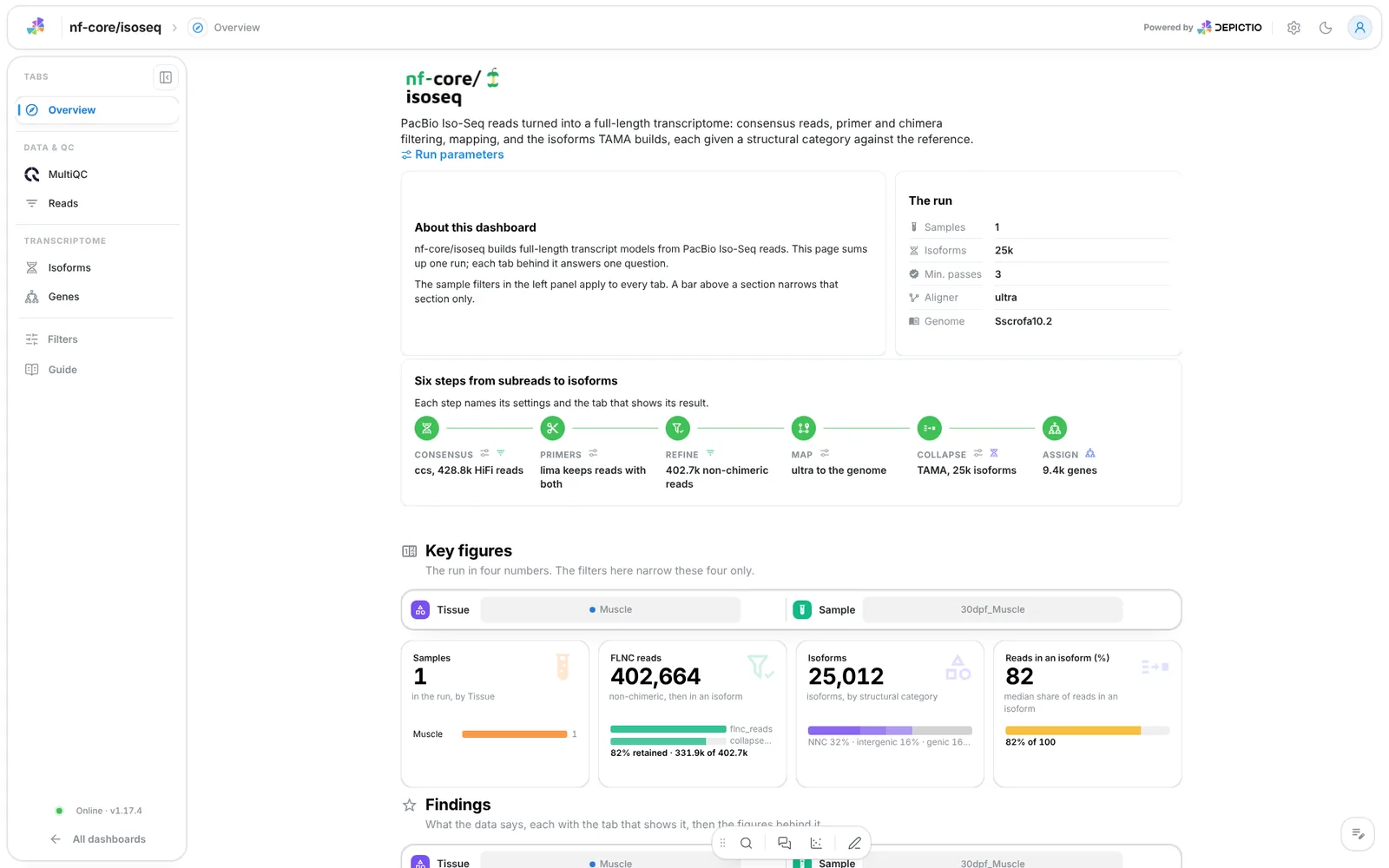
A short hero links the run parameters. The run lists the samples, isoforms, minimum CCS passes, aligner and genome, and Six steps from subreads to isoforms walks consensus, primers, refine, map, collapse and gene assignment, each linked to its parameters and its tab. The findings are live values.
Filters and components
Filters · the left panel starts collapsed. Key figures and Findings each have their own filter bar (the design group and the sample): each narrows its own section only.
| Section | What it holds |
|---|---|
| Key figures | 4 headline cards: samples, FLNC reads, isoforms, the share of reads that end in an isoform |
| Findings | Live result rows (CCS pass rate, collapse rate, commonest structural category, genes with several isoforms), then 4 figures: the insert length curves, the category composition, isoform length against read support and isoforms against read support per gene |
Data & QC · Did every CCS chunk pass the filters and keep its primers?
MultiQC panels only, one bar per CCS chunk: the ZMWs each chunk passed and the filters that removed the others (ccs), and the reads lima kept and rejected. A report sample is a CCS chunk, matched to the sample hub by prefix, so the pinned sample filters narrow both panels.
Filters and components
Filters · the pinned sample filters only.
| Section | What it holds |
|---|---|
| CCS filtering | 1 MultiQC panel |
| Primer demultiplexing | 1 MultiQC panel |
Data & QC · How many reads survive each step, and how long are they?
The read funnel from ZMWs to collapsed FLNC reads, then the CCS outcome of every ZMW per library stacked to 100 %, and the FLNC insert length and poly(A) tail length distributions side by side. Per-sample shares are shown as a box across samples, never averaged over reads of different samples.
Filters and components
Filters · Read scope: ZMWs giving a CCS read (%), Reads in an
isoform (%) and Median insert length (bp), all range sliders.
| Section | What it holds |
|---|---|
| Reads at a glance | 4 cards: ZMWs read, ZMWs giving a CCS read (%), non-chimeric reads (%), median insert length |
| CCS outcome | 1 advanced visualization, CCS outcome per library |
| Read lengths | 2 advanced visualizations: FLNC insert length (100 bp bins) and Poly(A) tail left to trim |
| Sample detail (collapsed) | Depth and collapse rate per sample, a scatter sized by isoforms, with the Sample record beside it |
| Read tables (collapsed) | CCS yield per library, Full-length reads per library |
Transcriptome · How much of the transcriptome is new, and how well supported?
Each isoform TAMA merges gets a SQANTI-style structural category from its exact intron chain: FSM, ISM, NIC, NNC, then genic, antisense and intergenic for isoforms that share no annotated splice site. The category composition switches between counting isoforms and FLNC reads, and the isoform plane shows length against read support. Most isoforms hold one read, so the cards count isoforms past a cut-off (three reads) rather than take a median.
Filters and components
Filters · Isoform scope: Structural category, Exon structure,
FLNC reads per isoform and Isoform length (bp). An isoform filter
keeps the genes of the isoforms it keeps, so it narrows the Genes tab too.
| Section | What it holds |
|---|---|
| Isoforms at a glance | 4 cards: isoforms, well-supported isoforms (3+ FLNC reads), median length, reads on NIC and NNC isoforms (%) |
| Structural categories | 1 advanced visualization, Structural category composition |
| Length and support | Isoform length against read support, with the Isoform record beside it |
| Length per category | 1 box plot of the summed exon length per category |
| Isoform table (collapsed) | Isoforms |
Transcriptome · Which genes carry the isoform diversity, and how does each look?
One row per sample and gene, annotated (a reference gene) or novel (found by TAMA, per sample). Isoforms against read support per gene, one point per gene coloured by the category that carries most of its reads, then the isoform structures of one gene on a base-pair axis, one lane per isoform beside the reference transcripts of that gene.
Filters and components
Filters · Gene scope: Gene status, Isoforms per gene, NIC and
NNC isoforms and FLNC reads over the gene.
| Section | What it holds |
|---|---|
| Genes at a glance | 4 cards: genes, isoforms per gene, genes with several isoforms, reads on the dominant isoform (%) |
| Isoform diversity | 1 advanced visualization, Isoforms against read support per gene |
| Gene structures | 1 advanced visualization, Isoform structures of one gene |
| Gene detail (collapsed) | Genes, with the Gene record beside it |
A row picked in the gene table draws that gene's lanes and opens its record. The structure view is not linked to the sample hub, because a sample filter would drop its reference lanes. A structural category keeps one colour on every tile.
Running the pipeline
Depictio reads the output of nf-core/isoseq, it does not run the pipeline. Run the pipeline first:
nextflow run nf-core/isoseq -r 3.0.1 \
  --input samplesheet.csv \
  --primers primers.fasta \
  --genome GRCh38 \
  --outdir results -profile docker
Then point Depictio at the results. The 3.0.1 run writes a MultiQC parquet, so no reprocess step is needed:
See nf-co.re/isoseq/usage for full pipeline documentation.
Required data structure
Point depictio ingest at the directory holding the pipeline output. Depictio scans
recursively and matches on file name. The TAMA merge outputs and the MultiQC report
are mandatory; the CCS, refine and poly(A) reports are optional.
<DATA_ROOT>/
├── input/
│   └── sample_metadata.tsv                    # optional design table (--var METADATA_FILE)
├── pipeline_info/                             # params_*.json, *software*versions*.yml
├── multiqc/multiqc_data/multiqc.parquet       # ccs and lima panels; optional with --var SKIP_MULTIQC=true
├── 01_PBCCS/*.report.json                     # CCS report per chunk
├── 03_ISOSEQ_REFINE/
│   ├── *.filter_summary.report.json           # FL and FLNC counts per chunk
│   └── *.report.csv                           # insert length per read
├── 05_GSTAMA_POLYACLEANUP/*_polya_flnc_report.txt.gz   # poly(A) tail lengths
├── 07_GSTAMA_COLLAPSE/*_trans_report.txt      # reads per collapsed model (read support)
├── 09_GSTAMA_MERGE/
│   ├── <sample>.bed                           # mandatory: the final transcriptome
│   └── <sample>_merge.txt                     # collapse models behind each isoform
└── ULTRA_INDEX/genome.gtf                     # reference on the uLTRA route (or REFERENCE_GTF)
Validation runs
The repository ships
download_test_data.sh,
which fetches the subset of nf-core's AWS megatest run that the template needs:
The run is
s3://nf-core-awsmegatests/isoseq/results-6c944831289d4d6e33497026f6b18e8c671705bd/,
the 3.0.1 test_full profile: one Iso-Seq sample started from subreads, CCS split
in 100 chunks, uLTRA mapping. The manifest skips reads, BAMs and FASTA files and
keeps the tables, about 287 MB, of which 234 MB is the reference GTF. The script
also copies the design table the template ships (tissue, stage) to input/.
Then run Depictio against it:
depictio ingest /tmp/isoseq_test \
  --template nf-core/isoseq/latest \
  --var METADATA_FILE=/tmp/isoseq_test/input/sample_metadata.tsv \
  --var GROUP_COL=tissue
Additional resources
- nf-co.re/isoseq: official pipeline documentation
- nf-co.re/isoseq/3.0.1/results: AWS test results
- Template System Reference: YAML format, variables, conditionals
- Recipes: how to read, test, and write recipes
Authorship
 weber8thomas
Reviewing a template on your own data, or taking over a role here, is a contribution in itself: the contributing guide says what each one involves.