Nextflow trigger (v1.10.0+)
A Nextflow pipeline can push its own results into Depictio the moment it finishes. You set it up once per machine, and from then on every pipeline you run lands in Depictio without a single line about Depictio in the pipeline itself.
Two guarantees, so you can put it on a machine and forget it. A pipeline that failed is never ingested, because a partial output directory would make a half-filled project. And if anything on Depictio's side goes wrong, the handler logs a warning and leaves your pipeline's own exit status alone.
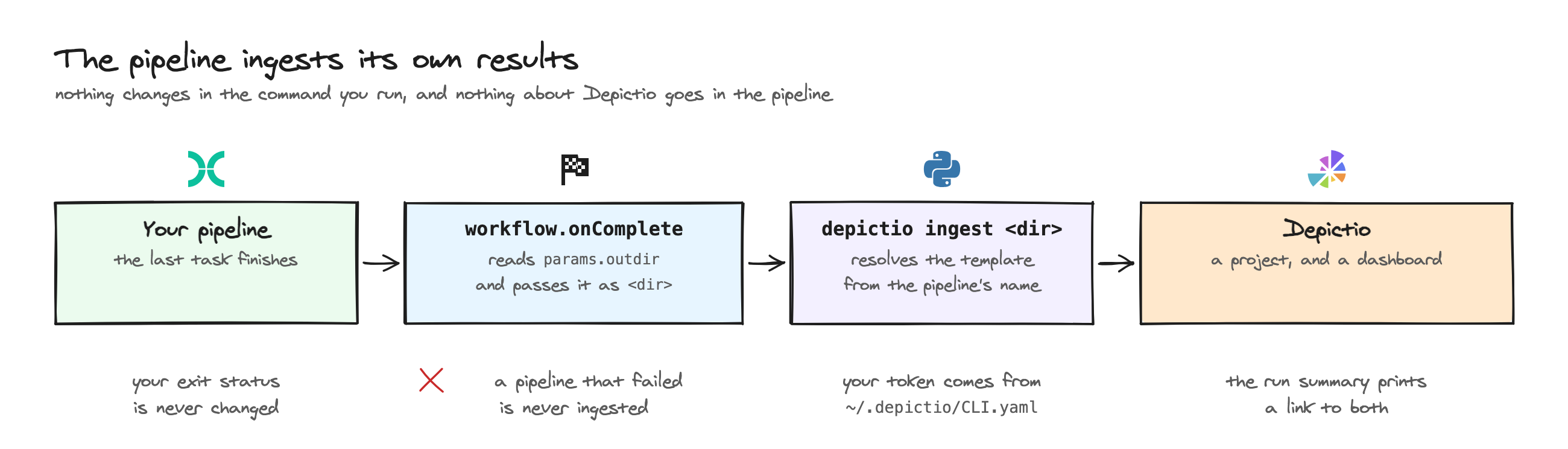
workflow.onComplete handler, shipped as a config snippet inside the CLI.Set it up once
The handler runs on the machine that runs nextflow, never on a compute node.
On a cluster that means the submit node, or the job that launches Nextflow. All
three steps happen there.
1. Install the CLI.
The [multiqc] extra reads the MultiQC reports that the nf-core templates
ingest. The package installs the depictio command, and depictio-cli, its
former name, which the handler runs.
2. Save your credentials to ~/.depictio/CLI.yaml. That is already the path
the viewer's CLI agents page
tells you to use, and the one the CLI reads by default, so there is nothing to
point at.
Since v1.13.1, the handler passes --server only when params.depictio_cli_config or
$DEPICTIO_CLI_CONFIG_PATH is set (the v1.12.0 handler always passes it,
with ~/.depictio/CLI.yaml as the default). Otherwise the CLI follows
its own order: ~/.depictio/CLI.yaml, else the
server that depictio local up runs on the same
machine. So to ingest into that local server, skip this step. To reach it even
when ~/.depictio/CLI.yaml exists, set params.depictio_cli_config = 'local'
in ~/.nextflow/config.
3. Turn the trigger on, then check the CLI reaches your server.
--install copies the handler to ~/.depictio/nextflow.config and adds one
includeConfig line for it to ~/.nextflow/config ($NXF_HOME/config if you
set NXF_HOME), which Nextflow reads before every run. Your pipeline's own
onComplete still runs. --uninstall removes the line, and
--depictio_enabled false skips Depictio for one run. Add --default-disabled
to install it opt-in instead: pipelines then stay silent unless a run passes
--depictio_enabled true, as in the
example below. Run --install again
after upgrading depictio, so the copy follows the new version. A copy
installed by an earlier release still calls depictio-cli run with the former
options, which keep working.
One run instead of the whole machine
Skip step 3 and add -c $(depictio config nextflow) to your
nextflow run command. That subshell prints the path of the snippet bundled
with the CLI, so there is still no file to download and none to keep in sync.
Run your pipeline
Nothing changes in the command:
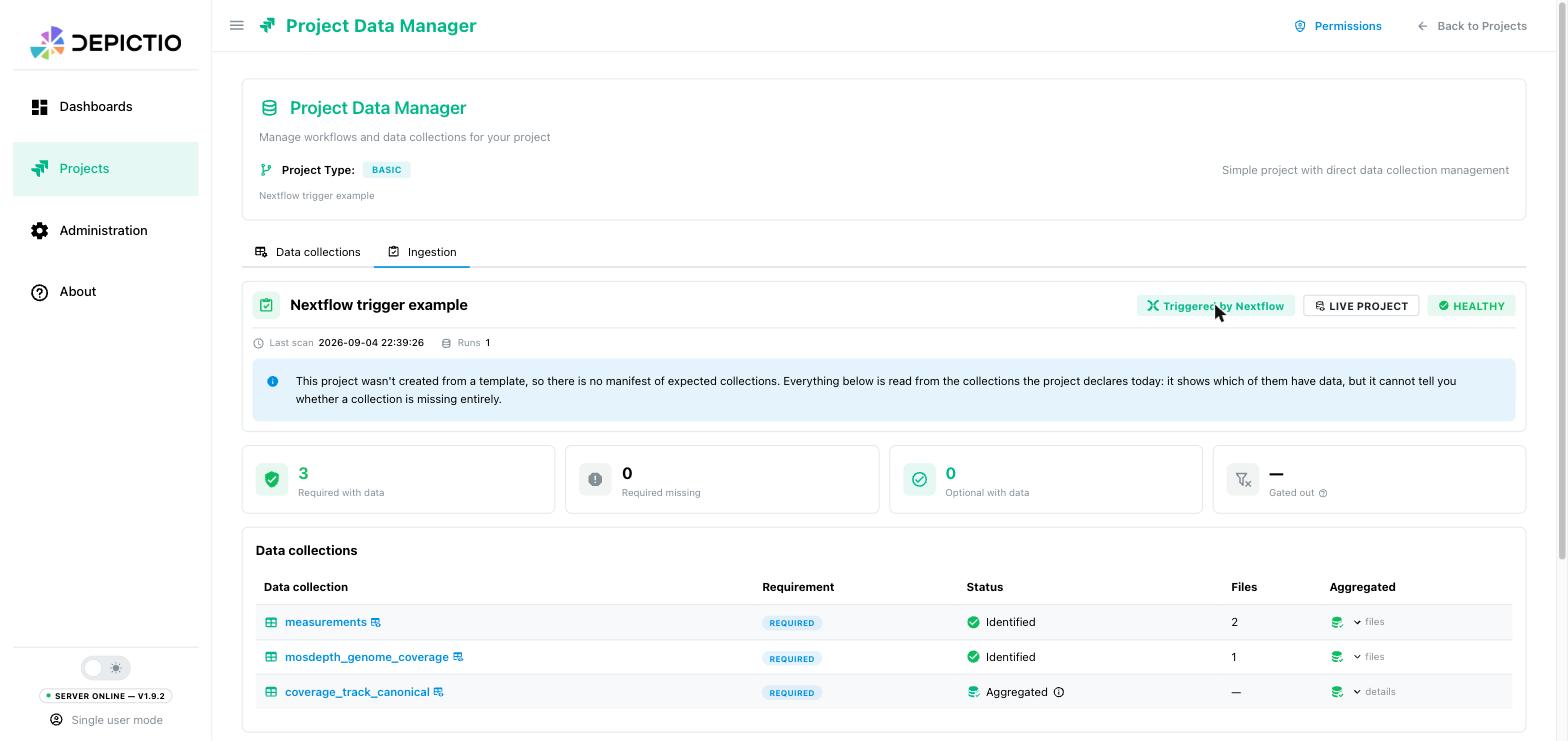
When the last task finishes, the handler ingests your --outdir, here
results, and the log ends with a [depictio] block:
[depictio] ==============================================================
[depictio] 📊 Depictio ingestion
[depictio] ==============================================================
[depictio] 📂 Data root  : /work/results
[depictio] 🔧 Executable : depictio-cli
[depictio] 💻 Command    :
[depictio]     depictio-cli ingest /work/results \
[depictio]         --triggered-by nextflow \
[depictio]         --pipeline-id nf-core/ampliseq/2.16.0
[depictio] --------------------------------------------------------------
[depictio] ✓ Resolved pipeline 'nf-core/ampliseq/2.16.0' to a bundled template.
[depictio] …
[depictio] • Project: https://depictio.example.org/projects/6a9ab9a6a1d2ead141378e27
[depictio] • Dashboard 'nf-core/ampliseq' created: https://depictio.example.org/dashboard/6a9acdf3835e12072990459a
[depictio] ✓ Ingestion finished for /work/results
You configured no template because the pipeline already knows what it is. The
handler forwards the name and version from the pipeline's manifest block as
--pipeline-id, and the CLI resolves the matching
bundled template from that. To pin one
instead, set params.depictio_template.
When params.outdir is not the directory to ingest, point
params.depictio_data_root at the right one and the handler passes that to
depictio ingest instead.
Set these per run on the command line, as --depictio_template <id>, or in the
pipeline's own nextflow.config. Keep them out of ~/.nextflow/config, where
they would apply to every pipeline on the machine.
A pipeline with no bundled template
Depictio ships templates for a handful of nf-core pipelines. For anything else, point the trigger at YAML of your own:
params.depictio_project_config = "${projectDir}/depictio_project.yaml"
params.depictio_dashboard      = "${projectDir}/depictio_dashboard.yaml"
The project YAML says what to ingest, the dashboard YAML says what to show. Their tags have to line up, or the import fails and names the component that broke.
The trigger does not compose a dashboard (v1.16.0)
Run by hand, depictio ingest <results dir>
composes a dashboard from the
tools catalog when no bundled template fits. The trigger does not get that
far: it passes --pipeline-id from the pipeline's manifest, and a
pipeline Depictio ships no template for stops there, with exit code 1 in
the log; the pipeline still succeeds. Run depictio ingest on the results
afterwards for a composed dashboard, or give the trigger YAML of your own.
A complete runnable example, pipeline included, is in
depictio/cli/configs/nextflow/example/.
It needs no container and no bioinformatics tool.
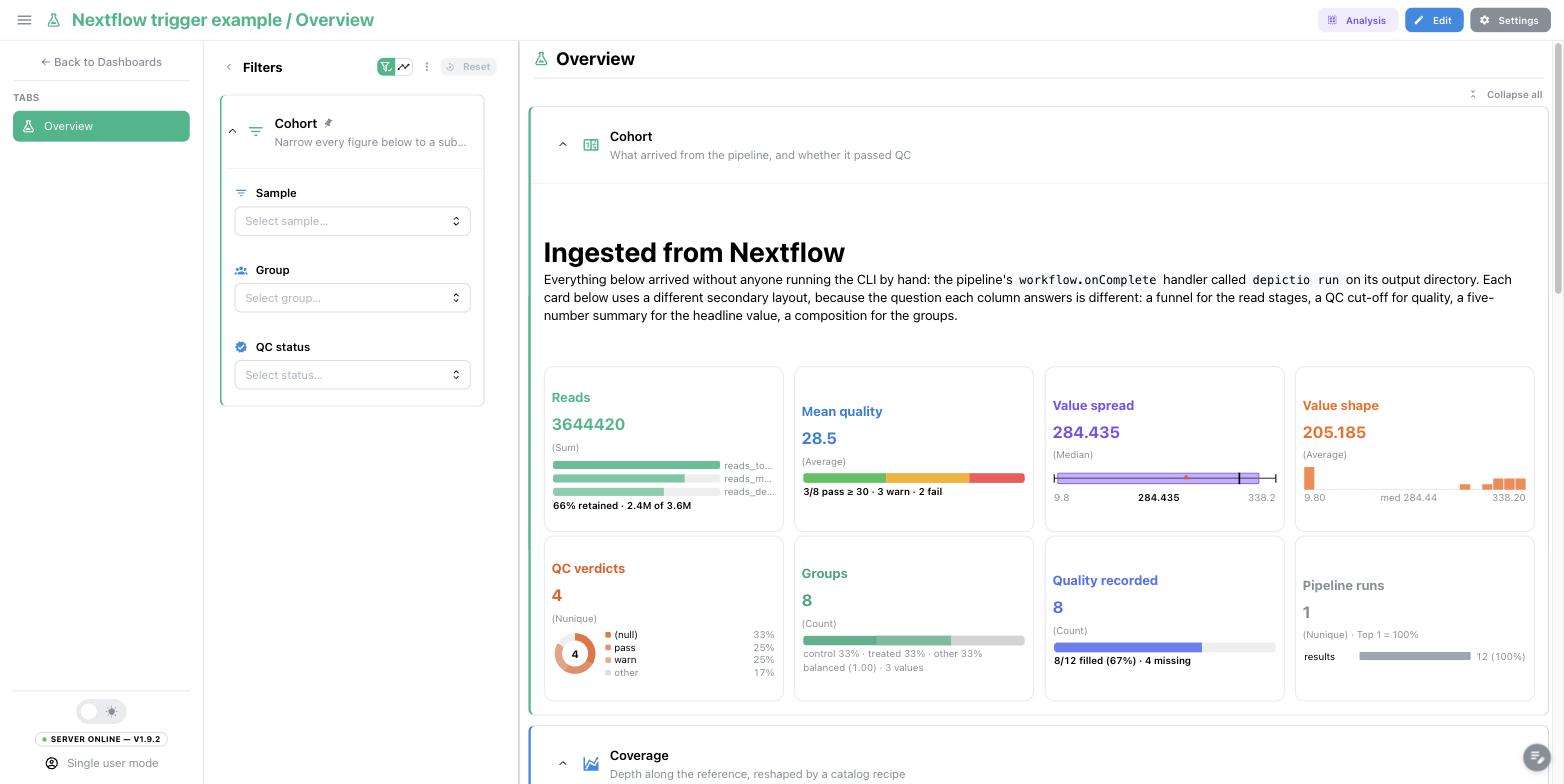
Here that example runs with the trigger installed opt-in by
--install --default-disabled, its nextflow.config cut down to its manifest
and the two parameters above. A plain nextflow run leaves Depictio out, and
--depictio_enabled true turns it on for that run only:
Running it again
A bundled template gives every run the same project name, so your next ampliseq
run, even on new samples, is not ingested: the project already exists, the log
shows depictio-cli exited with code 2, and the pipeline still succeeds. Say
which one you meant:
| You want | Add to nextflow run |
What happens |
|---|---|---|
| A project per run | --depictio_project study-B |
This run creates its own project, under that name |
| One project, many runs | --depictio_attach true |
This run is added to the existing project as another run. Nothing already ingested is lost, and the dashboards are kept |
| To refresh the project at every completion | --depictio_update true |
The handler adds --update-config: the project is refreshed in place, and its dashboards are kept as edited in the viewer |
depictio_update keeps your dashboards (v1.12.0+)
A refresh keeps the dashboards the project has, edits made in the viewer
included, and adds the template's dashboards it lacks, so it can run
unattended at every completion. Before v1.12.0 it re-imported them,
discarding those edits. To start the dashboards over from the template, run
depictio ingest <results dir> --reset-dashboards by hand.
Since v1.13.1, a refresh keeps the runs of this output directory and of the directories
added with depictio_attach. The runs of any other directory are removed.
If an attached directory cannot be reached from the machine where the
pipeline completes, the refresh stops and changes nothing, and the log
shows depictio-cli exited with code 1. See
Refreshing a project for the details.
On a cluster or in CI
Two things that machine usually cannot offer: a writable home directory to hold a secret, and a Python environment.
Keep the token out of the file. The CLI always reads a CLI.yaml, but the
token and the server URL can come from the environment and override it:
export DEPICTIO_CLI_CONFIG_PATH=/path/to/CLI.yaml
export DEPICTIO_CLI_TOKEN=<long-lived CLI token>
export DEPICTIO_CLI_API_BASE_URL=https://depictio.example.org
Reach the CLI through a container. Where Docker is available,
depictio_cli_executable accepts a list, so it can be a whole docker run
invocation. This one belongs in ~/.nextflow/config, next to the include, since
it describes the machine:
params.depictio_cli_executable = [
    'docker', 'run', '--rm',
    '-v', '{DATA_ROOT}:{DATA_ROOT}',
    '-v', "${System.getProperty('user.home')}/.depictio:${System.getProperty('user.home')}/.depictio:ro",
    '-e', 'DEPICTIO_CLI_TOKEN',
    '-e', 'DEPICTIO_CLI_API_BASE_URL',
    '--network', 'host',
    'ghcr.io/depictio/depictio-cli:<version>',
]
Replace <version> with your server's release, v1.12.0 or later: the handler
that --install copies calls ingest, the command earlier images name run.
The container has its own home, so it finds no ~/.depictio/CLI.yaml of its
own. Export DEPICTIO_CLI_CONFIG_PATH, as above, or set
params.depictio_cli_config, so that the handler passes the file as
--server.
Use {DATA_ROOT} for the directory being ingested: the handler fills it in when
the pipeline completes, while a ${params.outdir} in the list is still null
when the file is read.
Each bind maps a host path onto the same path inside the container, because
the handler passes absolute host paths through as they are. If
DEPICTIO_CLI_CONFIG_PATH points outside ~/.depictio, mount that directory the
same way. The container runs as UID 1000, so the mounted CLI.yaml must be
readable by that user.
For results that should belong to whoever launched the run rather than to a
service account, set params.depictio_user and see
Pipeline provisioning.
Reference
Every parameter the handler reads
| Parameter | Default | CLI option it drives |
|---|---|---|
depictio_enabled |
true, false if installed with --default-disabled |
none, set it to false to disable the trigger |
depictio_data_root |
params.outdir |
the results directory, ingest's argument |
depictio_cli_config |
$DEPICTIO_CLI_CONFIG_PATH |
--server; local for the server depictio local up runs. With neither set, no --server is passed and the CLI uses ~/.depictio/CLI.yaml, else the local server |
depictio_template |
none | --template |
depictio_project_config |
none | --project-config-path, which wins over the template |
depictio_project |
none | --project |
depictio_dashboard |
none | --dashboard, one path or a list |
depictio_attach |
false |
--attach-run |
depictio_update |
false |
--update-config, ignored with --attach-run |
depictio_user |
none | --user |
depictio_cli_executable |
depictio-cli |
the executable, or a list for a container invocation. {DATA_ROOT} in a list element is substituted when the pipeline completes. depictio-cli is the former name of depictio, which pip install depictio installs too |
Only depictio_cli_config and depictio_cli_executable describe the
machine and belong in ~/.nextflow/config. Set the others on the
nextflow run command line or in the pipeline's own nextflow.config. A
--depictio_* value on the command line always wins.
Nothing happened
Every line the handler writes is prefixed with [depictio], on the console
and in .nextflow.log.
| Symptom | Cause |
|---|---|
No [depictio] lines at all |
The snippet was never included, or params.depictio_enabled is false |
Pipeline did not complete successfully, skipping ingestion |
Working as designed. Fix the pipeline first |
No data root to ingest |
Neither params.depictio_data_root nor params.outdir is set |
No bundled depictio template matches pipeline |
The pipeline declares a manifest, Depictio ships no template for its name and version, and no project YAML is set. For your own pipeline, set params.depictio_project_config as in a pipeline with no bundled template. For an nf-core release with no template, pin params.depictio_template to a shipped version |
Could not start the Depictio CLI |
depictio-cli, which pip install depictio installs, is not on the head job's PATH. Installing it in the pipeline's containers does not help. Point params.depictio_cli_executable at an absolute path, or at a container |
Ingestion trigger failed, pipeline result unchanged |
Anything else, with the exception on that line. Your pipeline's result is never affected |
already exists on this server, then exited with code 2 |
An earlier run created this project. See Running it again |
depictio-cli exited with code N |
The ingestion itself failed. The CLI's own output is in the lines above |
Next steps
- CLI Usage for
depictio ingestand every other command - Template System Reference for how a pipeline id resolves to a template
- nf-core templates for what ships today
depictio/cli/configs/nextflow/for the snippet itself, an annotated reference config, and the example pipeline