

The stableexpression template follows an nf-core/stableexpression run from the public expression datasets of one species to the genes that hold steadiest across them, the reference genes a qPCR assay can normalise against:
- Overview: the run in four key figures, live findings and four figures, each linked to the tab that explains it
- Datasets: which datasets reached the merged matrix, and how many samples each step kept
- ID mapping: the fate of each dataset's gene ids
- Ranking: the most stable genes of each expression section, with their stability score
- Candidates: the parts of the score and the agreement of Normfinder and geNorm
- Sections: scores, variation and mean expression across the sections
The persistent Sample filters (group, dataset, sample) sit in the collapsed left
panel. They narrow the dataset tabs and the per-sample values of the Ranking tab,
and never move a stability score, which is a statistic of the whole cohort.
No MultiQC tab
A 1.1.0 run writes a MultiQC report of custom content only, and a Plotly Dash app. The pinned test run published neither, so the template declares no MultiQC collection and has no MultiQC tab.
Quick start
stableexpression takes a species, not a samplesheet, so there is nothing to
supply: the design is merged_data/whole_design.csv, written by the run.
METADATA_FILE can point to an annotated copy with extra columns (tissue,
treatment), and GROUP_COL (default platform) can name any of them. For a run
with --skip_id_mapping, pass --var NO_ID_MAPPING=true.
depictio config nextflow --install     # once per machine
nextflow run nf-core/stableexpression -r 1.1.0 -profile docker --outdir results
No depictio ingest, and no template named: the pipeline ingests its own
output directory when it finishes and resolves this template from its own
manifest. See Nextflow trigger.
Reference
The template reads the merged design, the per-dataset design files and statistics, the error and warning tables of the ID mapping, the gene summary with the stability measures, and the merged gene by sample matrix before imputation. The ID mapping collection is optional.
Self-adapting layout
The dashboard adapts to whatever the run actually produced: components bound to pruned or unparsed data collections are hidden, tabs left with no real visualizations are dropped entirely, and the remaining components are re-packed so there are no empty rows.
Template variables
Variables you provide when running the template: DATA_ROOT is the results directory given to depictio ingest, the others are set with --var NAME=value:
| Variable | Required | Description |
|---|---|---|
DATA_ROOT |
✓ | stableexpression output directory (reporting/, merged_data/, datasets/, statistics/, errors/, warnings/, id_mapping/, pipeline_info/). |
METADATA_FILE |
— | Sample design table: batch (the dataset), condition and sample, plus any annotation column. Defaults to the pipeline's merged_data/whole_design.csv. |
METADATA_ID_COL |
— | Design id column. stableexpression fixes it to sample; recorded for the metadata auto-detection. |
GROUP_COL |
— | Sample hub column the dashboard groups and filters samples by. Defaults to platform (Microarray or RNA-seq), derived from the dataset directories; name an annotation column of METADATA_FILE instead. |
GROUP_COL_DISPLAY |
— | Reader-facing label of GROUP_COL, used in filter and card titles. |
TOP_PER_SECTION |
— | Candidates per expression section summarised as box statistics (stableexpression_stable_gene_distribution). Default 25, as many as the pipeline's report draws. |
VALUES_PER_SECTION |
— | Candidates per expression section kept as one row per sample (stableexpression_stable_gene_values), the boxes the sample filters can redraw. Default 2; each gene adds a row per sample. |
NO_ID_MAPPING |
— | Set (--var NO_ID_MAPPING=true) for a run with --skip_id_mapping: no ID mapping statistics are written, so the ID mapping collection and tab are removed. |
Data collections
9 data collections — 8 required 1 optional · 9 direct 0 derived.
Origin tells you whether a collection is real pipeline data or a reshape of it: direct = a pipeline output (scanned, or a recipe that reads raw files); derived = a recipe that reshapes one or more direct collections into the layout a visualization needs (no new measurement). Reads shows what produces it: a recipe .py transform, or a raw file scanned off disk. (A direct collection can still have a recipe — one that merely parses/cleans the raw file; derived means the recipe reshapes another collection.)
| Tag | Origin | Type | Reads | Status |
|---|---|---|---|---|
samples |
direct | Table | recipe |
required |
stableexpression_dataset_summary |
direct | Table | recipe |
required |
stableexpression_dataset_funnel |
direct | Table | recipe |
required |
stableexpression_id_mapping |
direct | Table | recipe |
optional |
stableexpression_gene_statistics |
direct | Table | recipe |
required |
stableexpression_gene_stability |
direct | Table | recipe |
required |
stableexpression_score_components |
direct | Table | recipe |
required |
stableexpression_stable_gene_distribution |
direct | Table | recipe |
required |
stableexpression_stable_gene_values |
direct | Table | recipe |
required |
Conditional routes
Rows are data collections; columns are the variables you set or params.json flags auto-detected from the run. Each filled cell is the effect of setting that variable; an empty cell means that variable leaves the collection unchanged. (8 collections are unaffected by any variable — present on every run.)
+ included− removed⇄ repointed
| Data collection | NO_ID_MAPPING |
|---|---|
stableexpression_id_mapping |
− |
Cross-DC links
9 links — selecting a value in the source collection filters the target. The join column is shown after the source.
| Source · column | Target | Filters | |
|---|---|---|---|
samples · dataset |
→ | stableexpression_dataset_summary |
Filter the datasets by the samples in view |
samples · dataset |
→ | stableexpression_dataset_funnel |
Filter the sample funnel by the samples in view |
samples · dataset |
→ | stableexpression_id_mapping |
Filter the ID mapping by the samples in view |
samples · sample |
→ | stableexpression_stable_gene_values |
Redraw the per-sample values from the samples in view |
stableexpression_dataset_summary · dataset |
→ | stableexpression_dataset_funnel |
Carry a dataset pick to the sample funnel |
stableexpression_dataset_summary · dataset |
→ | stableexpression_id_mapping |
Carry a dataset pick to the ID mapping |
stableexpression_stable_gene_distribution · gene_id |
→ | stableexpression_stable_gene_values |
Carry a section or gene pick on the ranking to the per-sample values |
stableexpression_gene_stability · gene_id |
→ | stableexpression_score_components |
Carry a candidate pick to the score parts |
stableexpression_gene_statistics · gene_id |
→ | stableexpression_gene_stability |
Carry a gene pick (expression level, platforms) to the candidates |
Recipes
Each recipe reshapes raw pipeline output into a tidy table. The name links to its source; Output lists the validated OUTPUT_SCHEMA columns.
| Recipe | Transforms | Output |
|---|---|---|
nf-core/stableexpression/samples.py |
Sample hub for nf-core/stableexpression: one row per public sample of the run. | sample, dataset, accession, array_design, platform, normalisation, condition, status, missing_share |
stableexpression/dataset_funnel.py |
The samples of every nf-core/stableexpression dataset, step by step (long form). | step_key, dataset, platform, outcome, step, step_order, samples, samples_lost, dataset_in |
stableexpression/dataset_summary.py |
One row per dataset nf-core/stableexpression downloaded, and what became of it. | dataset, accession, platform, normalisation, array_design, design, outcome, conditions, samples_downloaded, samples_id_mapped, samples_after_zero_filter, samples_kept, samples_rejected_zeros, samples_rejected_missing, kept_share, gene_ids_in, genes_kept, ids_collapsed, genes_rare, ids_unmapped, mapped_share, zero_share, missing_share, skewness, downloaded, id_mapped, merged, failure_reason, mapping_note |
stableexpression/gene_stability.py |
Stability score of every candidate gene of nf-core/stableexpression. | gene_id, gene_name, gene_symbol, description, section, section_index, section_rank, overall_rank, rank_weight, stability_score, normfinder_stability, genorm_m, normfinder_rank, genorm_rank, cv, robust_cv, normfinder_norm, genorm_norm, cv_norm, robust_cv_norm, missing_penalty, normfinder_part, genorm_part, cv_part, robust_cv_part, mean, median, measured_share, zero_share, expression_percentile, expression_level, platforms, source_ids |
stableexpression/gene_statistics.py |
Expression statistics of every gene of nf-core/stableexpression's merged matrix. | gene_id, gene_name, gene_symbol, description, section, section_index, expression_percentile, expression_level, candidate, mean, median, standard_deviation, mad, cv, robust_cv, measured_share, zero_share, platforms, source_ids |
stableexpression/id_mapping.py |
Where the gene ids of every nf-core/stableexpression dataset went (long form). | fate_key, dataset, accession, platform, outcome, fate, fate_order, gene_ids, share |
stableexpression/score_components.py |
The stability score of every candidate gene, split into its parts (long form). | part_key, gene_id, gene_name, section, section_index, section_rank, overall_rank, stability_score, component, component_order, contribution, normalised_value |
stableexpression/stable_gene_distribution.py |
Box statistics of the most stable genes of every section of nf-core/stableexpression. | gene_id, gene_name, section, section_index, section_rank, overall_rank, stability_score, q1, median, q3, lower, upper, mean, sd, min, max, n_measured, n_samples, measured_share, expression_level |
stableexpression/stable_gene_values.py |
Normalised expression of the very top candidates of each section, sample by sample. | value_key, gene_id, gene_name, section, section_index, section_rank, overall_rank, stability_score, sample, dataset, value |
Dashboard tabs
One dashboard: the Overview, then five child tabs in two groups, read as a funnel from the datasets in the merged matrix to the genes that hold steadiest in it. Each tab below carries the same icon and colour the dashboard gives it.
| Group | Tabs |
|---|---|
| Data & QC | Datasets, ID mapping |
| Stability | Ranking, Candidates, Sections |
The most stable genes across public expression data.
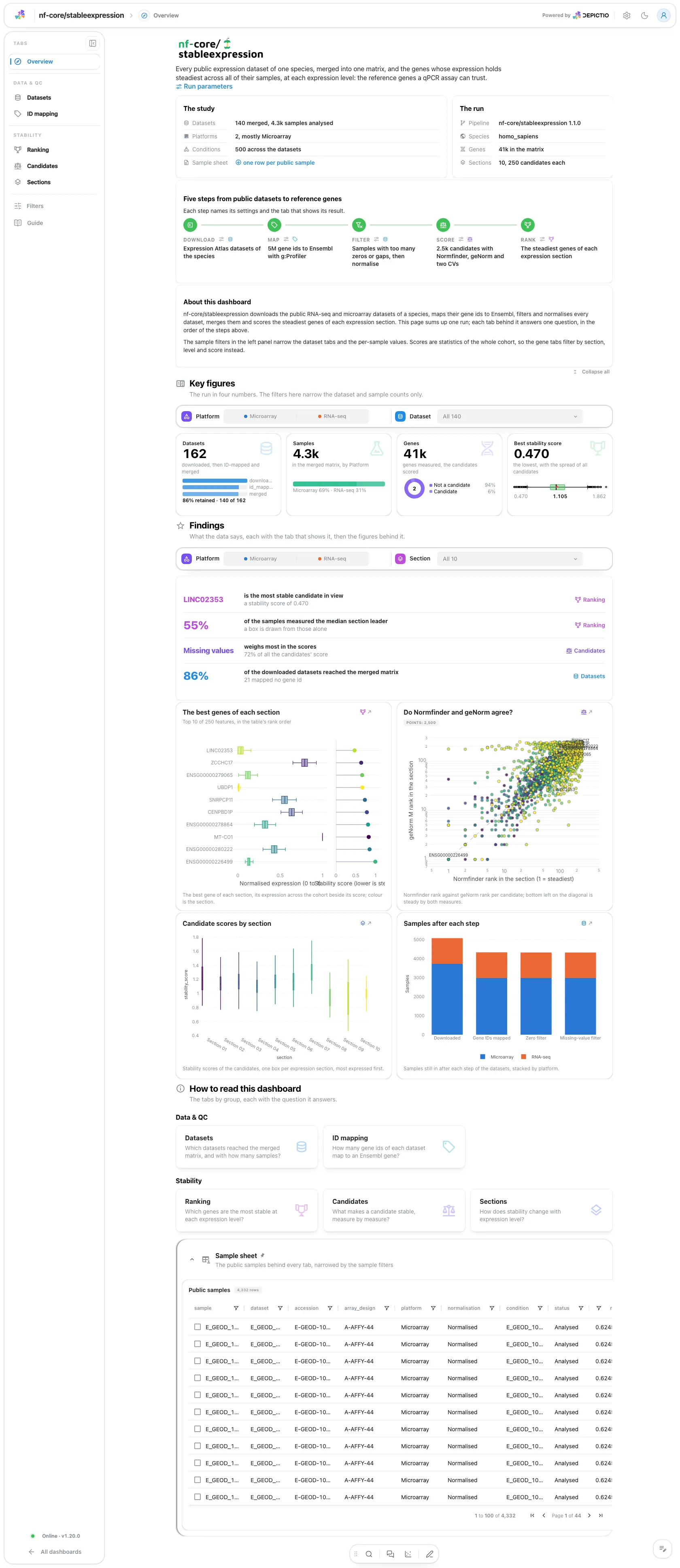
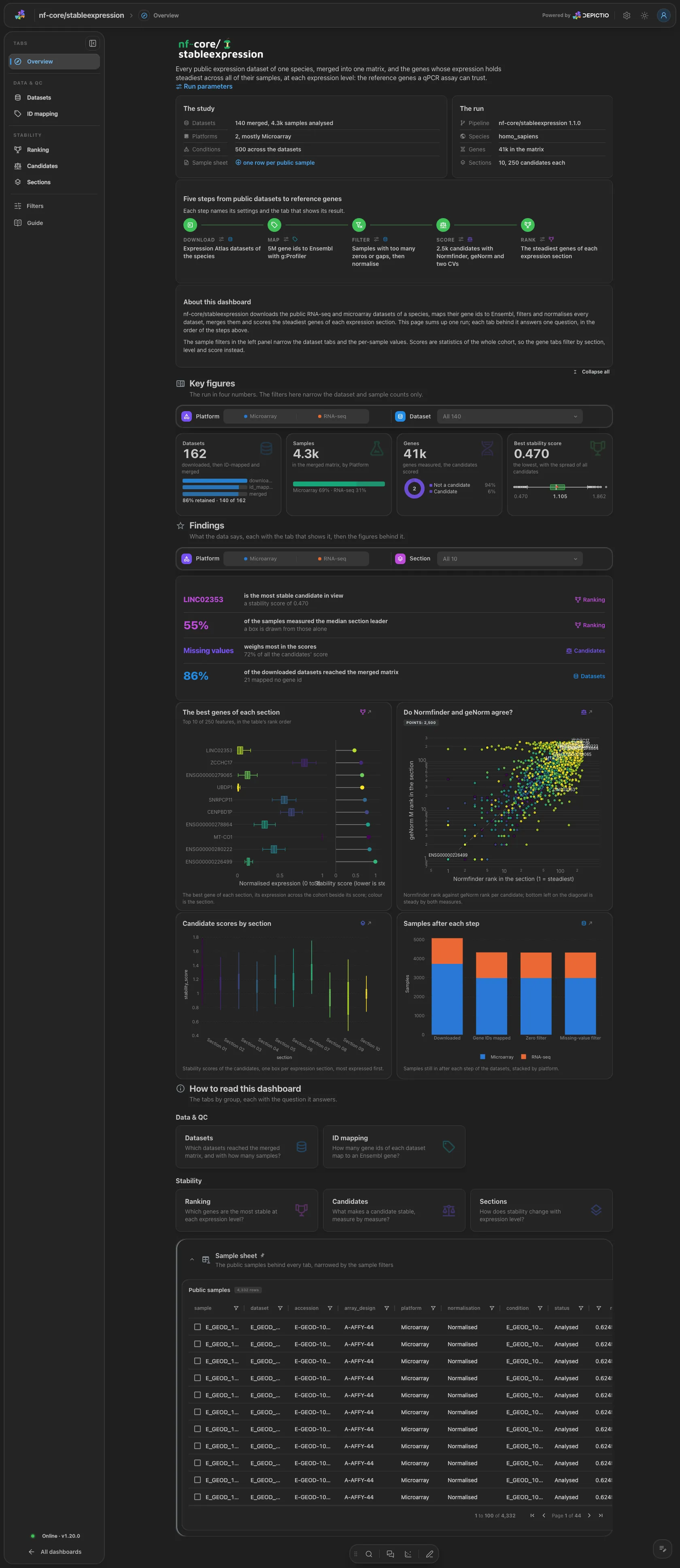
A hero links the run parameters. The run gives the species, the datasets merged, the samples analysed, the genes in the matrix and the sections and candidates per section, and Pipeline walks five steps (download, map, filter, score, rank). Four key figures: datasets, samples analysed, genes and the best stability score. The group and dataset filters narrow the first two; the gene cards are cohort-wide.
Data & QC · Which datasets reached the merged matrix, and with how many samples?
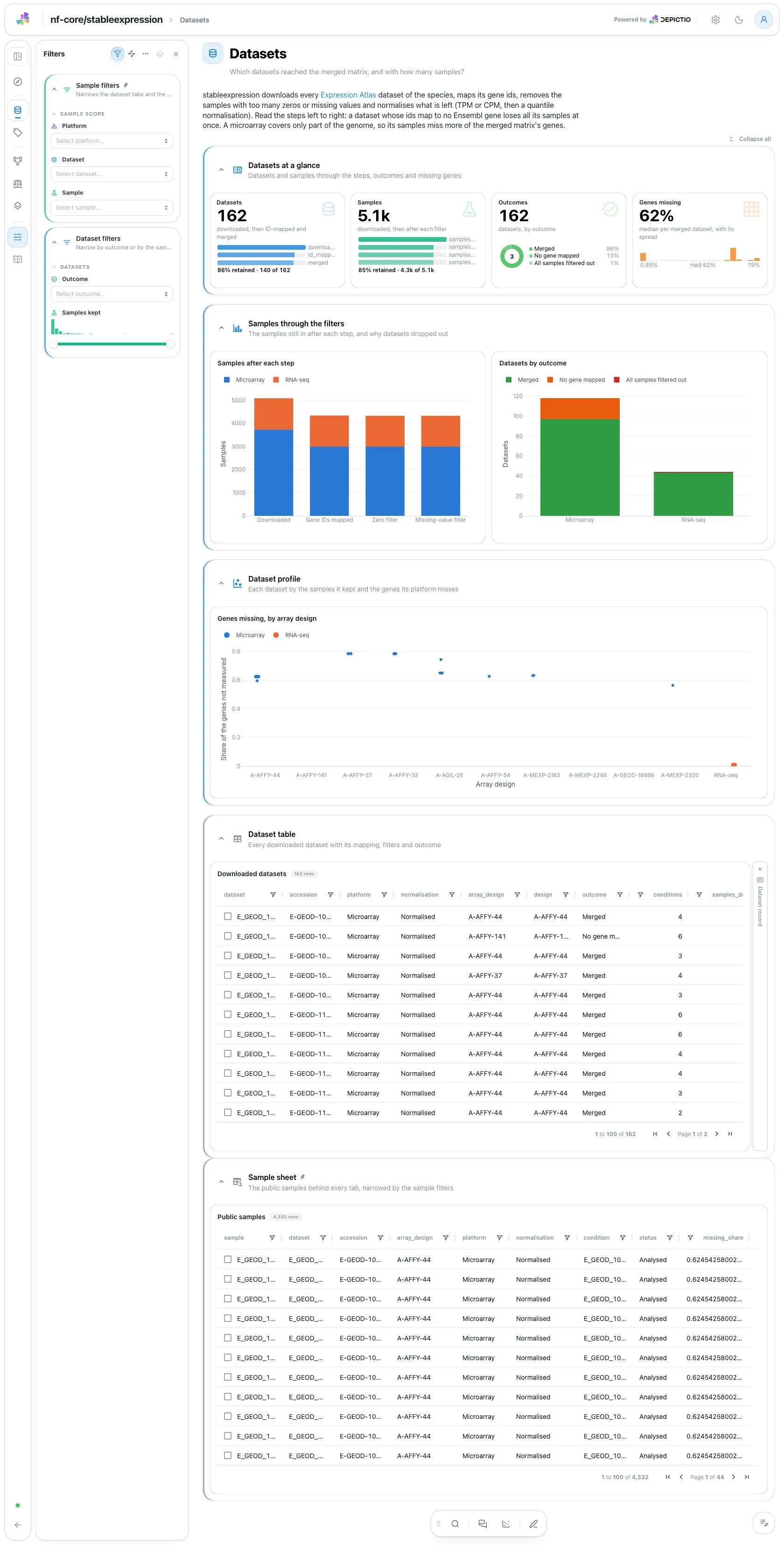
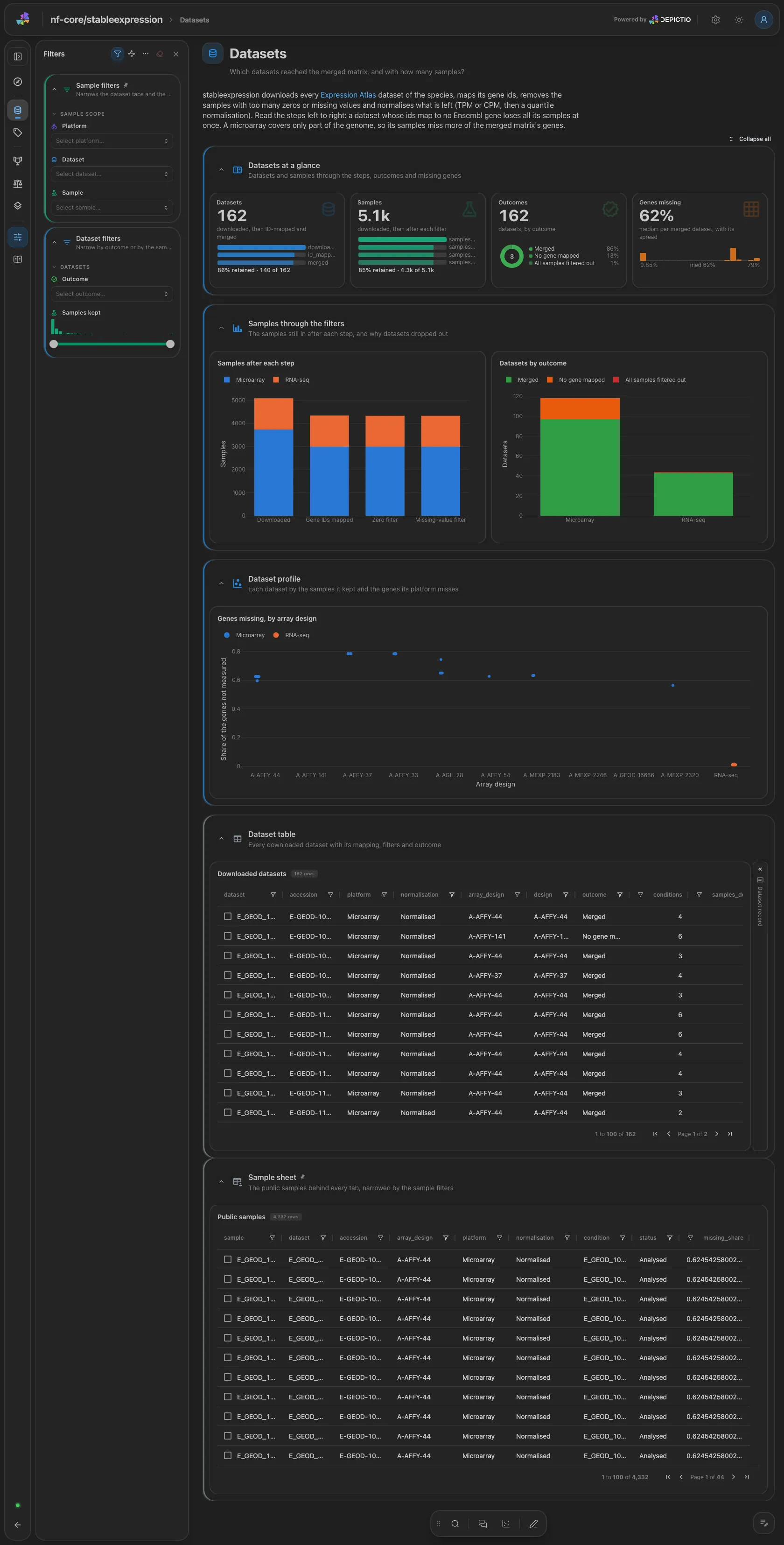
Datasets and samples through the steps (download, ID mapping, zero filter, missing-value filter), the samples after each step by platform, and the share of the genes each dataset misses, one strip per array design. The dataset table with its record card is collapsed. Filters: outcome and samples kept.
Data & QC · How many gene ids of each dataset map to an Ensembl gene?
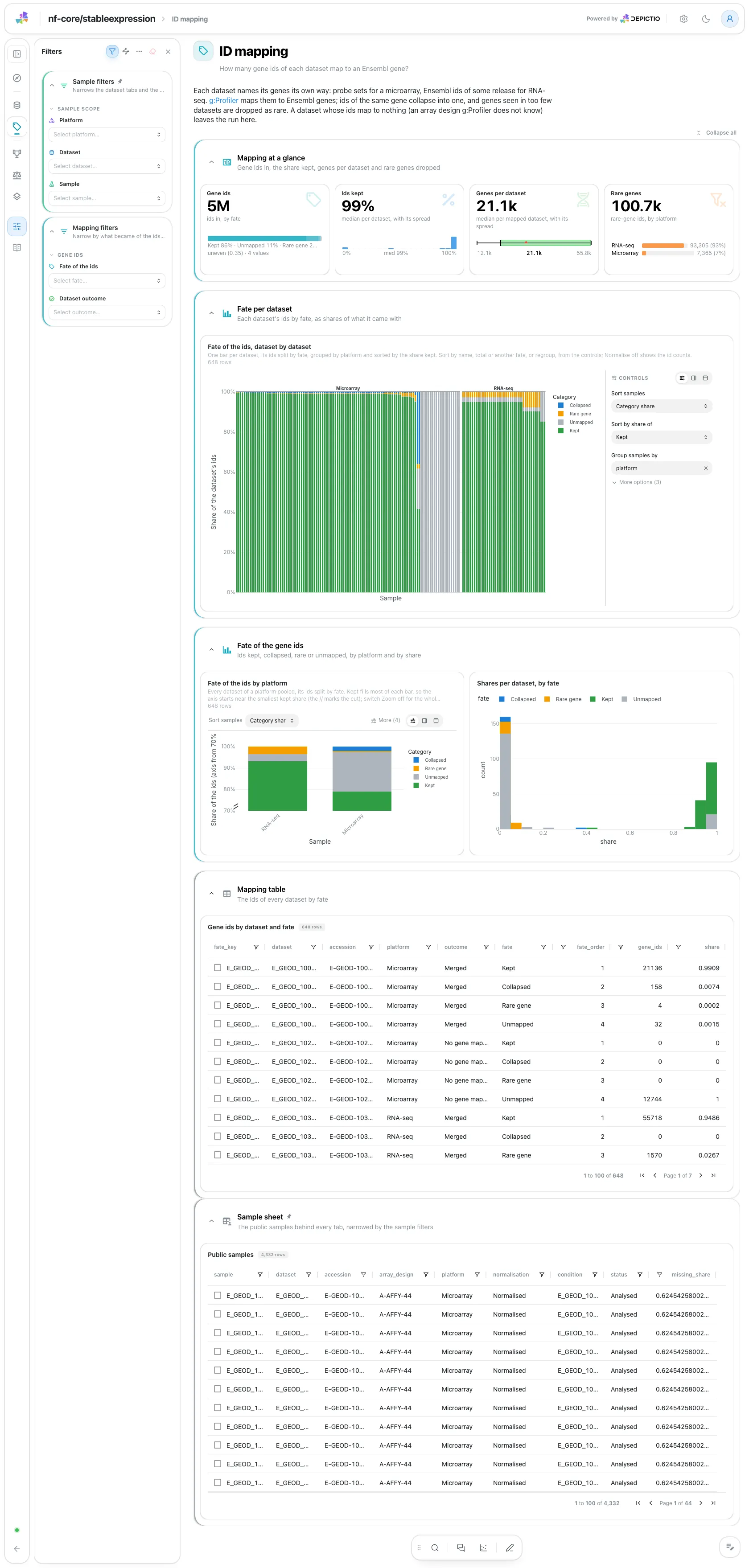
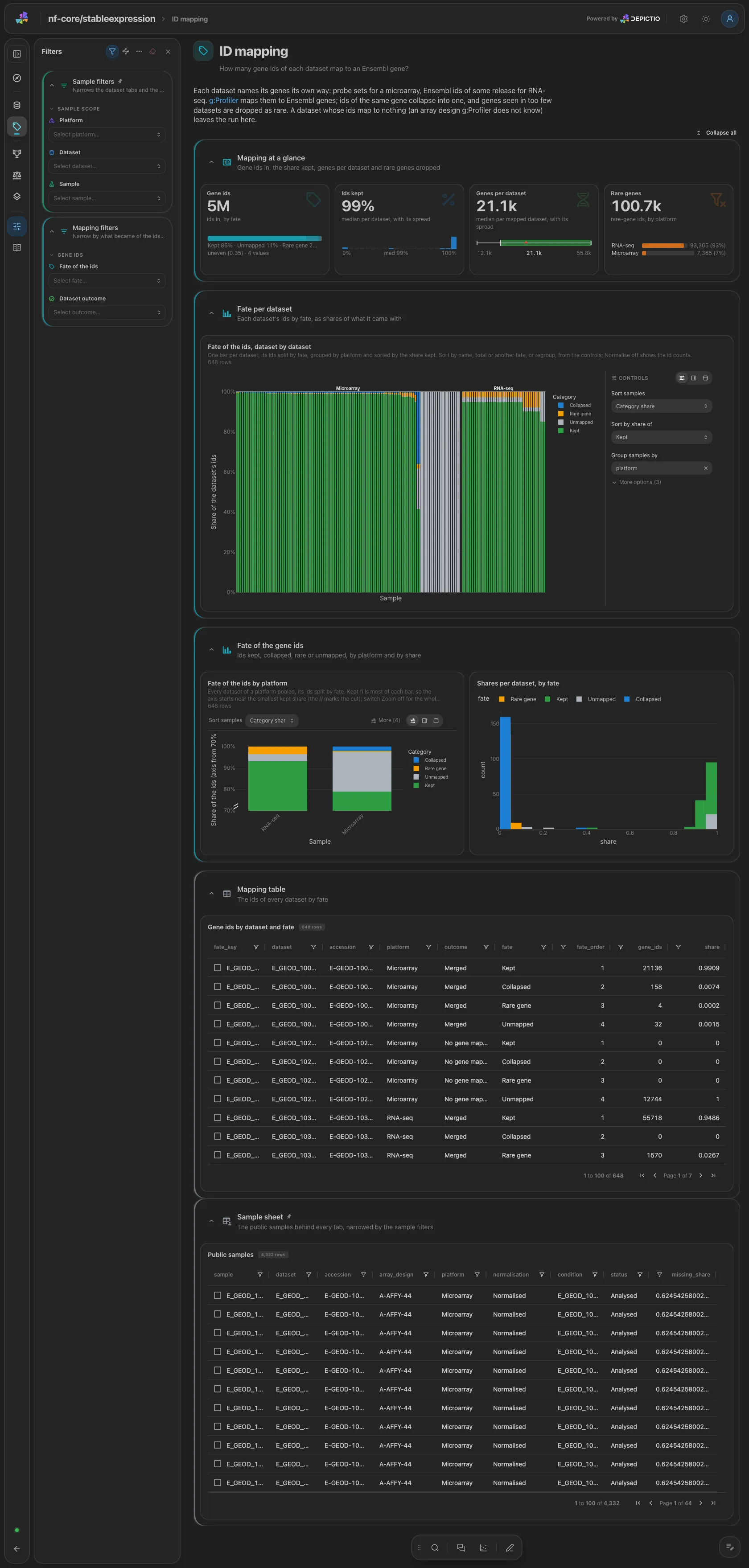
One stacked bar per dataset of the fate of its gene ids, grouped by platform and
sorted by the share kept, then the fate per platform. Filters: fate and dataset
outcome. A run with --skip_id_mapping drops this tab.
Stability · Which genes are the most stable at each expression level?
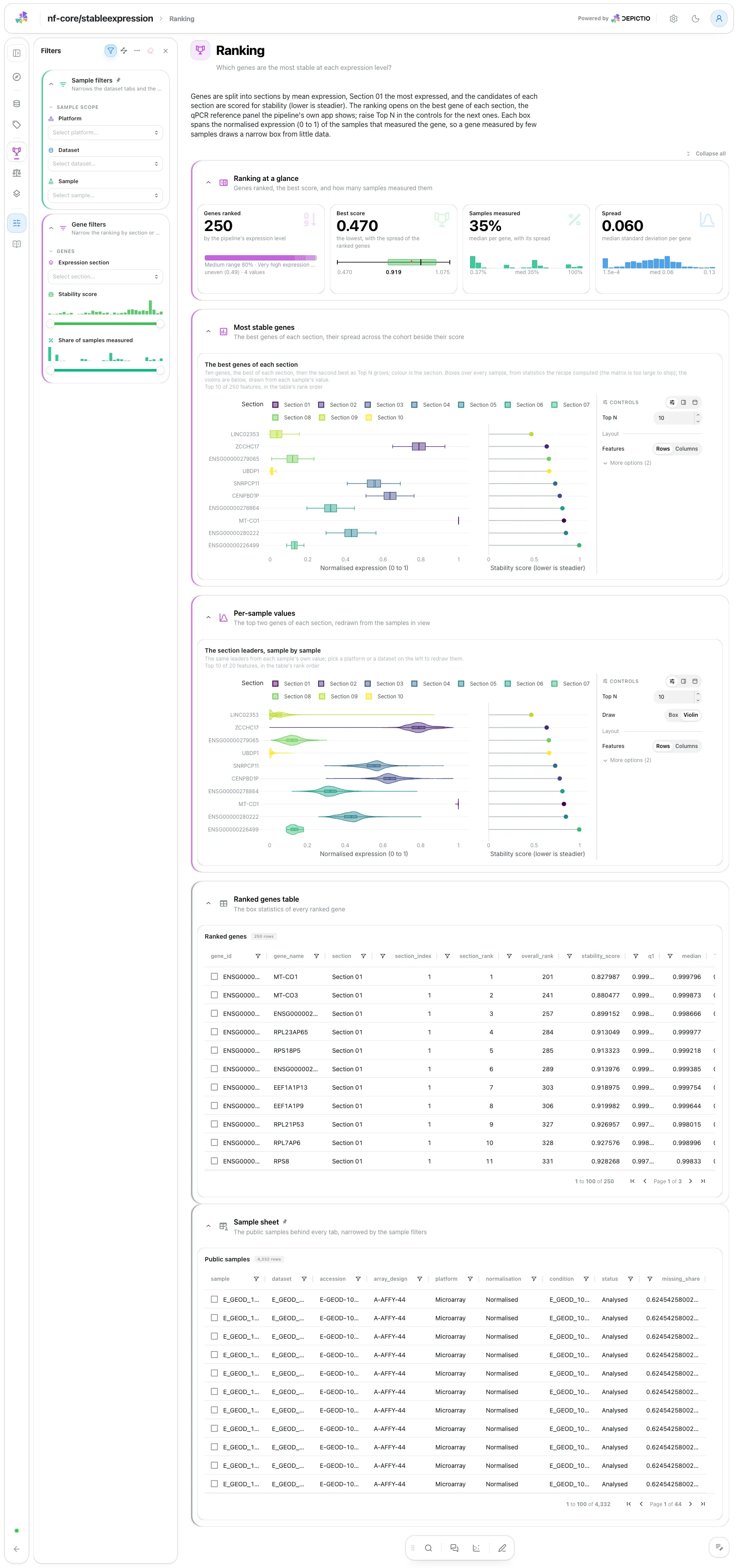
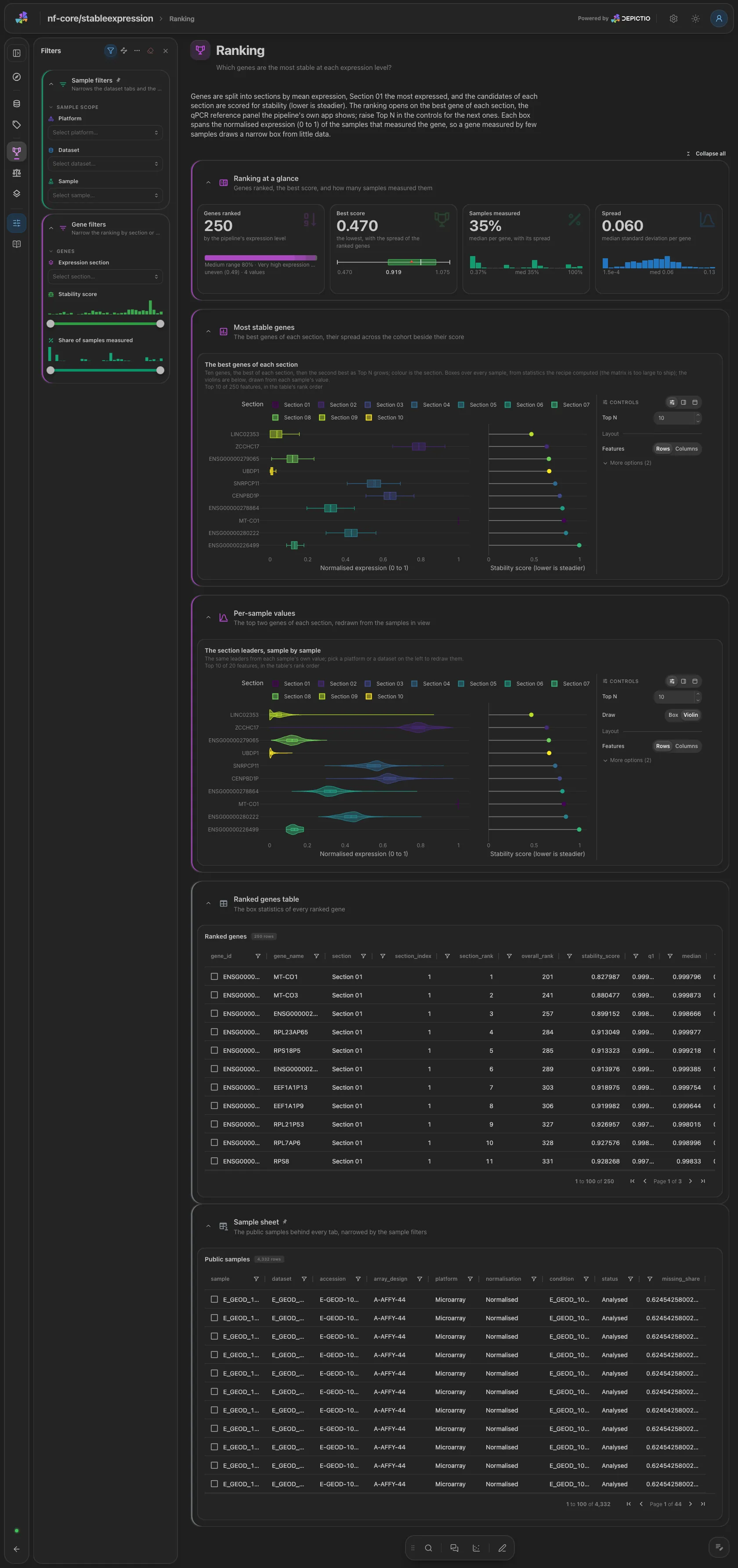
The best genes of each section as boxes of normalised expression with their stability score, lower being steadier. Top N and a section filter set what is ranked. Below, the same leaders as violins from the per-sample values, the one gene tile the sample filters redraw. Filters: section, score and measured share.
Stability · What makes a candidate stable, measure by measure?
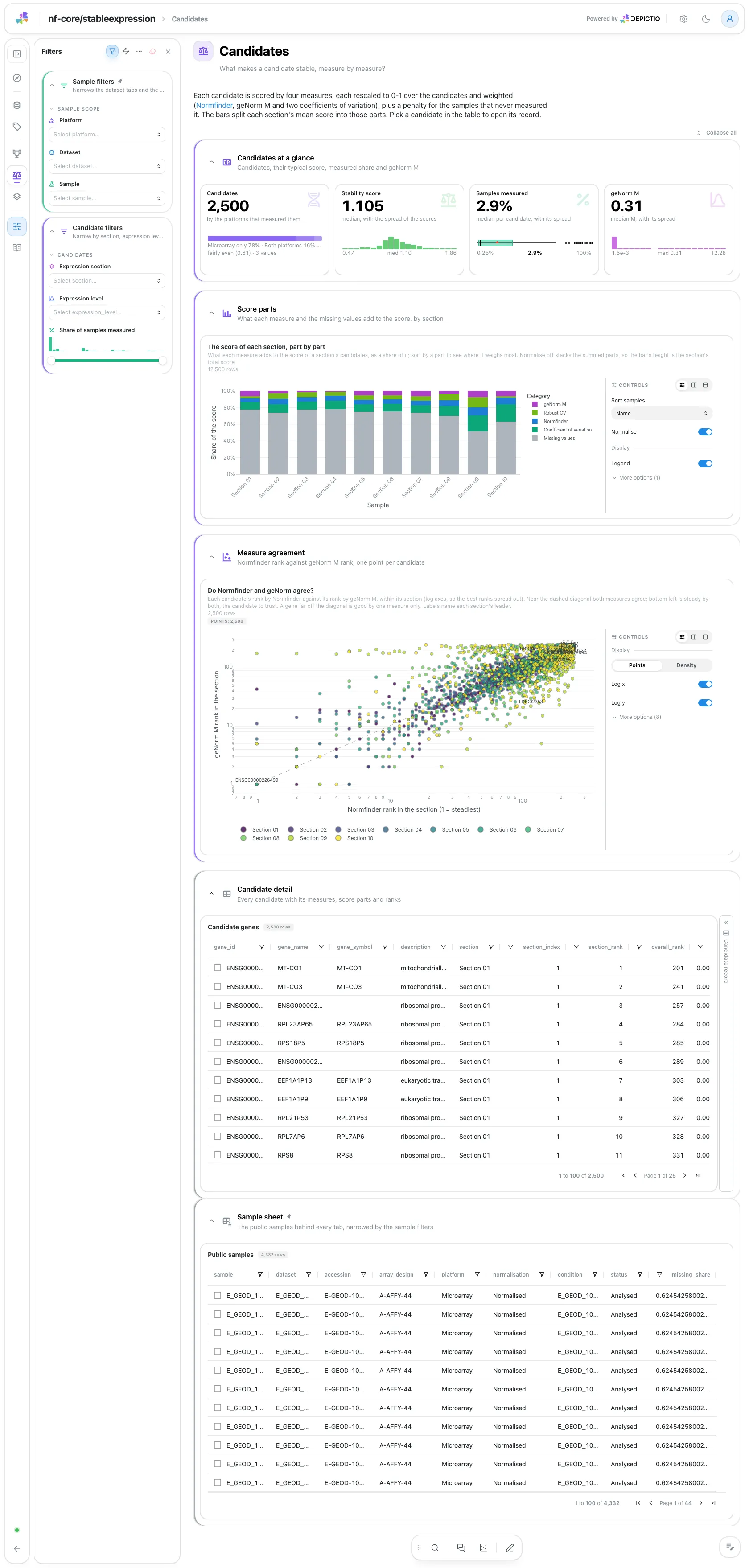
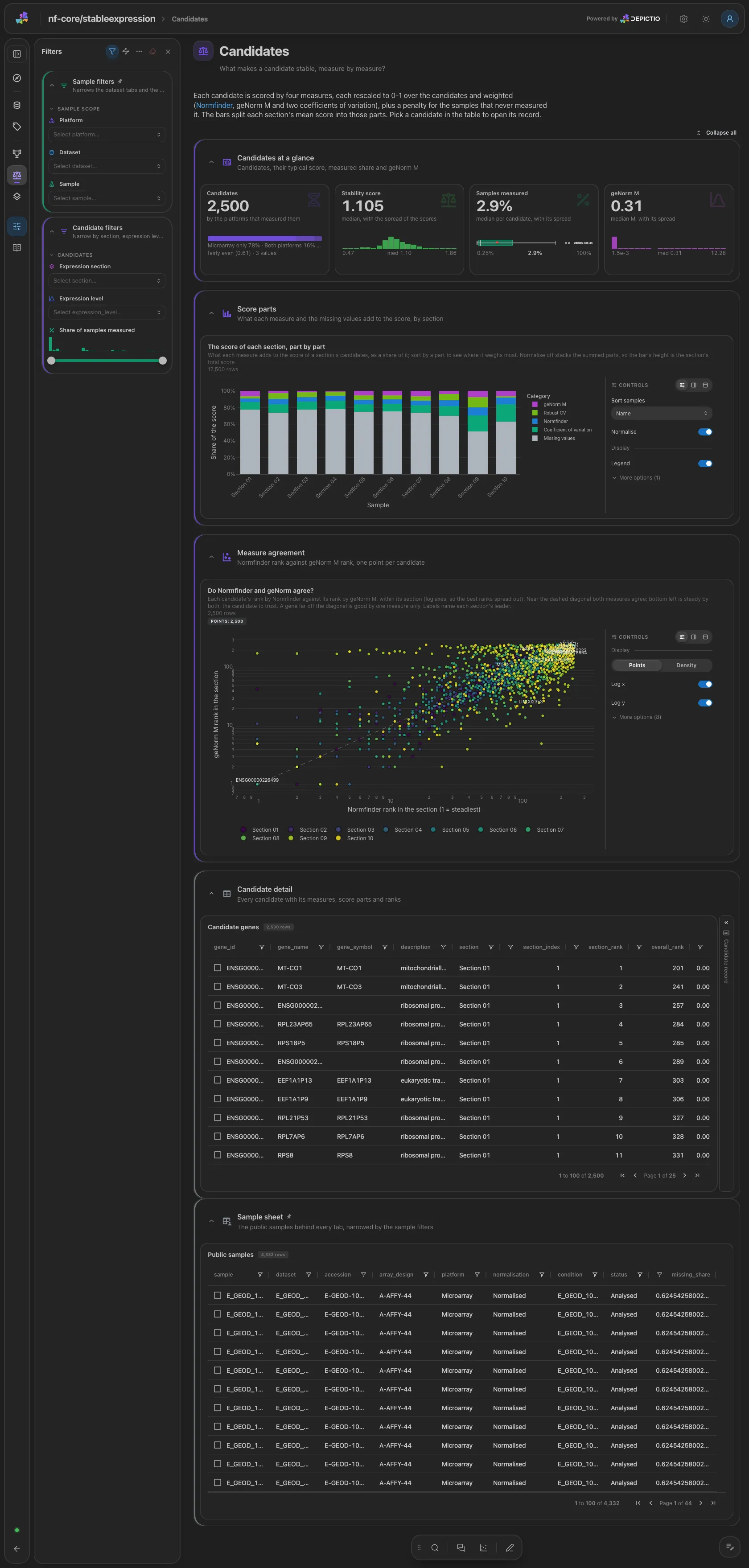
Each section's score split into its five parts, then Normfinder rank against geNorm M rank within the section, one point per candidate. The candidate table with its record card is collapsed. Filters: section, expression level and measured share.
Stability · How does stability change with expression level?
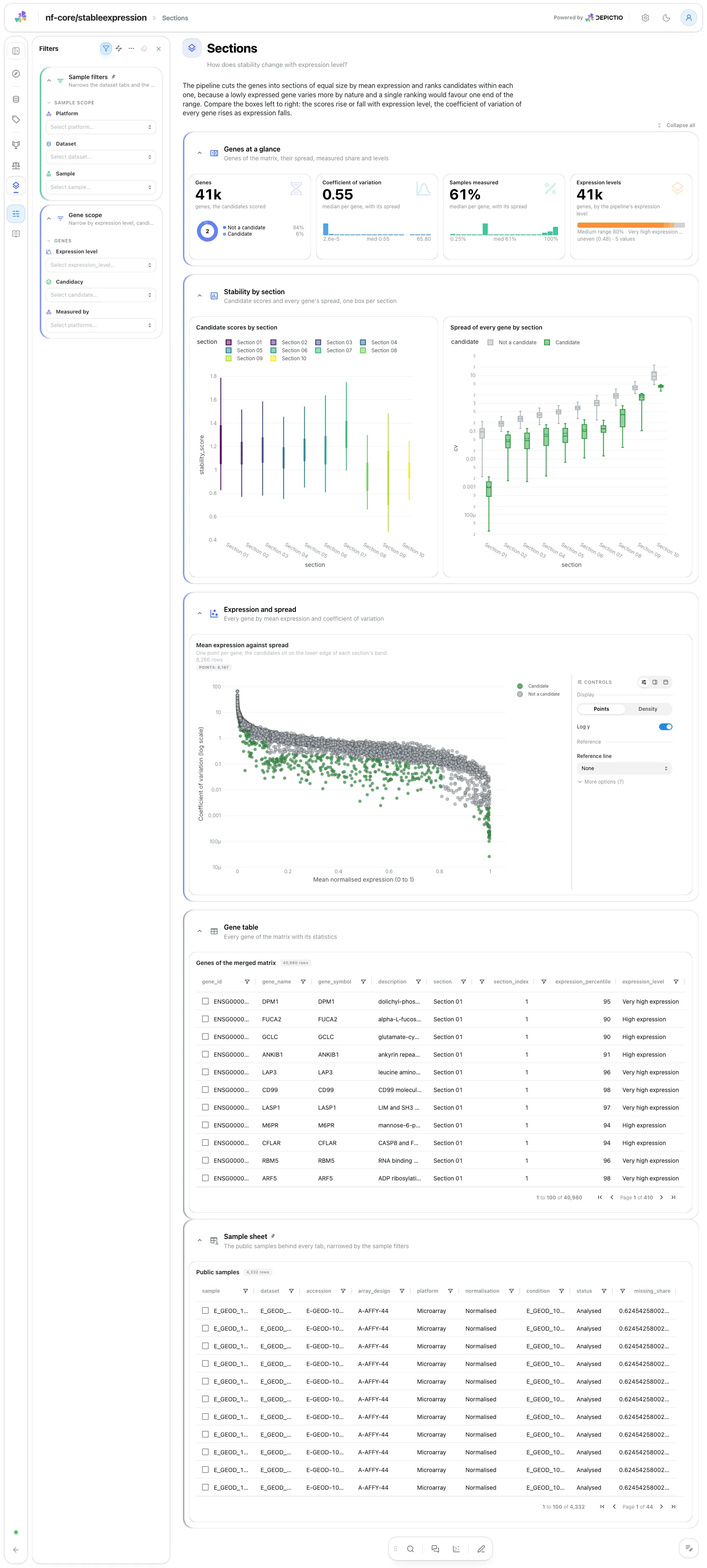
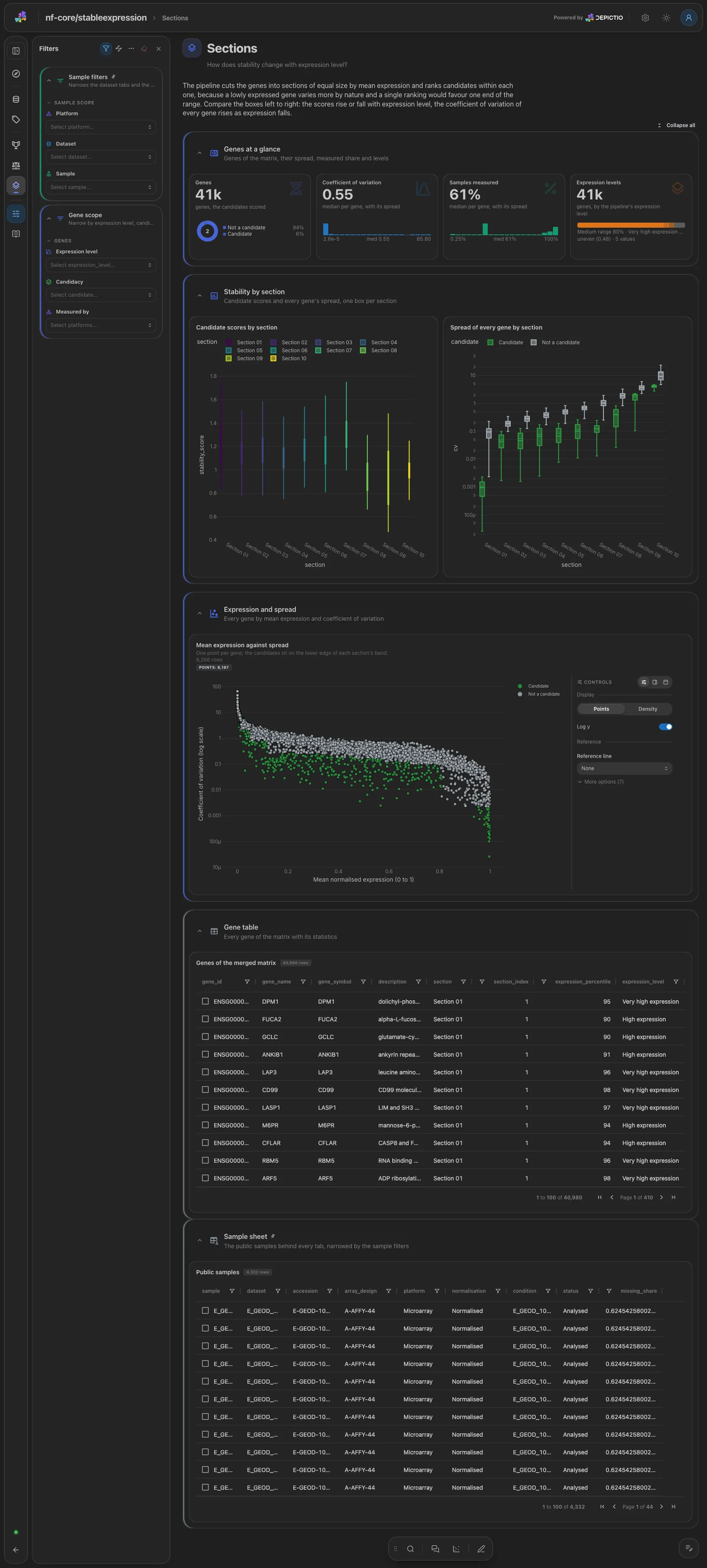
The candidates' scores per section, every gene's coefficient of variation per section (candidates beside the rest) and every gene by mean expression against variation. Filters: expression level, candidacy and platforms.
The dataset table selects on dataset, which reaches the funnel and the ID mapping.
The ranking, the candidate table and the scatters select on gene_id, which
reaches the per-sample values.
Running the pipeline
Depictio reads the output of nf-core/stableexpression, it does not run the pipeline. Run the pipeline first, with the species to study:
nextflow run nf-core/stableexpression -r 1.1.0 \
  --species homo_sapiens \
  -profile docker --outdir results
Then point Depictio at the results:
See nf-co.re/stableexpression/usage for full pipeline documentation.
Required data structure
Point depictio ingest at the directory holding the pipeline output. Depictio scans
recursively and matches on file name.
<DATA_ROOT>/
├── reporting/all_genes_summary.csv            # every gene: statistics, section, measures, score, rank
├── merged_data/
│   ├── whole_design.csv                       # the hub: one row per sample (METADATA_FILE)
│   └── all_counts.parquet                     # the merged matrix before imputation
├── datasets/<platform>/<normalisation>/<dataset>/<dataset>.design.csv
├── statistics/*.csv                           # ID mapping, filter, zero, null and skewness tables
├── errors/renaming_failure_reasons.tsv
├── warnings/renaming_warning_reasons.tsv
└── pipeline_info/
The per-step dataset matrices under datasets/ and the imputed matrix are not read.
Validation runs
The 1.1.0 release prefix of the AWS megatests holds pipeline_info/ only, so the
template was validated against
s3://nf-core-awsmegatests/stableexpression/results-d6b1654c4784332cbad71f1d928cc8b75a77272f/,
a complete test_full run (Homo sapiens) written by a development build
(v1.0.0-gd6b1654), which published neither the MultiQC report nor the Dash app.
megatest.yaml lists the tables-only subset the template needs (about 358 MB, the
merged matrix being most of it):
bash depictio/projects/nf-core/stableexpression/1.1.0/download_test_data.sh /tmp/stableexpression_test
depictio ingest /tmp/stableexpression_test --template nf-core/stableexpression/latest
Do not pass --project when ingesting: the dashboard is attached to the
project by name, so renaming it breaks a later depictio dashboard import.
Re-ingesting accumulates dashboards, so delete the project before repeating a run.
Additional resources
- nf-co.re/stableexpression: official pipeline documentation
- nf-co.re/stableexpression/1.1.0/results: AWS test results
- Template System Reference: YAML format, variables, conditionals
- Recipes: how to read, test, and write recipes
Authorship
 weber8thomas
Reviewing a template on your own data, or taking over a role here, is a contribution in itself: the contributing guide says what each one involves.