

The hlatyping template follows an nf-core/hlatyping run from the reads to the genotypes and the support behind them:
- Overview: the run in four key figures, live findings and four figures, each linked to the tab that explains it
- Data & QC: the MultiQC report, and how many reads each sample gave and how many typed it
- HLA: the alleles each sample carries, how often each allele occurs across the samples, and how many reads each genotype rests on
The persistent Sample filters (sequencing type, sample and input format) sit in
the left panel and narrow every tab. The sequencing type (DNA or RNA) is the
default grouping.
The samplesheet is not published by the pipeline
The hub of the dashboard is the samplesheet the run was started with. It is
not part of the published output, so copy it under input/ in the results
directory, or pass --var METADATA_FILE=.... Without a sheet the hub still
lists every sample OptiType typed, with the sequencing type Not stated.
Allele spelling matches nf-core/epitopeprediction
Alleles are normalised to two fields, HLA-A*02:01, the spelling the
epitopeprediction template uses. The genotype table
writes each sample's alleles as the ;-separated list an epitopeprediction
samplesheet takes, so a typed sample can be predicted against its own
genotype. The two runs are separate projects, so a pick in one does not
filter the other.
Quick start
depictio ingest /path/to/hlatyping_results \
  --template nf-core/hlatyping/latest \
  --var METADATA_FILE=/path/to/samplesheet.csv
The results directory is the only required value when the samplesheet sits at
{DATA_ROOT}/input/samplesheet.csv.
| Variable | Default | Role |
|---|---|---|
METADATA_FILE |
{DATA_ROOT}/input/samplesheet.csv |
the samplesheet the run was started with |
GROUP_COL |
seq_type |
column the dashboard groups and filters samples by; any column added to the sheet works |
GROUP_COL_DISPLAY |
Sequencing type |
reader-facing label of GROUP_COL in filters and cards |
depictio config nextflow --install     # once per machine
nextflow run nf-core/hlatyping -r 2.2.0 -profile docker --outdir results
No depictio ingest, and no template named: the pipeline ingests its own
output directory when it finishes and resolves this template from its own
manifest. See Nextflow trigger. The
trigger passes no --var, so put a copy of the samplesheet at
results/input/samplesheet.csv before the run.
Reference
The template reads the samplesheet, OptiType's result table of each sample, the
MultiQC report and the per-read-file FastQC table it was built from. With
--enumerations above 1 OptiType also writes sub-optimal solutions; the
genotypes keep the optimum. No variable prunes a route: every 2.2.0 run that
reaches MultiQC writes all five collections. HLA-HD output (--tools hlahd) is
not read.
Self-adapting layout
The dashboard adapts to whatever the run actually produced: components bound to pruned or unparsed data collections are hidden, tabs left with no real visualizations are dropped entirely, and the remaining components are re-packed so there are no empty rows.
Template variables
Variables you provide when running the template: DATA_ROOT is the results directory given to depictio ingest, the others are set with --var NAME=value:
| Variable | Required | Description |
|---|---|---|
DATA_ROOT |
✓ | hlatyping output directory (optitype/, yara/, multiqc/, pipeline_info/ and the FastQC files). |
METADATA_FILE |
— | The samplesheet the run was started with (--input: sample, fastq_1, fastq_2, bam, seq_type, plus any design columns). Defaults to input/samplesheet.csv under DATA_ROOT. |
METADATA_ID_COL |
— | Samplesheet id column. hlatyping fixes it to sample; recorded for the metadata auto-detection. |
GROUP_COL |
— | Samplesheet column the dashboard groups and filters samples by. Defaults to seq_type (DNA or RNA), from the sheet; name any design column added to the sheet instead. |
GROUP_COL_DISPLAY |
— | Reader-facing label of GROUP_COL, used in filter and card titles. |
Data collections
5 data collections — 5 required 0 optional · 4 direct 1 derived.
Origin tells you whether a collection is real pipeline data or a reshape of it: direct = a pipeline output (scanned, or a recipe that reads raw files); derived = a recipe that reshapes one or more direct collections into the layout a visualization needs (no new measurement). Reads shows what produces it: a recipe .py transform, or a raw file scanned off disk. (A direct collection can still have a recipe — one that merely parses/cleans the raw file; derived means the recipe reshapes another collection.)
| Tag | Origin | Type | Reads | Status |
|---|---|---|---|---|
samples |
direct | Table | recipe |
required |
multiqc_data |
direct |  MultiQC |
file |
required |
optitype_genotypes |
direct | Table | recipe |
required |
optitype_summary |
direct | Table | recipe |
required |
read_qc |
derived | Table | recipe |
required |
Cross-DC links
6 links — selecting a value in the source collection filters the target. The join column is shown after the source.
| Source · column | Target | Filters | |
|---|---|---|---|
samples · sample |
→ | multiqc_data |
Filter the MultiQC panels by samplesheet samples (FastQC writes <sample>_1 and <sample>_2) |
samples · sample |
→ | optitype_genotypes |
Filter the genotypes by samplesheet samples |
samples · sample |
→ | optitype_summary |
Filter the per-sample typing by samplesheet samples |
samples · sample |
→ | read_qc |
Filter the read files by samplesheet samples |
optitype_genotypes · sample_id |
→ | optitype_summary |
Carry an allele pick to the samples that carry it |
optitype_genotypes · sample_id |
→ | read_qc |
Carry an allele pick to the read files of the samples that carry it |
Recipes
Each recipe reshapes raw pipeline output into a tidy table. The name links to its source; Output lists the validated OUTPUT_SCHEMA columns.
| Recipe | Transforms | Output |
|---|---|---|
nf-core/hlatyping/read_qc.py |
Read QC of nf-core/hlatyping: one row per sample and read file. | read_key, sample, read, total_sequences, pct_gc, pct_duplicates, mean_length, fastqc_fail, fastqc_warn, fastqc_status, typing_reads, typing_share |
nf-core/hlatyping/samples.py |
Sample hub for nf-core/hlatyping: one row per sample of the run. | sample, seq_type, input_format, read_layout, runs, input_files |
optitype/genotypes.py |
OptiType HLA class I genotypes, one row per sample, locus and haplotype. | call_id, sample_id, locus, haplotype, allele, allele_group, hla_class, zygosity, reads, objective |
optitype/summary.py |
OptiType typing per sample: the genotype, its zygosity and its support. | sample_id, hla_a, hla_b, hla_c, alleles, distinct_alleles, typed_loci, homozygous_loci, heterozygous_loci, homozygous_class, reads, objective, objective_per_read, solutions, runner_up_gap |
Dashboard tabs
One dashboard: the Overview, then five child tabs in two groups, read as a funnel from the reads to the genotypes and the support behind them. Each tab below carries the same icon and colour the dashboard gives it, so the page and the app read alike.
| Group | Tabs |
|---|---|
| Data & QC | MultiQC, Reads |
| HLA | Genotypes, Alleles, Typing quality |
Each child tab opens with a short intro and a strip of four cards, then at most three open sections; tables follow, collapsed. The Sample sheet is pinned, collapsed, to the bottom of every child tab.
HLA class I typing with OptiType, from the reads to the genotypes.
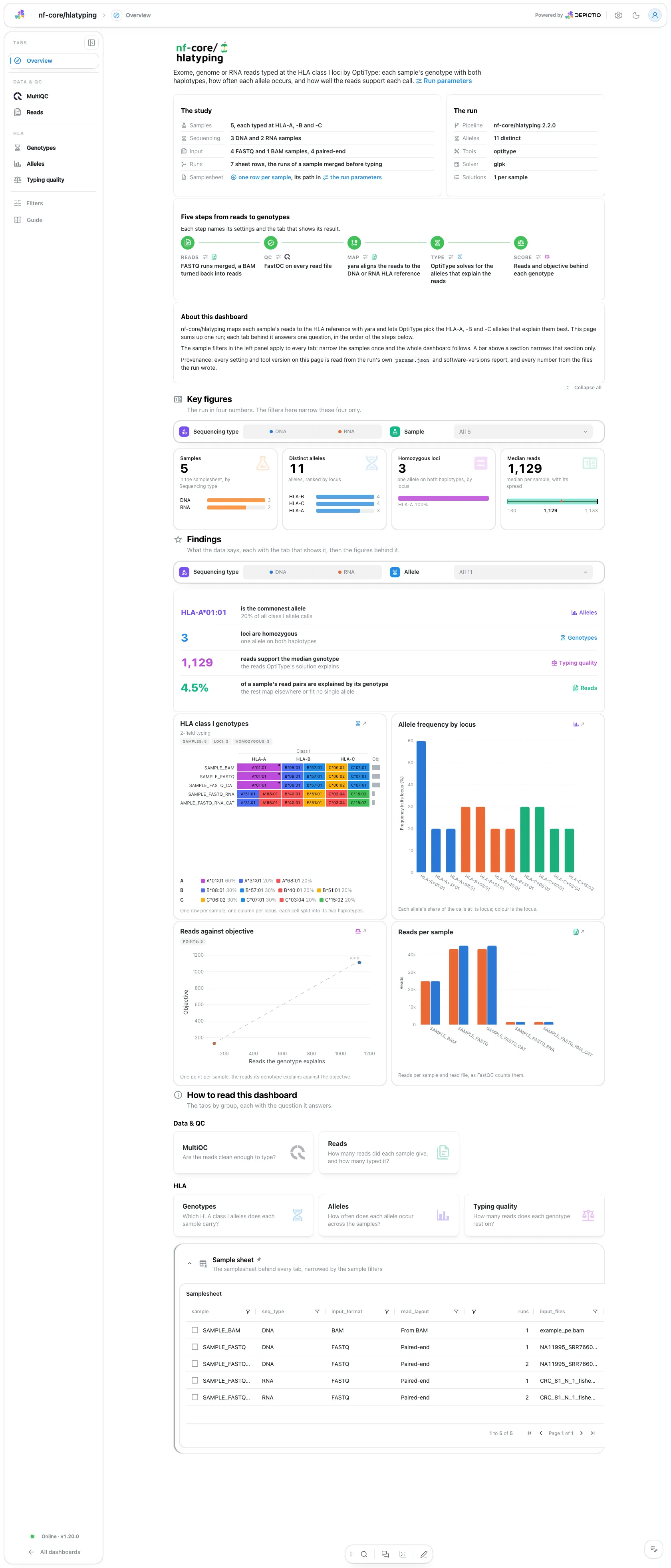
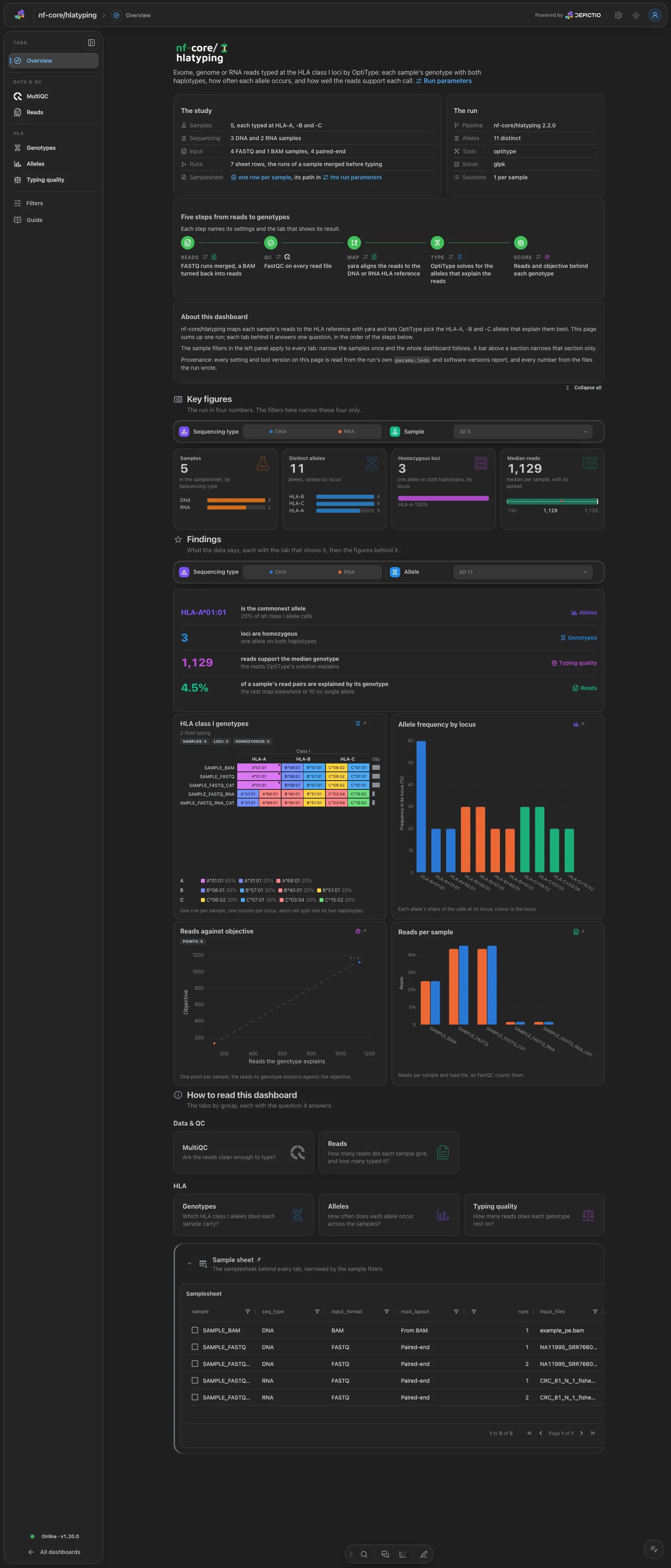
The run lists the samples, the distinct alleles, the typing tool, the solver and the solutions asked per sample, and Pipeline walks five steps (reads, QC, map, type, score), each linked to its parameters and its tab. Four key figures: the samples, the distinct alleles, the homozygous loci and the median reads behind a genotype. The findings are live rows plus four figures: the genotype grid, the allele frequency by locus, the reads against the objective and the reads per sample.
Data & QC · Are the reads clean enough to type?
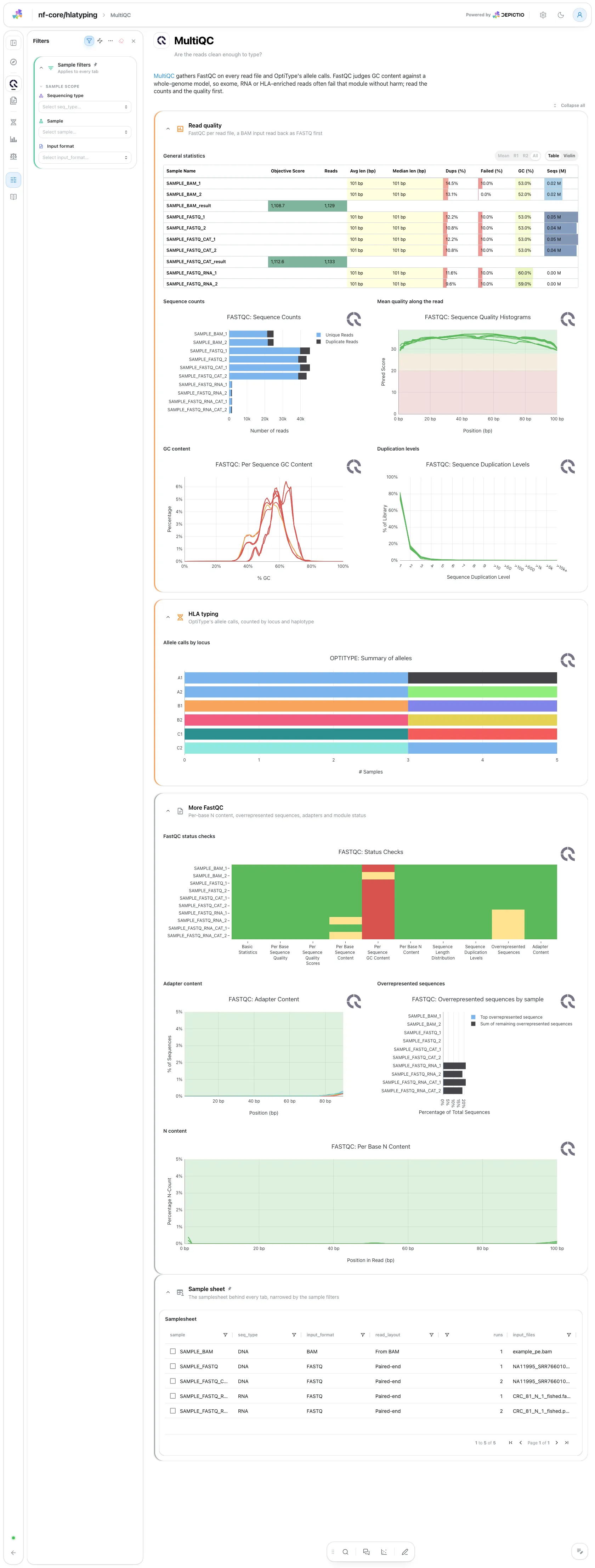
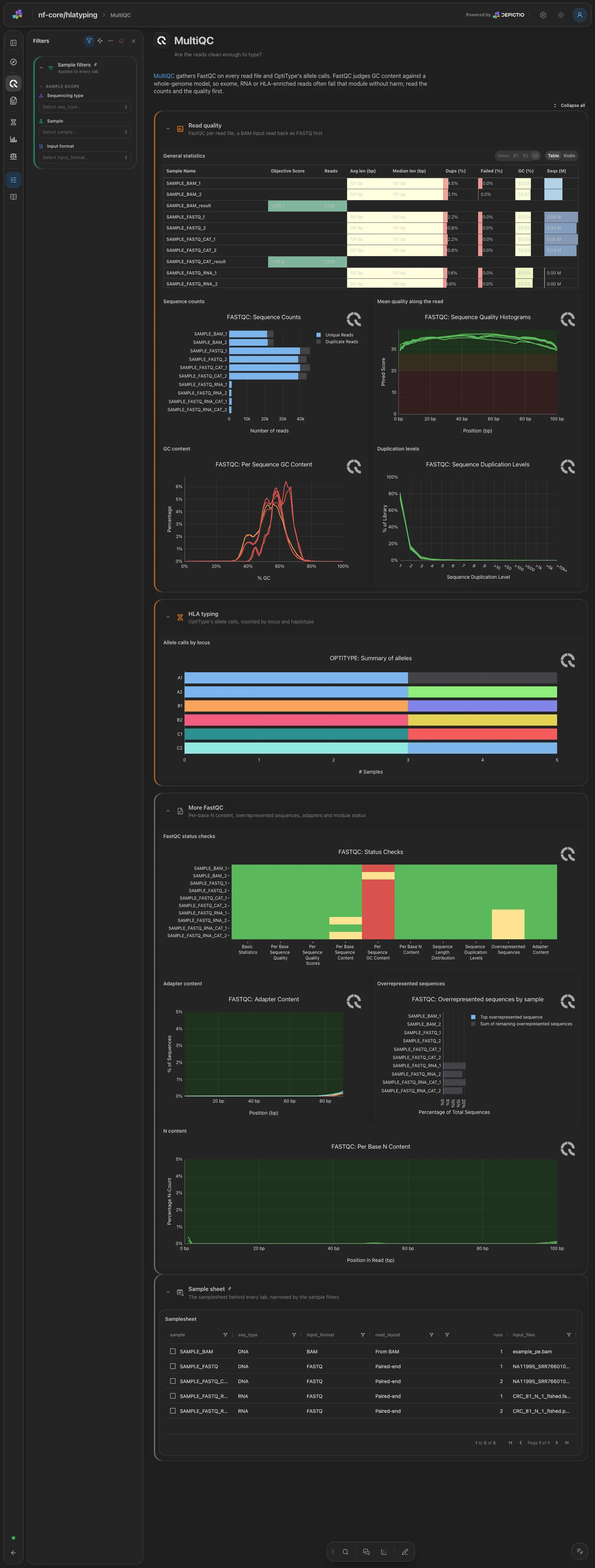
MultiQC panels only. Open: the general statistics, FastQC's sequence counts, mean quality, GC content and duplication levels, and OptiType's allele calls by locus. The FastQC status checks, adapter content, overrepresented sequences and N content are collapsed. FastQC judges GC content against a whole-genome model, so exome, RNA or HLA-enriched reads often fail that module without harm.
Data & QC · How many reads did each sample give, and how many typed it?
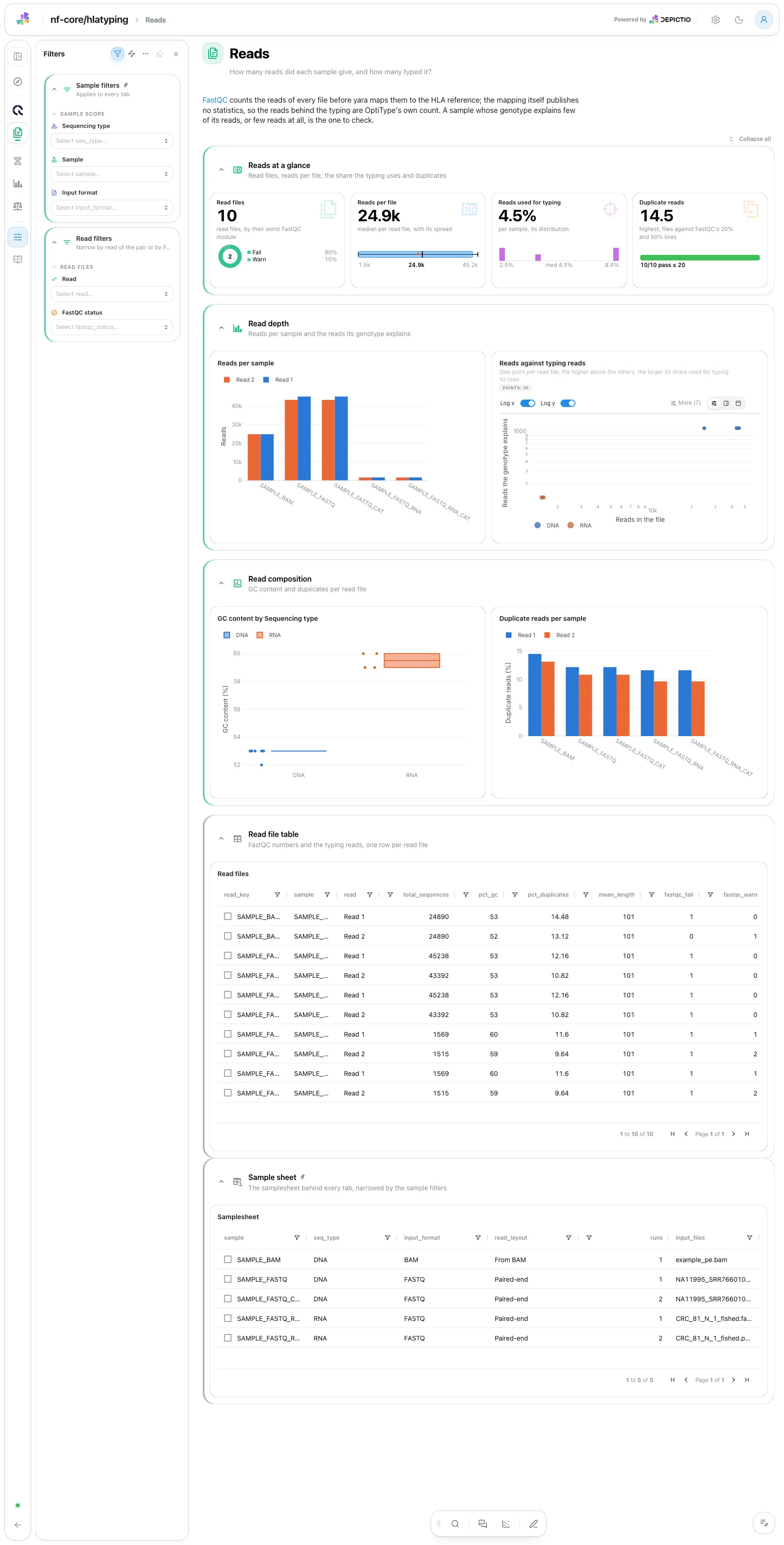
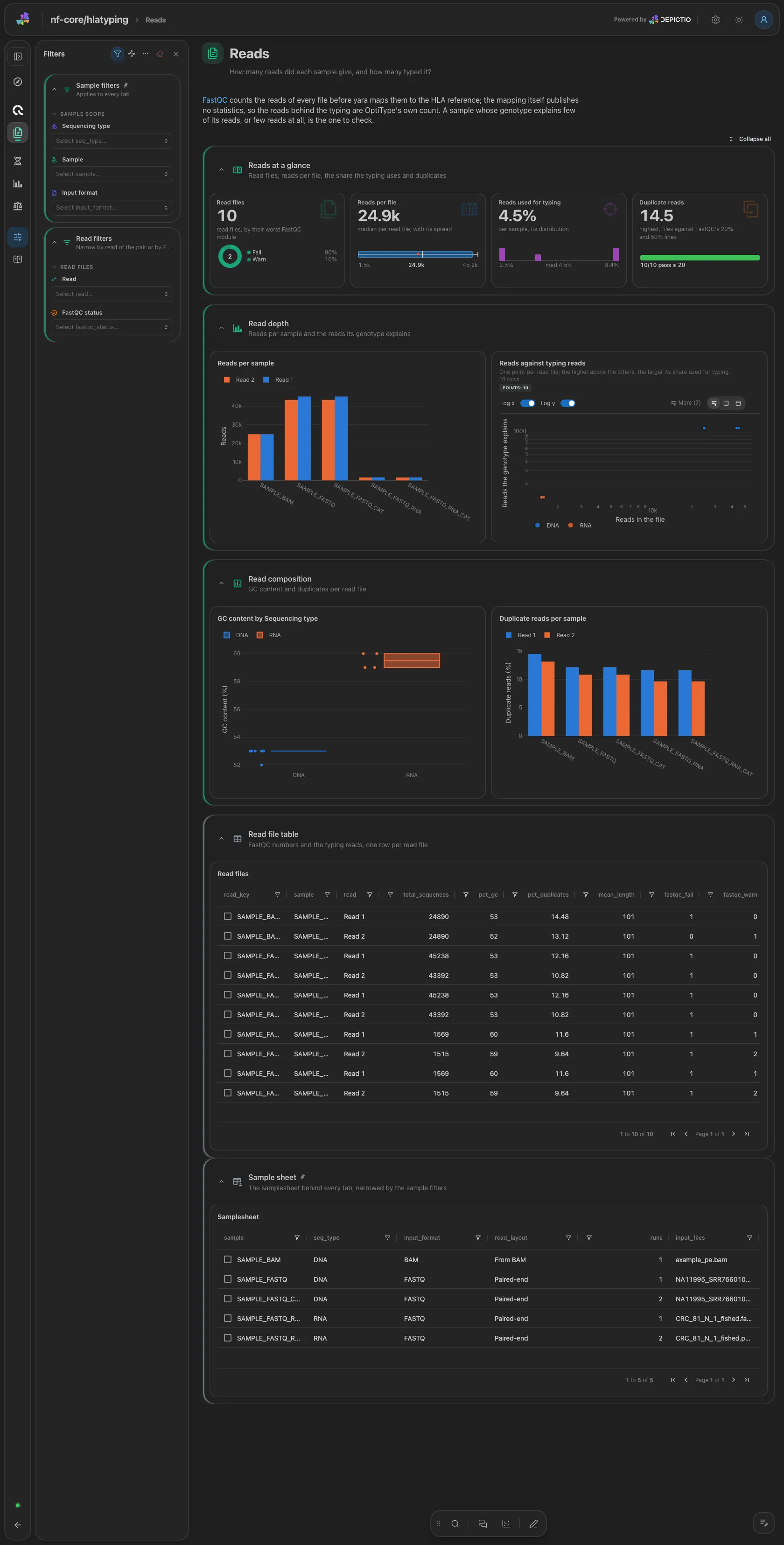
The read files (a ring by their worst FastQC module), the median reads per file, the share of a sample's read pairs its genotype explains and the highest duplicate share against FastQC's 20% and 50% lines. Then the reads per sample and read, the reads of each file against the reads its genotype explains, the GC content by group and the duplicate share per sample. Filters: read of the pair and FastQC status.
HLA · Which HLA class I alleles does each sample carry?
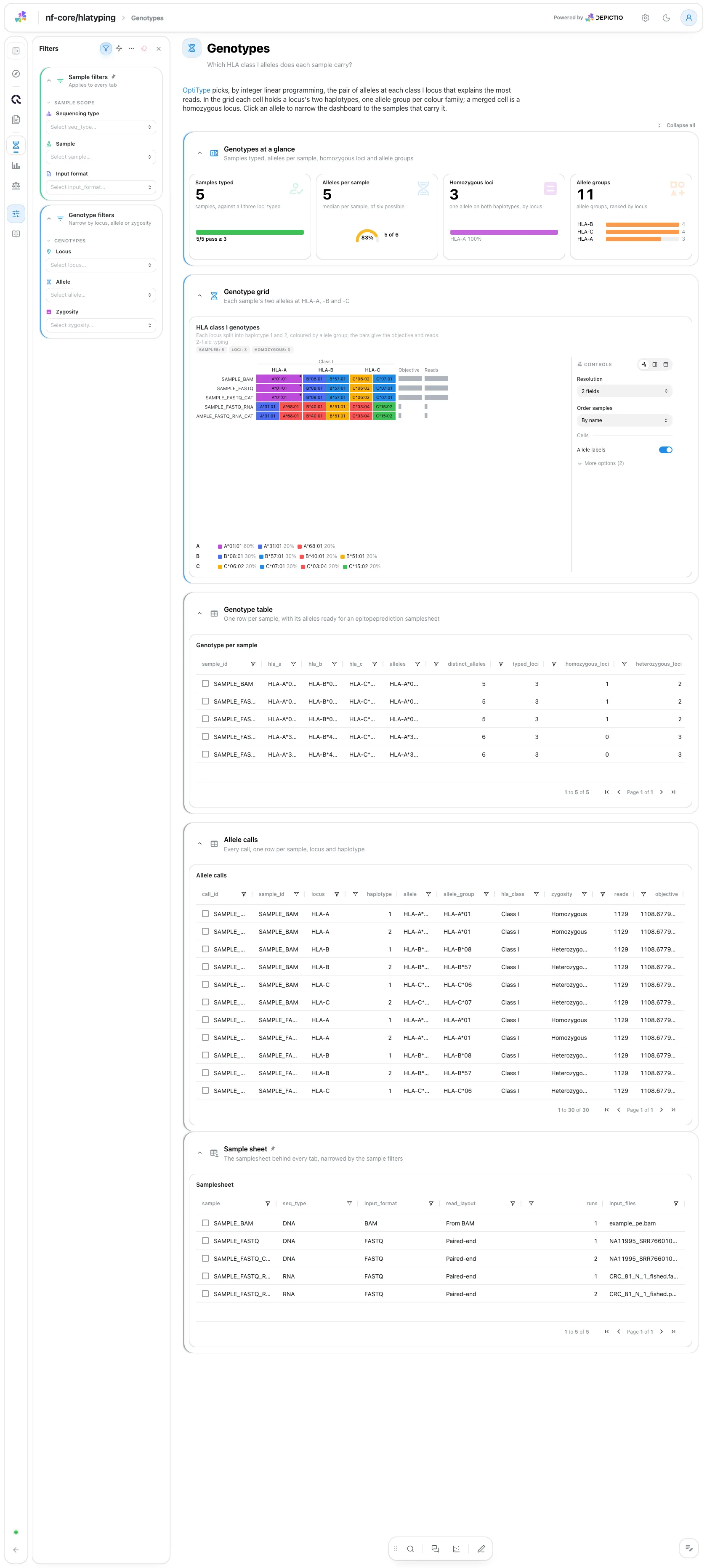
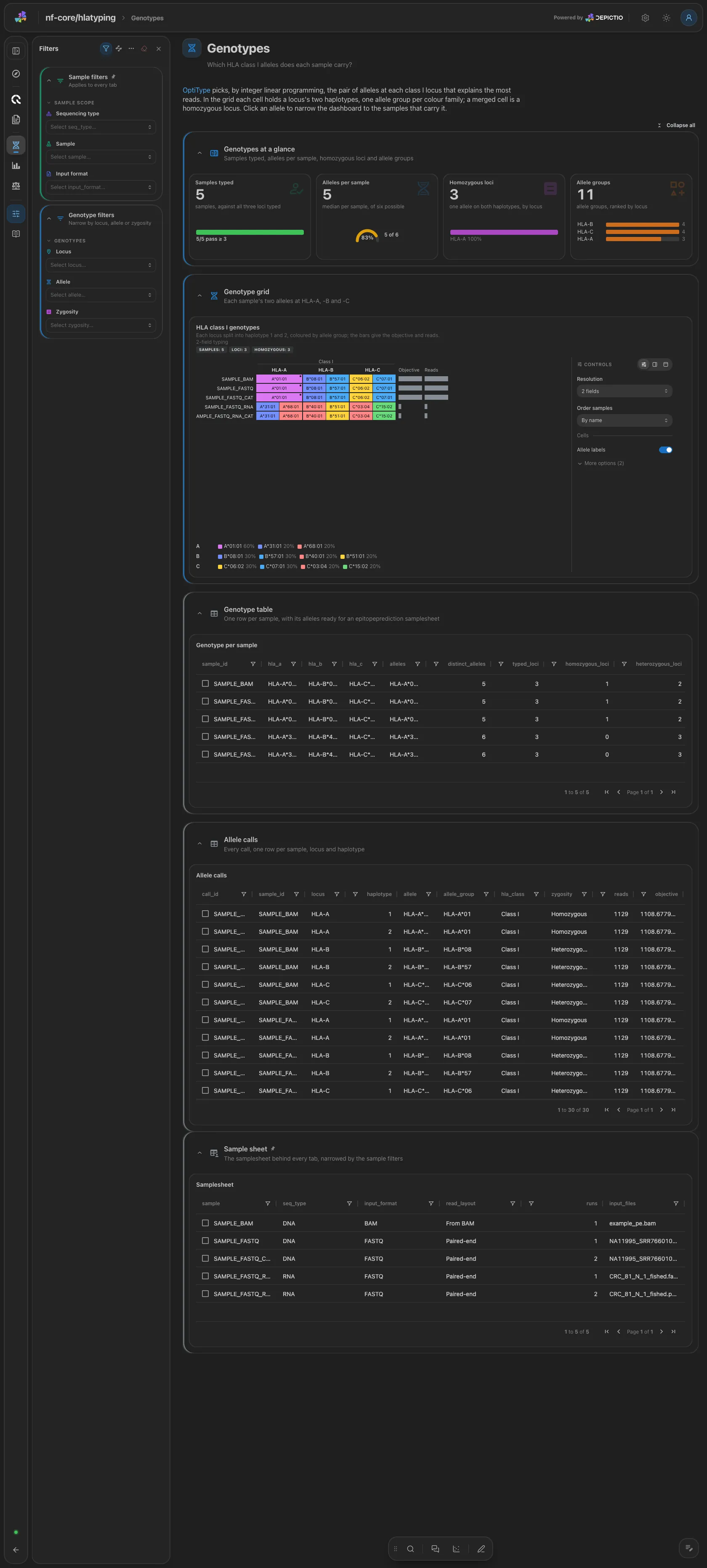
The samples typed, the distinct alleles per sample, the homozygous loci and the allele groups. Then the allele grid: one row per sample, one column per locus, each cell split into its two haplotypes and coloured by allele group, with the objective and the reads as side bars. A click on an allele narrows the dashboard to the samples that carry it. The genotype table and every allele call are collapsed. Filters: locus, allele and zygosity.
HLA · How often does each allele occur across the samples?
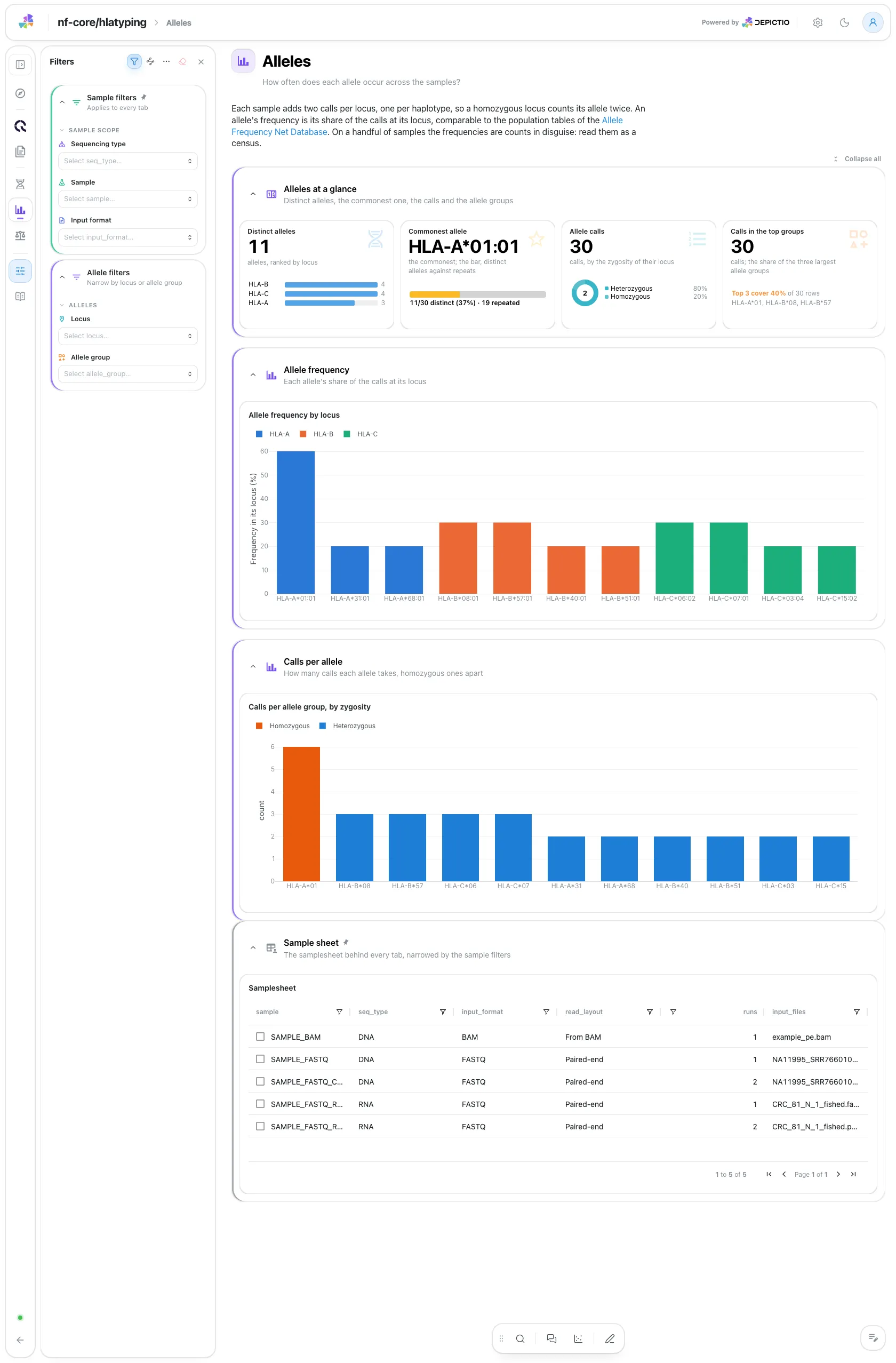
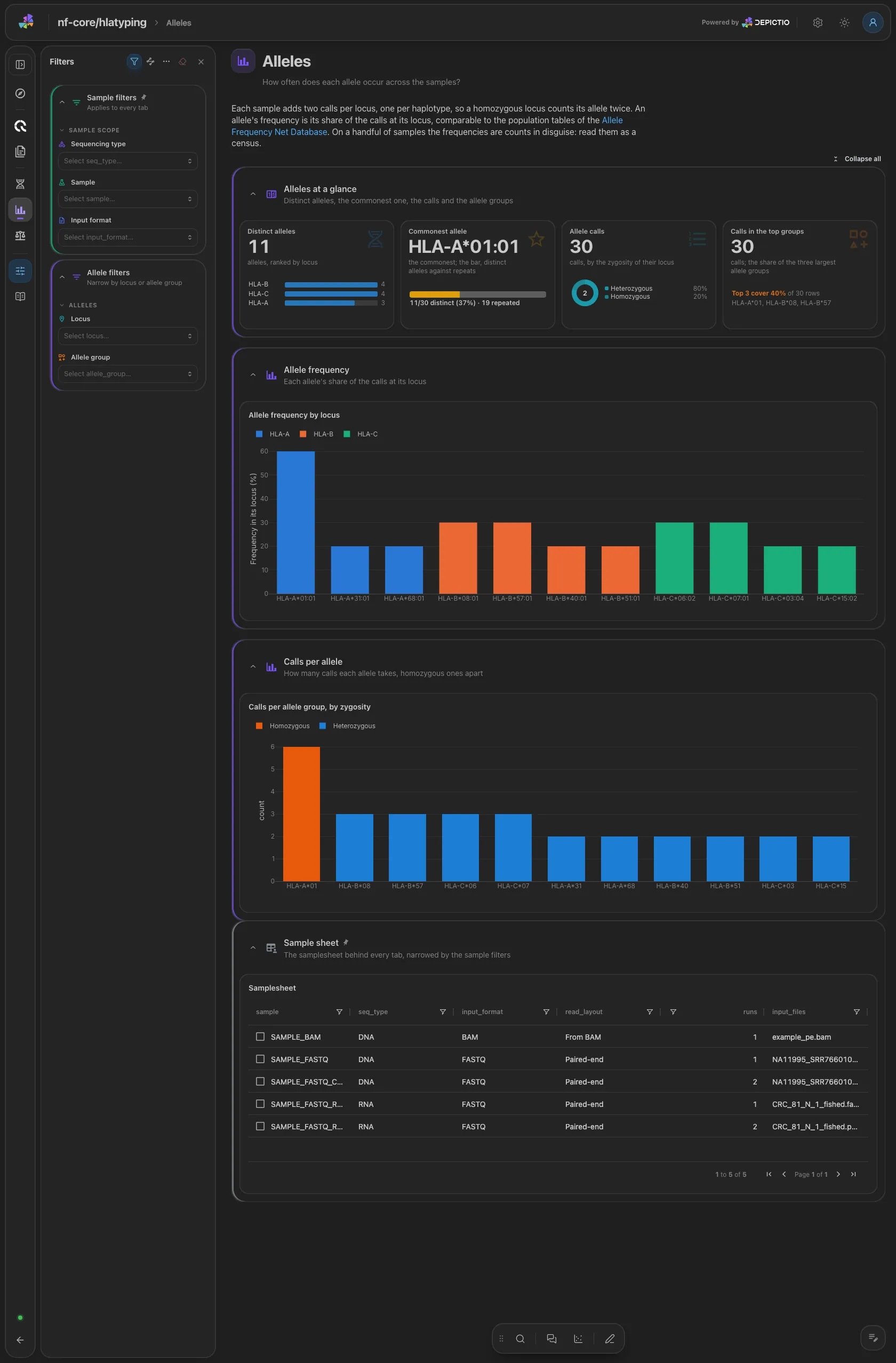
The distinct alleles, the commonest allele, the allele calls by zygosity and the share of calls the three largest allele groups take. Then the allele frequency by locus (each sample contributes two calls per locus, so a homozygous locus counts its allele twice) and the calls per allele group stacked by zygosity. Filters: locus and allele group.
HLA · How many reads does each genotype rest on?
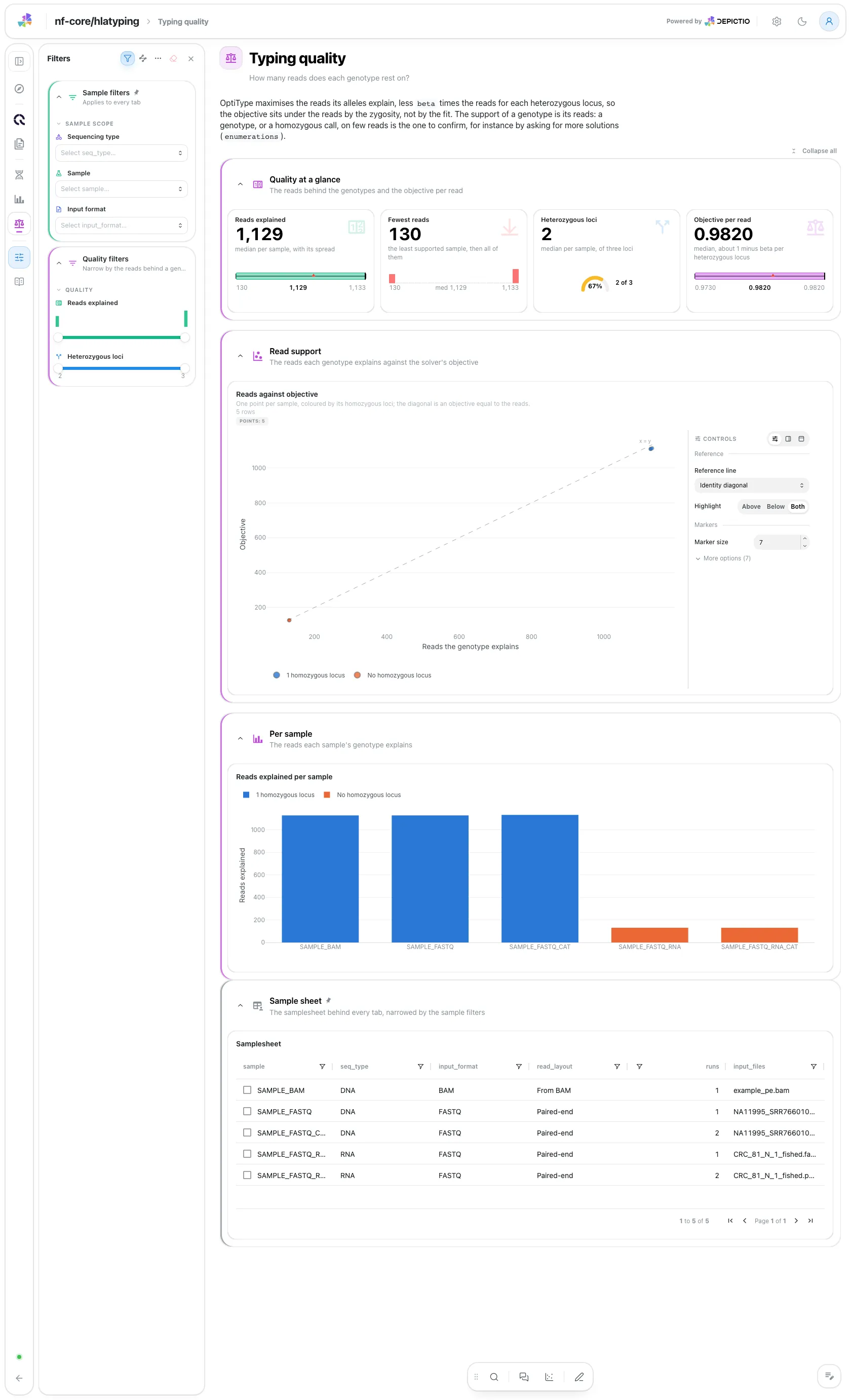
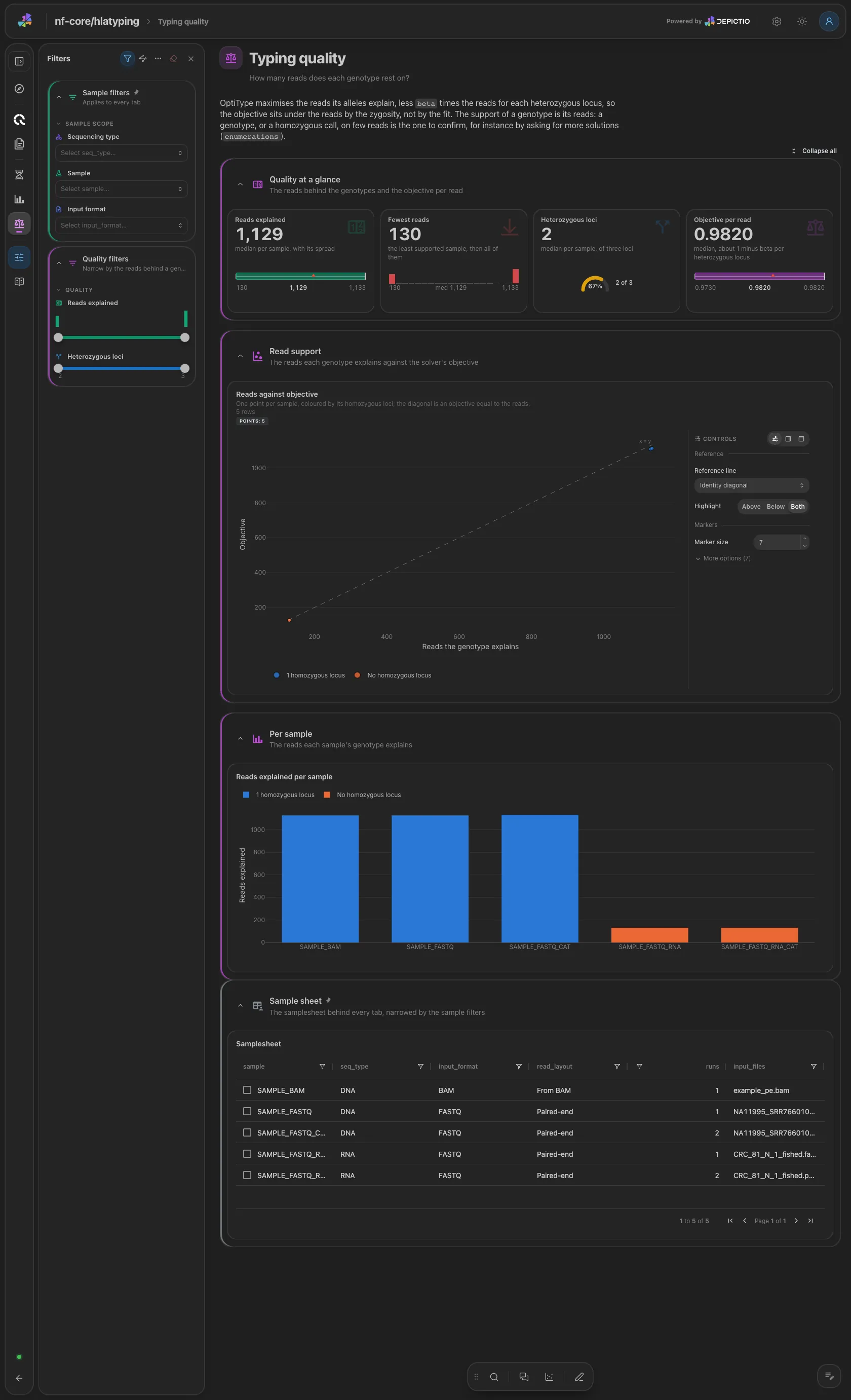
The median reads behind a genotype, the fewest reads of any sample, the median heterozygous loci and the median objective per read. Then the reads against the objective, one point per sample coloured by its homozygous loci, and the reads per sample. The objective mostly reads the zygosity, not the quality of the fit, so judge a genotype by its reads. Filters: a reads range and a heterozygous-loci range.
An allele, locus or zygosity pick on the genotypes reaches the per-sample typing and the read files through the sample, so a pick on an allele shows the samples that carry it.
Running the pipeline
Depictio reads the output of nf-core/hlatyping, it does not run the pipeline. Run the pipeline first:
nextflow run nf-core/hlatyping -r 2.2.0 \
  --input samplesheet.csv \
  --outdir results \
  -profile docker
The samplesheet is sample,fastq_1,fastq_2,bam,seq_type, with seq_type set to
dna or rna; several rows of one sample are concatenated. Copy it under
results/input/, then point Depictio at the results:
See nf-co.re/hlatyping/usage for full pipeline documentation.
Required data structure
Point depictio ingest at the directory holding the pipeline output. Depictio
scans recursively and matches on file name.
<DATA_ROOT>/
├── input/samplesheet.csv                       # --var METADATA_FILE (not published by the pipeline)
├── pipeline_info/
│   ├── params_*.json
│   └── *software*versions*.yml
├── multiqc/multiqc_data/
│   ├── multiqc.parquet
│   └── multiqc_fastqc.txt                      # per-read-file FastQC table
└── optitype/<sample>/<sample>_result.tsv       # OptiType's call, one per sample
Validation runs
The repository ships
download_test_data.sh,
which fetches the subset of nf-core's AWS megatest run that the template needs
and copies the vendored samplesheet into input/:
bash depictio/projects/nf-core/hlatyping/2.2.0/download_test_data.sh \
  /tmp/hlatyping_test
depictio ingest /tmp/hlatyping_test \
  --template nf-core/hlatyping/latest
The run is
s3://nf-core-awsmegatests/hlatyping/results-3237d20e7e611d8bbf8c37e637202dfe8a23e996/,
the 2.2.0 test_full run: five samples, a DNA exome (as FASTQ, as the same FASTQ in
two parts and as a BAM) and an RNA sample (as FASTQ and as the same FASTQ in two
parts), typed from two individuals. It tests the pipeline, not a cohort, so the
genotypes repeat by design. The vendored samplesheet is the test-datasets sheet
that run read.
Additional resources
- nf-co.re/hlatyping: official pipeline documentation
- nf-co.re/hlatyping/results: AWS test results
- Template System Reference: YAML format, variables, conditionals
- Recipes: how to read, test, and write recipes
Authorship
 weber8thomas
Reviewing a template on your own data, or taking over a role here, is a contribution in itself: the contributing guide says what each one involves.