Python Package Installation (v1.12.0+)
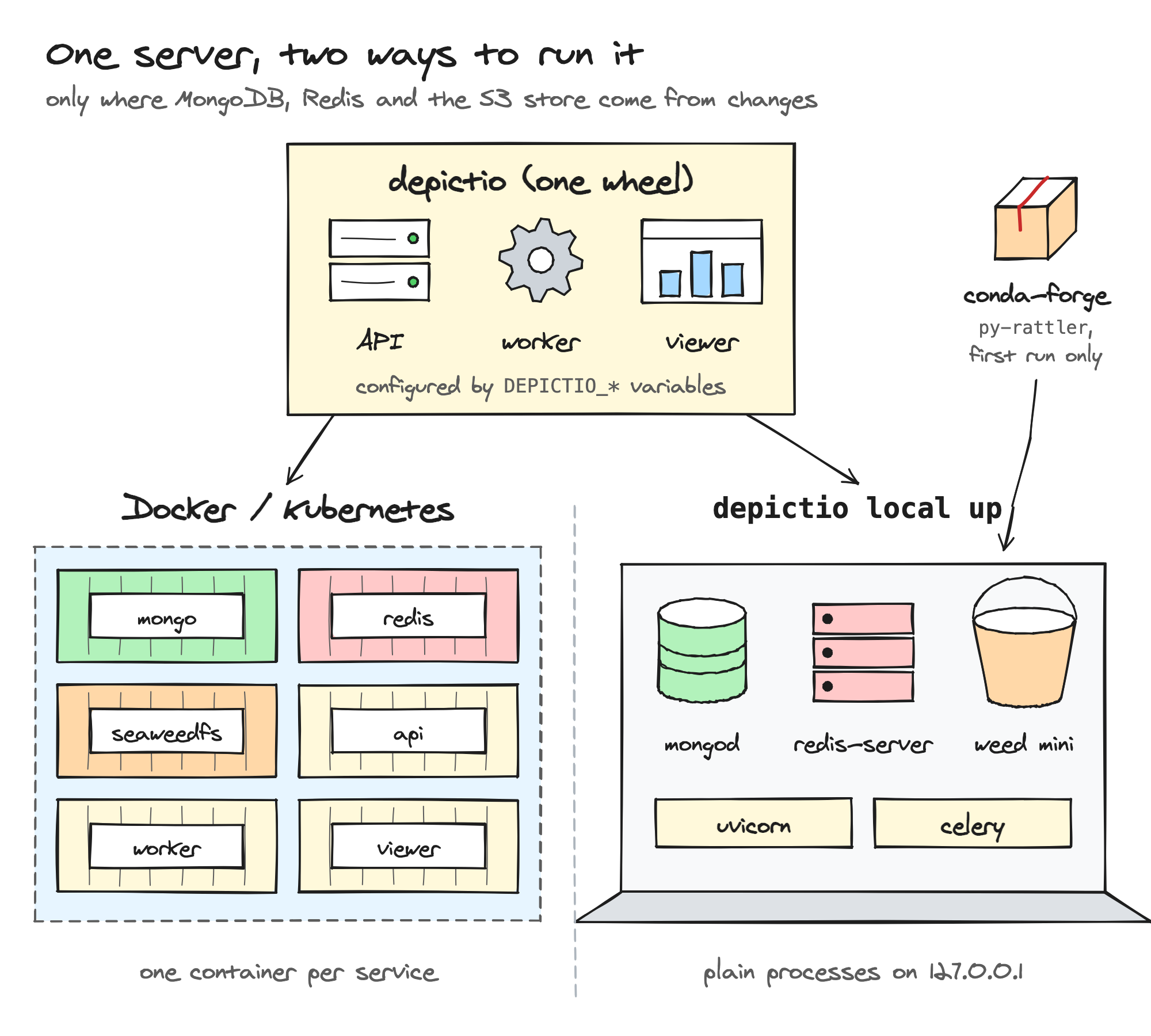
Install depictio[local] with uv or pip, then run every service as a local process on your machine: no containers.
depictio local up starts the same API, worker and viewer as the
Docker Compose and Kubernetes deployments, with
MongoDB, Redis and SeaweedFS (the S3 store) run as plain processes on
127.0.0.1. depictio ingest then adds your pipeline results, so you go from a
results directory to its dashboard without Docker, a cluster or a shared
instance.
Use it to review a template on your own results, or to try Depictio on a laptop. For a team, a demo or production, use Docker Compose or Kubernetes: a local server can later be moved to Docker Compose with its data.
Quick Start
No machine at hand?
Open in Codespaces runs these steps in a GitHub cloud workspace. Its
image already holds depictio[local], the services and the examples, so
it only starts depictio local up, in a terminal of the editor, and opens
the viewer. Drag a results folder onto its Explorer, then run
depictio ingest in its terminal. While the codespace is being created,
View logs on its loading page, or Codespaces: View Creation Log in
the command palette, shows what it is doing.
Prerequisites: Linux, or macOS on Apple silicon (see Platforms), with uv, or pip and Python 3.11 to 3.14.
Step 1: Install
uv tool install puts the depictio command on your PATH, in an
environment of its own. Prefer it to uvx --from "depictio[local]" depictio local up,
which runs in a temporary environment and leaves no depictio command
behind for depictio local status and depictio local down.
If you installed the former depictio-cli package with uv tool install,
add --force: it replaces the depictio and depictio-cli commands that
package installed.
The [local] extra adds the server's Python dependencies, about 1.6 GB
installed, from prebuilt wheels on Python 3.11 to 3.14. The package carries the
viewer, already built.
The install with uv, then a first look at the depictio command:
From a clone of the repository
To run the code of a clone, install it in editable mode:
A clone has no viewer bundle, so depictio local up builds it, with
pnpm install then pnpm run build, when it is missing or older than its
sources. That needs Node.js 20 or later with
pnpm (corepack enable pnpm); the output
goes to ~/.depictio/local/logs/viewer-build.log. A build that fails does
not stop the start: the server runs with the previous bundle, or without
dashboards when there is none, and up says so.
Step 2: Start the server
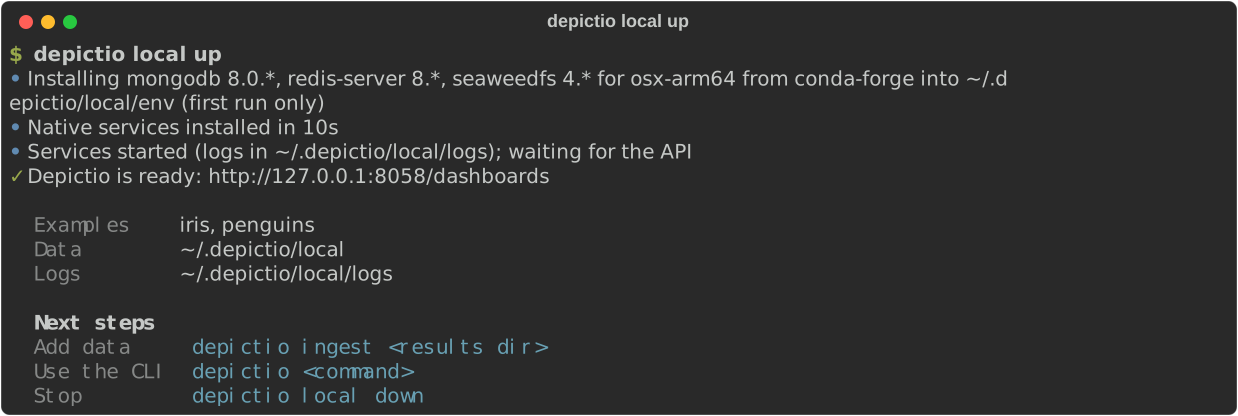
The first run downloads MongoDB, Redis and SeaweedFS from conda-forge into
~/.depictio/local/env (about 170 MB, once), seeds the Iris and Penguins
example projects, and waits for them to load so that their dashboards open with
data. It then opens the dashboards page in your browser,
http://127.0.0.1:8058/dashboards unless that port was taken (see
Ports). Later runs reuse the binaries and the data, and start in
seconds.
Over SSH, or on Linux without a display, no browser opens: up prints the
tunnel to run from your own machine, ssh -L <port>:127.0.0.1:<port> <host>,
then the URL to open there.
The next steps above need no --server: when no other server is configured (no
~/.depictio/CLI.yaml, and no DEPICTIO_CLI_* variable set), every
CLI command reaches this server. Otherwise the
summary adds --server local, which names this server whatever else is
configured. See
Which server a command uses.
Step 3: Add your results
depictio ingest detects the
template from the pipeline name and version
the run recorded, and ends with links to the project and its dashboards. Pass
--template to choose the template, and template variables with --var.
nf-core results do not contain the samplesheet: when the template cannot find it
under input/, pass it explicitly.
depictio ingest path/to/results \
  --template nf-core/rnaseq/latest \
  --var SAMPLESHEET_FILE=$PWD/samplesheet.csv
If the ingestion fails, the command exits with an error and the server keeps
running. To ingest the same results again after a new run, add
--update-config: it refreshes the project and keeps its dashboards as edited
in the viewer (see
Refreshing a project).
Coming from v1.12.0-b1
depictio local up no longer ingests data. Given --template,
--data-root, --project-name or --var, it prints the
depictio local up and depictio ingest commands to run instead, and
exits with code 2.
Manage the server
depictio local manages the server only: data goes in with
depictio ingest.
| Command | Effect |
|---|---|
depictio local up |
Start the services, print the summary and open the browser. A first run also downloads the binaries and seeds the examples |
depictio local open |
Open the dashboards page of the running server in a browser, or print the SSH tunnel to use |
depictio local status |
Show each process with its port, and whether the API answers. Exits with code 1 unless every process runs and the API answers |
depictio local down |
Stop every process. The data and the ports are kept for the next up |
depictio local wipe |
Stop the server and delete all its data. The downloaded binaries are kept. --yes skips the prompt |
depictio local export |
Stop the server and copy its data into a directory that Docker Compose runs, see Move to Docker Compose. Formerly export-compose, which still works |
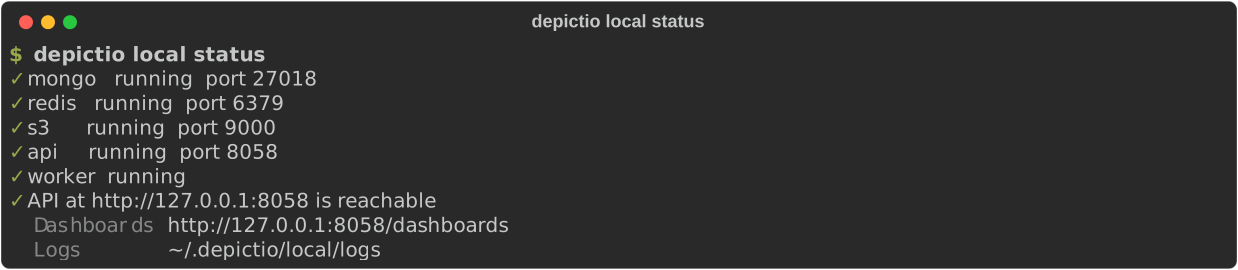
Here a first up, which downloads the services, then status, open and down:

up options
| Option | Default | Description |
|---|---|---|
--examples |
iris,penguins |
Example projects to seed on the first run of a local home: iris, penguins, iris,penguins or none |
--port |
the previous run's, else 8058 or a free one |
Port of the API and the viewer, kept for later runs. A busy --port fails |
--open / --no-open |
--open |
Open the dashboards page in a browser |
--screenshots / --no-screenshots |
off | Dashboard thumbnails through Playwright. Installs Chromium (about 150 MB) if needed |
--data-root-allow PATH |
Also let the web UI read run folders under PATH, an existing absolute folder outside ~/.depictio/local with no comma in its path. Repeatable. Your home folder is always allowed. See From a run folder (v1.16.0+) |
- Examples are seeded on the first run of a local home only:
upwarns when--examplesnames one the home was created without. upon a server that is already running reuses it and prints the summary again.--port,--screenshotsand--data-root-allowthen apply only afterdepictio local down, and a warning says so. For the folders, it also warns whenupnames fewer or none: the running server keeps those it was started with.- A second
upon the same home while one is starting fails at once. - Ctrl-C during startup stops what that run started, and exits with code 130. SIGTERM and SIGHUP, as when the terminal is closed, do the same, with code 128 plus the signal number.
Upgrade
depictio local down
uv tool upgrade depictio            # with pip: pip install --upgrade "depictio[local]"
depictio local up
Stop the server first, so that it starts again on the new version. The data
under ~/.depictio/local is kept. up downloads the binaries again only when
the new version pins other MongoDB, Redis or SeaweedFS series.
How it differs from Docker Compose
Only configuration differs, and only through the usual DEPICTIO_* variables:
every service is pointed at 127.0.0.1.
| Docker Compose | Python package | |
|---|---|---|
| MongoDB, Redis, S3 | containers | mongod 8.0.x, redis-server 8.x and weed mini (SeaweedFS) 4.x from conda-forge, fetched by py-rattler |
| API | 4 gunicorn workers | 1 uvicorn worker |
| Celery worker | 4 processes | 2 slots: prefork on Linux, threads on macOS |
| Viewer | its own container, on http://localhost:5080 |
served by the API, on its port: http://127.0.0.1:8058/dashboards |
| Authentication | single-user, multi-user or public | single-user |
| Dashboard thumbnails | on | off unless --screenshots |
The conda-forge packages follow the major series of the Compose images (the 8.0
series for MongoDB), so their minor versions can be newer than the images'.
depictio local export runs the exact MongoDB and
SeaweedFS versions of the local server, so the data never moves to an older one.
Ports
The first up picks its ports on 127.0.0.1: the defaults (API 8058, MongoDB
27018, Redis 6379, S3 9000) when they are free, any free port otherwise,
so a local server runs next to a Docker stack or another local server. The
ports are saved in ports.json and reused, so the dashboards URL stays the
same. A saved port that another program has taken since moves to a free one,
with a warning for the API port; a --port that is busy fails instead. The CLI
configuration follows the ports in use. SeaweedFS also opens internal ports
(master 9333, volume 9340, filer 8888, admin 23646, and their gRPC
ports), picked the same way at each start.
Files
Everything lives under ~/.depictio/local, or the folder DEPICTIO_LOCAL_HOME
names:
| Path | Content |
|---|---|
env/ |
MongoDB, Redis and SeaweedFS binaries |
mongo/, redis/, s3/ |
Service data, kept between runs |
logs/ |
One log per process: api.log, worker.log, mongo.log, redis.log, s3.log, and viewer-build.log for a viewer built from a clone |
keys/ |
Token signing keys |
cli/ |
The CLI configuration that --server local reads, with its admin token. up writes it again if it was deleted, with a new token, and revokes those of earlier rewrites |
backups/ |
Backups that depictio backup create makes on this server |
cache/, multiqc_prerender/, screenshots/ |
Caches, and dashboard thumbnails |
secrets.json |
Generated S3 and admin passwords |
ports.json |
Ports kept for the next up |
state.json |
Process IDs of the running server, deleted by down |
.depictio-local-home |
Marks the folder as a local home: wipe deletes nothing in a folder without it, and up refuses a folder that holds other files |
The local home, keys/ and cli/ are owner-only (0700); secrets.json and
the CLI configuration file are owner-only too (0600).
Shared machines
The local server runs in single-user mode: no login, and whoever reaches its
port acts as its admin. It listens on 127.0.0.1 only, but on a shared
machine, such as an HPC login node, every other user of that machine can
reach it, and the data it serves. The owner-only files do not change that.
On such a machine, load only data that every user of it may see, or use
Docker Compose in multi-user mode.
Move to Docker Compose
A local server can be handed over to Docker Compose with its projects, dashboards and table data, for instance once a review turns into a shared instance.

export stops the local server if it is running, so that the copy is
consistent, then copies the MongoDB and SeaweedFS data and the token signing
keys into the directory, depictio-docker by default (--out). Everything
that can refuse the export (no local data, a directory that is not empty, no
compose file to use) is checked before the server is stopped. The two never
share files: depictio local up restarts the local server on its own data.
The directory is made owner-only (0700), since it holds the token signing
key. It holds:
| File | Content |
|---|---|
docker-compose.yaml |
The compose file that matches the installed code: the clone's own file when depictio runs from a clone, otherwise the file of the release tag v<version> (betas included), downloaded from GitHub. A development build outside a clone matches no published file, and the command stops with a message |
docker-compose.override.yaml |
The mongo and chrislusf/seaweedfs images at the versions the local server ran, on the copied data. On Linux they run as your user, who owns the copied files |
.env |
Single-user mode, the local server's S3 and admin credentials and, for a release, DEPICTIO_VERSION. Owner-only |
data/ |
The copied MongoDB and SeaweedFS data, and the key files |
Redis is not carried over, since it holds only cache and queues, and thumbnails
are rendered again. The token in ~/.depictio/local/cli stays valid against the
Docker stack, since it was signed with the copied keys. The raw pipeline files
are not copied, only the tables built from them: to ingest again, point
depictio ingest --server <file> at the CLI configuration of the Docker stack.
Platforms
| Platform | Status |
|---|---|
| Linux x86_64 | Supported, tested in CI |
| Linux arm64 | Supported, tested in CI |
| macOS arm64 (Apple silicon) | Supported, tested in CI |
| macOS x86_64 (Intel) | Not supported: cryptography, a server dependency, ships macOS wheels for arm64 only. Use Docker Compose |
| Windows | Not supported, up refuses to start: conda-forge has no redis-server for Windows, and the services are managed as POSIX process groups. Use WSL2 or Docker Compose |
Python 3.11 to 3.14 is supported: the dependencies install from prebuilt wheels on each. CI runs the stack on Python 3.12.
On macOS the Celery worker runs in threads: a forked worker process that opens a
Delta table crashes there, because the libraries it loads are not safe to use
after fork(). Celery time limits and max-tasks-per-child do not apply to a
threads pool.
MongoDB 5 and later needs AVX on x86_64 and ARMv8.2-A on arm64, which rules out
some older machines such as the Raspberry Pi 4. up reports it when mongod
stops on an illegal instruction.
Troubleshooting
A service exited during startup
up stops the services it started and names the log to read, under
~/.depictio/local/logs.
A port is already in use
Every port moves to a free one by itself (see Ports): only an explicit
--port that is busy stops up. So two local servers, each with its own
DEPICTIO_LOCAL_HOME, or a local server and a Docker stack, run side by side.
On an HPC login node or behind a proxy
An HTTP proxy set in the environment does not break startup: the readiness
checks on 127.0.0.1 bypass it, SeaweedFS runs without the proxy variables, and
the API, the worker and any CLI command that reaches the local server get
127.0.0.1 and localhost added to no_proxy. The downloads do need the
network: MongoDB, Redis and SeaweedFS from conda-forge on the first run, and the
compose file of depictio local export. When one fails, a one-line error says
so: check the network or the proxy settings, then run the command again. Over
SSH, open the server through the ssh -L tunnel that up prints, and mind the
shared machines warning.
DEPICTIO_* settings are ignored
up does not pass the DEPICTIO_* variables of your shell to the server, since
they usually target another instance (DEPICTIO_LOCAL_HOME is read by
depictio local itself). There are two exceptions. DEPICTIO_TELEMETRY_*:
DEPICTIO_TELEMETRY_ENABLED=false (or DO_NOT_TRACK=1) turns
telemetry off for the local server too. And, since
v1.16.0, DEPICTIO_REMOTE_*, the
remote data settings: the hosts and
buckets the server may read. The AWS_* variables are not passed on, so the
services never reach another S3 store with your shell's keys. A bucket on
DEPICTIO_REMOTE_CREDENTIALED_S3_BUCKETS is then read with the default profile
of your ~/.aws files or the machine's role, never with AWS_* variables.
Likewise, DEPICTIO_CLI_TOKEN and DEPICTIO_CLI_API_BASE_URL, which usually
hold the credentials of another server, never apply to --server local.
The example dashboards show no data
The examples load in the background on the first run. If the server was stopped
before they finished, they stay incomplete, and up then warns that they did
not finish loading. depictio local wipe, then depictio local up, loads them
again.
Dashboards stay blank
The viewer bundle is missing, which only concerns an install from a clone,
where up builds it. up warns when the build fails: read
~/.depictio/local/logs/viewer-build.log, fix the cause (often pnpm or Node.js
missing), then run depictio local down and depictio local up again, which
builds it. A server that was already running when the sources changed only
gets a warning: depictio local down, then depictio local up, rebuilds it.
Start from scratch
depictio local wipe --yes deletes every project, dashboard and file of the
local server, with its passwords, keys and saved ports. The downloaded binaries
are kept. The next up seeds the examples again.
Next Steps
- Pipeline templates
- CLI usage, with
--server local, or by default when no other server is configured - Docker Compose, to share an instance with a team