Single sign-on (OpenID Connect)
Depictio can send its users to an identity provider (IdP) and take them back signed in. It speaks OpenID Connect (OIDC), so any compliant provider works: Keycloak, Google, Authentik, Okta, GitLab and so on. You can declare several providers at once; the sign-in page then shows one button per provider, next to password sign-in.
OIDC is off until you declare a provider in DEPICTIO_AUTH_OIDC_PROVIDERS.
Replaces the Google-specific sign-in
OpenID Connect replaces the dedicated Google OAuth sign-in (depictio#1336). Existing users keep their accounts. Coming from it? See From Google OAuth to OIDC.
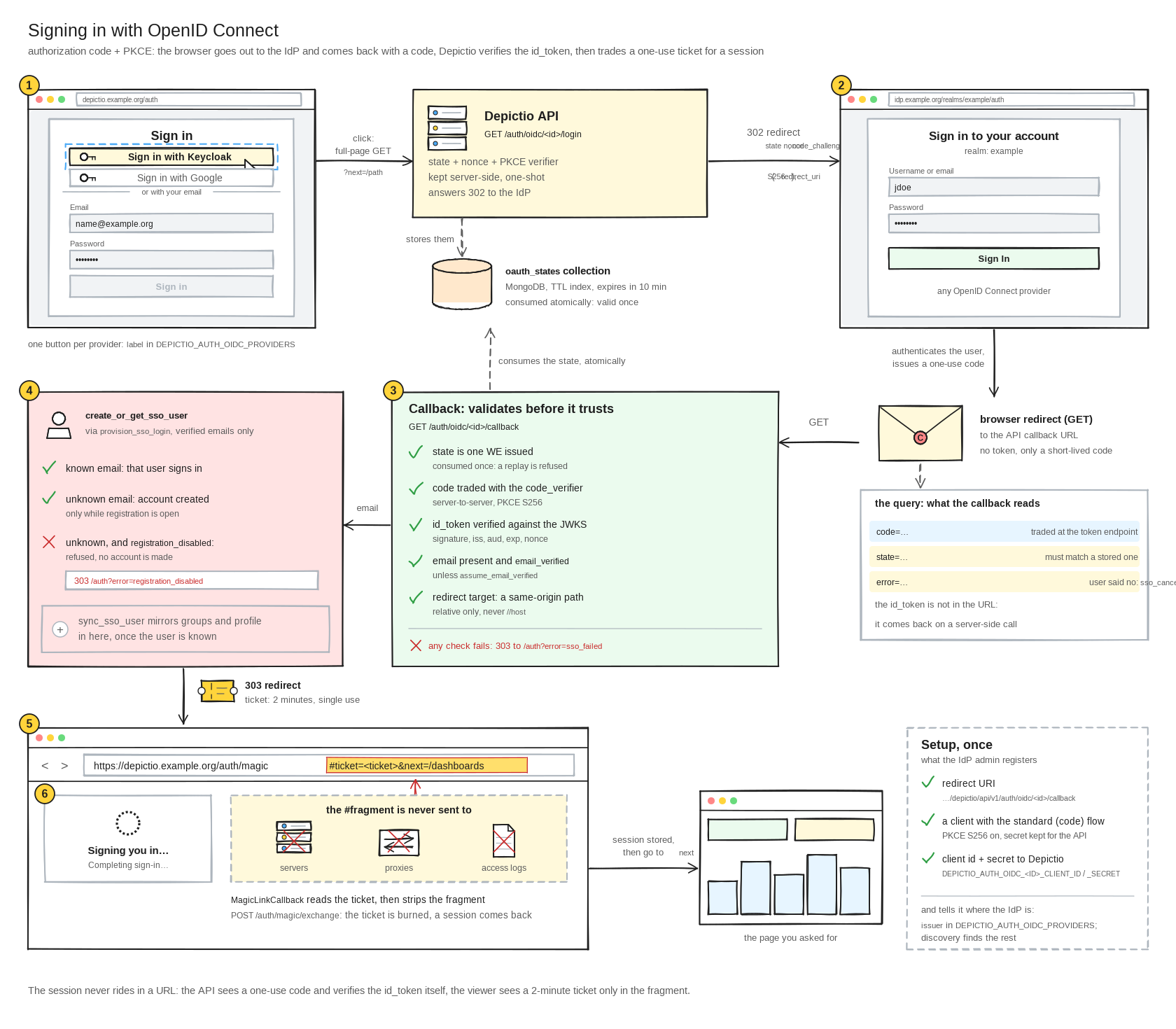
How it works
Depictio uses the authorization code flow with PKCE:
- The sign-in page lists the enabled providers (
GET /depictio/api/v1/auth/oidc/providers). A click is a full-page navigation to/depictio/api/v1/auth/oidc/<id>/login. - The API creates a random
state, anonceand a PKCEcode_verifier, stores them server-side in theoauth_statescollection (valid for 10 minutes), and answers302to the IdP's authorization endpoint with thestate, thenonceand theS256code challenge. - The user authenticates at the IdP, which redirects the browser to the API callback,
/depictio/api/v1/auth/oidc/<id>/callback?code=…&state=…. - The API consumes the state atomically (a replayed callback finds nothing), exchanges
the code at the token endpoint together with the
code_verifier, and verifies the returnedid_token. - The browser is redirected to the viewer with a single-use ticket in the URL fragment
(
/auth/magic#ticket=…), which the viewer redeems for a session.
What is verified
| Check | Detail |
|---|---|
state |
Issued by this instance for this provider, used once, not expired |
| Signature | The id_token is checked against the IdP's JWKS, discovered from its metadata. Keys are cached and re-fetched when the IdP rotates them |
iss |
Equals the issuer of the discovery document, which in turn must equal the configured issuer |
aud |
Contains this provider's client_id |
exp / iat |
Valid, with 60 seconds of clock-skew leeway |
nonce |
Equals the one stored for this login |
Present in the configured claim, and trusted only when email_verified is true (see below) |
|
| Redirect target | The next path must be a same-origin path; anything else is replaced by the default landing page |
The redirect URI is never taken from the request: it comes from the configuration.
One provisioning path
Every OIDC login, whatever the provider, runs the same steps: the verified claims resolve to an account, then groups and profile are mirrored from the claims (group and profile sync), then the user gets a ticket for the viewer. There is no provider-specific code path.
Email and accounts
Accounts are matched by email. A user who signed in before through Google or a password, with the same address, lands on the same account, with the same projects and permissions. A new address creates an account, unless registration is closed. A new account has no project access until someone grants it.
The email is trusted only when the provider says it is verified: the id_token (or
userinfo) must carry email_verified: true. Otherwise anyone who could type your address
into a self-service IdP could take over your Depictio account. A login without a verified
email is refused with the error email_not_verified.
Some IdPs assert only verified emails but never send the claim. For those,
set assume_email_verified: true on the provider. Use it only when you control the IdP's
user directory and know it never holds unverified addresses.
Set it up
-
Register Depictio at the IdP as an OpenID Connect client (a "confidential" client using the authorization-code flow). Register this redirect URI:
<api-host>is the public host of the API (for exampledepictio.example.org), and<id>is the provider id you choose below. If you set a customredirect_urion the provider, register that value instead. -
Declare the provider as a JSON list in
DEPICTIO_AUTH_OIDC_PROVIDERS, and keep the credentials in their own variables: -
Restart the API. The button appears on the sign-in page. A provider that is enabled but lacks an issuer (or discovery URL) or a client id or secret is logged as an error at startup and its button stays hidden.
Keep secrets out of the JSON
client_id and client_secret may sit in the provider object, but the variables
DEPICTIO_AUTH_OIDC_<ID>_CLIENT_ID and DEPICTIO_AUTH_OIDC_<ID>_CLIENT_SECRET override
them and are what you should use with Docker or Kubernetes secrets. <ID> is the
provider id in upper case with - replaced by _ (my-idp gives MY_IDP).
In this section
-
Environment variables, provider keys, claim mapping, redirect URI, Helm values.
-
Keycloak, Google, Authentik and any other provider.
-
Group and profile sync, closed registration, SSO-only mode.
-
From the Google OAuth sign-in.
-
Error codes, common causes, what the flow protects against.