Architecture
Depictio is built on a modern microservices architecture that provides flexibility, scalability, and maintainability.
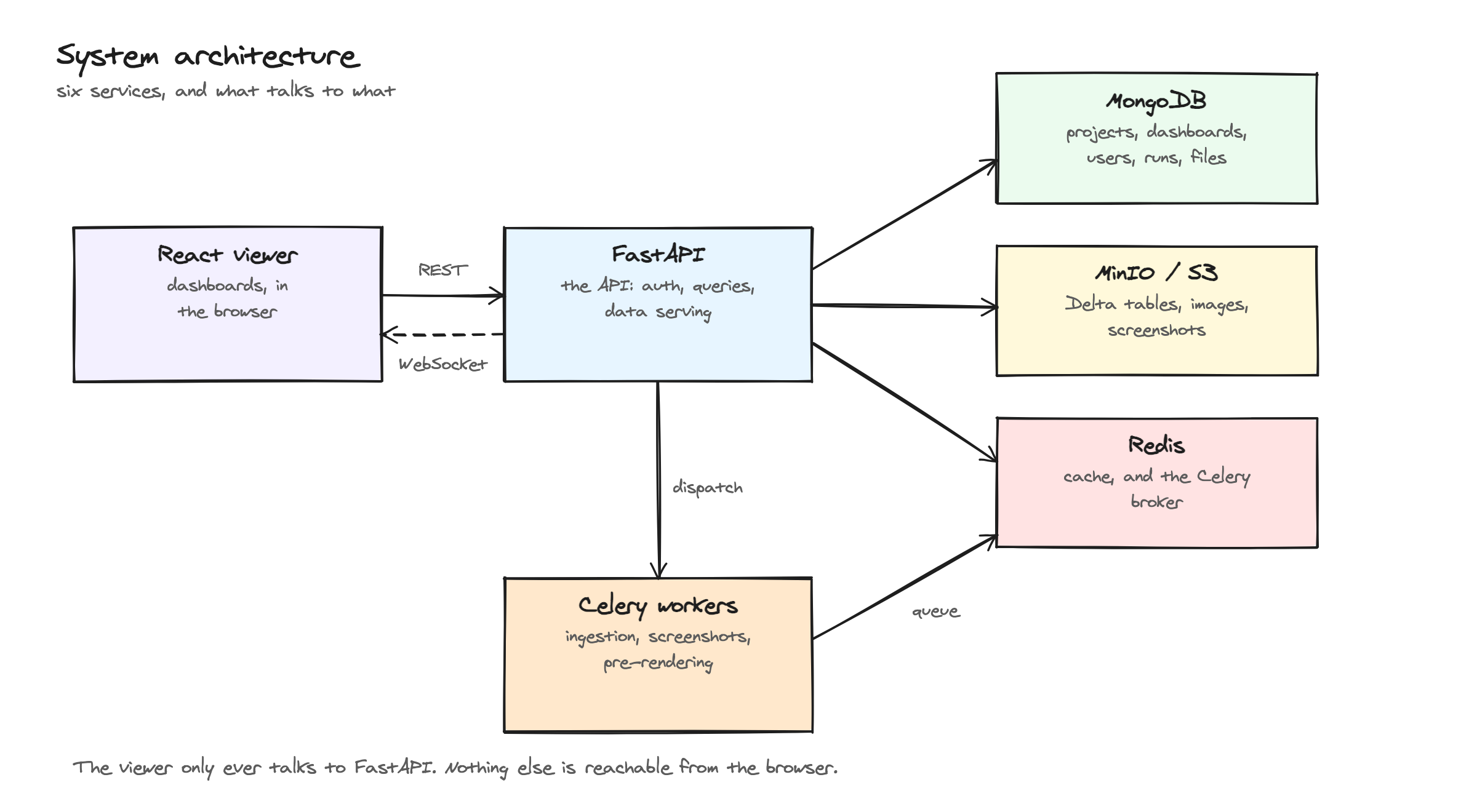
The figure draws the default: the browser reads indexed files (genome tracks, 3D structures)
from S3 through presigned URLs. With DEPICTIO_S3_BROWSER_ACCESS=proxy (v1.22.0+)
they go through the API instead (see Data Flow).
Microservices Overview
Depictio's architecture consists of six main components organized by category:
Core Services
| Component | Technology | Purpose |
|---|---|---|
| Backend | FastAPI | RESTful API, authentication, business logic |
| Frontend | React + Vite + Mantine | Vite SPA served by nginx, which also proxies the API; no state of its own |
Data Layer
| Component | Technology | Purpose |
|---|---|---|
| Database | MongoDB | Metadata, users, configurations |
| Storage | S3 (SeaweedFS when bundled) | Data files, Delta Lake tables |
Infrastructure
| Component | Technology | Purpose |
|---|---|---|
| Cache/Broker | Redis | DataFrame cache, Celery queue and results, live events |
| Worker | Celery | Previews, code figures, screenshots, MultiQC; always on. A second worker for ingestion is optional |
FastAPI Backend
The backend service is built with FastAPI, a modern, high-performance web framework:
- RESTful API endpoints for all platform functionality
- JWT-based authentication and authorization
- Asynchronous request handling for improved performance
- Pydantic models for data validation and serialization
- Beanie ODM for MongoDB integration
MongoDB Database
MongoDB serves as the primary database, storing:
- User accounts and authentication information
- Project metadata and configurations
- Workflow definitions and run information
- Dashboard layouts, structure, and content
- Data collection metadata
S3 Storage
S3-compatible object storage holds:
- Processed data ready for visualization (Delta Lake format)
- Genome-browser compatible data
- Large file assets
Docker Compose and the Helm chart bundle SeaweedFS as the store since v1.12.0 (MinIO before). Any S3 endpoint can replace it: see External S3.
Redis Cache/Broker
Redis serves three purposes in Depictio, each on its own database:
- Caching (db 0): DataFrames read from Delta tables, and the per-address limit on sign-in attempts
- Task Broker (db 1 and 2): message broker and result backend for Celery background tasks
- Live events (db 3): the pub/sub channel of real-time events
Sessions are not kept in Redis: tokens live in MongoDB, and the browser keeps its own copy.
Frontend — React viewer
The frontend is a Vite + Mantine React SPA (depictio/viewer/, shared packages/depictio-react-core/), graduating onto canonical URLs in v1.0.0. It provides:
- Interactive data visualization components
- Real-time data updates
- Draggable and customizable dashboard layouts
- Integration with the backend API
The legacy Plotly Dash frontend was removed in v0.13.12. See the changelog for the full migration history.
React SPA Surfaces (v1.0.0+)
The React viewer (depictio/viewer/) is a single Vite SPA served by nginx with a fallback rewrite. It exposes three logical surfaces against the same FastAPI backend:
| Surface | URL Pattern | Purpose |
|---|---|---|
| Management | /dashboards, /projects, /admin |
Dashboard listing, project management, admin panel |
| Viewer | /dashboard/{id} |
Read-only dashboard viewing |
| Editor | /dashboard-edit/{id} |
Dashboard editing and component creation |
During the v0.12–v0.13 series the same surfaces ran at /*-beta paths alongside the legacy Dash frontend. Dash was removed in v0.13.12; the *-beta suffix paths redirect to canonical in v1.0.0.
Background Processing (v0.6.0+)
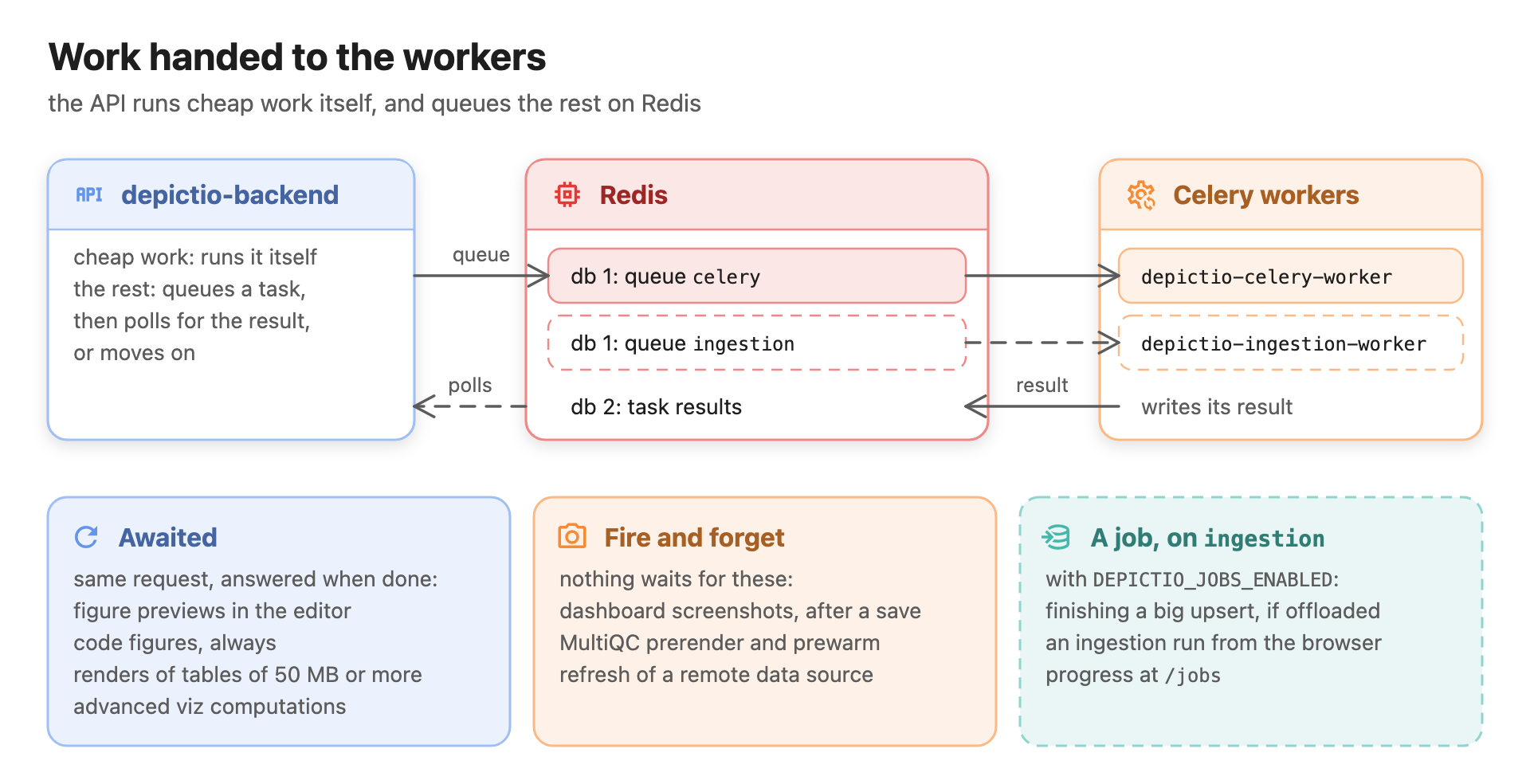
Depictio supports background task processing using Celery and Redis for computations that would otherwise block the UI.
When Background Processing is Used
The worker always runs; there is nothing to turn on.
| Work | Runs on the worker |
|---|---|
| Figure previews in the editor | By default (DEPICTIO_CELERY_OFFLOAD_PREVIEW) |
| Dashboard renders | When the source table is 50 MB or more, or always with DEPICTIO_CELERY_OFFLOAD_RENDERING |
| Code figures | Always, to keep user code off the API |
| Dashboard thumbnails | Always |
| Offloaded ingestion | On the separate ingestion worker |
Environment Variables
| Variable | Default | Description |
|---|---|---|
DEPICTIO_CELERY_WORKERS |
4 |
Worker processes, set on the worker container |
DEPICTIO_CELERY_BROKER_HOST |
redis |
Redis broker hostname |
DEPICTIO_CELERY_BROKER_PORT |
6379 |
Redis broker port |
DEPICTIO_CELERY_BROKER_DB |
1 |
Redis database for Celery broker |
DEPICTIO_CELERY_RESULT_BACKEND_DB |
2 |
Redis database for Celery results |
All of them, including the offload thresholds: Celery Task Queue.
Real-time Events (v1.1.4+)
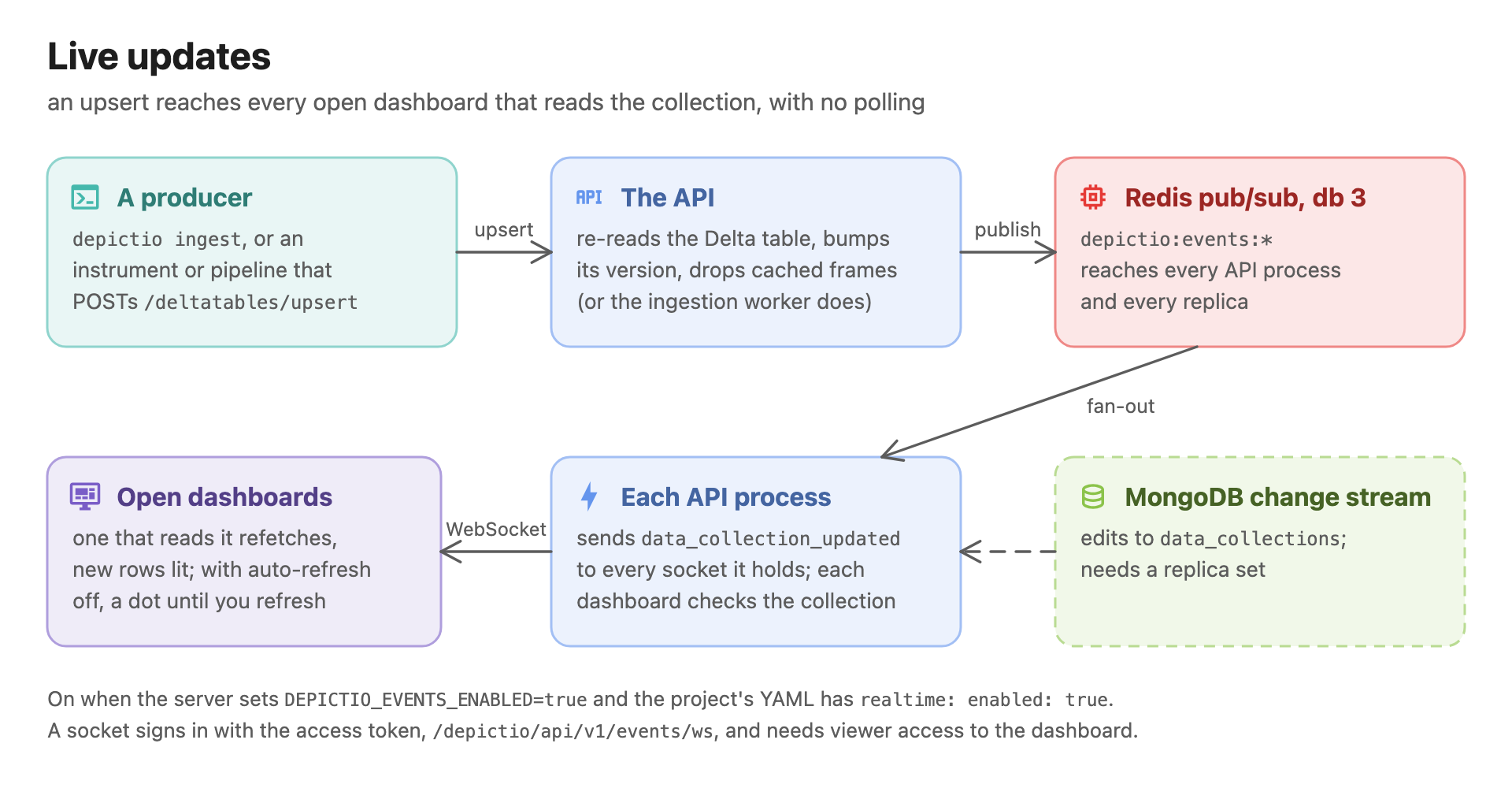
Depictio can push live dashboard updates over WebSocket when the data behind a dashboard changes, so viewers refresh without polling. The subsystem is disabled by default (DEPICTIO_EVENTS_ENABLED) and opt-in per project.
Moving parts:
- Event service + connection manager (FastAPI): track WebSocket subscriptions per dashboard and broadcast
data_collection_updatedevents. - Redis pub/sub: fans events out across API workers and replicas, on a dedicated Redis DB (default
3, separate from cache and Celery). - MongoDB change streams (optional, requires a replica set): detect data-collection changes at the database layer.
- WebSocket channel
/depictio/api/v1/events/ws: JWT-authenticated via atokenquery parameter and permission-checked at viewer level; the React viewer subscribes per dashboard and drives the live indicator.
Activation requires both the server flag and a realtime block in the project's project.yaml.
See the Real-time events guide for setup, and the environment reference for the full DEPICTIO_EVENTS_* list.
Data Flow
The figure at the top of this page draws it:
- CLI reads the run's files, writes the Delta tables to S3 itself, then registers them through the API (
/deltatables/upsert), which records the metadata in MongoDB. Add data in the web UI does the same on the server. - API answers every figure, table and card: it reads the Delta tables from S3, with the frames cached in Redis.
- React viewer only talks to the API, through its nginx proxy. It never reaches MongoDB, Redis or S3, except for indexed files (genome tracks, 3D structures), read from S3 through presigned URLs. With
DEPICTIO_S3_BROWSER_ACCESS=proxy(v1.22.0+) the API streams those too, for an S3 store browsers cannot reach.
Related Documentation
- Dashboards - Dashboard modes, tabs, and layouts
- Components - Available component types
- Data Model - Domain objects and relationship model
- Security - Security features and code restrictions
- Real-time events - Enabling live WebSocket dashboard refresh