Architecture
Depictio is built on a modern microservices architecture that provides flexibility, scalability, and maintainability.
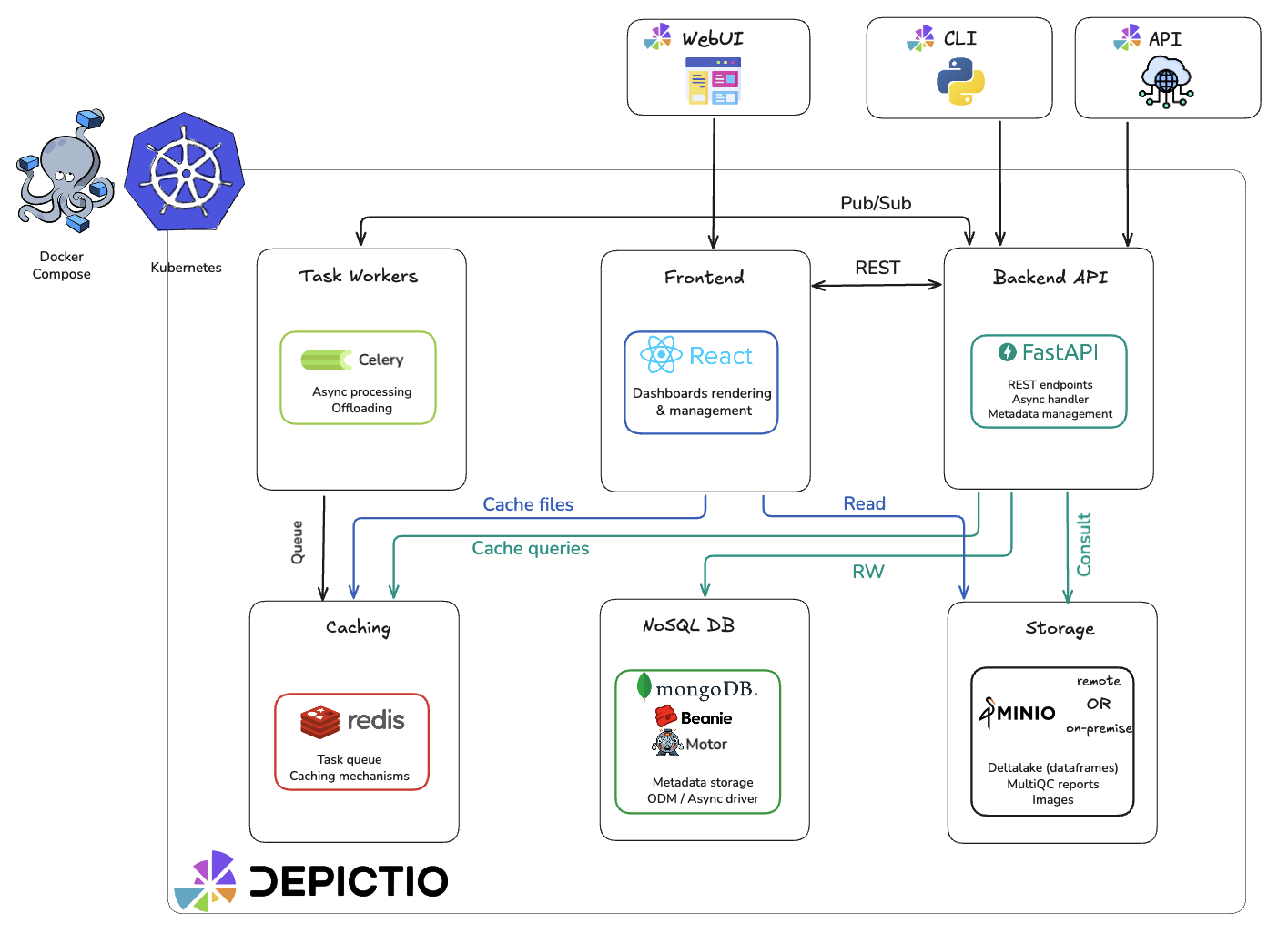
Microservices Overview
Depictio's architecture consists of six main components organized by category:
Core Services
| Component | Technology | Purpose |
|---|---|---|
| Backend | FastAPI | RESTful API, authentication, business logic |
| Frontend | React + Vite + Mantine | Vite SPA; canonical URLs in v1.0.0 |
Data Layer
| Component | Technology | Purpose |
|---|---|---|
| Database | MongoDB | Metadata, users, configurations |
| Storage | MinIO/S3 | Data files, Delta Lake tables |
Infrastructure
| Component | Technology | Purpose |
|---|---|---|
| Cache/Broker | Redis | Caching, session storage, Celery task broker |
| Worker | Celery (Optional) | Background task processing |
FastAPI Backend
The backend service is built with FastAPI, a modern, high-performance web framework:
- RESTful API endpoints for all platform functionality
- JWT-based authentication and authorization
- Asynchronous request handling for improved performance
- Pydantic models for data validation and serialization
- Beanie ODM for MongoDB integration
MongoDB Database
MongoDB serves as the primary database, storing:
- User accounts and authentication information
- Project metadata and configurations
- :material-workflow: Workflow definitions and run information
- Dashboard layouts, structure, and content
- Data collection metadata
MinIO S3 Storage (Optional)
MinIO provides S3-compatible object storage for:
- Processed data ready for visualization (Delta Lake format)
- Genome-browser compatible data
- Large file assets
Redis Cache/Broker
Redis serves dual purposes in Depictio:
- Caching: DataFrame caching and session storage for improved performance
- Task Broker: Message broker and result backend for Celery background tasks
Frontend — React viewer
The frontend is a Vite + Mantine React SPA (depictio/viewer/, shared packages/depictio-react-core/), graduating onto canonical URLs in v1.0.0. It provides:
- Interactive data visualization components
- Real-time data updates
- Draggable and customizable dashboard layouts
- Integration with the backend API
The legacy Plotly Dash frontend was removed in v0.13.12. See the changelog for the full migration history.
React SPA Surfaces (v1.0.0+)
The React viewer (depictio/viewer/) is a single Vite SPA served by nginx with a fallback rewrite. It exposes three logical surfaces against the same FastAPI backend:
| Surface | URL Pattern | Purpose |
|---|---|---|
| Management | /dashboards, /projects, /admin |
Dashboard listing, project management, admin panel |
| Viewer | /dashboard/{id} |
Read-only dashboard viewing |
| Editor | /dashboard-edit/{id} |
Dashboard editing and component creation |
During the v0.12–v0.13 series the same surfaces ran at /*-beta paths alongside the legacy Dash frontend. Dash was removed in v0.13.12; the *-beta suffix paths redirect to canonical in v1.0.0.
Background Processing (v0.6.0+)
Depictio supports background task processing using Celery and Redis for computations that would otherwise block the UI.
┌─────────────┐     ┌─────────────────┐     ┌─────────────┐
│ React/API   │────▶│  Celery Worker  │────▶│    Redis    │
│  (Editor)   │     │                 │     │  (Broker)   │
└─────────────┘     └─────────────────┘     └─────────────┘
The FastAPI backend submits tasks to Celery workers, which use Redis as both a message broker (for task queuing) and result backend (for storing task results).
When Background Processing is Used
| Context | Background Processing |
|---|---|
| Editor (design mode) | Always required |
| Viewer app | Optional (DEPICTIO_CELERY_ENABLED) |
| Management app | Never (no heavy computations) |
Configuration
To enable background processing:
- Set the environment variable in your
.envfile or Docker Compose configuration:
- Restart the full Docker Compose stack to apply the change:
Full Restart Required
After changing DEPICTIO_CELERY_ENABLED, you must restart the entire Docker Compose stack for the change to take effect across all services.
Environment Variables
| Variable | Default | Description |
|---|---|---|
DEPICTIO_CELERY_ENABLED |
false |
Enable background callbacks |
DEPICTIO_CELERY_BROKER_HOST |
redis |
Redis broker hostname |
DEPICTIO_CELERY_BROKER_PORT |
6379 |
Redis broker port |
DEPICTIO_CELERY_BROKER_DB |
1 |
Redis database for Celery broker |
DEPICTIO_CELERY_RESULT_BACKEND_DB |
2 |
Redis database for Celery results |
Data Flow
┌─────────┐     ┌─────────────┐     ┌─────────────┐     ┌─────────┐
│  CLI    │────▶│  FastAPI    │────▶│  MongoDB    │◀────│  React  │
│         │     │  Backend    │     │             │     │  Viewer │
└─────────┘     └──────┬──────┘     └─────────────┘     └────┬────┘
                       │                                      │
                       ▼                                      │
                ┌─────────────┐                               │
                │   MinIO     │◀──────────────────────────────┘
                │  (Delta)    │
                └─────────────┘
- CLI ingests data, validates, stores in Delta format, registers in MongoDB
- API serves metadata and data access endpoints
- React viewer renders interactive visualizations, calls API for data
Related Documentation
- Dashboards - Dashboard modes, tabs, and layouts
- Components - Available component types
- Data Model - Domain objects and relationship model
- Security - Security features and code restrictions