Architecture
Depictio is built on a modern microservices architecture that provides flexibility, scalability, and maintainability.
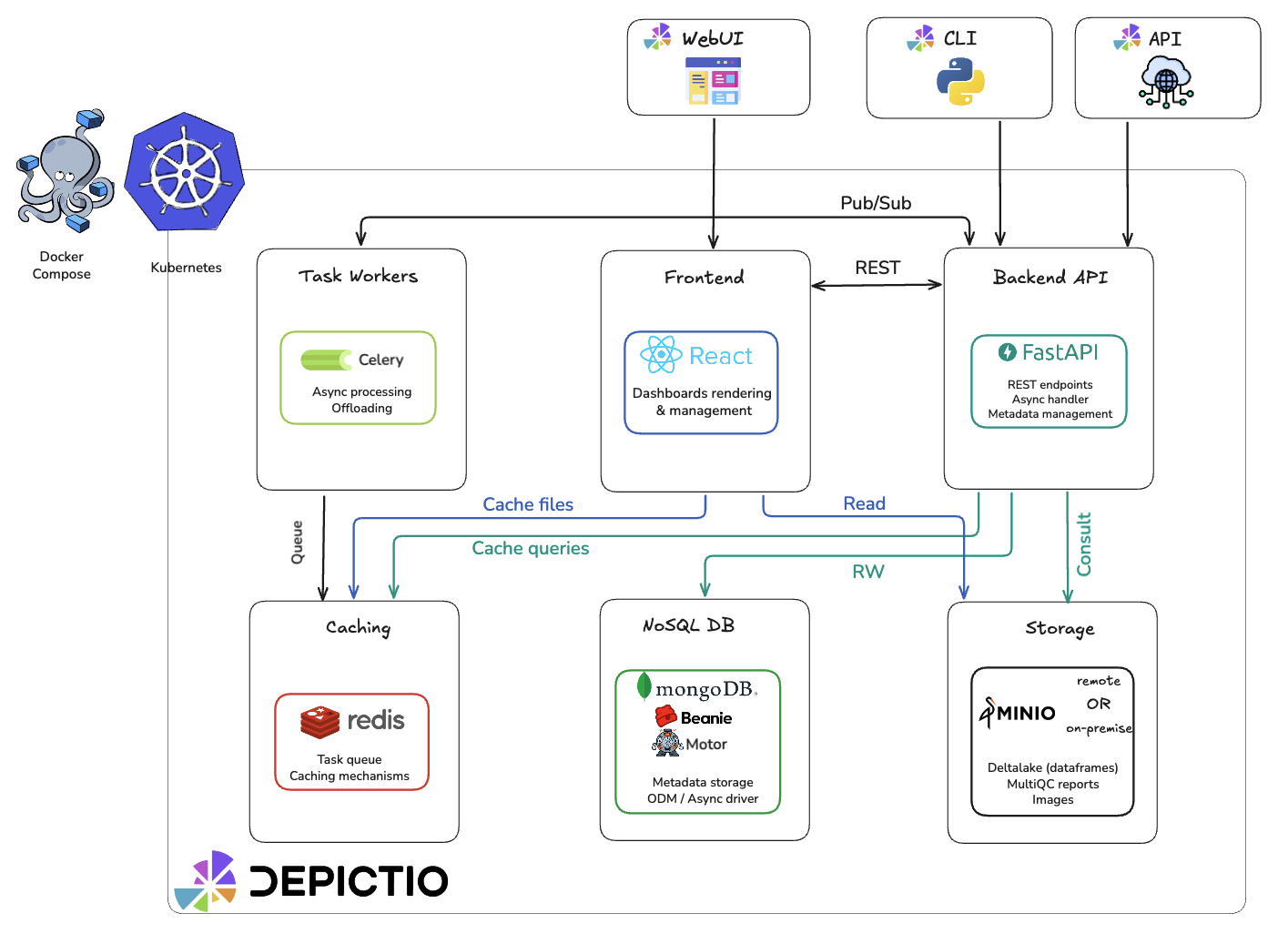
Microservices Overview
Depictio's architecture consists of six main components organized by category:
Core Services
| Component | Technology | Purpose |
|---|---|---|
| Backend | FastAPI | RESTful API, authentication, business logic |
| Frontend | Plotly Dash | Interactive dashboards |
Data Layer
| Component | Technology | Purpose |
|---|---|---|
| Database | MongoDB | Metadata, users, configurations |
| Storage | MinIO/S3 | Data files, Delta Lake tables |
Infrastructure
| Component | Technology | Purpose |
|---|---|---|
| Cache/Broker | Redis | Caching, session storage, Celery task broker |
| Worker | Celery (Optional) | Background task processing |
FastAPI Backend
The backend service is built with FastAPI, a modern, high-performance web framework:
- RESTful API endpoints for all platform functionality
- JWT-based authentication and authorization
- Asynchronous request handling for improved performance
- Pydantic models for data validation and serialization
- Beanie ODM for MongoDB integration
MongoDB Database
MongoDB serves as the primary database, storing:
- User accounts and authentication information
- Project metadata and configurations
- :material-workflow: Workflow definitions and run information
- Dashboard layouts, structure, and content
- Data collection metadata
MinIO S3 Storage (Optional)
MinIO provides S3-compatible object storage for:
- Processed data ready for visualization (Delta Lake format)
- Genome-browser compatible data
- Large file assets
Redis Cache/Broker
Redis serves dual purposes in Depictio:
- Caching: DataFrame caching and session storage for improved performance
- Task Broker: Message broker and result backend for Celery background tasks
Plotly Dash Frontend
The frontend is built with Plotly Dash (React), providing:
- Interactive data visualization components
- Real-time data updates
- Draggable and customizable dashboard layouts
- Integration with the backend API
Multi-App Architecture (v0.6.0+)
Starting with version 0.6.0, Depictio uses a multi-app architecture that separates the frontend into three independent Dash applications:
┌─────────────────────────────────────────────────────────────────┐
│                     Flask Dispatcher                             │
│                   (flask_dispatcher.py)                          │
└───────────────┬───────────────┬───────────────┬─────────────────┘
                │               │               │
    ┌───────────▼───────┐ ┌─────▼─────┐ ┌───────▼───────────┐
    │   Management App  │ │ Viewer App│ │    Editor App     │
    │        /          │ │ /dashboard│ │  /dashboard-edit  │
    │                   │ │           │ │                   │
    │ • Authentication  │ │ • Read-   │ │ • Dashboard       │
    │ • Dashboard list  │ │   only    │ │   editing         │
    │ • Projects page   │ │   viewing │ │ • Component       │
    │ • Admin panel     │ │ • Data    │ │   creation        │
    │                   │ │   updates │ │ • Design mode     │
    └───────────────────┘ └───────────┘ └───────────────────┘
App Responsibilities
| App | URL Pattern | Purpose |
|---|---|---|
| Management | /, /auth, /dashboards, /projects, /admin |
Authentication, listing, project management |
| Viewer | /dashboard/{id} |
Read-only dashboard viewing |
| Editor | /dashboard-edit/{id} |
Dashboard editing and component creation |
Benefits
- Callback Isolation: Each app has its own callback registry, preventing conflicts
- Performance: Reduced callback overhead per app
- Security: Editor functionality isolated from viewer mode
- Scalability: Apps can be optimized independently
Background Processing (v0.6.0+)
Depictio supports background task processing using Celery and Redis for computations that would otherwise block the UI.
┌─────────────┐     ┌─────────────────┐     ┌─────────────┐
│  Dash App   │────▶│  Celery Worker  │────▶│    Redis    │
│  (Editor)   │     │                 │     │  (Broker)   │
└─────────────┘     └─────────────────┘     └─────────────┘
The Dash application submits tasks to Celery workers, which use Redis as both a message broker (for task queuing) and result backend (for storing task results).
When Background Processing is Used
| Context | Background Processing |
|---|---|
| Editor (design mode) | Always required |
| Viewer app | Optional (DEPICTIO_CELERY_ENABLED) |
| Management app | Never (no heavy computations) |
Configuration
To enable background processing:
- Set the environment variable in your
.envfile or Docker Compose configuration:
- Restart the full Docker Compose stack to apply the change:
Full Restart Required
After changing DEPICTIO_CELERY_ENABLED, you must restart the entire Docker Compose stack for the change to take effect across all services.
Environment Variables
| Variable | Default | Description |
|---|---|---|
DEPICTIO_CELERY_ENABLED |
false |
Enable background callbacks |
DEPICTIO_CELERY_BROKER_HOST |
redis |
Redis broker hostname |
DEPICTIO_CELERY_BROKER_PORT |
6379 |
Redis broker port |
DEPICTIO_CELERY_BROKER_DB |
1 |
Redis database for Celery broker |
DEPICTIO_CELERY_RESULT_BACKEND_DB |
2 |
Redis database for Celery results |
Data Flow
┌─────────┐     ┌─────────────┐     ┌─────────────┐     ┌─────────┐
│  CLI    │────▶│  FastAPI    │────▶│  MongoDB    │◀────│  Dash   │
│         │     │  Backend    │     │             │     │  UI     │
└─────────┘     └──────┬──────┘     └─────────────┘     └────┬────┘
                       │                                      │
                       ▼                                      │
                ┌─────────────┐                               │
                │   MinIO     │◀──────────────────────────────┘
                │  (Delta)    │
                └─────────────┘
- CLI ingests data, validates, stores in Delta format, registers in MongoDB
- API serves metadata and data access endpoints
- Dash UI renders interactive visualizations, calls API for data
Related Documentation
- Dashboards - Dashboard modes, tabs, and layouts
- Components - Available component types
- Data Model - Domain objects and relationship model
- Security - Security features and code restrictions